
TOMs is a fully open-source, high-performance, systematic, plugin-oriented, and scenario-agnostic general-purpose development framework.






English | 简体中文
1. Introduction
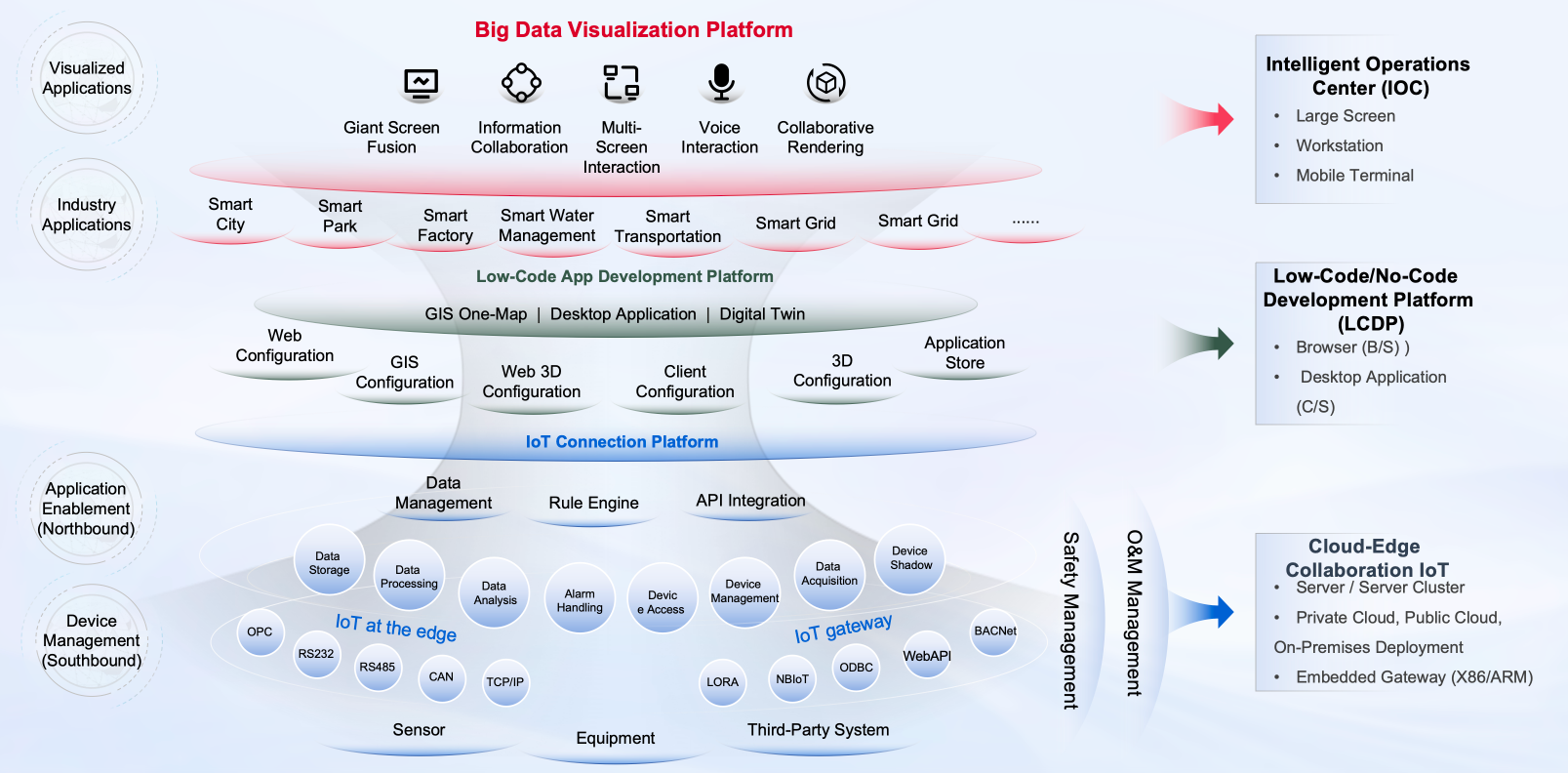
TOMs is a fully open-source, high-performance, systematic, plugin-oriented, and general-purpose development framework designed for various intelligent scenarios. TOMs is built on the latest .NET 9.0, and its extension plugins can be developed using programming languages such as C#, Java, Python, C++, Go, and Rust. TOMs supports cloud-native deployment, local deployment (Windows, Linux, macOS), and embedded device deployment.
1.1 The Meaning of TOMs
|Letter | Explanation | |----|---------------| |T| Translation,Converts heterogeneous external data into a unified data model | |O| Orchestrator,Allows customizable orchestration of data processing, business workflows, and UI interfaces| |M| Module,All features are plugin-based, supporting free installation and uninstallation | |s| Plural form (s),Developers can contribute various plugins and enable online transactions, gathering contributions to build a thriving ecosystem |1.2 Framework Overview
1.3 Application Scenarios
TOMs can be widely applied to various large-scale intelligent scenarios, including but not limited to Industrial、Transportation、Port、Electricity、Construction、Agriculture、Data Centers、New Energy、Environmental Protection、Smart Cities.

1.4 Software Interface
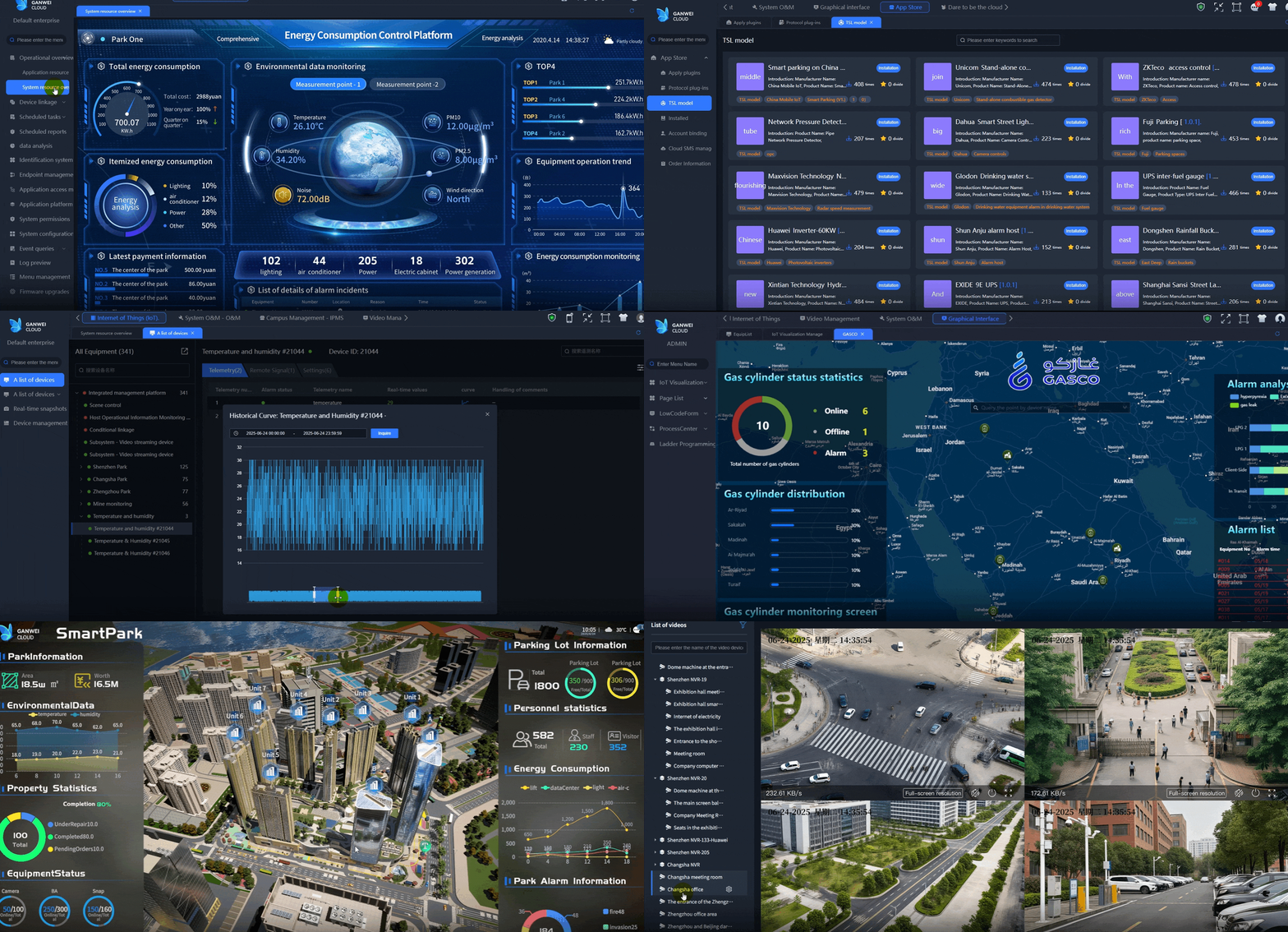
💡 Tip: Click to watch video online
1.5 Related Sub-Repositories
📦 Core Components | Badge | Repository | Description | Status | |------------|------------|-------------|--------| | | Gateway | high-performance, centralized communication and scheduling module for various device plugins. It uniformly converts heterogeneous data into standardized models and delivers core functionalities such as real-time data storage, alarm triggering, linkage control, and task planning |
 | GrpcServer | Builds a lightweight, high-performance proxy service framework using the gRPC (Google Remote Procedure Call) protocol. It models communication interfaces using the Protocol Buffers (protobuf) interface definition language, and supports cross-language and cross-platform service integration and invocation |
  | WebPlugins | A modular and pluggable application framework based on ASP.NET Core and VUE. Built on the design principles of loose coupling and high cohesion, it provides an extensible and maintainable application framework. By completely decoupling core logic from functional components, it enables secondary development |
🛠️ Tools & Utilities | Badge | Repository | Description | Status | |------------|------------|-------------|--------| | | Devices | Natively support Modbus and OPC UA (Open Platform Communications Unified Architecture), two of the most widely used communication protocols in the field of industrial automation, providing efficient and reliable data acquisition and device interaction capabilities |
🌐 Multi-Language | Badge | Repository | Description | Status | |------------|------------|-------------|--------| |


2. Prerequisites
2.1 Supported OS
| OS | Supported Versions | Architectures | Notes | | ----------- | ------------------------------------ | ----------------- | ------------------------- | | Windows | Windows 10, Windows 11, Windows Server 2012+ | x86/x64/Arm64 | Nano Server is supported in Windows Server 2025, 2019 and 2022 | | Linux | OpenEuler, Kylin, OpenKylin, Deepin, UOS, and other mainstream domestic operating systems | x64/Arm64 | | | | Ubuntu(25.04, 24.04, 22.04), Debian 12, RHEL(10, 9, 8), CentOS (10, 9), Azure Linux 3.0, Fedora(42, 41), OpenSUSE Leap 15.6, SUSE Enterprise Linux 15.6, Alpine(3.22, 3.21, 3.20, 3.19) | x64/Arm64 | | | macOS | macOS 13(Ventura), macOS 14(Sonoma), macOS 15(Sequoia) | x64/Arm64 | |
💡Note: As of June 30, 2024, all versions of CentOS Linux have reached end-of-life (EOL). It is recommended to migrate to alternative operating systems.
2.2 .NET 9.0 Runtime Installation
2.2.1 System Suggests
| Component | Explanation | |-------------|-----------------------------------------------------------------------| | OS | Windows 11 / Linux (Ubuntu 22.04+, Debian 12, Fedora 40+, etc.) / Domestic Linux OS (e.g., OpenEuler, Kylin, Deepin) / macOS 13+ | | Arch | x64/Arm64 (recommended to use 64-bit architecture) | | Memory | Minimum 1GB (recommended to use 8GB+) | | Storage | At least 500M free space |
2.2.2 Installation Steps
macOS
- Homebrew Installation (recommended)
brew install --cask dotnet-sdk- Manual Download
.NET 9.0 Runtime (macOS x64/ARM64 Installer)
- Double-click installer and follow prompts
Windows
- Installer Method
.NET 9.0 Runtime (Windows x64/ARM64 Installer)
3. Run installer, check I accept the license terms, click Install
- Command Line Method
# Run PowerShell as Administrator
   Start-Process -FilePath "dotnet-runtime-9.0.x-win-x64.exe" -ArgumentList "/quiet /norestart" -Wait
Linux
- Ubuntu/Debian
wget https://packages.microsoft.com/config/ubuntu/$(lsb_release -rs)/packages-microsoft-prod.deb -O packages-microsoft-prod.deb
sudo dpkg -i packages-microsoft-prod.deb
sudo apt-get update
sudo apt-get install -y aspnetcore-runtime-9.0- CentOS/RHEL
sudo rpm -Uvh https://packages.microsoft.com/config/centos/$(rpm -E %centos)/packages-microsoft-prod.rpm
sudo yum install aspnetcore-runtime-9.0
2.3 Clone the repo
Clone the TOMs repository using:
git clone https://github.com/ganweisoft/TOMs3. Build & Release
3.1 Local Build
Local build script (Windows / Linux)windows-linux.batLocal build script (Docker)
docker.bat3.2 Cloud Build
Automated cloud builds(Windows / Linux / Docker) using GitHub Actions, see Cloud Build Script
4. Installation & Execution
4.1 Windows Installation
Run installation with:regist.bat4.2 Linux Installation
Run installation with:./install.sh4.3 Docker Installation
Run installation with:docker run -d -p 44380:44380 -p 44381:44381 --name toms ghcr.io/ganweisoft/toms:latest5. License
TOMs uses the permissive MIT License, see LICENSE
6. Release Notes
6.1 Windows / Linux Releases
See Windows and Linux release history at Releases
6.2 Docker Releases
See Docker release history at Releases
7. Contributing
We welcome contributions! If you find a bug or have ideas to discuss, please submit an issue


