
Tool for helping developers keep their code bases clean and decoupled. It allows visualising a code base complexity using a 3d force-directed graph of files and the dependencies between them.


Visualize the entropy of a code base with a 3d force-directed graph.
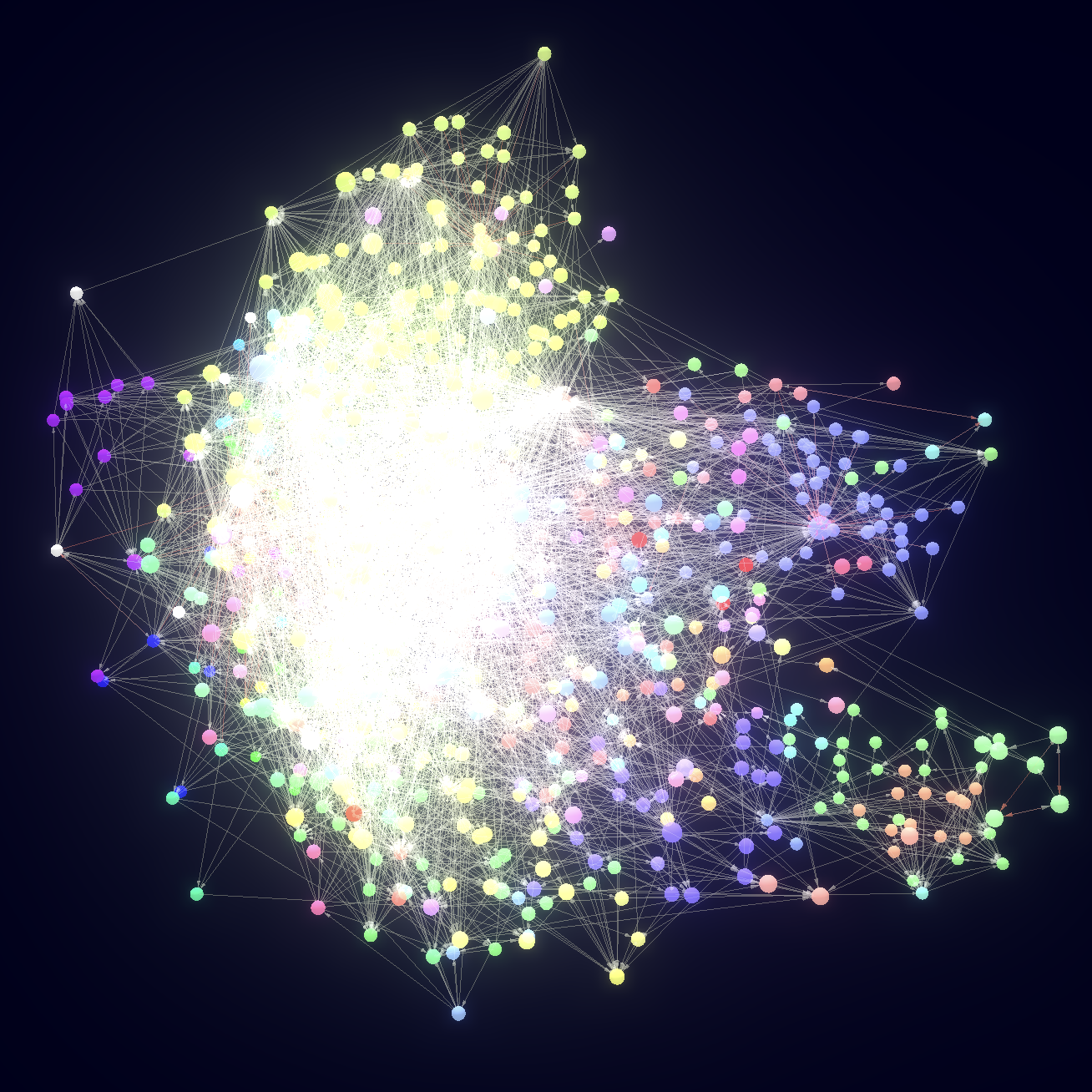
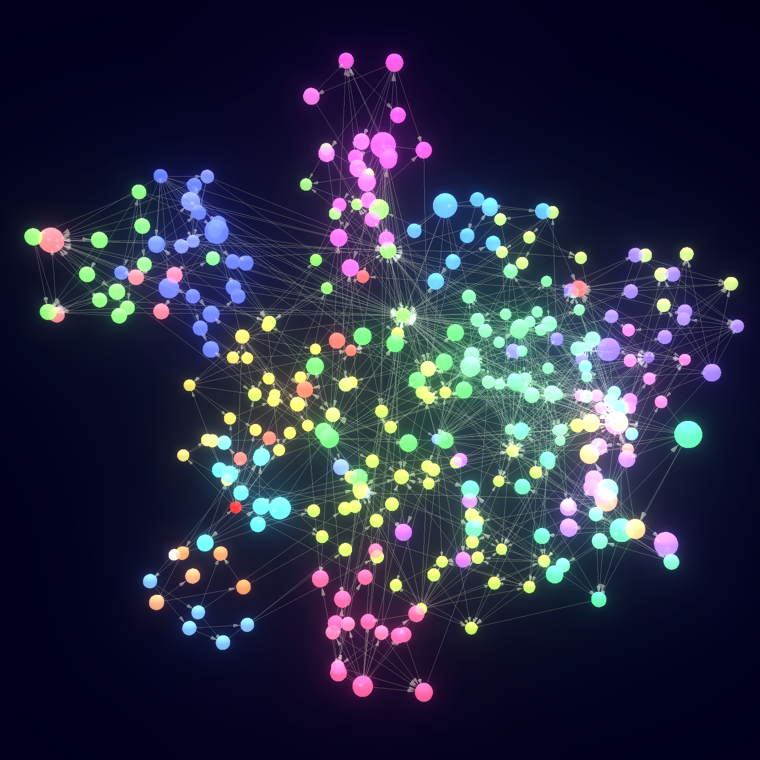
The more decoupled and modular a code base is, the more spread and clustered the graph will look like.
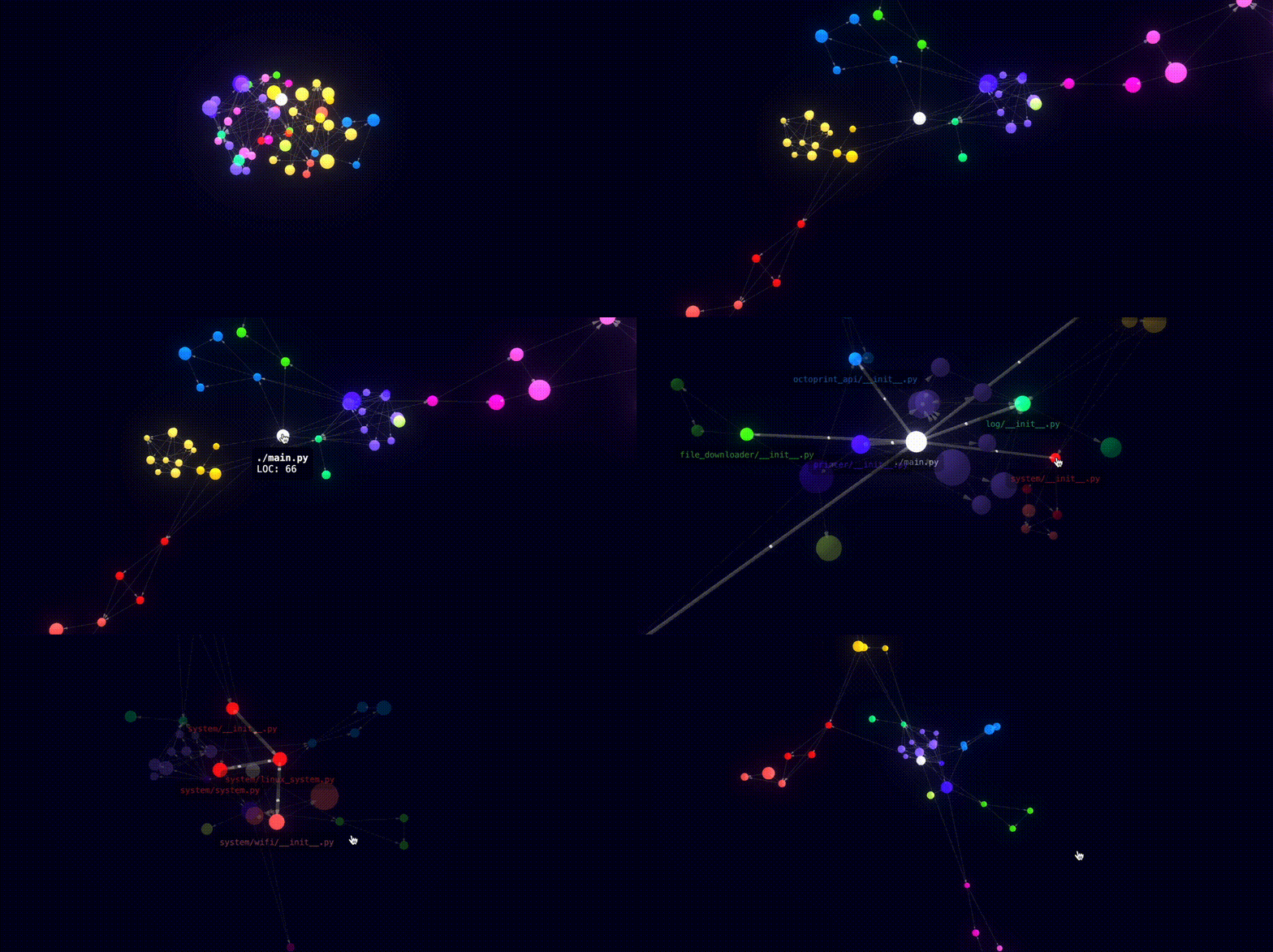
Ensure your code base decoupling by creating your own rules and enforcing them with dep-tree check
Checkout the entropy graph of well-known projects
| Ts/Js | Python | Rust | Go | |------------------------------------------------------------------------------------------------------------------|-------------------------------------------------------------------------------------------------------------------------|---------------------------------------------------------------------------------------------------------|:------------------------------------------------------------------------------------------------------------------------| | typescript | langchain | deno | Docker buildx | | react | pytorch | polars | Docker compose | | svelte | tensorflow | alacritty | Kubernetes kubelet | | vuejs | fastapi | bevy (ecs) | Ollama | | angular | numpy | rocket | Gin | | storybook | scikit-learn | axum | Go's crypto std | | three.js | audiocraft | MusicGPT | Dep Tree | | expressjs | | | Cockroach DB SQL parser | | material-ui | | | Ethereum | | eslint | | | | | prettier | | | |
Supported languages





Contributing additional languages
If you want to contribute additional languages, there's a guide here that teaches how to implement them with a hands-on example based on a fictional language.
Contributions are always welcome!
Install
On Mac and Linux, it can be installed using brew:
brew install dep-treeAlternatively, on any platform including Windows it can be installed with pip...
pip install python-dep-tree...or npm:
npm install @dep-tree/cliAbout Dep Tree
dep-tree is a cli tool for visualizing the complexity of a code base, and creating rules for ensuring its loosely coupling.
It works with files, meaning that each file is a node in the dependency tree:
- It starts from one or more entrypoints, which are usually the main executable files in a
package/main.py, src/index.ts, src/lib.rs...).
- It makes a parent node out of the root file, and one child node for each imported file.
[!NOTE]
it only takes into account local files, not files imported from external libraries.
- That process is repeated recursively with all the imported files, until the file dependency
- If rendering the code base entropy, the nodes will be rendered using a 3d force-directed graph
- If rendering the dependency tree in the terminal, the nodes will be placed in a human-readable
- If validating the dependency rules in a CI system, it will check that the dependencies between files
.dep-tree.yml file.
Usage
Entropy
Choose the file that will act as the root of the dependency graph (for example src/index.ts), and run:
dep-tree entropy src/index.tsYou can also pass multiple files if you don't have a single entrypoint:
dep-tree entropy src/*It will open a browser window and will render your file dependency graph using a 3d force-directed graph.
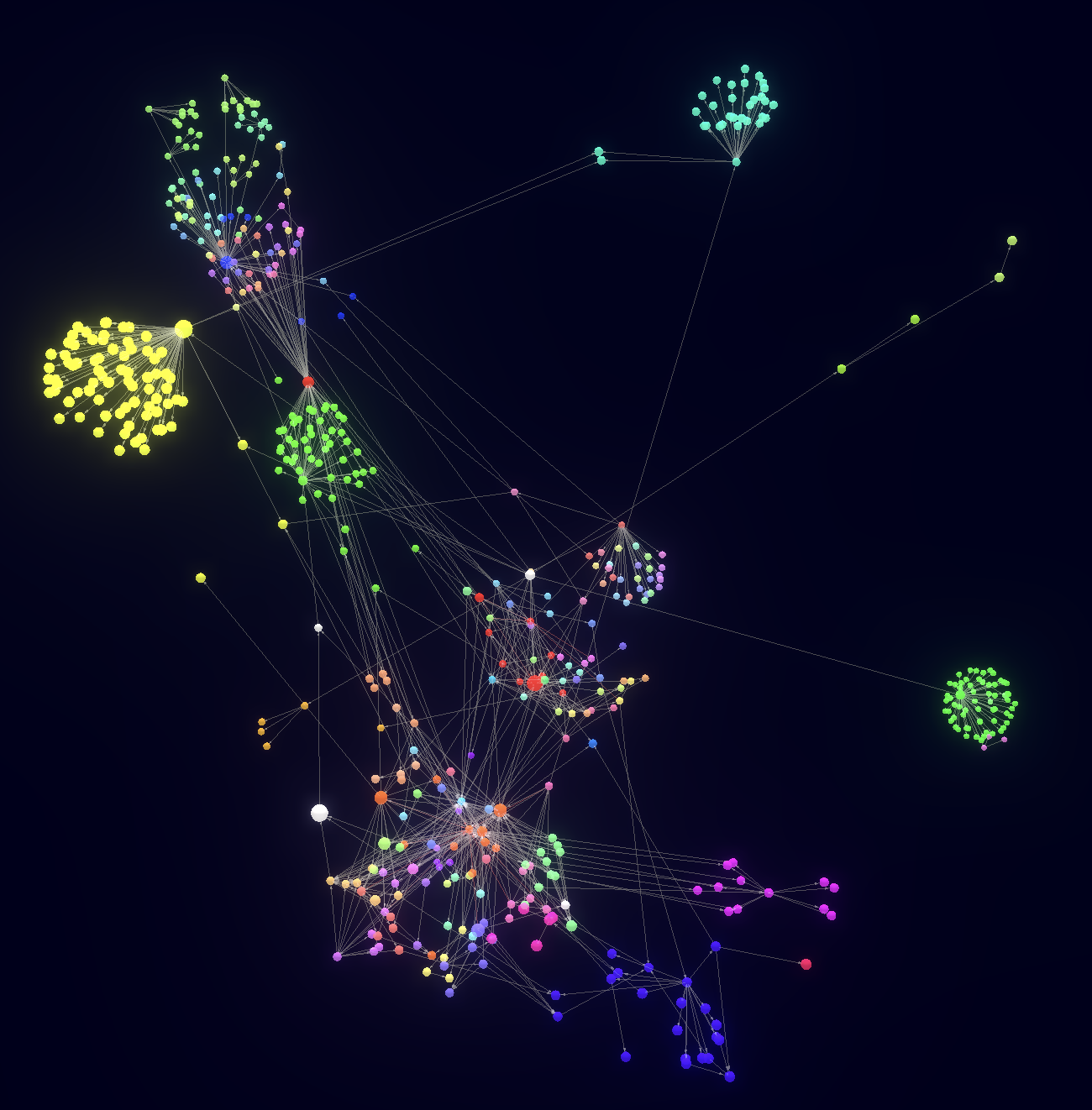
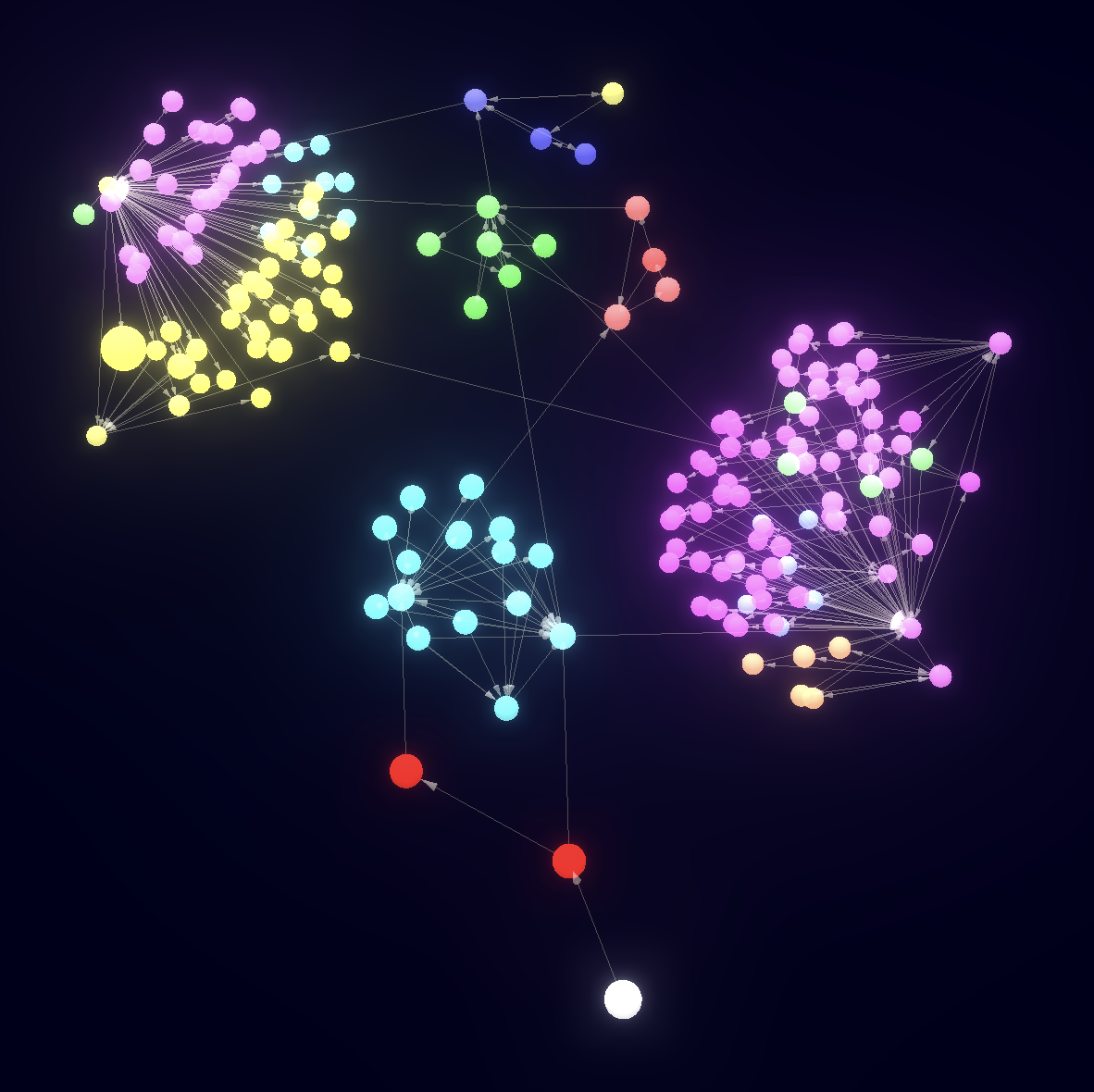
The spheres (files) will be placed mimicking some attraction/repulsion forces. Some parts of your code base will tend to gravitate together if they are tightly coupled, and will tend to be separated if they are loosely coupled.
The 3d graph for a clean code base will have groups of nodes clustered together and clearly separated from other clusters:
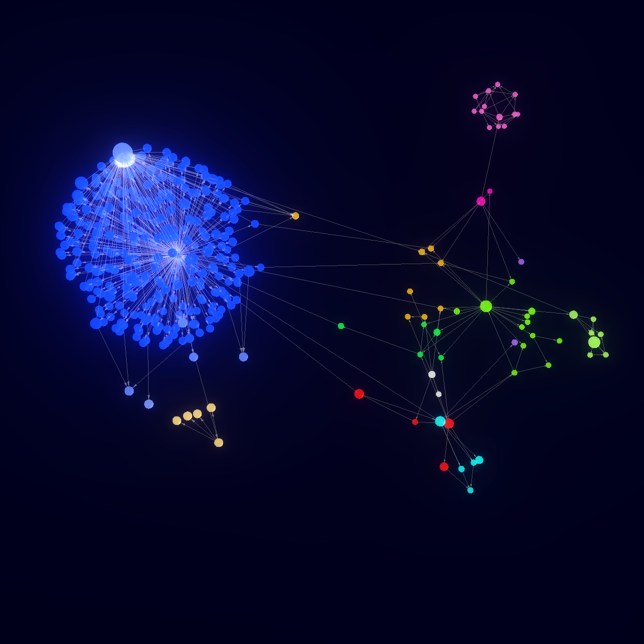
The 3d graph for a tightly coupled code base will have all the nodes grouped together with no clustering and no clear separation between them:

Explain
Given two pieces of code, displays what are the dependencies between them. These pieces of code are specified using a glob patterns, for example:
dep-tree explain 'src/products//.go' 'src/orders//.go'[!WARNING]
Make sure you wrap the two glob patterns with single quotes ('') or double quotes (""),
otherwise your shell might expand the globstars, and dep-tree explain will receive
an incorrect number of arguments.
This command will display what Golang files under the src/products directory depend on other Golang files under the src/orders directory.
It will output something like this:
src/products/books/book.go -> src/orders/renting.go
src/products/price.go  -> src/orders/order_manager.go
src/products/storage.go -> src/orders/order_manager.go
Additionally, the --overlap-left (-l) or --overlap-right (-r) arguments can be passed:
--overlap-left: when the left and right glob patterns have some files in common, keep only the
# Retrieves dependencies from files in src/products to any other file that is not inside src/products dep-tree explain 'src/products//.go' '/.go' --overlap-left--overlap-right: when the left and right glob patterns have some files in common, keep only the
# Retrieves dependencies from any folder but src/products that point to files inside src/products
dep-tree explain '/.go' 'src/products//.go' --overlap-right
Tree
Choose the file that will act as the root of the dependency graph (for example my-file.py), and run:
dep-tree tree my-file.pyYou can see the controls for navigating through the graph pressing h at any time:
j      -> move one step down
k      -> move one step up
Ctrl d -> move half page down
Ctrl u -> move half page up
Enter  -> select the current node as the root node
q      -> navigate backwards on selected nodes or quit
h      -> show this help section
Check
The dependency linting can be executed with:
dep-tree checkThis is specially useful for CI systems, for ensuring that parts of an application that should not be coupled remain decoupled as the project evolves.
These are the parameters that can be configured in the .dep-tree.yml file:
entrypoints:
List of entrypoints that will act as root nodes for evaluating multiple dependency trees. Some applications might expose more than one entrypoint, for that reason, this parameter is a list. The most typical thing is that there is only one entrypoint.
allow:
Map from glob pattern to list of glob patterns that define, using a "white list" logic, what files can depend on what other files. For example:
check:
  allow:
    "src/products/**":
      - "src/products/**"
      - "src/common/**"
In the example above, any file under the src/products folder has the restriction of only being able to import files that live either in the same src/products folder, or in the src/common folder.
deny:
Map from glob pattern to list of glob patterns that define, using a "black list" logic, what dependencies are forbidden. For example:
check:
  deny:
    "api/routes.py":
      - "adapters/**"
In the example above, the file api/routes.py can import from anywhere but the adapters folder.
allowCircularDependencies:
Boolean parameter that defines whether circular dependencies are allowed or not. By default they are not allowed.
check:
allowCircularDependencies: truealiases:
Map from string to glob pattern that gathers utility groups of glob patterns that can be reused in the deny and allow fields. For example:
check:
  aliases:
    "common-stuff":
      - "src/common/**"
      - "src/utils/**"
      - "src/helpers/**"
  allow:
    "src/function.py":
      - "common-stuff"
      - "src/class.py"
is the same as saying:
check:
  allow:
    "src/function.py":
      - "src/common/**"
      - "src/utils/**"
      - "src/helpers/**"
      - "src/class.py"
Example configuration file
A schema.json file is provided in https://github.com/gabotechs/dep-tree/blob/main/schema.json which can be used in IDEs for providing autocompletion on .dep-tree.yml files.
Dep Tree by default will read the configuration file in .dep-tree.yml, which is expected to be a file that contains the following settings:
# Files that should be completely ignored by dep-tree. It's fine to ignore
some big files that everyone depends on and that don't add
value to the visualization, like auto generated code.
exclude:
  - 'some-glob-pattern/*/.ts'
The only files that will be included by dep-tree. If a file does not
match any of the provided patterns, it is ignored.
only:
  - 'some-glob-pattern/*/.ts'
Whether to unwrap re-exports to the target file or not.
Imagine that you have the following setup:
#
 src/index.ts     -> import { foo } from './foo'
 src/foo/index.ts -> export { bar as foo } from './bar'
 src/foo/bar.ts   -> export function bar() {}
#
If unwrapExports is true, a dependency will be created from
src/index.ts to src/foo/bar.ts, and the middle file src/foo/index.ts
will be ignored, as it's just there for re-exporting the bar symbol,
which is actually declared on src/foo/bar.ts
#
If unwrapExports is false, re-exported symbols will not be traced back
to where they are declared, and instead two dependencies will be created:
- from src/index.ts to src/foo/index.ts
- from src/foo/index.ts to src/foo/bar.ts
#
Entropy visualization tends to lead to better results if this is set to false,
but CLI rendering is slightly better with this set to true.
unwrapExports: false
Check configuration for the dep-tree check command. Dep Tree will check for dependency
violation rules declared here, and fail if there is at least one unsatisfied rule.
check:
  # These are the entrypoints to your application. Dependencies will be checked with
  # these files as root nodes. Typically, an application has only one entrypoint, which
  # is the executable file (src/index.ts, main.py, src/lib.rs, ...), but here
  # you can declare as many as you want.
  entrypoints:
    - src/index.ts
# Whether to allow circular dependencies or not. Languages typically allow   # having circular dependencies, but that has an impact in execution path   # traceability, so you might want to disallow it.   allowCircularDependencies: false
# map from glob pattern to array of glob patterns that determines the exclusive allowed   # dependencies that a file matching a key glob pattern might have. If file that   # matches a key glob pattern depends on another file that does not match any of   # the glob patterns declared in the values array, the check will fail.   allow:     # example: any file in src/products can only depend on files that are also     # in the src/products folder or in the src/helpers folder.     'src/products/**':       - 'src/products/**'       - 'src/helpers/**'     # additionally, instead of providing a simple list of allowed dependencies, you     # can also provide the reason for this restriction to exist, that way, when if the     # check fails, an informative error is displayed through stderr.     'src/users/**':       to:         - 'src/helpers/**'       reason: The Users domain is only allowed to import helper code, nothing else
# map from glob pattern to array of glob patterns that determines forbidden   # dependencies. If a file that matches a key glob pattern depends on another   # file that matches at least one of the glob patterns declared in the values   # array, the check will fail.   deny:     # example: files inside src/products cannot depend on files inside src/users,     # as they are supposed to belong to different domains.     'src/products/**':       - 'src/users/**'     # additionally, instead of providing a simple list of forbidden dependencies, you     # can also provide the reason for each individual restriction to exist. If one of     # these rules is broken, the reason will be displayed through stderr     'src/users/**':       - to: 'src/products/**'         reason: The Users domain should not import anything from the Products domain       - to: 'src/orders/**'         reason: The Users domain should not import anything from the Orders domain
# typically, in a project, there is a set of files that are always good to depend   # on, because they are supposed to be common helpers, or parts that are actually   # designed to be widely depended on. This allows you to create aliases to group   # of files that are meant to be widely depended on, so that you can reference   # them afterward in the allow or deny sections.   aliases:     # example: this 'common' entry will be available in the other sections:     #     # check:     #   allow:     #     'src/products/**':     #       - 'common'     'common':       - 'src/helpers/**'       - 'src/utils/**'       - 'src/generated/**'
JavaScript and TypeScript specific settings.
js:
  # Whether to take package.json workspaces into account while resolving paths
  # or not. You might want to disable it if you only want to analyze one workspace
  # in a monorepo.
  workspaces: true
  # Whether to follow tsconfig.json paths or not. You will typically want to
  # enable this, but for some monorepo setups, it might be better to leave this off
  # if you want to analyze only one package.
  tsConfigPaths: true
Python specific settings.
python:
  # Whether to take into account conditional imports as dependencies between files or not.
  # A conditional import is an import statement that is wrapped inside an if block or
  # a function, for example:
  #
  # if SHOULD_IMPORT:
  #     from foo import *
  #
  # by default these statements introduce a dependency between importing and imported file,
  # but depending on your use case you might want to disable it.
  excludeConditionalImports: false
Rust specific settings.
rust:
None available at the moment.
Motivation
As codebases expand and teams grow, complexity inevitably creeps in. While maintaining a cohesive and organized structure is key to a project's scalability and maintainability, the current developer toolbox often falls short in one critical area: file structure and dependency management.
Luckily, the community has come up with very useful tools for keeping our projects in check:
- Type checkers ensure correct interactions between code segments.
- Linters elevate code quality and maintain a consistent style.
- Formatters guarantee a uniform code format throughout.
- But what about file structure and file dependency management...
Supported languages
- Python
- JavaScript/TypeScript (es imports/exports)
- Rust (beta)


