
A NeoVim plugin which remembers where you've been
Memento.nvim
A NeoVim plugin which remembers where you've been
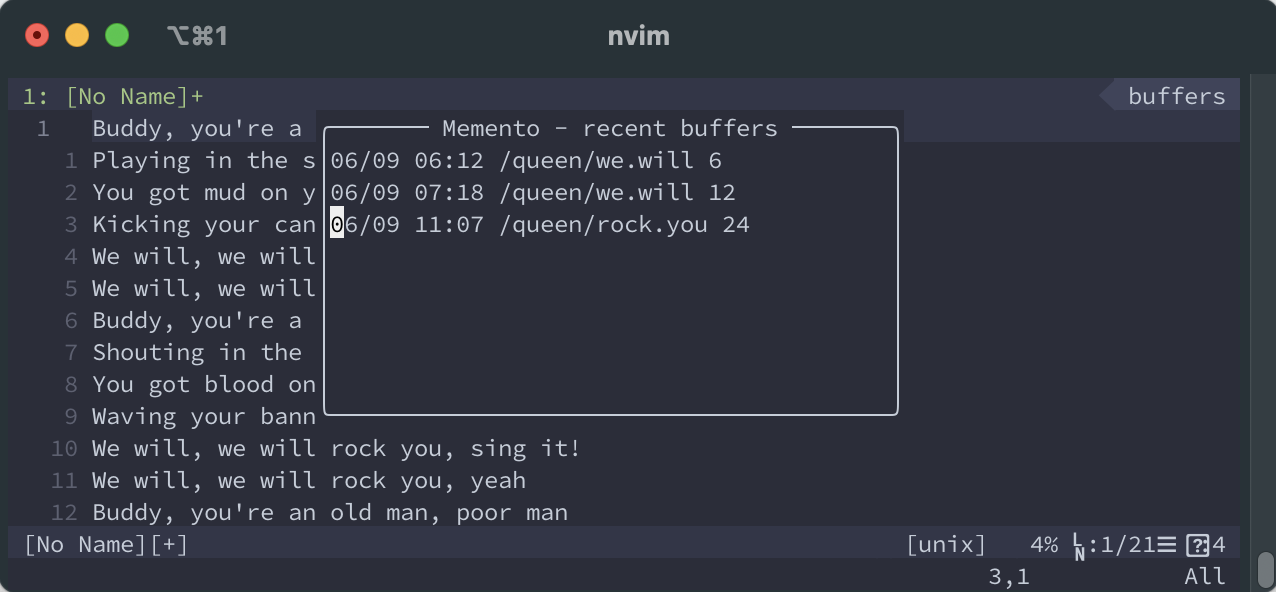
When a buffer is deleted (e.g.: :q, :bd) memento.nvim stores the filepath, and current line number so you can check your history and easily go back to a file. The history is persistent across sessions.
Imagine, you are editing 3 files and in the heat of development you close nvim to open it up
in another directory (happened with me to many times).
Still, you'd like to use those files, so you'd need to open them up one-by-one knowing the path of the file.
With this plugin you just hit the right keys (or call :lua require("memento").toggle())
and you can check your history and open them up again easily from a popup menu.
(The plugin is mostly for my personal use, but PRs are welcome)
Install
Plug 'nvim-lua/plenary.nvim' -- if you already have this you don't need to include it again
Plug 'gaborvecsei/memento.nvim'
Usage
-- Open up history popup menu
:lua require("memento").toggle()
-- Clear history :lua require("memento").clear_history()
When the popup is visible, you can close it with q and open up any file at any line by hitting <CR>
Keybinding
nnoremap <leader>mh <cmd>lua require('memento').toggle()<CR>Configuration
| Variable | Description | Type | Default | |-------------------------|------------------------------------------------------------------------------------------------------------|--------|---------| | memento_history | Length of the history | int | 20 | | mementoshortenpath | Compact representation of the filepath. (e.g.: /t/i/a/t/script.py instead of /this/is/a/test/script.py | bool | true | | mementowindowwidth | Popup window's width | int | 80 | | mementowindowheight | Popup window's height | int | 14 |
vim.g.memento_history = 20
vim.g.mementoshortenpath = true
vim.g.mementowindowwidth = 80
vim.g.mementowindowheight = 14


