
A Rusty way to interact with Microsoft Flight Simulator 2020

✈️ msfs-rs 🦀
Use Rust to interact with Microsoft Flight Simulator
As seen in the FlyByWire A32NX and A380X!
- Write custom aircraft logic in Rust
- Interact with the Microsoft SDK
- Create external applications that interact with MSFS using SimConnect






Example
Drawing a red rectangle on a glass instrument panel inside an aircraft cockpit:// gauge_logic.rs
use msfs::{nvg, MSFSEvent};
#[msfs::gauge(name=Demo)] async fn demo(mut gauge: msfs::Gauge) -> Result<(), Box<dyn std::error::Error>> { // Use NanoVG to draw let nvg = gauge.create_nanovg().unwrap();
let black = nvg::Style::default().fill(nvg::Color::from_rgb(0, 0, 0)); let red = nvg::Style::default().fill(nvg::Color::from_rgb(255, 0, 0));
// Reacting to MSFS events while let Some(event) = gauge.next_event().await { match event { MSFSEvent::PreDraw(d) => { nvg.draw_frame(d.width(), d.height(), |f| { // Red rectangle f.draw_path(&red, |p| { p.rect(20.0, 20.0, 40.0, 40.0); println!("Hello rusty world!");
Ok(()) })?;
Ok(()) }); } _ => {} } } Ok(()) }
[VCockpit01]
size_mm=1024,768
pixel_size=1024,768
texture=$SCREEN_1
background_color=0,0,255
htmlgauge00=WasmInstrument/WasmInstrument.html?wasmmodule=gaugelogic.wasm&wasm_gauge=Demo, 0,0,1024,768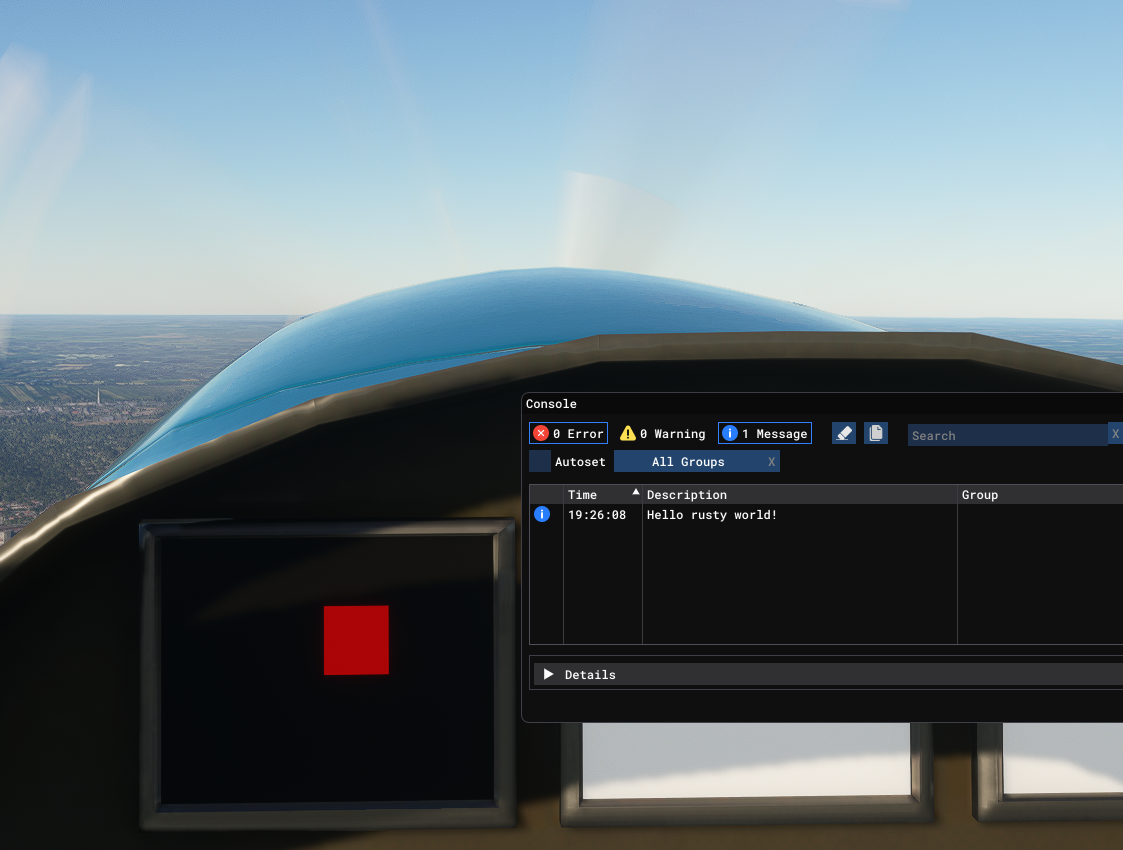
Getting started
$ cd examples/nvg
$ cargo build --target wasm32-wasip1Further reading
* Creating an aircraft with custom logic * Programming APIs * Microsoft's Samples and Examples * External interaction with SimConnectHelp
- Join the Discord #rust-lang channel


