
Manage multi-tenant clusters with Flux
flux2-multi-tenancy



This repository serves as a starting point for managing multi-tenant clusters with Git and Flux v2.
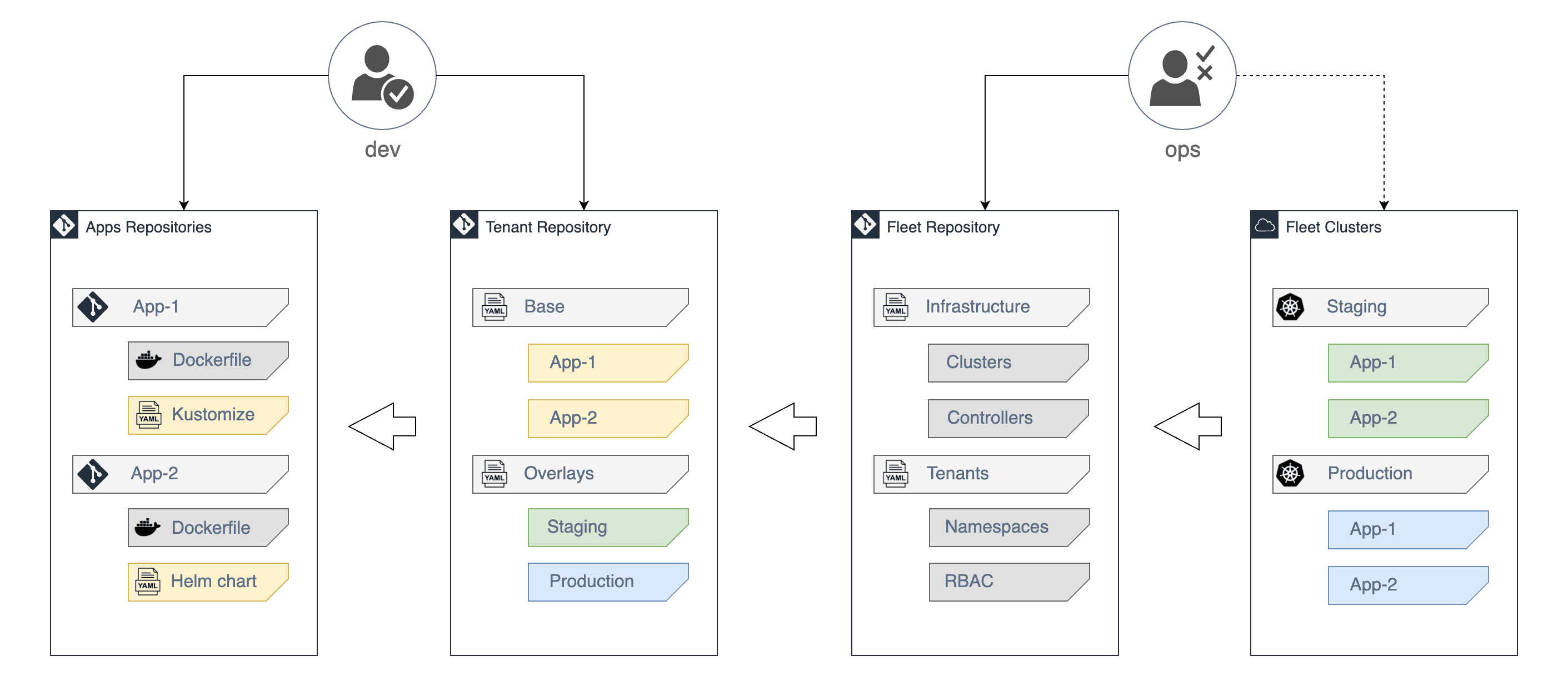
Flux multi-tenancy features
Flux has built-in support for multi-tenancy on shared clusters by leveraging Kubernetes namespaces and RBAC to isolate tenants and their workloads.
A single Flux instance can manage multiple tenants by reconciling Kubernetes manifests from different Git repositories and applying them with the permissions of a service account assigned to each tenant.
The trust boundary of a tenant is the Kubernetes namespace assigned to it by the platform admin. Sharing namespaces between tenants is not supported, as it would break the isolation guarantees of Flux.
When the multi-tenancy lockdown is enabled, Flux will:
- Deny cross-namespace access to custom resources, thus ensuring that a tenant
- Deny accesses to Kustomize remote bases, thus ensuring all resources refer to local files.
- Impersonates tenant service accounts instead of using the controller's service account to reconcile.
Kustomization or
HelmRelease, it would automatically default to the flux account in the tenant's namespace.
Flux user roles
Platform Admin
- Has cluster admin access to the fleet of clusters
- Has maintainer access to the fleet Git repository
- Manages cluster wide resources (CRDs, controllers, cluster roles, etc) and policies to enforce tenant restrictions
- Manages tenants by assigning namespaces, service accounts and RBAC for the tenant's app delivery
- Onboards the tenant’s main repository using Flux
GitRepositoryandKustomizationcustom resources
- Has no direct access to the Kubernetes API, all changes must be made via Git
- Has maintainer access to the GitOps repository and apps repositories
- Can deploy apps with Flux
KustomizationsandHelmReleasesfrom approved sources (GitRepository,OCIRepositoryandHelmRepository) - Can automate image updates with Flux
ImagePolicyandImageUpdateAutomationfrom approved sources (ImageRepository) - Can only deploy workloads in the namespaces assigned by the platform admin
Repository structure
Fleet repository
The fleet repository contains the following top directories:
- clusters dir contains the Flux configuration per cluster
- policies dir contains the cluster-wide admission policies (CEL
ValidatingAdmissionPolicy) - tenants dir contains namespaces, RBAC and Flux custom resources for registering tenant repositories
├── clusters
│   ├── production
│   └── staging
├── policies
│   ├── base
│   ├── production
│   └── staging
└── tenants
    ├── base
    ├── production
    └── staging
Reconciliation hierarchy
Inside the clusters dir we define in which order the policies and the tenant resources are reconciled on the staging and production clusters:
./clusters/
├── production
│   ├── policies.yaml
│   └── tenants.yaml
└── staging
    ├── policies.yaml
    └── tenants.yaml
First we set up the reconciliation of the admission policies. These are native Kubernetes ValidatingAdmissionPolicy resources:
apiVersion: kustomize.toolkit.fluxcd.io/v1
kind: Kustomization
metadata:
  name: policies
  namespace: flux-system
spec:
  serviceAccountName: kustomize-controller
  sourceRef:
    kind: GitRepository
    name: flux-system
  path: ./policies/staging
  prune: true
  wait: true
  interval: 1h
  timeout: 2m
Then we set up the reconciliation for the tenant resources, depending on the policies:
apiVersion: kustomize.toolkit.fluxcd.io/v1
kind: Kustomization
metadata:
  name: tenants
  namespace: flux-system
spec:
  serviceAccountName: kustomize-controller
  dependsOn:
    - name: policies
  sourceRef:
    kind: GitRepository
    name: flux-system
  path: ./tenants/staging
  prune: true
  interval: 1h
  timeout: 5m
With dependsOn we tell Flux to apply the policies before reconciling the tenants. This ensures that the resources from tenant repositories are subject to the admission policies.
Tenant repositories
A tenant repository contains the following top directories:
- base dir contains
HelmReleasemanifests and Flux sources for the tenant's application delivery - staging dir contains Kustomize patches for deploying pre-releases on the staging cluster
- production dir contains Kustomize patches for deploying stable releases on the production cluster
├── base
│   ├── kustomization.yaml
│   ├── podinfo-release.yaml
│   └── podinfo-repository.yaml
├── production
│   ├── kustomization.yaml
│   └── podinfo-values.yaml
└── staging
    ├── kustomization.yaml
    └── podinfo-values.yaml
The repository structure mirrors the cluster fleet, with a base directory for the common configuration and overlays for staging and production environments.
The tenants have full control over their app delivery, adding or modifying Helm releases as needed within the constraints defined by the platform admins (e.g. allowed namespaces, Helm chart repositories, etc).
Cluster bootstrap
When bootstrapping a cluster, platform admins must set up the Flux instance with the multi-tenancy lockdown and configure the reconciliation of the admission policies before the tenant repositories.
There are two options to bootstrap multi-tenant clusters:
- Use the
flux bootstrapcommand with a kustomize patch configured for multi-tenancy lockdown - Use the Flux Operator with a
FluxInstancemanifest configured withmultitenant: true
Flux CLI bootstrap
This repository contains the multi-tenancy kustomize patch for the flux bootstrap approach in the clusters/staging/flux-system/kustomization.yaml and clusters/production/flux-system/kustomization.yaml files.
Example of bootstrapping the staging cluster with the Flux CLI:
flux bootstrap github \
  --owner=<org> \
  --repository=<repository> \
  --branch=main \
  --path=clusters/staging
The Flux CLI supports SSH and token-based authentication for bootstrapping with private repositories. For more details, see the CLI bootstrap documentation.
Flux Operator bootstrap
First we install the operator with multi-tenancy enabled:
helm install flux-operator oci://ghcr.io/controlplaneio-fluxcd/charts/flux-operator \
  --namespace flux-system \
  --create-namespace \
  --set multitenancy.enabled=true
To bootstrap Flux, we create a FluxInstance with multi-tenancy enabled, and we also specify the default tenant service account:
apiVersion: fluxcd.controlplane.io/v1
kind: FluxInstance
metadata:
  name: flux
  namespace: flux-system
spec:
  distribution:
    version: "2.x"
    registry: "ghcr.io/fluxcd"
  cluster:
    type: kubernetes
    size: medium
    multitenant: true
    tenantDefaultServiceAccount: flux
    networkPolicy: true
    domain: "cluster.local"
  sync:
    kind: GitRepository
    url: "https://github.com/my-org/my-fleet.git"
    ref: "refs/heads/main"
    path: "clusters/my-cluster"
For more details on how to configure the Git authentication including GitHub App support, see the cluster sync documentation.
Admission policies
While Flux isolates tenants to their assigned namespaces, it does not restrict the origin of the resources that tenants can deploy. Tenants can reference any Git repository, container registry or Helm chart repository to deploy their workloads, which may not be desirable.
Platform admins can define admission policies to harden the delivery pipeline and enforce an allowlist of approved sources for tenants to deploy their workloads.
Flux sources restriction
A common policy is to restrict the origin of Flux sources to prevent tenants from deploying workloads from repositories outside the organization’s control.
apiVersion: admissionregistration.k8s.io/v1
kind: ValidatingAdmissionPolicy
metadata:
  name: flux-tenant-sources
spec:
  failurePolicy: Fail
  paramKind:
    apiVersion: v1
    kind: ConfigMap
  matchConstraints:
    resourceRules:
      - apiGroups:   ["source.toolkit.fluxcd.io"]
        apiVersions: ["v1"]
        operations:  ["CREATE", "UPDATE"]
        resources:
          - gitrepositories
          - ocirepositories
          - helmrepositories
      - apiGroups:   ["image.toolkit.fluxcd.io"]
        apiVersions: ["*"]
        operations:  ["CREATE", "UPDATE"]
        resources:
          - imagerepositories
  variables:
    - name: prefixes
      expression: "params.data['allowedPrefixes'].split('\\n').filter(p, p != '')"
    - name: url
      expression: "has(object.spec.url) ? object.spec.url : 'oci://' + object.spec.image"
  validations:
    - expression: "variables.prefixes.exists(p, variables.url.startsWith(p))"
      messageExpression: "'spec.url \"' + variables.url + '\" is not allowed. Permitted prefixes: ' + variables.prefixes.join(', ')"
      reason: Forbidden
The above policy prevents tenants from creating Flux sources that don't match the allowed URL prefixes, thus ensuring that tenants can only use approved sources to deploy their workloads. The same allowlist is applied to ImageRepository resources, treating spec.image as an oci:// URL so the image registry prefixes are reused for image scanning.
The platform admins can maintain the list of allowed URL prefixes in a ConfigMap that can be updated without the need to change the admission policy:
apiVersion: v1
kind: ConfigMap
metadata:
  name: flux-tenant-sources-allowlist
  namespace: flux-system
data:
  allowedPrefixes: |
    https://github.com/my-org/
    oci://ghcr.io/my-org/
Note that we also deny the usage of Flux Bucket sources with the flux-tenant-buckets policy.
On the production cluster, all Flux image automation resources (ImageRepository, ImagePolicy and ImageUpdateAutomation) are rejected outright by the flux-tenant-image-automation policy. Image automation remains permitted on staging where the sources allowlist constrains which registries can be scanned.
Flux service account restriction
The flux service account has broad permissions to manage resources inside a tenant namespace and should not be used by tenant workloads.
To enforce this we reject any pod that runs with the flux service account in tenant namespaces with the following admission policy:
apiVersion: admissionregistration.k8s.io/v1
kind: ValidatingAdmissionPolicy
metadata:
  name: flux-tenant-pods
spec:
  failurePolicy: Fail
  matchConstraints:
    resourceRules:
      - apiGroups:   [""]
        apiVersions: ["v1"]
        operations:  ["CREATE", "UPDATE"]
        resources:   ["pods"]
  validations:
    - expression: "object.spec.serviceAccountName != 'flux'"
      message: "pods in tenant namespaces cannot run under the 'flux' ServiceAccount"
      reason: Forbidden
Note that we also deny tenants from targeting remote clusters via spec.kubeconfig in Flux Kustomizations and HelmReleases with the flux-tenant-kubeconfig policy.
Onboard tenants with private repositories
You can configure Flux to connect to a tenant repository using SSH, PAT ot GitHub App authentication. The tenant credentials will be stored in the platform admin repository as a Kubernetes secret.
Encrypt Kubernetes secrets in Git
In order to store credentials safely in a Git repository, you can use the SOPS CLI to encrypt Kubernetes secrets with Age or KMS.
brew install age sopsGenerate an Age key pair using the age-keygen command:
$ age-keygen -o sops.agekey
Public key: age1helqcqsh9464r8chnwc2fzj8uv7vr5ntnsft0tn45v2xtz0hpfwq98cmsg
Create a Kubernetes secret in the flux-system namespace with the Age private key:
kubectl create secret generic sops-age \
--namespace=flux-system \
--from-file=sops.agekey
You should store the Age private key in a safe place for disaster recovery, in case you need to rebuild the cluster from scratch. The Age public key can be shared with the platform team, so anyone with write access to the platform repository can encrypt secrets.
Git over SSH
Generate a Kubernetes secret with the SSH and known host keys:
flux -n apps create secret git dev-team-auth \
    --url=ssh://git@github.com/<org>/<dev-team> \
    --export > ./tenants/base/dev-team/auth.yaml
Print the SSH public key and add it as a read-only deploy key to the dev-team repository:
yq eval '.stringData."identity.pub"' ./tenants/base/dev-team/auth.yamlGit over HTTP/S
Generate a Kubernetes secret with basic auth credentials:
flux -n apps create secret git dev-team-auth \
    --url=https://github.com/<org>/<dev-team> \
    --username=$GITHUB_USERNAME \
    --password=$GITHUB_TOKEN \
    --export > ./tenants/base/dev-team/auth.yaml
The GitHub token must have read-only access to the dev-team repository.
Configure Git authentication
Encrypt the dev-team-auth secret's data field with sops:
sops --encrypt \
    --age=age1helqcqsh9464r8chnwc2fzj8uv7vr5ntnsft0tn45v2xtz0hpfwq98cmsg \
    --encrypted-regex '^(data|stringData)$' \
    --in-place ./tenants/base/dev-team/auth.yaml
Create the sync manifests for the tenant Git repository referencing the git-auth secret:
flux create source git dev-team \
    --namespace=apps \
    --url=https://github.com/<org>/<dev-team> \
    --branch=main \
    --secret-ref=dev-team-auth \
    --export > ./tenants/base/dev-team/sync.yaml
flux create kustomization dev-team \     --namespace=apps \     --service-account=flux \     --source=GitRepository/dev-team \     --path="./" \     --export >> ./tenants/base/dev-team/sync.yaml
Create the base kustomization.yaml file:
cd ./tenants/base/dev-team/ && kustomize create --autodetectConfigure Flux to decrypt secrets using the sops-age key:
flux create kustomization tenants \
  --depends-on=policies \
  --source=flux-system \
  --path="./tenants/staging" \
  --prune=true \
  --interval=5m \
  --decryption-provider=sops \
  --decryption-secret=sops-age \
  --export > ./clusters/staging/tenants.yaml
With the above configuration, the Flux instance running on the staging cluster will:
- create the tenant namespace, service account and role binding
- decrypt the tenant Git credentials using the Age private key
- create the tenant Git credentials Kubernetes secret in the tenant namespace
- clone the tenant repository using the supplied credentials
- apply the
./stagingdirectory from the tenant's repo using the tenant's service account
Tenant onboarding via Flux Operator
Alternatively to the flux create tenant approach, the platform admins can onboard tenants using the Flux Operator ResourceSet API.
For an example of how to create tenants using OCI Artifacts as the desired state storage, see the d2-fleet repository.
Testing
Any change to the Kubernetes manifests or to the repository structure should be validated in CI before a pull request is merged into the main branch and synced on the cluster.
This repository contains the following GitHub CI workflows:
- the test workflow validates the Kubernetes manifests
- the e2e workflow starts a Kubernetes cluster in CI


