
System-wide Web3 for macOS, Windows and Linux

F R A M E
System-wide Web3 for macOS, Windows and Linux :tada:
Features ⁃ Installation ⁃ Usage ⁃ Related
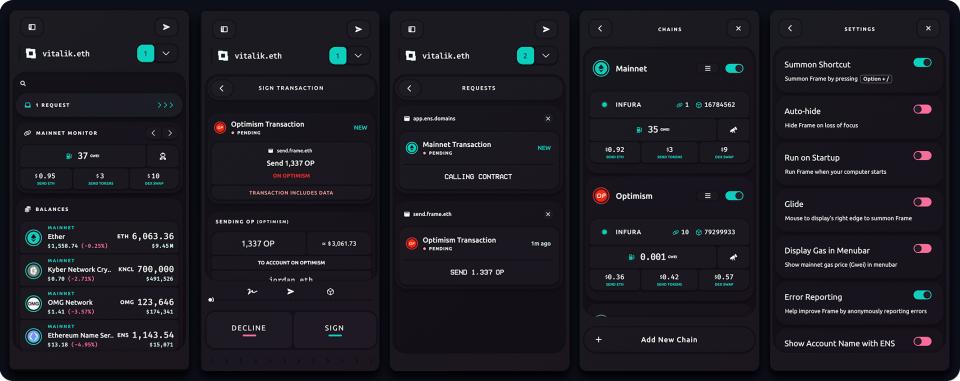
Frame is a web3 platform that creates a secure system-wide interface to your chains and accounts. Now any browser, command-line, or native application has the ability to access web3.
Features
- First-class Hardware Signer Support
- Extensive Software Signer Support
- Permissions
- Omnichain Routing
- Transaction Decoding
- Set your own connections to Ethereum and IPFS
- Menu Bar Support
- Cross Platform
Talks
Installation
Downloads
Arch Linux
If you use an arch-based distro, you can use an AUR Helper like yay to install Frame by running yay -S frame-eth or for the development version: yay -S frame-eth-dev.
Run Source
On Ubuntu: Run sudo apt-get install build-essential libudev-dev.
# Clone
› git clone https://github.com/floating/frame
Use node v18
› nvm install 18.12.1
› nvm use 18.12.1
Install
› npm run setup
Run
› npm run prod
Build
› npm run bundle # Create bundle
› npm run build # Build Frame for current platform
Usage
Connect to Frame natively
Frame exposes system-wide JSON-RPC endpoints ws://127.0.0.1:1248 and http://127.0.0.1:1248 that you can connect to from any app. We recommend using eth-provider to create a connection const provider = ethProvider('frame') as eth-provider will handle any connection edge cases across browsers and environments
Frame's injected provider
Frame also has a browser extension for injecting a Frame-connected EIP-1193 provider into web apps as window.ethereum. This can be used to inject a connection when an app does not provide the option to connect to Frame natively.
Related
- Frame Chat - Feel free to drop in and ask questions!
- Frame Browser Extension - Use Frame with any web dapp
- eth-provider - A universal Ethereum provider
- Restore - A predictable and observable state container for React apps
Website ⁃
Blog ⁃
Twitter ⁃
Chat
Website ⁃ Blog ⁃ Twitter ⁃ Chat


