
Collection of Windows dotfiles (Windows, WSL, GlazeWM)
⭐ this repo if 💖 like it.
Introduction
This dotfile serves as a guide to setup a development environment and keyboard-driven workflow. Configurations are based on Windows 10 with Windows Subsystem Linux (WSL) Ubuntu and Visual Studio Code. If you happen to be a WSL, VS Code and Vim user, I hope this dotfile is useful to you.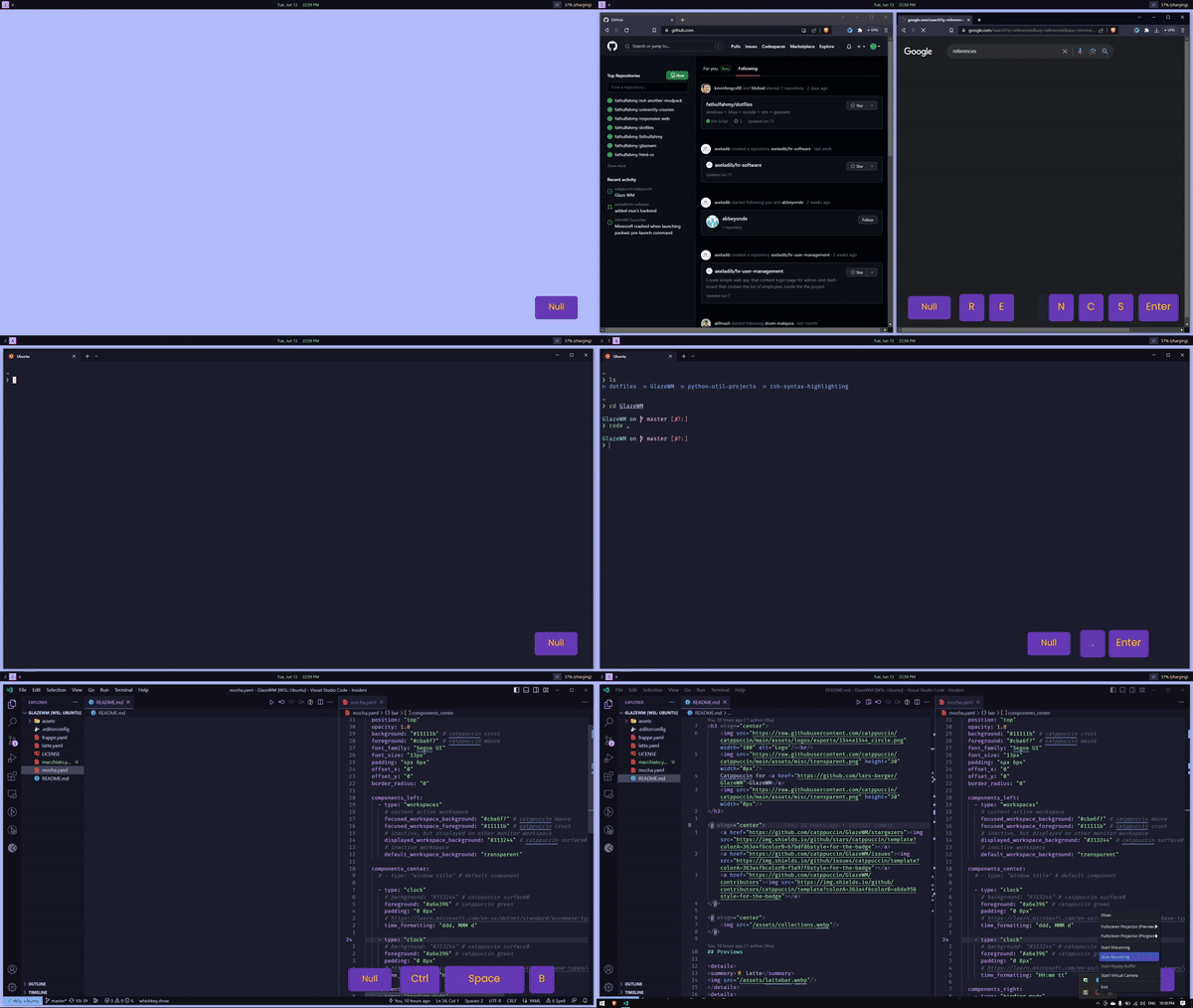
Table of Content
Apps and Packages
Windows
| Apps | Description | |----------------------------|------------------------- | | WSL | To run Linux within Windows | | Windows Terminal Preview | To run WSL | | Visual Studio Code | To write and debug code | | Git | To synchronize git credentials | | Glaze WM | To navigate through applications | | Brave Browser | To browse internet |
Linux
💻 Web Development
| Packages | Description | |-------------- |--------------------------------------------------| | fnm | To install and change versions of nodejs and npm | | mysql-server | To run mysql server |
🌐 Languages
| Packages | Description | |-------------- |------------------------------------------------------| | build-essential | To compile C and C++ programs | | sdkman | To install and change versions of java and javac | | python3 | To compile python programs | | go | To compile go programs | | rust | To compile rust programs |
🛠️ Build Tools
| Packages | Description | |----------------- |-------------------------- | | python3-pip | To build python packages | | zip | To de/compress files | | unzip | To de/compress files | | gzip | To de/compress files | | bzip2 | To de/compress files |
🤖 Command Line Interface (Optional)
| Packages | Description | |--------------|-------------------------------------------------| | zsh | To enter command lines | | zap-zsh | To manage zsh plugins | | fzf | To browse list of files and command lines | | exa | To display colors and icons on file directories |
Visual Studio Code
🌐 Languages
| Extensions | Description | |---------------------|------------------------------------- | | C/C++ | To enable C and C++ | | Code Runner | To compile C and C++ programs | | Java Extension Pack | To enable and debug java programs | | Python | To enable and debug python programs | | Go | To enable and debug go programs | | rust-analyzer | To enable and debug rust programs |
🌿 Quality Of Life
| Extensions | Description | |----------------|------------------------ | | Prettier | To format code | | Live Preview | To view static website | | Postman | To test api | | Git Lens | To view git changes | | Lunarkeymap | Quick and easy Vim and Which Key config | | Vim | To enable vim keybindings | | Which Keys | To bind more shortcuts |
Workflow
Based on all of my configurations📟 Applications
Requires: GlazeWMAlt + 2to go to browserAlt + 3to go to code editorAlt + 4to go to terminalAlt + h/j/k/lto move focus between applicationsAlt + shift + qto quit an applicationAlt + shift + eto exit Glaze WM
🌐 Browser
Requires: Vimium Chrome Extensionjandkto scroll pageJandKto cycle tabsHandLto go back or nextoto search or enter linkfto select element, follow-up with desired letterstto open new tabxto close tabXto open closed tabs
🖥️ Terminal
Requires: zsh, zap-zsh, zap-zsh-vim, fzfescandito switch vim modesjandkto cycle through previous commands- type
fzfto fuzzyfind command lines or directories
👨💻 Visual Studio Code
Requires: Lunarkeymap, Vim and Which Keyctrl+eto open file explorer- in file explorer
jandkto go up and down - in file explorer
ato create new file andAto create new folder - in file explorer
lorenterto expand folder - in file explorer
enterto open file ctrl + h/j/k/lto navigate between panesctrl+spaceto view all shortcuts, follow-up with desired letters
References
- ThePrimeagen - My Developer Workflow - How I use i3, tmux, and vim
- chris@machine - VSCode with embedded Neovim
- Joaquin Varela - THE BEST VIM CONFIG FOR VSCODE | configure vscode like vim
- chris@machine - Zap - A minimal zsh plugin manager
- chris@machine - Manage your dotfiles across multiple machines with GNU Stow and Git


