
PEG trace visualizer
pegviz



Visualizer for https://crates.io/crates/peg parsers.
Screenshot
pegviz reads peg's tracing markers and generates a collapsible HTML tree.
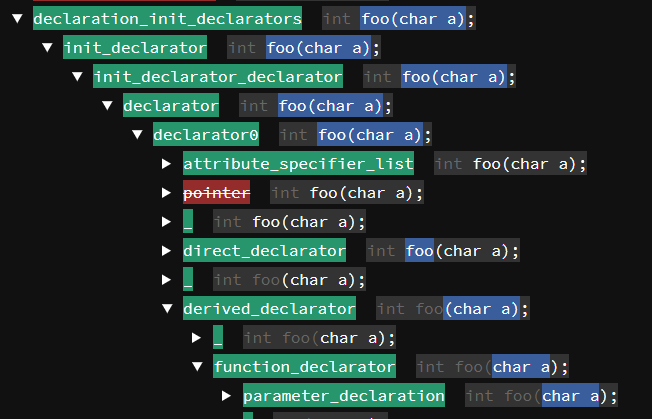
Left side:
* Green: matched rule * Yellow: partial match (see below) * Red: failed rule
Right side:
* Gray: previous input, for context * Blue background: input matched by this rule * White text: rest of input after matching
Partial Matches
A partial match is a (special kind of) match failure. It happens, if a rule consists of multiple sub-rules and some of them do match, but they do not all match.
Consider for example the grammar
pub rule traits() -> (Vec<String>, Vec<String>)
    = awesome_traits:(awesome() ++ ". ") "."? " "?
      boring_traits:(boring() ** ". ") "."?
    {
      (awesometraits, boringtraits)
    }
rule awesome() -> String     = name() " is awesome due to " reason:$(['a'..='z' | ' ']+) { reason.to_string() }
rule boring() -> String     = name() " is boring because of " reason:$(['a'..='z' | ' ']+) { reason.to_string() }
rule name() -> String = s:$(['A'..='Z']['a'..='z']+) { s.to_string() }
Here both awesome and boring start with name(). When parsing a string like
"Paul is awesome due to his kindness. Ludwig is boring because of his cat."
the first sentence will match to the awesome rule, the second does not, but it partially matches, because Ludwig also matches to name(). It will, though, match to the boring rule.
Format
pegviz expects input in the following format:
[PEGINPUTSTART] int a = 12 + 45; [PEGTRACESTART] [PEGTRACE] Attempting to match ruleat 1:1 [PEG_TRACE] Attempting to match ruletranslationunit0list0at 1:1 [PEG_TRACE] Attempting to match rulenodeat 1:1 [PEGTRACE] Attempting to match ruleexternaldeclaration at 1:1 [PEG_TRACE] Attempting to match ruledeclarationat 1:1 [PEG_TRACE] Attempting to match rulenodeat 1:1 [PEG_TRACE] Attempting to match ruledeclaration0at 1:1 [PEG_TRACE] Attempting to match rulegnuat 1:1 [PEGTRACE] Attempting to match rulegnuguard at 1:1 [PEGTRACE] Failed to match rulegnuguard at 1:1 [PEG_TRACE] Failed to match rulegnuat 1:1 [PEGTRACE] Attempting to match ruleat 1:1 [PEGTRACE] Matched ruleat 1:1 to 1:1 ... <omitted> ... [PEGTRACESTOP]
The START and STOP marker are pegviz-specific, you'll need to add them to your program. See the Integration section for more information.
Multiple traces may be processed, they'll all show up in the output file. Output that occurs between traces is ignored.
Compatibility
pegviz has been used with:
* peg 0.5.7 * peg 0.6.2 * peg 0.8.4
There are no tests. It's quickly thrown together.
Integration
In your crate, re-export the trace feature:
# in Cargo.toml
[features] trace = ["peg/trace"]
Then, in your parser, add a tracing rule that captures all the input and outputs the markers pegviz is looking for:
peg::parser! { pub grammar example() for str {
rule traced<T>(e: rule<T>) -> T =     &(input:$([_]*) {         #[cfg(feature = "trace")]         println!("[PEGINPUTSTART]\n{}\n[PEGTRACESTART]", input);     })     e:e()? {?         #[cfg(feature = "trace")]         println!("[PEGTRACESTOP]");         e.ok_or("")     }
pub rule toplevel() -> Toplevel = traced(<toplevel0()>)
}}
If your parser uses slices (such as &[u8], &[T]), then each character or token must be on a new line.
peg::parser! { pub grammar example() for str {
rule traced<T>(e: rule<T>) -> T =     &(input:$([_]*) {         #[cfg(feature = "trace")]         println!(             "[PEGINPUTSTART]\n{}\n[PEGTRACESTART]",             input.iter().fold(                 String::new(),                 |s1, s2| s1 + "\n" + s2.tostring().asstr()             ).trimstart().tostring()         );     })     e:e()? {?         #[cfg(feature = "trace")]         println!("[PEGTRACESTOP]");         e.ok_or("")     }
pub rule toplevel() -> Toplevel = traced(<toplevel0()>)
}}
The above is the recommended way if you're maintaining the grammar and want to be able to turn on pegviz support anytime.
If you're debugging someone else's parser, you may want to print the start/stop markers and the source yourself, around the parser invocation, like so:
let source = std::fs::readtostring(&source).unwrap();
    println!("[PEGINPUTSTART]\n{}\n[PEGTRACESTART]", source);
    let res = langc::driver::parsepreprocessed(&config, source);
    println!("[PEGTRACESTOP]");
Make sure you've installed pegviz into your $PATH:
cd pegviz/
cargo install --force --path .
While installing it, you may noticepegvizdepends onpeg.
That's right! It's using a PEG to analyze PEG traces.
Then, simply run your program with the trace Cargo feature enabled, and pipe its standard output to pegviz.
cd example/
cargo run --features trace | pegviz --output ./pegviz.html
Note that the --output argument is mandatory.
The last step is to open the resulting HTML file in a browser and click around!
License
pegviz is released under the MIT License. See the LICENSE file for details.


