
Built a practical Multi-Factor Backtesting Framework from scratch based on Huatai Security's(One of China's largest sell side) financial engineering report. Steps include factor data collection and preprocessing, factor combination, portfolio optimization and risk return analysis.
Multifactor project
Description
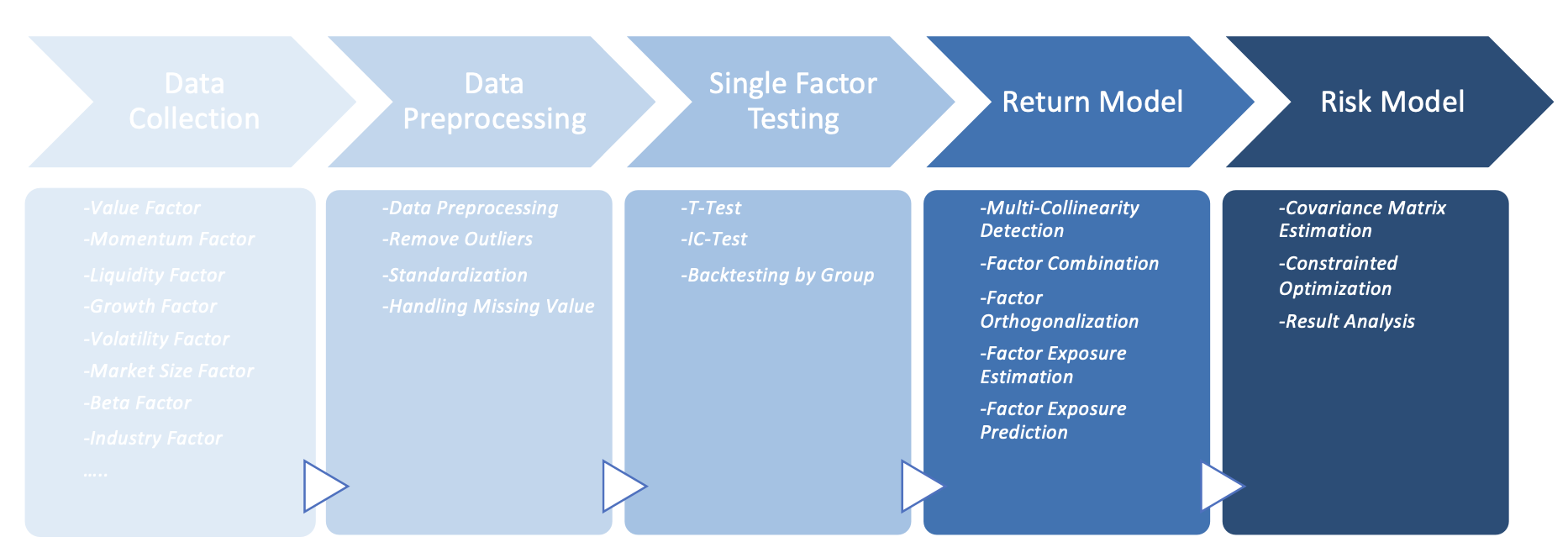
This is a practical multi-factor backtesting framework from scratch based on Huatai Security's(one of China's largest sell side) financial engineering report, as a part of the quantitative finance research project development in ETC Investment Group. Steps include factor data collection and preprocessing, single factor testing, building return model, building risk model, and result analysis.Do not distribute for use without explicit consent from contributing members of ETC Quant.
Project environment
To set up the project, first install anaconda and github cli. (Currently only compatible with windows)- Open CMD/bash
cdto navtigate to desired folder location
git clone https://github.com/etccapital/MultiFactorto clone the lastest version of the repo
- (Linux/MacOS)
conda env create -f environment.ymlto download configure the all packages needed \
./makefile_win.bat "setup" to download configure the all packages needed
- Use
conda env listto list all conda packages available. Make sure environmentmultifactoris in the list
- Download
rq_crendential.jsonand save it to root project folder
- Convert target python files into jupyter notebooks. See "Version Control of .ipynb Files" section below.
- Open CMD/bash
- Use
conda activate multifactor
Workflow
- Download zipped price data and extract them to
.data/price
- Download factor data from ricequant with
datadownloadand_process.ipynb
- Or download zipped factor data and extract them to
.data/factor
Project structure
Use commandtree in command line to generate the following folder structure.
Whenever you change the folder structure, please update the following diagram and update the corresponding file to the OneDrive folder.
.
├── Data
│   ├── factor
│   │   ├── cashflow
│   │   │   ├── cashflowpersharettm.h5
│   │   │   └── cashflowratio_ttm.h5
│   │   ├── dividend
│   │   ├── financial_quality
│   │   │   ├── debttoassetratiottm.h5
│   │   │   ├── fixedassetratio_ttm.h5
│   │   │   └── returnonequity_ttm.h5
│   │   ├── growth
│   │   │   └── increvenuettm.h5
│   │   ├── momentum
│   │   ├── size
│   │   │   └── marketcap3.h5
│   │   ├── technical
│   │   ├── value
│   │   │   ├── booktomarketratiottm.h5
│   │   │   ├── ev_ttm.h5
│   │   │   ├── pbratiottm.h5
│   │   │   ├── pcfratiottm.h5
│   │   │   ├── peratiottm.h5
│   │   │   ├── pegratiottm.h5
│   │   │   └── psratiottm.h5
│   │   └── volatility
│   ├── index_data
│   │   └── sh000300.csv
│   ├── raw_data
│   │   ├── dfbasicinfo.h5
│   │   ├── industry_mapping.h5
│   │   ├── is_st.h5
│   │   ├── is_suspended.h5
│   │   ├── listed_dates.h5
│   │   ├── stock_names.h5
│   │   ├── rebalancing_dates.h5
│   │   └── industrycodeto_names.xlsx
│   ├── stock_data
│   │   ├── sh600000.csv
│   │   ...
│   │   └── sz301039.csv
├── README.md
├── environment.yml
├── makefiles
│   ├── makefilemacnotebooktopy.sh
│   ├── makefilemacpytonotebook.sh
│   └── makefile_win.bat
├── not useful temporarily
│   ├── Dataloader.py
│   └── Ricequant API.ipynb
├── notebook
│   ├── Alphalens_new.ipynb
│   ├── Alphalenssinglefactor_testing.ipynb
│   ├── data_download.ipynb
│   ├── datadownloadand_process.ipynb
│   ├── factor_combination.ipynb
│   ├── portfolio_optimization.ipynb
│   └── singlefactoranalysis.ipynb
├── rq_credential.json
├── scripted_notebook
│   ├── Alphalens_new.py
│   ├── Alphalenssinglefactor_testing.py
│   ├── data_download.py
│   ├── datadownloadand_process.py
│   ├── factor_combination.py
│   ├── portfolio_optimization.py
│   └── singlefactoranalysis.py
└── src
    ├── init.py
    ├── constants.py
    ├── dataloader.py
    ├── factor_combinator.py
    ├── portfolio_optimizer.py
    ├── preprocess.py
    └── utils.py
Version Control of .ipynb Files
Currently, we have the following notebooks on our local laptops:datadownloadandprocess.ipynb Alphalenssinglefactortesting.ipynb
However, version control will be impossible if we directly push them to the repo in the form of .ipynb files. This is because jupyter notebooks are json files and cannot be displayed properly in github. As a result, we will use jupytext(pip install jupytext --upgrade) to convert between .ipynb and .py files, and store only .py files in the shared repo. Taking datadownloadandprocess.ipynb as an example, when you finish editing it on your local laptop, run jupytext --to py:percent datadownloadandprocess.ipynb in CMD and the changes will be updated to datadownloadandprocess.py. Then you can merge changes and resolve conflicts in datadownloadandprocess.py as in other python files. To fetch changes from datadownloadandprocess.py to datadownloadandprocess.ipynb, run jupytext --to notebook --update datadownloadand_process.py in CMD. Note that the --update option is essential as it will only update the code and comments in the .ipynb file while preserving graphs and outputs. \
To save your time, we have made the following shell scripts/makefiles:
(On Windows) \ ./makefiles/makefilewin.bat "scriptto_notebook" to covert scripts to notebooks \ ./makefiles/makefilewin.bat "notebookto_script" to covert notebooks to scripts
(On Mac) \ sh ./makefiles/makefilemacpytonotebook.sh to covert scripts to notebooks \ sh ./makefiles/makefilemacnotebooktopy.sh to covert notebooks to scripts
Note: make sure to update the makefile script if more notebooks are added


