
A Python command-line tool designed to collect TikTok data using SerpAPI for Google search results and Apify for TikTok data extraction.
TikSpyder
TikSpyder is a command-line tool designed to collect TikTok data using SerpAPI for Google search results and Apify for TikTok data extraction. The tool supports video downloading via yt-dlp and uses Python's asynchronous capabilities and multithreading for efficient data collection.





🔧 Companion Tools
| Tool | Description | Access | |------|-------------|--------| | 🎙️ Audio Transcription | Transcribe audio files from TikTok videos |  |
|
🖥️ User Interface Options
TikSpyder provides two ways to interact with the tool:
1. 🎨 Streamlit Web Interface (Recommended for Non-Technical Users)
A modern, user-friendly web interface with TikTok-inspired dark theme that makes data collection accessible to everyone.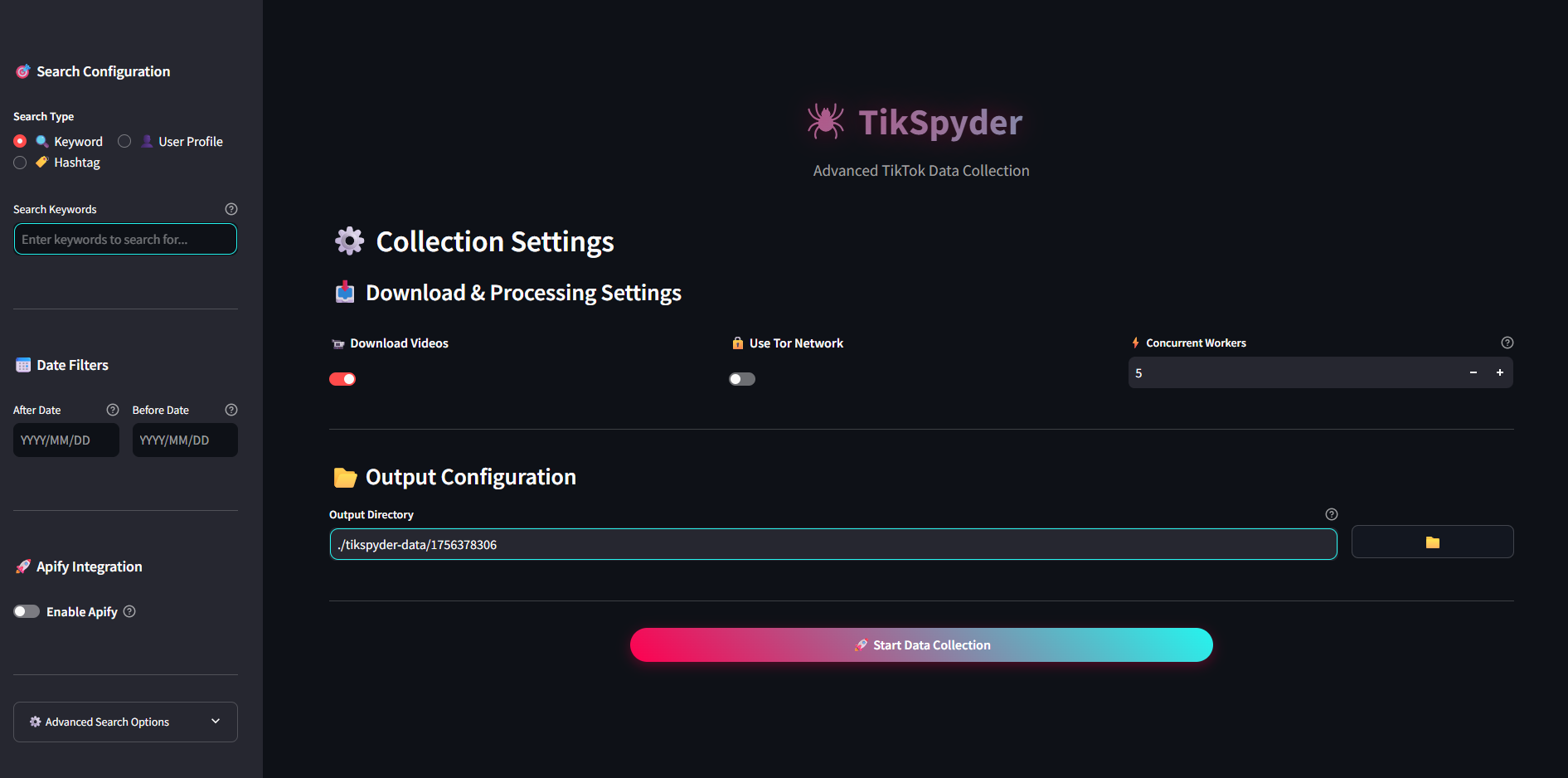
Features:
- 🎯 Intuitive Configuration: Easy search setup with tabbed interface for keywords, users, or hashtags
- 📅 Visual Date Filters: Calendar widgets for precise date range selection
- 🚀 Apify Integration: Simple toggle to enable enhanced data collection
- ⚙️ Advanced Options: Collapsible section for Google search parameters
- 📥 Download Settings: Visual controls for video downloads and Tor network usage
- 📂 File Browser: Point-and-click directory selection
- 📊 Real-time Progress: Live progress tracking with step-by-step status updates
Method 1 (Recommended):
# Using package installation tikspyder --app
Using standard installation
python main.py --app
Method 2 (Direct):
streamlit run app.py2. ⌨️ Command Line Interface (For Advanced Users)
Full-featured command-line tool for automation and scripting scenarios.🔍 Description
TikSpyder offers two main methods of data collection:
- Google Search Results: Using SerpAPI to find TikTok videos based on search queries
- Apify Data collection: Using Apify to collect videos directly from TikTok profiles or keywords
Given the dynamic nature of search results and the constantly evolving landscape of TikTok's platform, it's important to note that the data collected by TikSpyder represents a sample rather than a comprehensive dataset. However, this sample can still be valuable for monitoring trends and identifying emerging narratives in the information ecosystem.
To get the most out of TikSpyder, it is recommended to test your query using Google's advanced search features. This can help refine your search query, improve the relevance of your results, and test specific keywords more effectively. By taking advantage of these features, you can ensure that you're collecting the most relevant data for your research or analysis.
🚀 Features
Core Functionality
- 🔍 Collects TikTok video links using SerpAPI and Apify
- 🖼️ Collects and downloads thumbnails for TikTok videos
- 🔗 Collects related content to the search query
- 💾 Stores collected data in SQLite database
- 📊 Exports data to CSV files for analysis
- 📹 Downloads TikTok videos using yt-dlp
- 🎞️ Extracts keyframes from downloaded videos
- ⚡ Supports asynchronous and multithreaded downloading for improved performance
- 🔒 Supports Tor network for enhanced privacy and rate limiting avoidance
User Interfaces
- 🎨 Modern Streamlit Web Interface: User-friendly GUI with TikTok-inspired dark theme
- ⌨️ Command Line Interface: Full-featured CLI for automation and advanced users
- 🎯 Search Types: Support for keywords, user profiles, and hashtag searches
- 📅 Date Range Filtering: Precise temporal data collection controls
⚙️ Requirements
System Requirements
API Keys & Services
- SerpAPI key (required for Google search functionality)
- Apify API token (optional, for direct TikTok profile scraping)
Optional Components
- Tor Browser (optional, for enhanced privacy during downloads)
Platform-Specific Requirements
- All Platforms: Python libraries listed in
requirements.txt - Streamlit Interface: Automatically installed with requirements
- Linux Users: For GUI components, install tkinter:
sudo apt-get install python3-tk(Ubuntu/Debian)
🔧 Installation
Method 1: Standard Installation
- Clone the repository
git clone https://github.com/estebanpdl/tik-spyder.git
cd tik-spyder- Install the required packages
pip install -r requirements.txtor
pip3 install -r requirements.txtMethod 2: Package Installation (Recommended)
This method installs TikSpyder as a package, making the tikspyder command available from anywhere on your system.
- Clone the repository
git clone https://github.com/estebanpdl/tik-spyder.git
cd tik-spyder- Install the package in editable mode
pip install -e .or
pip3 install -e .After installation, you can use tikspyder directly from any directory instead of python main.py.
Configuration
- Once you obtain an API key from SerpAPI and Apify, populate the config/config.ini file with the described values. Replace
apikeyvalueandapifytokenvaluewith your API key and token.
[SerpAPI Key]
apikey = yourserpapikey
[Apify Token] apifytoken = yourapify_token
📚 Usage
TikSpyder offers two interface options to suit different user preferences and use cases:
🎨 Streamlit Web Interface Usage
The Streamlit interface provides an intuitive, visual way to configure and run data collection tasks.
Launch the Interface
# Navigate to TikSpyder directory
cd tik-spyder
Launch the Streamlit app
streamlit run app.py
The interface will automatically open in your default web browser at http://localhost:8501
Using the Interface
- 🎯 Configure Search: Choose between keyword, user profile, or hashtag search
- 📅 Set Date Filters: Use calendar widgets to define your collection timeframe
- 🚀 Enable Apify (Optional): Toggle for enhanced direct TikTok data collection
- ⚙️ Adjust Advanced Options: Fine-tune Google search parameters if needed
- 📥 Configure Downloads: Set video download preferences and worker counts
- 📂 Choose Output Directory: Select where your data will be saved
- 🚀 Start Collection: Click the centered "Start Data Collection" button
⌨️ Command Line Interface Usage
For advanced users and automation scenarios, TikSpyder provides a full-featured CLI.
Using Package Installation (Method 2)
tikspyder [OPTIONS]Using Standard Installation (Method 1)
python main.py [OPTIONS]Command Line Arguments
# Package installation
tikspyder --help
or
tikspyder -h
Standard installation
python main.py --help
or
python main.py -h
Command Line Arguments.
Help options: -h, --help Show this help message and exit.
SerpAPI options: --q The search term of phrase for which to retrieve TikTok data. --user Specify a TikTok user to search for videos from. --tag Specify a TikTok tag to search for videos from. --google-domain Defines the Google domain to use. It defaults to google.com. --gl Defines the country to use for the search. Two-letter country code. --hl Defines the language to use for the search. Two-letter language code. --cr Defines one or multiple countries to limit the search to. --safe Level of filtering for adult content. Options: active (default), off --lr Defines one or multiple languages to limit the search to. --depth Depth of iterations to follow related content links.
Google advanced search options: --before Limit results to posts published before the specified date. Format: YYYY-MM-DD. --after Limit results to posts published after the specified date. Format: YYYY-MM-DD.
Optional Apify arguments: --apify Specify whether to use Apify integration. --oldest-post-date Filter posts newer than the specified date. Format: YYYY-MM-DD. --newest-post-date Filter posts older than the specified date. Format: YYYY-MM-DD. --number-of-results Specify the number of results to return from Apify. Default: 25
Optional arguments and parameters: --app Launch the Streamlit web interface instead of using CLI mode. --use-tor Specify whether to use Tor for downloading TikTok videos. -d, --download Specify whether to download TikTok videos from SerpAPI and Apify. -w , --max-workers Specify the maximum number of threads to use for downloading TikTok videos and extracting keyframes. -o , --output Specify output directory path. If not provided, data is saved in the current working directory in a folder named tikspyder-data
Example Usage
- Search-based collection:
# Using package installation (Method 2)
tikspyder --q "F-16 AND Enemy AND (Ukraine OR Russia)" --gl us --hl en --after 2024-02-01 --before 2024-05-31 --output {output_directory}/ --download
Using standard installation (Method 1)
python main.py --q "F-16 AND Enemy AND (Ukraine OR Russia)" --gl us --hl en --after 2024-02-01 --before 2024-05-31 --output {output_directory}/ --download
Note: Replace '{output_directory}' with the desired output path.
- Profile-based collection:
# Using package installation (Method 2)
tikspyder --q Trump --user username --output {output_directory}/ --download --apify --oldest-post-date 2025-01-01
Using standard installation (Method 1)
python main.py --q Trump --user username --output {output_directory}/ --download --apify --oldest-post-date 2025-01-01
Note: Replace '{output_directory}' with the desired output path.
- Tag-based collection
# Using package installation (Method 2)
tikspyder --tag sinaloa --apify --oldest-post-date 2025-08-01 --number-of-results 50 --output {output_directory}/ --download
Using standard installation (Method 1)
python main.py --tag sinaloa --apify --oldest-post-date 2025-08-01 --number-of-results 50 --output {output_directory}/ --download
Note: Replace '{output_directory}' with the desired output path.
Tor Integration
You can use Tor network for downloading TikTok videos to enhance privacy and avoid rate limiting. To use this feature:- Make sure Tor Browser is installed and running
- Configure your torrc file with:
## Enable SOCKS proxy
SocksPort 9050
Enable Control Port for IP rotation
ControlPort 9051
CookieAuthentication 1- Use the
--use-torflag when running the script. If Tor connection fails, the script will automatically fall back to a normal connection.
☕ Support
If you find TikSpyder helpful, please consider buying me a coffee to support ongoing development and maintenance. Your donation will help me continue to improve the tool and add new features.



