
a midi step sequencer in the terminal, made with live performance in mind :loop:
Sektron


:notebook: User Manual
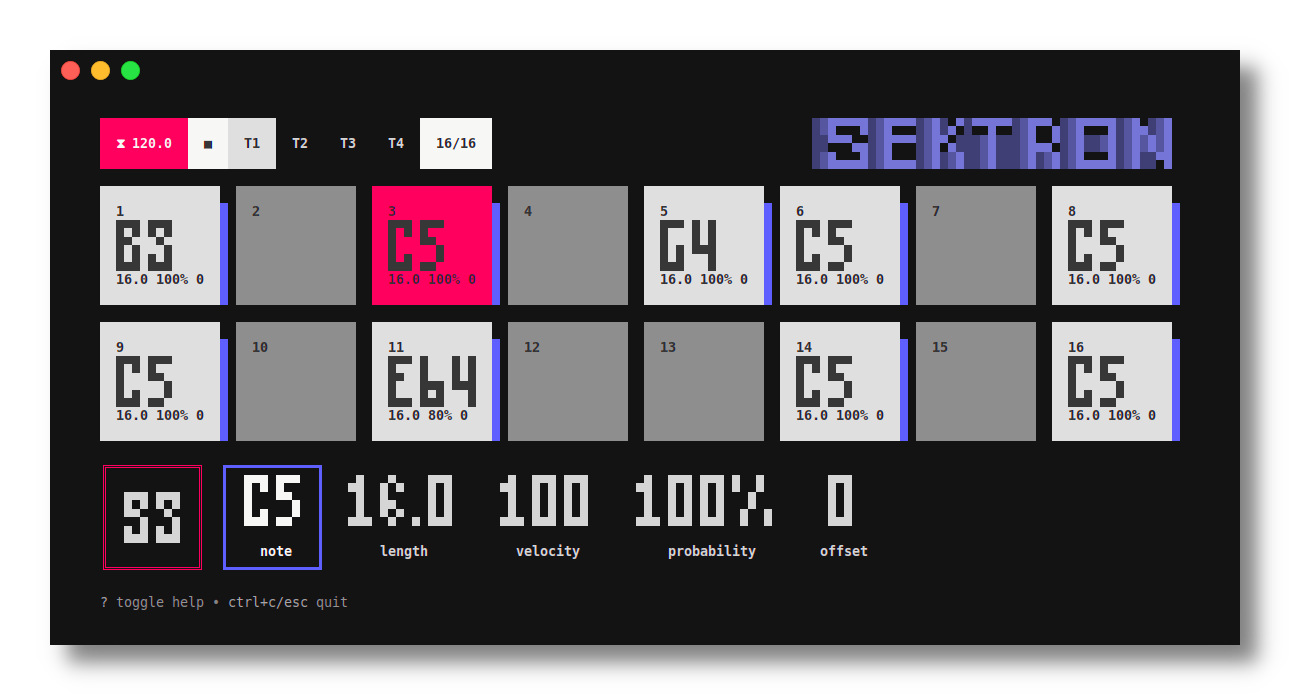
Sektron is a midi step sequencer, made with live performance in mind, that runs in the terminal (TUI). Its main purpose is to mimic the fun and immediacity of hardware sequencers by being entirely controllable via keyboard.
It's heavily inspired by elektron devices.
Sektron has only been tested on linux (it should work on macOS as well) and you may experience some crashes here and there.
Feel free to open an issue._
Features
- Fully (and only) controllable by keyboard - Customizable keyboard mapping - Up to 10 midi tracks, that can be attached to specific midi device and channel - Up to 128 steps per track. The number of steps per track is independent, allowing complex polyrhythms - Parameters can be set per track or step (parameter locking) - Up to 64 patterns can be loaded at the same time - Pattern chaining
See Roadmap for more.
Installation
Download the last release for your platform.
Then:
# Extract files mkdir -p sektron && tar -zxvf sektronVERSIONPLATFORM.tar.gz -C sektron
Run sektron
./sektron
Build it yourself
You'll need go 1.22 minimum. Although you should be able to build it for either linux, macOS or Windows, it has only been tested on linux.
# Linux
make GOLANG_OS=linux build
macOS
make GOLANG_OS=darwin build
Windows
make GOLANG_OS=windows build
Raspberry Pi OS
sudo apt install libasound2-dev
make GOLANGOS=linux GOLANGARCH=arm64 build
Usage
# Run sektron
./sektron
Display current version
./sektron --version
Hit ? to see all keybindings. esc to quit.
Some companion apps that receive midi for testing Sektron: - Enfer (github) - QSynth

Keyboard mapping
Keys mapping is fully customizable. After running Sektron for the first time, a config.json is created. You can edit all the keys inside it.
You can select one of the default keyboard layouts available:
# QWERTY ./sektron --keyboard qwerty
AZERTY
./sektron --keyboard azerty
QWERTY MAC
./sektron --keyboard qwerty-mac
AZERTY MAC
./sektron --keyboard azerty-mac
Default keyboard mapping
The default key mapping looks like this:
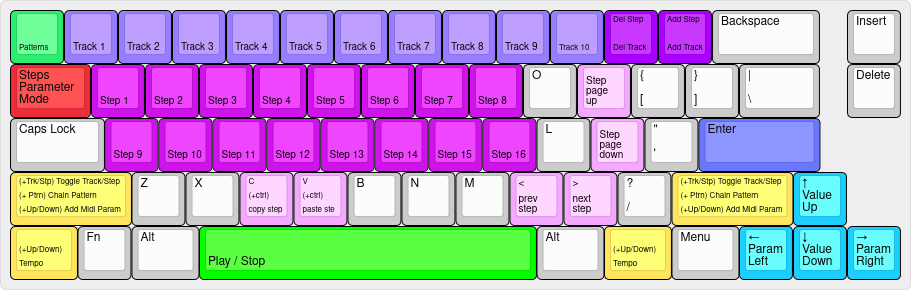
For qwerty keyboards, here's the default mapping:
- space play or stop - tab toggle parameter mode (track, record) - ` ` toggle pattern select mode - 1 2 3 4 5 6 7 8 9 0 select track - ! @ # $ % ^ & * ( ) toggle track - q w e r t y u i q s d f g h j k select step or switch to pattern - Q W E R T Y U I Q S D F G H J K toggle step or chain pattern - , previous step - . next step - = add track - - remove track - + add step to the selected track - _ remove step from the selected track - p page up either steps or patterns if more than 16 items - ; page down either steps or patterns if more than 16 items - shift+up increase tempo - shift+down decrease tempo - ctrl+c copy selected step - ctrl+v paste selected step - ctrl+up add new midi control to the selected track - ctrl+down remove midi control. It will remove the selected one - enter validate selection - left move parameter selection to the left - right move parameter selection to the right - up increase selected parameter value - down decrease selected parameter value - ? show help - escape or ctrl+q quit
Patterns management
Each time you start Sektron, a json file (default: patterns.json) containing 128 pattern slots is loaded. For selecting a different file, use the --patterns` flag:
./sektron --patterns my-patterns.jsonEach time you change pattern or quit the program, the current pattern is saved to the file.
Acknowledgments
Sektron uses a few awesome packages: - gomidi/midi for all midi communication - charmbracelet/bubbletea as the main TUI framework - charmbracelet/lipgloss for making things beautiful
Roadmap
The project isn't under active development right now. I may fix some bugs here and there. But I'll considerer adding more features if there's some interest.
Things that I might consider adding at some point: - Step polyphony - Retrigs - LFOs


