
No description available.
agitator.nvim
agitator is a neovim/lua plugin providing some git-related functions:
blame
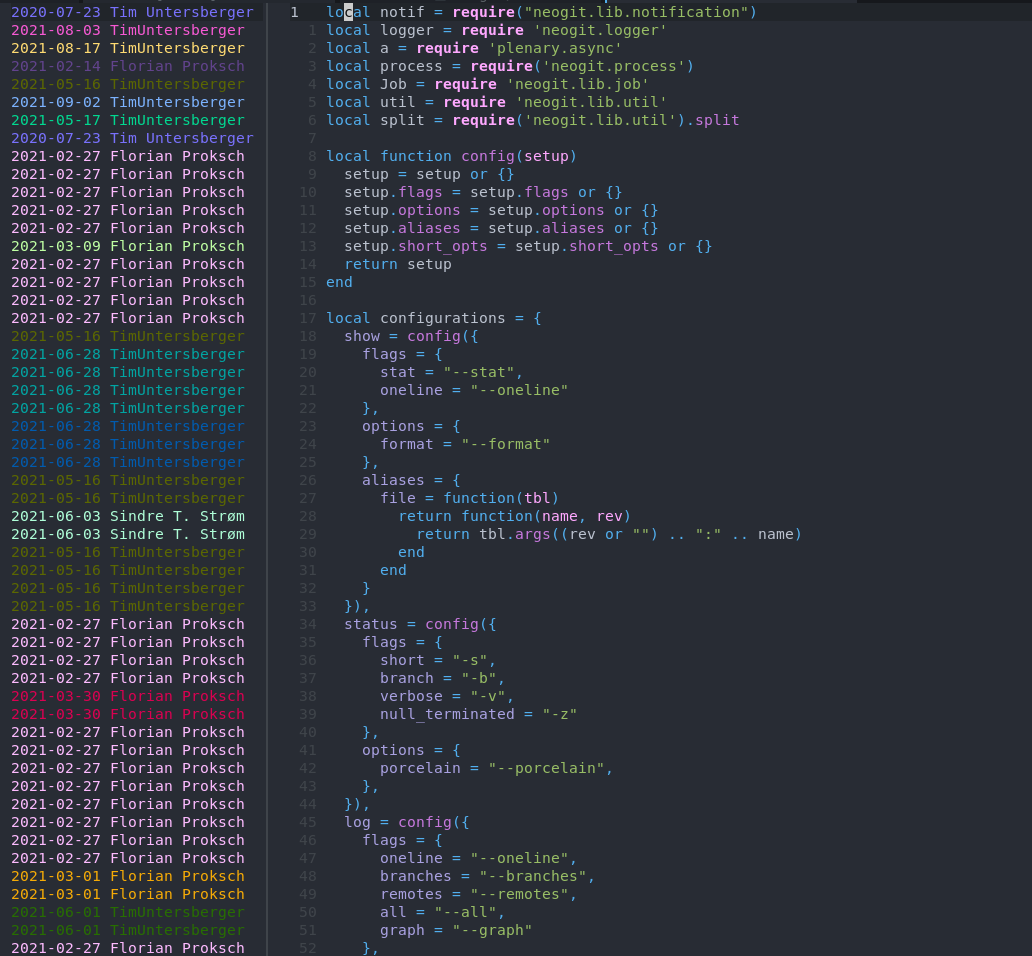
Blame adds a window on the left side of your window with blame information for the file. The sidebar is scroll bound to the main file window. Three functions are exported:
gitblame({sidebarwidth?, formatter?}): open the sidebar. The default width is 30 characters, you
{sidebar_width = 20}. You can also pass in a
formatter function, to display the commit information, see lower;
gitblameclose(): close the blame sidebar;gitblametoggle(): toggle (open or close) the blame sidebar.gitblamecommitforline(): get the git commit SHA for the current line, as string.
function _G.ShowCommitAtLine()
    local commitsha = require"agitator".gitblamecommitfor_line()
    vim.cmd("DiffviewOpen " .. commitsha .. "^.." .. commitsha)
end
The formatter function for git_blame() lets you customize the rendering of the blame information. For instance, you could call:
require'agitator'.git_blame{formatter=function(r) return r.author .. " => " .. r.summary; end}And you'd get in a sidebar the author and the commit summary instead of the author and date, which is the default. The formatter function receives a single parameter, which has the following fields:
- author
- summary
- date, which is a
os.datewhich has among othersyearmonthanddayfields.
git find file
Git find file will open two telescope pickers in succession. The first one to pick a git branch; the second one to pick a file from that branch. The selected file from another branch is then displayed in a read-only buffer.
openfilegit_branch()
search in git branch
search git branch will open two telescope pickers in succession. The first one to pick a git branch; the second one to enter text to search for in that branch. The selected file from another branch is then displayed in a read-only buffer.
searchgitbranch()
search in added lines
search in added will open a telescope picker to search in lines that you've added compared to you a git revision (by default HEAD): basically you search in the git diff.
searchinadded({git_rev?})
time machine
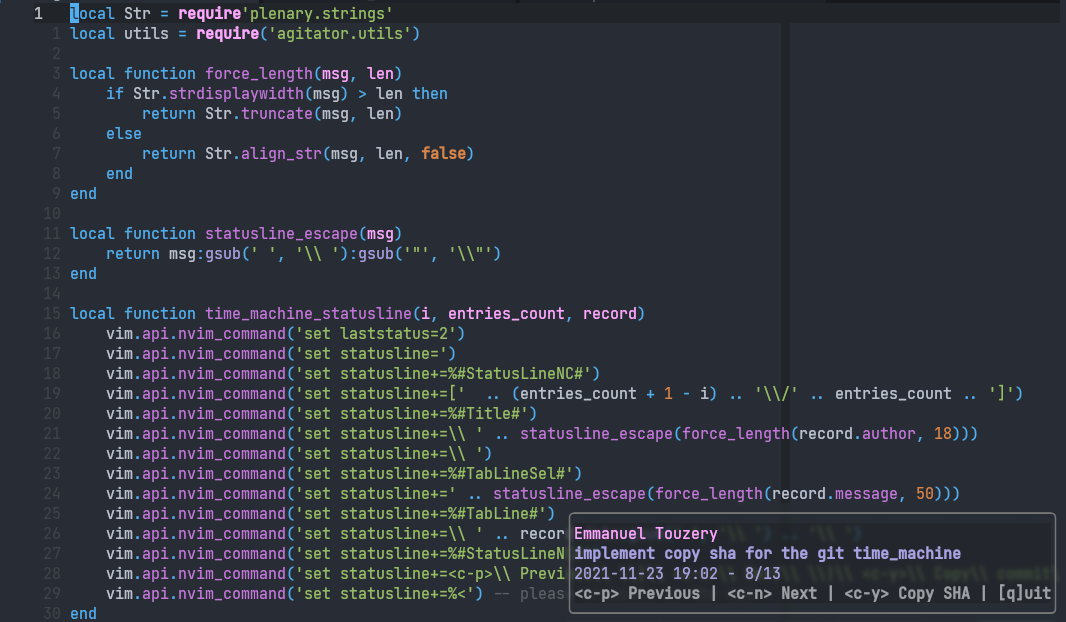
The time machine allows you to see the history of a single file through time. It opens a new read-only window, where you can navigate through past versions of the file and view their contents. Details about the currently displayed version appear in a popup window at the bottom-right.
gittimemachine({usecurrentwin?, commitsha?, setcustomshortcuts?, popuplastline?, popupwidth?})
{usecurrentwin: true} to reuse the current window instead of creating a new one.
You can also pass in {commit_sha: "your-sha"} to open the time machine focused on a specific commit. The sha can be a full or short sha (without the # prefix).
setcustomshortcuts allows to customize the shortcuts for the time machine. It should be a function, that'll receive the buffer number of the time machine. You should set up the autocommands you want; you can reproduce the default behavior with this implementation:
{
  setcustomshortcuts = function(code_bufnr)
    vim.keymap.set('n', '<c-p>', function()
      require"agitator".gittimemachine_previous()
    end, {buffer = code_bufnr})
    vim.keymap.set('n', '<c-n>', function()
      require"agitator".gittimemachine_next()
    end, {buffer = code_bufnr})
    vim.keymap.set('n', '<c-h>', function()
      require"agitator".gittimemachinecopysha()
    end, {buffer = code_bufnr})
    vim.keymap.set('n', 'q', function()
      require"agitator".gittimemachine_quit()
    end, {buffer = code_bufnr})
  end
}
If you change the shortcuts for instance, you'd probably want to change the shortcut hints at the bottom of the popup window. You can do that with the popuplastline option. You can reproduce the default behavior with this implementation:
{ popuplastline = '<c-p> Previous | <c-n> Next | <c-h> Copy SHA | [q]uit' }You can also change the popup width with popup_width. The default value is currently 53.
General
To call any function, if you use a plugin manager such as Packer, you must prepend require('agitator'). For instance require('agitator').git_blame().
This plugin depends on telescope.nvim for the functions displaying a picker.
The plugin is meant to be combined with gitsigns, neogit and diffview, so I won't add features covered by these.


