
Dash app for classifying tweets in real-time
Twitter Sentiment Tracker




This repository contains the source code and resources for building a web app that tracks the sentiment on twitter towards a set of pre-specified accounts. Essentially, it is a leaner version of polituits.com.
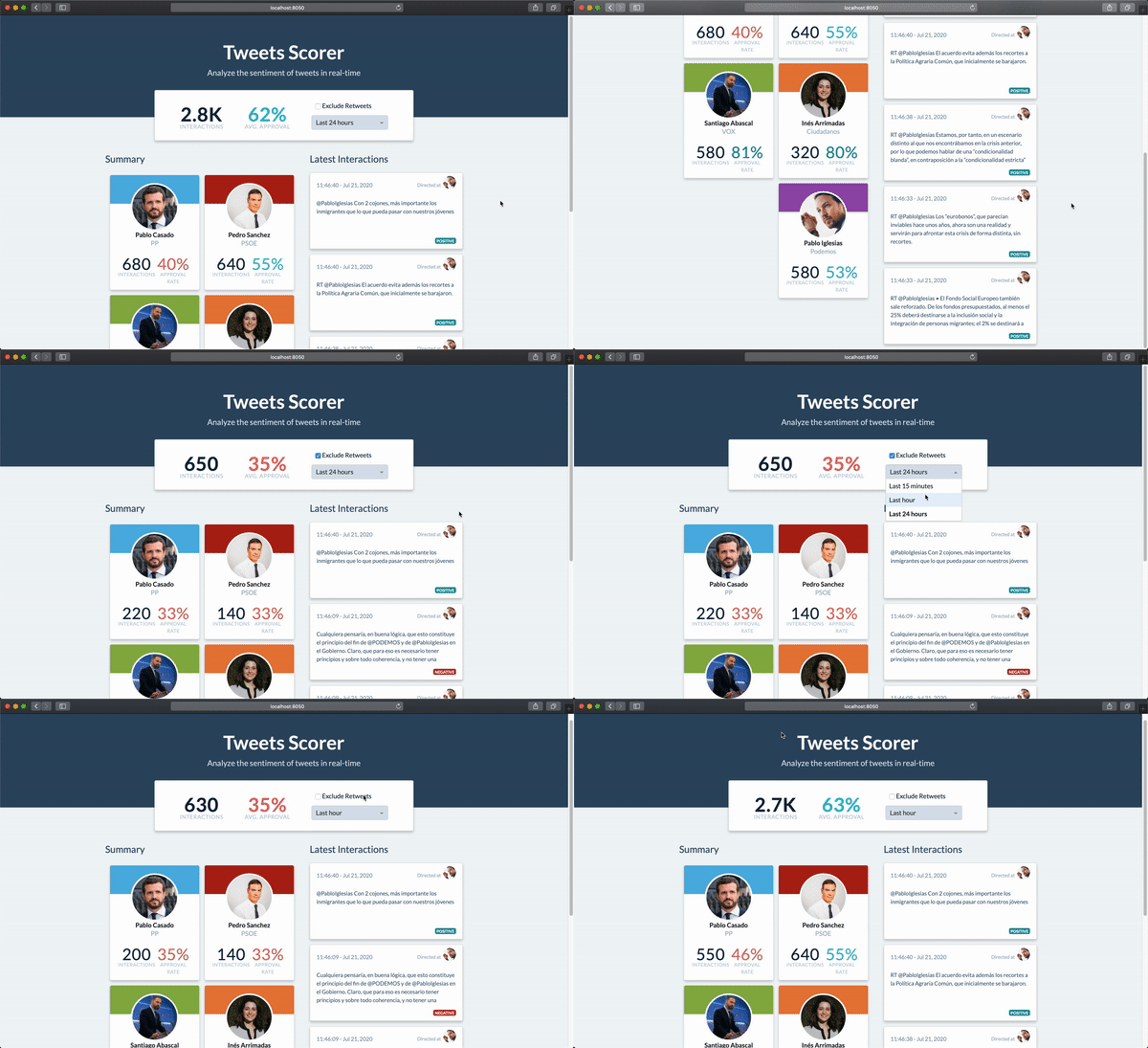
The end-product looks as follows:
How It Works
The application provides you with (close to) real-time tracking of the sentiment on Twitter towards a set of accounts. For predicting the sentiment of comments it uses a combination of fixed rules and a classifier built using the language model BERT>).
To make it clearer, the app doesn't track the sentiment of the comments made by the accounts you defined. It tracks the sentiment of the responses and mentions received by those accounts.
Here's the architecture of the app:
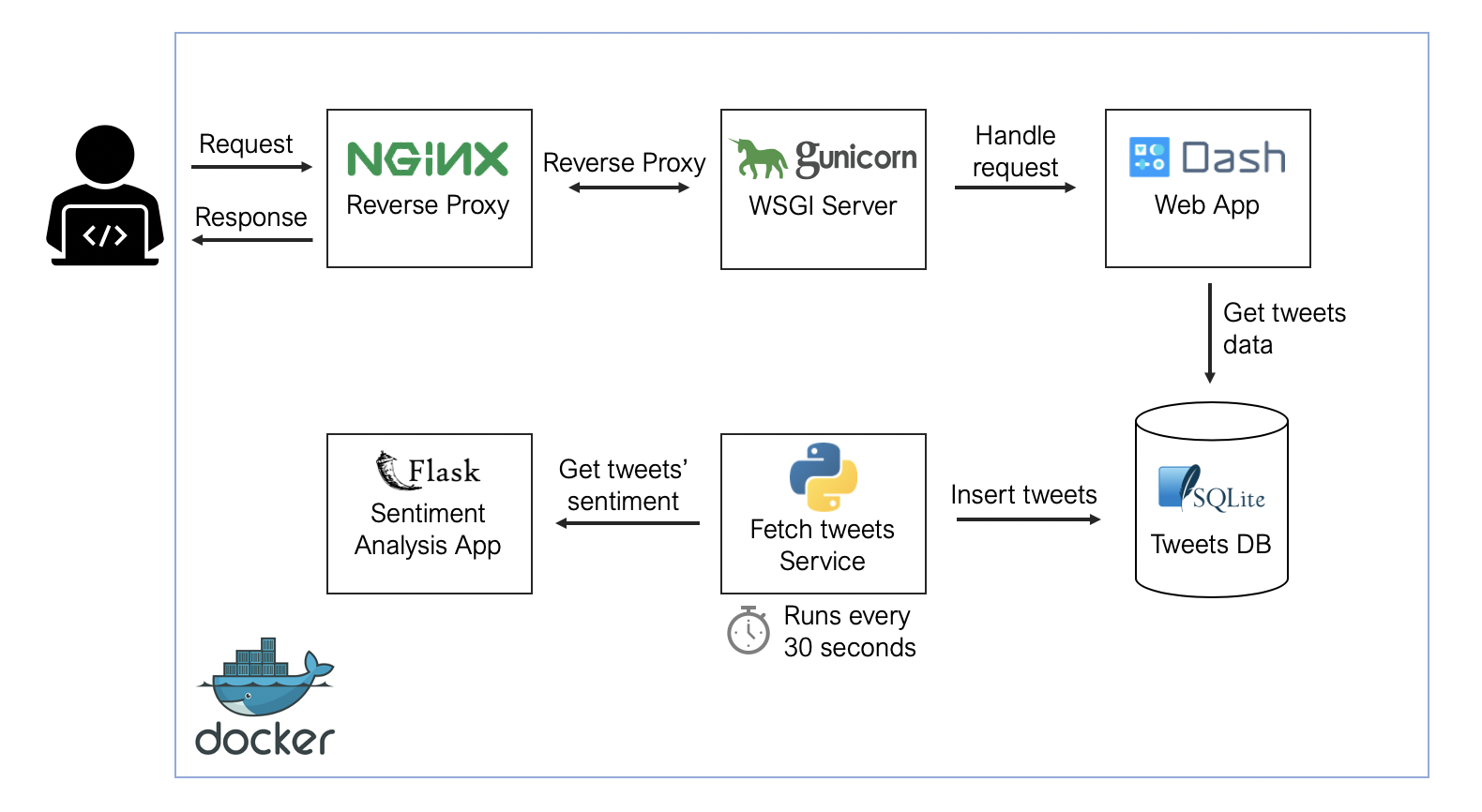
It comprises the following elements:
- NGINX as a reverse proxy server
- Gunicorn as a WSGI server
- A Dash application for visualizing results
- An SQlite3 database to store processed tweets
- Two additional services for getting, processing, and assigning sentiment to tweets
How to Add Accounts to Track
If you want to build your own app to track sentiment toward a specific set of accounts, there are three things you need to do: set the required environment variables, define which accounts you want to track, and configure your sentiment classifier model.
Set Environment Variables
Start by setting up a Twitter Developer account, create an App, and generate consumer keys for your App. In case you're wondering, this is entirely free. You just need to fill out some questions.
Then, create an .env file in the fetcher/ directory. It should contain these variables:
TWITTERKEY=COPYYOURAPIKEY_HERE
TWITTERSECRET=COPYYOURAPISECRETKEYHERE
SENTIMENTAPPHOST=sentiment_app
FETCH_INTERVAL=30
LANGUAGE=es
You can get the values for TWITTERKEY and TWITTERSECRET from your App's details in your developer account:

For SENTIMENTAPPHOST use sentimentapp if you are testing or deployig the app using docker-compose. If you are doing tests in a python virtual environment in your local machine_, put localhost there.
FETCHINTERVAL defines how frequently, in seconds, you make requests to the Twitter API to get the latest tweets. Make sure to read the rate limits you should respect. The general recommendation is not to have many accounts and not updating that
Define Accounts to Track
To define which accounts you want to track you need to update the data/accounts.csv file. This will feed a query to the Twitter API that gets the mentions and responses that those accounts get. There's some smart filters to avoid getting mentions or responses that are note relevant.
The accounts.csv file has the following fields:
- id: Identifier of the account (can be anything, just needs to be unique)
- account: Twitter handle you are interested in tracking
- name: Name that is displayed in the summary cards
- image: Image displayed in the summary cards and the latest tweets section
- color: Color associated with that account, it is shown at the top of the summary card
- party: Political party associated with the account you want to track. Leave it empty if it isn't relevant.
Bring Your Own Model
You'll probably want to use a different model than the one I used. It shouldn't be that hard to add one. You need to provide the following things:
- A vocabulary file (
vocab.txt) for the Tokenizer - A pre-trained BERT model from HugginFace's repository of models
- The model's learned parameters to load using
loadstatedict() - An updated
emojis_dict.csvfile in thedata/directory, if you are planning on keeping that in the tweet processing pipeline
If you plan on building a dataset for training your model, then use the same pre-processing steps as in the processtext() function in fetchtweets.py . Adjust them if necessary.
Save the vocab.txt and the model's learned parameters files in the sentimentapp/input/ directory. Then, update the config.py file in sentmentapp/:
MAX_LEN = 256
PREDICTBATCHSIZE = 32
NUM_WORKERS = 4
MODEL_PATH = "./input/model.bin" # Replace by your file with the learned parameters
BERT_MODEL = "dccuchile/bert-base-spanish-wwm-uncased" # Replace by pre-trained BERT from HugginFace's models
TOKENIZER = transformers.BertTokenizerFast.from_pretrained(
"./input/", dolowercase=True, truncation=True
)
Remember to replace the emojis_dict.csv in the data/ directory by the version you are planning to use.
You can use the versions of the vocabulary and the learned parameters I used. Save them as vocab.txt and model.bin in sentiment_app/input/. Keep the config.py file as is.
How to Deploy
First, make sure you've set everything specified in the previous section.
In addition, there are a few things you need to have in place in your VPS:
Log in to your VPS, and install Python 3.8, Docker, and docker-compose. Then, continue as follows:- Clone the repository:
git clone https://github.com/dylanjcastillo/twitter-sentiment-tracker.git
- Open a terminal at the root directory of your project and create the Tweets database as follows:
$ cd utils
$ python3.8 create_database.py- Create an
.envfile with the required variables
- Update the
accounts.csvfile with accounts you want to track.
- Setup your model
- Add the server name to the NGINX configuration file in
nginx/project.conf
server {
listen 80;        servername REPLACEBYDOMAINOR_IP;
charset utf-8;
location / {            proxypass http://dashapp:8050;
# Do not change this            proxysetheader Host $host;            proxysetheader X-Forwarded-For $proxyaddxforwardedfor;            proxysetheader X-Forwarded-Proto $scheme;            proxysetheader X-Real-IP $remote_addr;        }
}
- Run
sh run-docker-shin the your root directory of your project
- (Optional) You can add a cronjob that executes the
cleandatabase.pyin theutils/folder everyday. This script removes old data from the database.
You can run the stop-docker.sh script to stop the Docker containers.
Limitations
- The model I trained is not great and will only work for tweets in Spanish. If you want high-quality results, make sure to dedicate some time to building your model.
- If you choose to track a very popular account, the application might not be able to do it at a proper pace. I do not paginate results from the API, so the fetcher will only get the last 100 results from whatever interval you decide to use.
- The fetcher tries to get tweets in the interval you defined. However, if it takes too much time to process the tweets, it will not guarantee that it works with that frequency.
- If you are planning on having an SSL certificate, then you'll to do some changes on the NGINX service.
- For local development, I was using Python virtual environments. I only used Docker for deploying the application.
- As usual, parts of the code come from tutorials, Stack Overflow questions, and blog posts. I did not keep track of these, but if you feel any attribution is due, shoot me a message.
- Finally, this was just an experimental project I did for fun. I just added a couple of tests for the fetcher. So expect bugs.


