
An example desktop app built using the Tauri framework to bundle Next.js with a Python server.
Example Tauri v1 app using Python sidecar
A native app built with Tauri v1 that spawns a Python sub-process (sidecar) which starts a FastAPI server.


[!IMPORTANT]>
Tauri v2 example is now available 👇>
example-tauri-v2-python-server-sidecar>
More features and documentation with example app.exe.
Introduction
This example app uses Next.js as the frontend and Python (FastAPI) as the backend. Tauri is a Rust framework that orchestrates the frontend and backend(s) into a native app experience.
How It Works
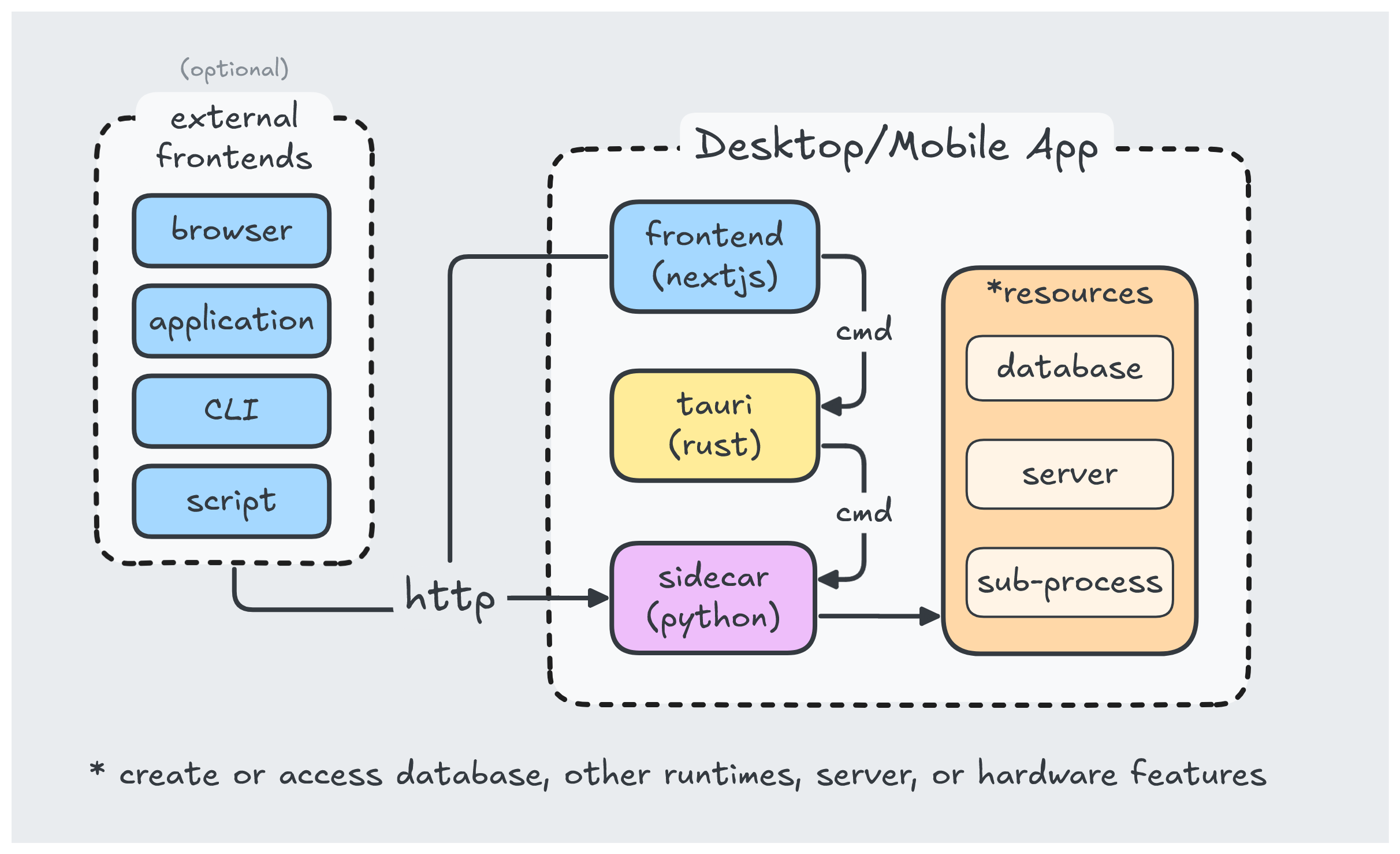
Tauri takes your frontend UI written in html/javascript and displays it in a native webview. This makes the resulting file size smaller since it does not need to include a web browser.
Getting Started
Dependencies
Install dependencies for
pnpm installTo install python dependencies listed in requirements.txt:
pnpm dev-reqsIn case you dont have PyInstaller installed:
pip install -U pyinstallerRun
To run the app in development mode with hot-reload (js):
pnpm tauri devBuild
Compile python sidecar
Run this at least once before running pnpm tauri dev and each time you make changes to your python code. This command is also called by pnpm tauri build:
pnpm build:fastapiBuild app for production:
pnpm tauri buildThis creates an installer located here:
- \
\src-tauri\target\release\bundle\nsis
Learn More
- Tauri Framework - learn about native app development in javascript and rust.
- NextJS - learn about the popular react framework Next.js
- FastAPI - learn about FastAPI server features and API.
- PyInstaller - learn about packaging python code.


