
👀 A Kubernetes cluster resource sanitizer

Popeye: Kubernetes Live Cluster Linter
Popeye is a utility that scans live Kubernetes clusters and reports potential issues with deployed resources and configurations. As Kubernetes landscapes grows, it is becoming a challenge for a human to track the slew of manifests and policies that orchestrate a cluster. Popeye scans your cluster based on what's deployed and not what's sitting on disk. By linting your cluster, it detects misconfigurations, stale resources and assists you to ensure that best practices are in place, thus preventing future headaches. It aims at reducing the cognitive overload one faces when operating a Kubernetes cluster in the wild. Furthermore, if your cluster employs a metric-server, it reports potential resources over/under allocations and attempts to warn you should your cluster run out of capacity.
Popeye is a readonly tool, it does not alter any of your Kubernetes resources in any way!


 [
[ ]()
]()
Screenshots
Console
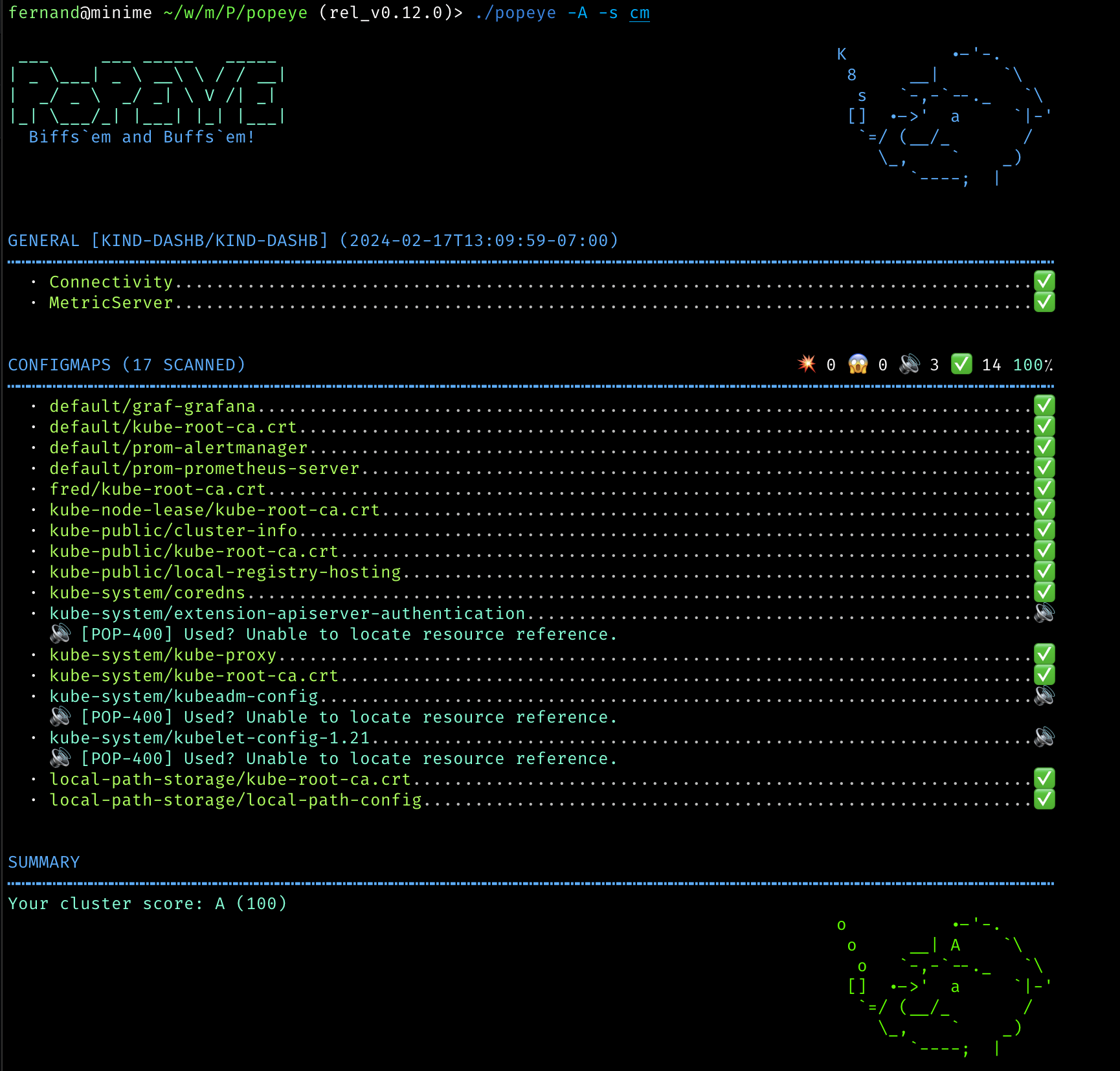
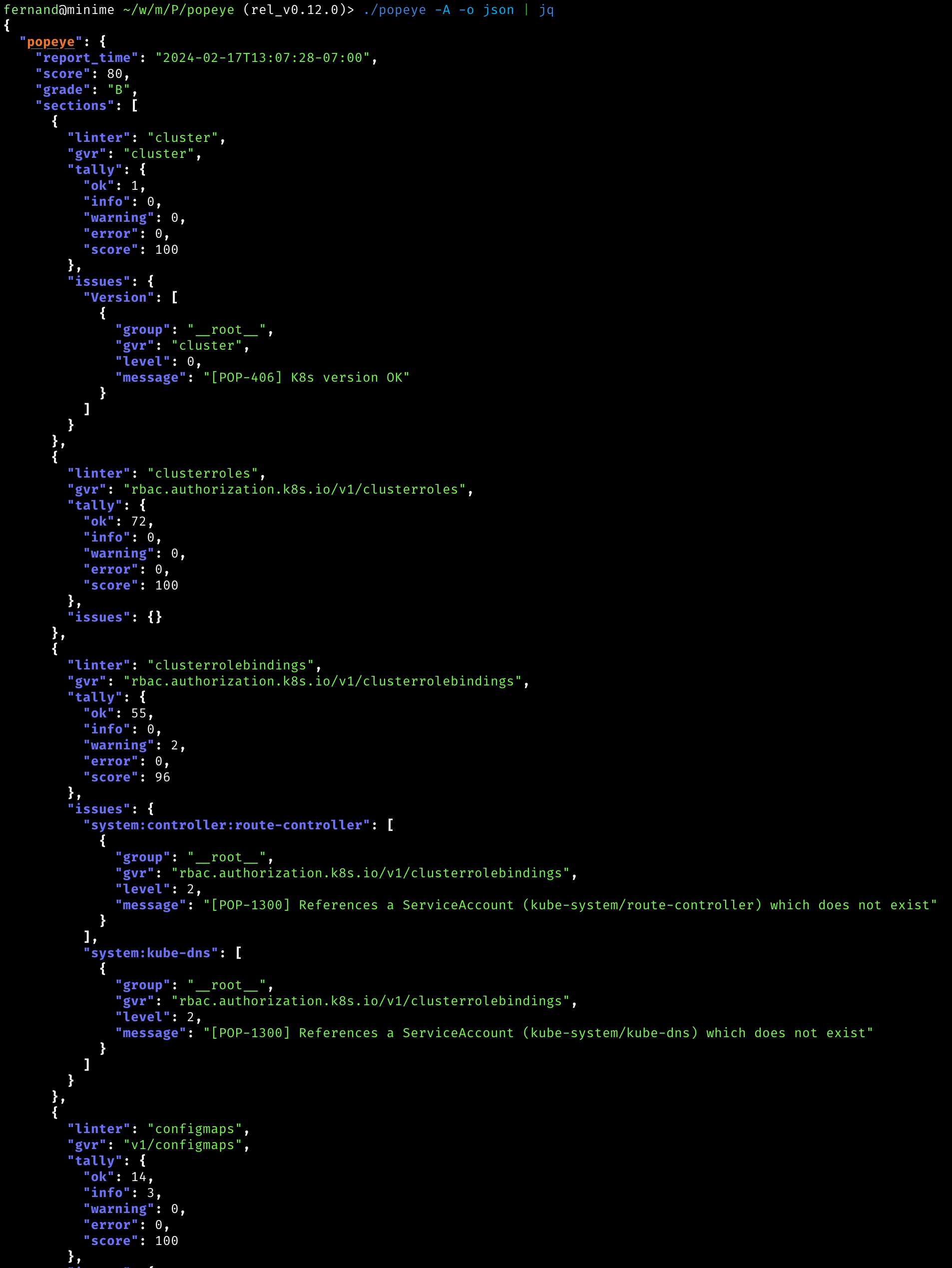
JSON
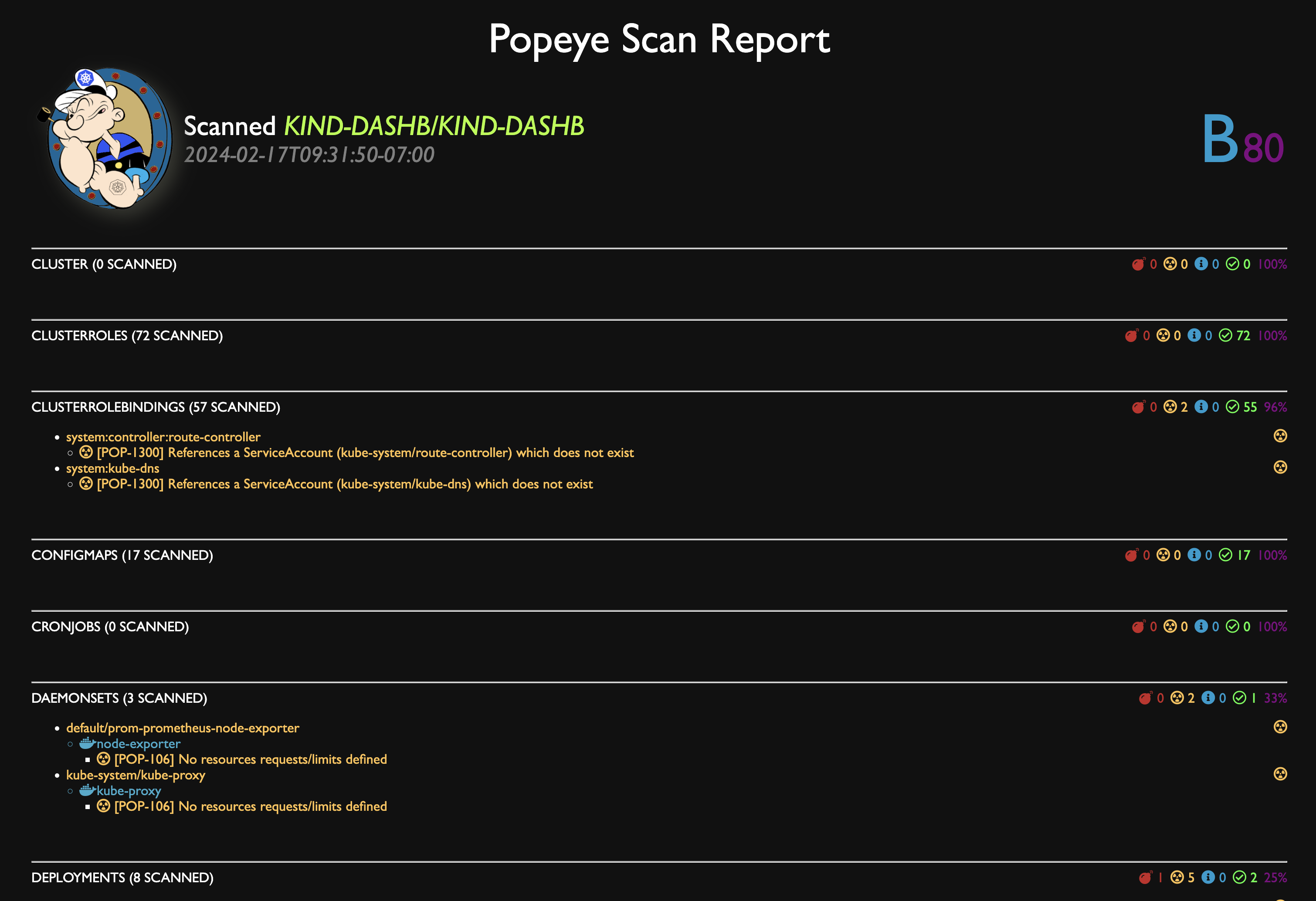
HTML
You can dump the scan report to HTML.
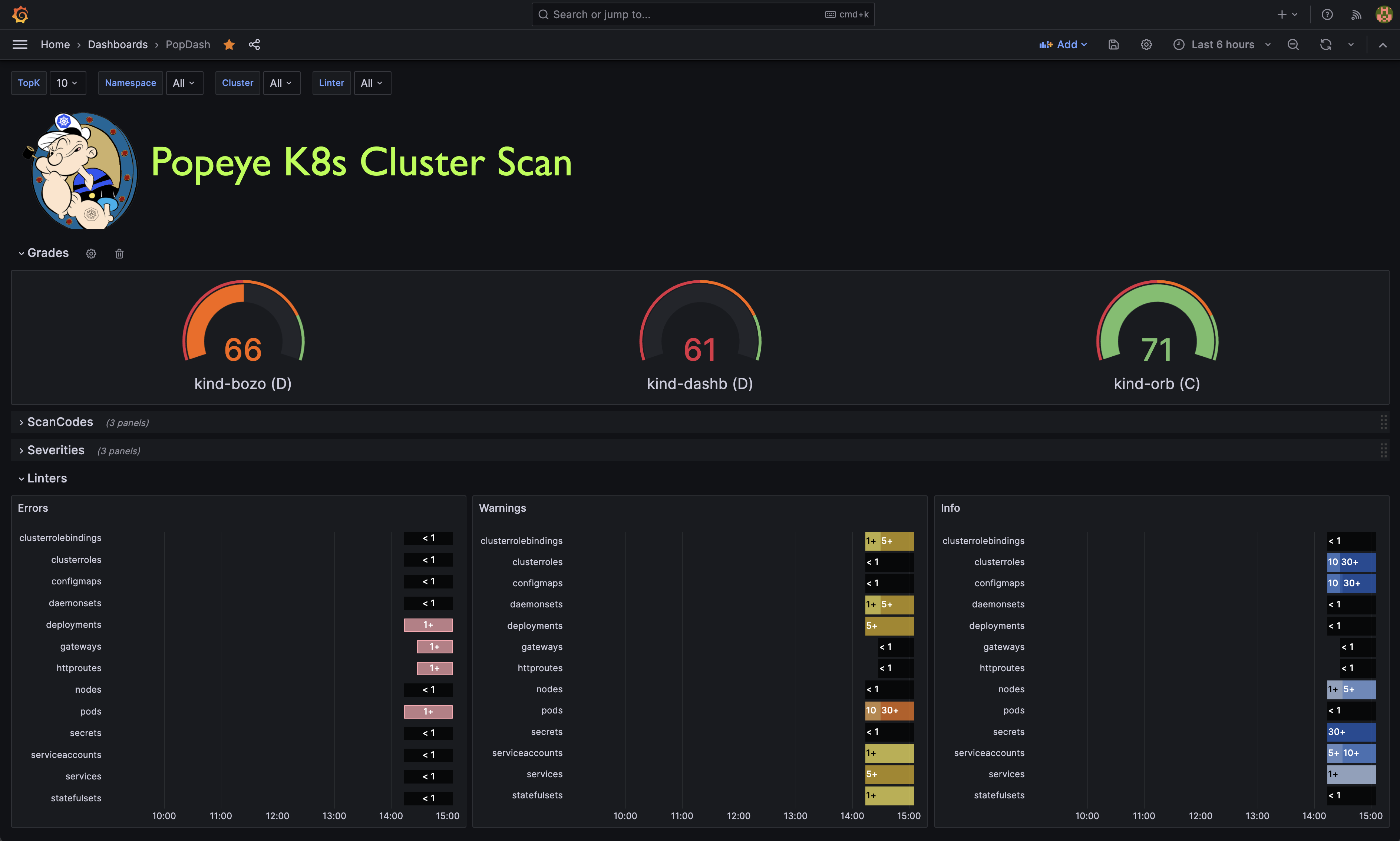
Grafana Dashboard
Popeye publishes Prometheus metrics. We provided a sample Popeye dashboard to get you started in this repo.
Installation
Popeye is available on Linux, OSX and Windows platforms.
- Binaries for Linux, Windows and Mac are available as tarballs in
- For OSX/Unit using Homebrew/LinuxBrew
brew install derailed/popeye/popeye- Using
go install
go install github.com/derailed/popeye@latest- Building from source
replace (
        github.com/derailed/popeye => MYPOPEYECLONEDGITREPO
      )
3. Build and run the executable
go run main.goQuick recipe for the impatient:
# Clone outside of GOPATH
   git clone https://github.com/derailed/popeye
   cd popeye
   # Build and install
   make build
   # Run
   popeye
PreFlight Checks
- Popeye uses 256 colors terminal mode. On
Nix system make sure TERM is set accordingly.
The Command Line
You can use Popeye wide open or using a spinach yaml config to tune your linters. Details about the Popeye configuration file are below.
<pre><code class="lang-shell"># Dump version info and logs location popeye version
Popeye a cluster using your current kubeconfig environment.
NOTE! This will run Popeye in the context namespace if set or like kubectl will use the default namespace
popeyeRun Popeye in the fred namespace
popeye -n fred Run Popeye in all namespaces
popeye -ARun Popeye uses a spinach config file of course! aka spinachyaml!
popeye -f spinach.yamlPopeye a cluster using a kubeconfig context.
popeye --context oliveRun Popeye with specific linters and log to the console
popeye -n ns1 -s pod,svc --logs noneRun Popeye for a given namespace in a given log file and debug logs
popeye -n ns1 --logs /tmp/fred.log -v4Stuck?
popeye help</code></pre>Linters
Popeye scans your cluster for best practices and potential issues. Currently, Popeye only looks for a given set of curated Kubernetes resources. More will come soon! We are hoping Kubernetes friends will pitch'in to make Popeye even better.
The aim of the linters is to pick up on misconfigurations, i.e. things like port mismatches, dead or unused resources, metrics utilization, probes, container images, RBAC rules, naked resources, etc...
Popeye is not another static analysis tool. It runs and inspect Kubernetes resources on live clusters and lint resources as they are in the wild!
Here is a list of some of the available linters:
| | Resource | Linters | Aliases | |----|-------------------------|-------------------------------------------------------------------------|------------| | 🛀 | Node | | no | | | | Conditions ie not ready, out of mem/disk, network, pids, etc | | | | | Pod tolerations referencing node taints | | | | | CPU/MEM utilization metrics, trips if over limits (default 80% CPU/MEM) | | | 🛀 | Namespace | | ns | | | | Inactive | | | | | Dead namespaces | | | 🛀 | Pod | | po | | | | Pod status | | | | | Containers statuses | | | | | ServiceAccount presence | | | | | CPU/MEM on containers over a set CPU/MEM limit (default 80% CPU/MEM) | | | | | Container image with no tags | | | | | Container image using latest tag | | | | | Resources request/limits presence | | | | | Probes liveness/readiness presence | | | | | Named ports and their references | | | 🛀 | Service | | svc | | | | Endpoints presence | | | | | Matching pods labels | | | | | Named ports and their references | | | 🛀 | ServiceAccount | | sa | | | | Unused, detects potentially unused SAs | | | 🛀 | Secrets | | sec | | | | Unused, detects potentially unused secrets or associated keys | | | 🛀 | ConfigMap | | cm | | | | Unused, detects potentially unused cm or associated keys | | | 🛀 | Deployment | | dp, deploy | | | | Unused, pod template validation, resource utilization | | | 🛀 | StatefulSet | | sts | | | | Unused, pod template validation, resource utilization | | | 🛀 | DaemonSet | | ds | | | | Unused, pod template validation, resource utilization | | | 🛀 | PersistentVolume | | pv | | | | Unused, check volume bound or volume error | | | 🛀 | PersistentVolumeClaim | | pvc | | | | Unused, check bounded or volume mount error | | | 🛀 | HorizontalPodAutoscaler | | hpa | | | | Unused, Utilization, Max burst checks | | | 🛀 | PodDisruptionBudget | | | | | | Unused, Check minAvailable configuration | pdb | | 🛀 | ClusterRole | | | | | | Unused | cr | | 🛀 | ClusterRoleBinding | | | | | | Unused | crb | | 🛀 | Role | | | | | | Unused | ro | | 🛀 | RoleBinding | | | | | | Unused | rb | | 🛀 | Ingress | | | | | | Valid | ing | | 🛀 | NetworkPolicy | | | | | | Valid, Stale, Guarded | np | | 🛀 | PodSecurityPolicy | | | | | | Valid | psp | | 🛀 | Cronjob | | | | | | Valid, Suspended, Runs | cj | | 🛀 | Job | | | | | | Pod checks | job | | 🛀 | GatewayClass | | | | | | Valid, Unused | gwc | | 🛀 | Gateway | | | | | | Valid, Unused | gw | | 🛀 | HTTPRoute | | | | | | Valid, Unused | gwr |
You can also see the full list of codes
Saving Scans
To save the Popeye report to a file pass the --save flag to the command. By default it will create a tmp directory and will store your scan report there. The path of the tmp directory will be printed out on STDOUT. If you have the need to specify the output directory for the report, you can use this environment variable POPEYEREPORTDIR. The final path will be <POPEYEREPORTDIR>/<cluster>/<context>. By default, the name of the output file follow the following format : lint (e.g. : "lint-mycluster-1594019782530851873.html"). If you want to also specify the output file name for the report, you can pass the --output-file flag with the filename you want as parameter.
Example to save report in working directory:
<pre><code class="lang-shell">POPEYEREPORTDIR=$(pwd) popeye --save</code></pre>
Example to save report in working directory in HTML format under the name "report.html" :
<pre><code class="lang-shell">POPEYEREPORTDIR=$(pwd) popeye --save --out html --output-file report.html</code></pre>
Save To S3 Object Store
Alternatively, you can push the generated reports to an AWS S3 or Minio object store by providing the flag --s3-bucket. For parameters you need to provide the name of the S3 bucket where you want to store the report. To save the report in a bucket subdirectory provide the bucket parameter as bucket/path/to/report.
Example to save report to S3:
<pre><code class="lang-shell"># AWS S3
NOTE: You must provide env vars for AWSACCESSKEYID and AWSSECRETACCESSKEY
This will create bucket my-popeye if not present and upload a popeye json report to /fred/scan.json
popeye --s3-bucket s3://my-popeye/fred --s3-region us-west-2 --out json --save --output-file scan.jsonMinio Object Store
NOTE: You must provide env vars for AWSACCESSKEYID and AWSSECRETACCESSKEY and a minio server URI
This will create bucket my-popeye if not present and upload a popeye json report to /fred/scan.json
popeye --s3-bucket minio://my-popeye/fred --s3-region us-east --s3-endpoint localhost:9000 --out json --save --output-file scan.json</code></pre>Docker Support
You can also run Popeye in a container by running it directly from the official docker repo on Quay. The default command when you run the docker container is popeye, so you customize the scan by using the supported cli flags. To access your clusters, map your local kubeconfig directory into the container with -v :
<pre><code class="lang-shell">docker run --rm -it -v $HOME/.kube:/root/.kube quay.io/derailed/popeye --context foo -n bar</code></pre>
Running the above docker command with --rm means that the container gets deleted when Popeye exits. When you use --save, it will write it to /tmp in the container and then delete the container when popeye exits, which means you lose the output ;( To get around this, map /tmp to the container's /tmp.
> NOTE: You can override the default output directory location by setting POPEYEREPORTDIR env variable.
<pre><code class="lang-shell">docker run --rm -it \ -v $HOME/.kube:/root/.kube \ -e POPEYEREPORTDIR=/tmp/popeye \ -v /tmp:/tmp \ quay.io/derailed/popeye --context foo -n bar --save --output-file my_report.txt
Docker has exited, and the container has been deleted, but the file
is in your /tmp directory because you mapped it into the container
cat /tmp/popeye/my_report.txt <snip></code></pre>Output Formats
Popeye can generate linter reports in a variety of formats. You can use the -o cli option and pick your poison from there.
| Format | Description | Default | Credits | |------------|--------------------------------------------------------|---------|----------------------------------------------| | standard | The full monty output iconized and colorized | yes | | | jurassic | No icons or color like it's 1979 | | | | yaml | As YAML | | | | html | As HTML | | | | json | As JSON | | | | junit | For the Java melancholic | | | | prometheus | Dumps report a prometheus metrics | | dardanel | | score | Returns a single cluster linter score value (0-100) | | kabute |
The Prom Queen!
Popeye can publish Prometheus metrics directly from a scan. You will need to have access to a prometheus pushgateway and credentials.
> NOTE! These are subject to change based on users feedback and usage!!
In order to publish metrics, additional cli args must be present.
<pre><code class="lang-shell"># Run popeye using console output and push prom metrics. popeye --push-gtwy-url http://localhost:9091
Run popeye using a saved html output and push prom metrics.
NOTE! When scan are dump to disk, popeyeclusterscore metric below includes
an additional label to track the persisted artifact so you can aggregate with the scan
Don't think it's the correct approach as this changes the metric cardinality on every push.
Hence open for suggestions here??
popeye -o html --save --push-gtwy-url http://localhost:9091</code></pre>PopProm metrics
The following Popeye prometheus metrics are published:
- popeyeseveritytotal
[gauge] tracks various counts based on severity. - popeyecodetotal
[gauge] tracks counts by Popeye's linter codes. - popeyelintertally_total
[gauge] tracks counts per linters. - popeyereporterrors_total
[gauge] tracks scan errors totals. - popeyeclusterscore
[gauge] tracks scan report scores.
PopGraf
A sample Grafana dashboard can be found in this repo to get you started.
> NOTE! Work in progress, please feel free to contribute if you have UX/grafana/promql chops.
SpinachYAML
A spinach YAML configuration file can be specified via the -f option to further configure the linters. This file may specify the container utilization threshold and specific linter configurations as well as resources and codes that will be excluded from the linter.
> NOTE! This file will change as Popeye matures!
Under the excludes key you can configure to skip certain resources, or linter codes. Popeye's linters are named after the k8s resource names. For example the PodDisruptionBudget linter is named poddisruptionbudgets and scans policy/v1/poddisruptionbudgets
> NOTE! The linter uses the plural resource kind form and everything is spelled in lowercase.
A resource fully qualified name aka FQN is used in the spinach file to identity a resource name i.e. namespace/resource_name.
For example, the FQN of a pod named fred-1234 in the namespace blee will be blee/fred-1234. This provides for differentiating fred/p1 and blee/p1. For cluster wide resources, the FQN is equivalent to the name. Exclude rules can be either a straight string match or a regular expression. In the latter case the regular expression must be specified via the rx: prefix.
> NOTE! Please be careful with your regex as more resources than expected may get excluded from the report with a loose regex rule. > When your cluster resources change, this could lead to a sub-optimal scans. > Thus we recommend running Popeye wide open once in a while to make sure you will pick up on any new issues that may have arisen in your clusters…
Here is an example spinach file as it stands in this release. There is a fuller eks and aks based spinach file in this repo under spinach. (BTW: for new comers into the project, might be a great way to contribute by adding cluster specific spinach file PRs...)
<pre><code class="lang-yaml"># spinach.yaml
A Popeye sample configuration file
popeye: # Checks resources against reported metrics usage. # If over/under these thresholds a linter warning will be issued. # Your cluster must run a metrics-server for these to take place! allocations: cpu: underPercUtilization: 200 # Checks if cpu is under allocated by more than 200% at current load. overPercUtilization: 50 # Checks if cpu is over allocated by more than 50% at current load. memory: underPercUtilization: 200 # Checks if mem is under allocated by more than 200% at current load. overPercUtilization: 50 # Checks if mem is over allocated by more than 50% usage at current load.# Excludes excludes certain resources from Popeye scans excludes: # [NEW!] Global exclude resources and codes globally of any linters. global: fqns: [rx:^kube-] # => excludes all resources in kube-system, kube-public, etc.. # [NEW!] Exclude resources for all linters matching these labels labels: app: [bozo, bono] #=> exclude any resources with labels matching either app=bozo or app=bono # [NEW!] Exclude resources for all linters matching these annotations annotations: fred: [blee, duh] # => exclude any resources with annotations matching either fred=blee or fred=duh # [NEW!] Exclude scan codes globally via straight codes or regex! codes: ["300", "206", "rx:^41"] # => exclude issue codes 300, 206, 410, 415 (Note: regex match!)
# [NEW!] Configure individual resource linters linters: # Configure the namespaces linter for v1/namespaces namespaces: # [NEW!] Exclude these codes for all namespace resources straight up or via regex. codes: ["100", "rx:^22"] # => exclude codes 100, 220, 225, ... # [NEW!] Excludes specific namespaces from the scan instances: - fqns: [kube-public, kube-system] # => skip ns kube-pulbic and kube-system - fqns: [blee-ns] codes: [106] # => skip code 106 for namespace blee-ns
# Skip secrets in namespace bozo. secrets: instances: - fqns: [rx:^bozo]
# Configure the pods linter for v1/pods. pods: instances: # [NEW!] exclude all pods matching these labels. - labels: app: [fred,blee] # Exclude codes 102, 105 for any pods with labels app=fred or app=blee codes: [102, 105]
resources: # Configure node resources. node: # Limits set a cpu/mem threshold in % ie if cpu|mem > limit a lint warning is triggered. limits: # CPU checks if current CPU utilization on a node is greater than 90%. cpu: 90 # Memory checks if current Memory utilization on a node is greater than 80%. memory: 80
# Configure pod resources pod: # Restarts check the restarts count and triggers a lint warning if above threshold. restarts: 3 # Check container resource utilization in percent. # Issues a lint warning if about these threshold. limits: cpu: 80 memory: 75
# [New!] overrides code severity overrides: # Code specifies a custom severity level ie critical=3, warn=2, info=1 - code: 206 severity: 1
# Configure a list of allowed registries to pull images from. # Any resources not using the following registries will be flagged! registries: - quay.io - docker.io</code></pre>
In Cluster
Popeye is containerized and can be run directly in your Kubernetes clusters as a one-off or CronJob.
Here is a sample setup, please modify per your needs/wants. The manifests for this are in the k8s directory in this repo.
<pre><code class="lang-shell">kubectl apply -f k8s/popeye</code></pre>
<pre><code class="lang-yaml">--- apiVersion: v1 kind: Namespace metadata: name: popeye
apiVersion: batch/v1 kind: CronJob metadata: name: popeye namespace: popeye spec: schedule: " /1 *" # Fire off Popeye once an hour concurrencyPolicy: Forbid jobTemplate: spec: template: spec: serviceAccountName: popeye restartPolicy: Never containers: - name: popeye image: derailed/popeye:vX.Y.Z imagePullPolicy: IfNotPresent args: - -o - yaml - --force-exit-zero resources: limits: cpu: 500m memory: 100Mi</code></pre>
The --force-exit-zero` should be set. Otherwise, the pods will end up in an error state.
NOTE! Popeye exits with a non-zero error code if any lint errors are detected.
Popeye Got Your RBAC!
In order for Popeye to do his work, the signed-in user must have enough RBAC oomph to get/list the resources mentioned above.
Sample Popeye RBAC Rules (please note that those are subject to change.)
NOTE! Please review and tune per your cluster policies.
---
Popeye ServiceAccount.
apiVersion: v1
kind: ServiceAccount
metadata:
name: popeye
namespace: popeye
Popeye needs get/list access on the following Kubernetes resources.
apiVersion: rbac.authorization.k8s.io/v1
kind: ClusterRole
metadata:
name: popeye
rules:
- apiGroups: [""]
resources:
- configmaps
- endpoints
- namespaces
- nodes
- persistentvolumes
- persistentvolumeclaims
- pods
- secrets
- serviceaccounts
- services
verbs: ["get", "list"]
- apiGroups: ["apps"]
resources:
- daemonsets
- deployments
- statefulsets
- replicasets
verbs: ["get", "list"]
- apiGroups: ["networking.k8s.io"]
resources:
- ingresses
- networkpolicies
verbs: ["get", "list"]
- apiGroups: ["batch.k8s.io"]
resources:
- cronjobs
- jobs
verbs: ["get", "list"]
- apiGroups: ["gateway.networking.k8s.io"]
resources:
- gateway-classes
- gateways
- httproutes
verbs: ["get", "list"]
- apiGroups: ["autoscaling"]
resources:
- horizontalpodautoscalers
verbs: ["get", "list"]
- apiGroups: ["policy"]
resources:
- poddisruptionbudgets
- podsecuritypolicies
verbs: ["get", "list"]
- apiGroups: ["rbac.authorization.k8s.io"]
resources:
- clusterroles
- clusterrolebindings
- roles
- rolebindings
verbs: ["get", "list"]
- apiGroups: ["metrics.k8s.io"]
resources:
- pods
- nodes
verbs: ["get", "list"]
Binds Popeye to this ClusterRole.
apiVersion: rbac.authorization.k8s.io/v1
kind: ClusterRoleBinding
metadata:
name: popeye
subjects:
- kind: ServiceAccount
name: popeye
namespace: popeye
roleRef:
kind: ClusterRole
name: popeye
apiGroup: rbac.authorization.k8s.ioReport Morphology
The lint report outputs each resource group scanned and their potential issues. The report is color/emoji coded in term of linter severity levels:
| Level | Icon | Jurassic | Color | Description | |-------|------|----------|-----------|-----------------| | Ok | ✅ | OK | Green | Happy! | | Info | 🔊 | I | BlueGreen | FYI | | Warn | 😱 | W | Yellow | Potential Issue | | Error | 💥 | E | Red | Action required |
The heading section for each scanned Kubernetes resource provides a summary count for each of the categories above.
The Summary section provides a Popeye Score based on the linter pass on the given cluster.
Known Issues
This initial drop is brittle. Popeye will most likely blow up when…
- You're running older versions of Kubernetes. Popeye works best with Kubernetes 1.25.X.
- You don't have enough RBAC oomph to manage your cluster (see RBAC section)
Disclaimer
This is work in progress! If there is enough interest in the Kubernetes community, we will enhance per your recommendations/contributions. Also if you dig this effort, please let us know that too!
ATTA Girls/Boys!
Popeye sits on top of many of open source projects and libraries. Our sincere appreciations to all the OSS contributors that work nights and weekends to make this project a reality!
Contact Info
- Email: fernand@imhotep.io
- Twitter: @kitesurfer
 © 2025 Imhotep Software LLC. All materials licensed under Apache v2.0


