
A Markdown rendering engine for Neovim — rich formatting, tables, images, video, Mermaid diagrams
md-render.nvim
日本語版はこちら / Japanese version — Full Japanese/CJK support with kinsoku shori and BudouX phrase segmentation.
A Markdown rendering engine for Neovim. Transforms raw Markdown into richly highlighted, interactive content — right inside your editor. Supports floating windows, tab views, and a pager mode for less-like usage from the command line.
Highlights
- Rich inline formatting — bold, strikethrough, inline code, links, Obsidian
==highlight==, all rendered in-place - Tables — box-drawing borders, column alignment, proportional sizing, and inline formatting within cells
- Callouts & folds — GitHub and Obsidian alert types with colored borders, icons, and folding you can toggle by clicking or with
za/<CR> - Code blocks — fenced blocks with treesitter syntax highlighting; expandable when truncated (click or
za/<CR>) - Images — local and web images (PNG, JPEG, WebP, GIF, animated GIF) displayed inline via terminal graphics protocol
- Video — local and web video (MP4, WebM, MOV, AVI, MKV, M4V) played as animated frames inline
- Mermaid diagrams — rendered as images inline
- CJK-aware word wrapping — JIS X 4051 kinsoku shori + optional BudouX phrase segmentation via budoux.lua
- Clickable links — mouse click to open URLs; hover the mouse over a link to peek the full URL in a subtle floating window; OSC 8 hyperlink support for compatible terminals
<details>support — collapsible sections you can toggle by clicking or withza/<CR>, respecting theopenattribute- Library API — use the rendering engine programmatically from your own plugins
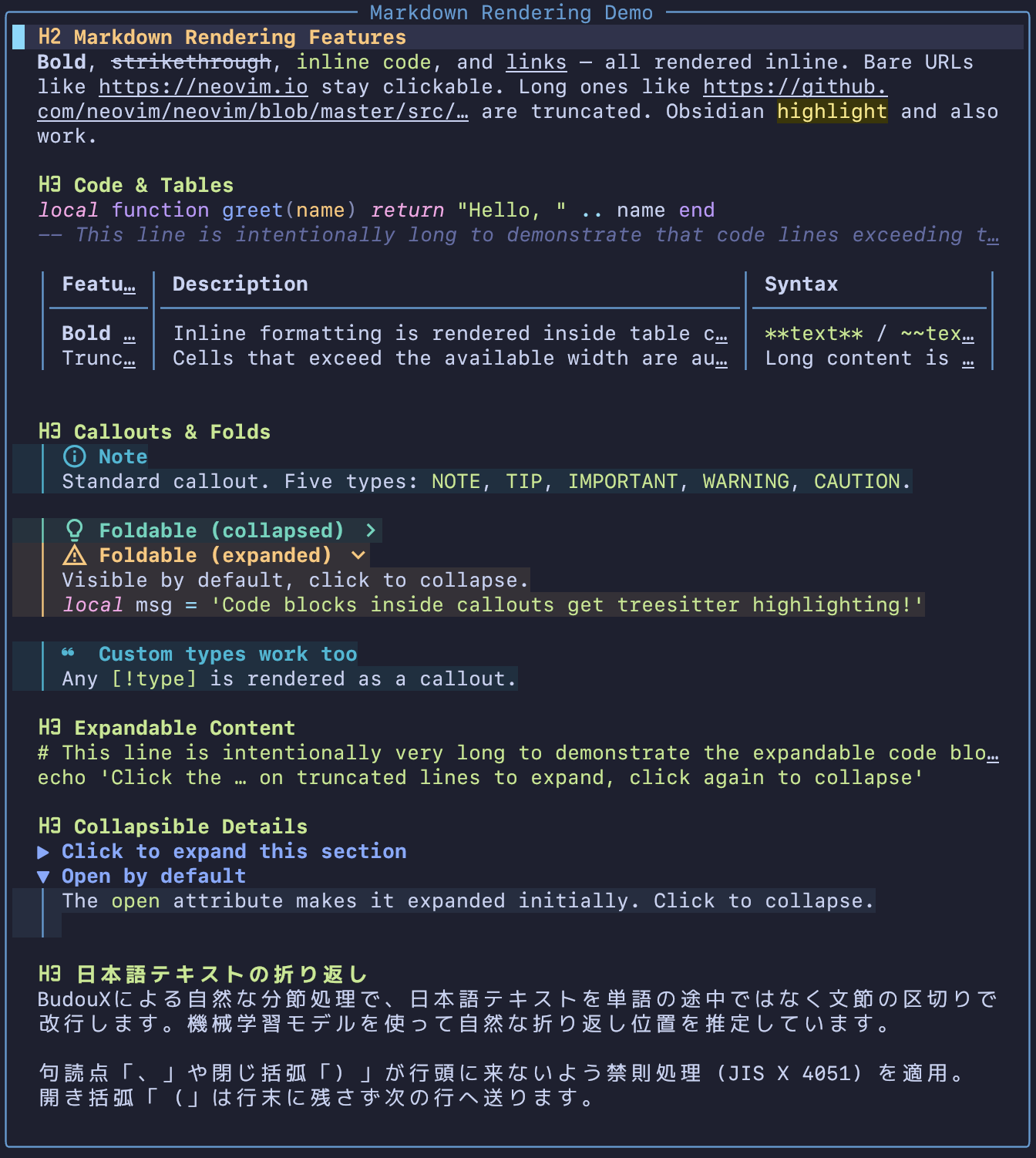
Try it yourself
The repo bundles a showcase Markdown file demonstrating every feature. After cloning, view it with the pager:
git clone https://github.com/delphinus/md-render.nvim
cd md-render.nvim
nvim +"MdRender pager" assets/showcase.md
Or, once the plugin is installed, run :MdRender demo to see a built-in demo of every supported notation.
Requirements
- Neovim >= 0.12 (uses
vim.api.nvimuisendfor terminal writes) - For inline images and video: a terminal supporting the Kitty graphics protocol.
Optional dependencies
| Dependency | Purpose | Fallback | |---|---|---| | curl | Download web images and video | Custom function via setdownload_fn() | | FFmpeg (ffmpeg / ffprobe) | JPEG/WebP → PNG conversion, animated GIF / video frame extraction | Falls back to ImageMagick (images only; video requires ffmpeg) | | ImageMagick (magick) | JPEG/WebP → PNG, animated GIF frame extraction | sips (macOS) handles static conversion; animated GIF requires ffmpeg or magick | | Mermaid CLI (mmdc) | Render Mermaid diagrams as images | Falls back to npx -y @mermaid-js/mermaid-cli | | budoux.lua | CJK phrase-level line breaking (BudouX) | Character-level splitting (kinsoku rules still apply) | | Treesitter parsers | Syntax highlighting in code blocks | Code blocks rendered without highlighting | | nvim-web-devicons or mini.icons | File type icons in code block headers | Built-in icon table |
For image/video format conversion and animation support, the plugin tries tools in this order:
| Use case | 1st | 2nd | 3rd | |---|---|---|---| | Static image conversion (JPEG/WebP → PNG) | sips (macOS) | ffmpeg | magick | | Animated GIF frame extraction | ffmpeg | magick | — | | Video frame extraction | ffmpeg | — | — |
Installation
lazy.nvim
{
  "delphinus/md-render.nvim",
  version = "*",
  dependencies = {
    { "nvim-tree/nvim-web-devicons", version = "*" }, -- optional: file type icons in code blocks
    { "delphinus/budoux.lua", version = "*" }, -- optional: CJK phrase-level line breaking
  },
  keys = {
    { "<leader>mp", "<Plug>(md-render-preview)",     desc = "Markdown preview (toggle)" },
    { "<leader>mt", "<Plug>(md-render-preview-tab)", desc = "Markdown preview in tab (toggle)" },
    { "<leader>md", "<Plug>(md-render-demo)",        desc = "Markdown render demo" },
  },
}
vim.pack (Neovim 0.12+)
vim.pack.add({
  "https://github.com/delphinus/md-render.nvim",
  -- optional:
  "https://github.com/nvim-tree/nvim-web-devicons",
  "https://github.com/delphinus/budoux.lua",
})
mini.deps
local add = MiniDeps.add
add({
  source = "delphinus/md-render.nvim",
  depends = {
    "nvim-tree/nvim-web-devicons", -- optional
    "delphinus/budoux.lua",        -- optional
  },
})
Comparison with similar plugins
Why not other Markdown previewers?
- markdown-preview.nvim — Excellent for true browser-quality rendering, but requires a browser context. md-render runs entirely inside the terminal.
- render-markdown.nvim — Beautiful in-buffer rendering, but modifies the editing buffer itself. md-render keeps your editing buffer untouched and renders into a separate floating/tab window or pager view.
- mcat — Closest in spirit (a pure-terminal Markdown renderer), but lacks complex layout features like auto-folding tables, click-to-toggle folds, and CJK word wrapping.
Keymaps
The plugin provides <Plug> mappings but does not set any default keybindings. Map them yourself:
vim.keymap.set("n", "<leader>mp", "<Plug>(md-render-preview)",     { desc = "Markdown preview (toggle)" })
vim.keymap.set("n", "<leader>mt", "<Plug>(md-render-preview-tab)", { desc = "Markdown preview in tab (toggle)" })
vim.keymap.set("n", "<leader>md", "<Plug>(md-render-demo)",        { desc = "Markdown render demo" })
| <Plug> mapping | Description | |---|---| | <Plug>(md-render-preview) | Toggle a floating preview window for the current Markdown buffer | | <Plug>(md-render-preview-tab) | Toggle a tab preview for the current Markdown buffer | | <Plug>(md-render-toggle) | Toggle the current window between source and render mode in place | | <Plug>(md-render-auto) | [experimental] Toggle auto mode (render outside Insert) for the current buffer | | <Plug>(md-render-split) | Open a split showing source and rendered Markdown | | <Plug>(md-render-demo) | Show a demo window with all supported Markdown notations |
In-preview keys
Inside a rendered preview (floating, tab, or in-place toggle), these buffer-local keys are set automatically:
| Key | Action | |---|---| | za | Toggle the fold / expandable region under the cursor (no-op elsewhere) | | <CR> | Toggle the fold / expandable region under the cursor (no-op elsewhere) | | <LeftMouse> | Toggle folds, expand regions, and open links by clicking | | q / <Esc> / <C-c> | Close the window (floating / tab mode only) |
Commands
The plugin exposes a single :MdRender command with subcommands:
| Command | Description | |---|---| | :MdRender | Floating preview window (alias of :MdRender float) | | :MdRender float | Toggle a floating preview window | | :MdRender tab | Toggle a tab preview | | :MdRender toggle | Toggle the current window between source and render mode in place | | :MdRender split | Open a split showing source and rendered Markdown (honours :vert, :tab, :topleft, :botright) | | :MdRender auto [on\|off\|toggle] | [experimental] Auto-toggle source/render based on Insert mode (per buffer) | | :MdRender pager | Pager mode — full-screen, no chrome, q to quit Neovim | | :MdRender demo | Show a demo window with all supported Markdown notations |
Tab completion lists the subcommands for the first arg, and on / off / toggle after auto.
Backwards compatibility. The legacy top-level commands (:MdRenderTab,:MdRenderToggle,:MdRenderSplit,:MdRenderAuto,:MdRenderPager,:MdRenderDemo) still work and forward to the new dispatcher. They print a one-shot deprecation warning per Neovim session and will be removed in a future major version.
In-place toggle
:MdRender toggle swaps the current window between the source Markdown buffer and a rendered view of it — without opening a new tab or floating window. This is designed for split layouts where you want, for example, code in one split and the rendered README in the other.
:vsplit README.md
:MdRender toggle
Behavior:
- The render buffer is read-only and reused across toggles (one render buffer per source).
- When the same source is shown in multiple windows, only the invoking window swaps; edits from other windows are reflected on the next toggle into render mode.
- Cursor position round-trips between source and render via the source-line mapping.
number,relativenumber, andlistare turned off on render-mode windows. The originals are stashed on the window and restored when toggling back to source.- Inside render mode,
q/<Esc>/<C-c>are not bound to close — call:MdRender toggleagain to return to source mode.<LeftMouse>,za, and<CR>still toggle folds and expand regions (and<LeftMouse>opens links).
Auto-toggle on Insert mode (experimental)
Experimental. This feature is new and the UX may change. Please report issues or rough edges.
:MdRender auto on keeps the current buffer in render mode while in Normal mode and swaps back to source automatically when you start editing. Pass off to disable, or call :MdRender auto (or :MdRender auto toggle) to toggle. To opt every Markdown buffer in:
autocmd FileType markdown silent! MdRender auto onSee :help :MdRender-auto for behavior details — the i / I / a / A / o / O remaps, :w forwarding, and the editing operations that are blocked on the read-only render buffer.
Source/render split
:MdRender split opens a split showing the source buffer and the rendered view together. Direction follows standard Vim split modifiers:
:MdRender split— horizontal split:vert MdRender split— vertical split (typical "README + code" layout):tab MdRender split— split inside a new tab:topleft MdRender split— place at the top:botright MdRender split— place at the bottom
:help :MdRender-split for full behavior and the inline-image limitation.
Pager mode
less
Use :MdRender pager to view Markdown files like less:
nvim +"MdRender pager" README.mdAdd a shell alias for convenience:
alias mdless='nvim +"MdRender pager"'
mdless README.md
Telescope Integration
Previewer
require("md-render.telescope").previewer() creates a previewer that can be passed to any telescope.nvim picker — builtin, extension, or custom:
local previewer = require("md-render.telescope").previewer()
require("telescope.builtin").find_files({ previewer = previewer }) require("telescope").extensions.egrepify.egrepify({ previewer = previewer })
The previewer automatically handles three kinds of files:
| File type | Behavior | |---|---| | Markdown (.md, .markdown) | Full md-render rendering with highlights, links, and images | | Image / Video (PNG, JPEG, WebP, GIF, MP4, ...) | Inline display via Kitty graphics protocol | | Other files | Falls back to telescope's default previewer with syntax highlighting |
For grep-based pickers, the preview scrolls to the matched line.
:Telescope md_render Extension
A shortcut for builtin pickers. Wraps telescope.builtin pickers with the md-render previewer. All arguments are passed through:
:Telescope mdrender findfiles
:Telescope mdrender livegrep cwd=~/notes
:Telescope mdrender grepstring search=TODO
Snacks.nvim Integration
require("md-render.snacks").preview() creates a preview function for snacks.nvim pickers. It handles the same three file types as the telescope previewer (Markdown, image/video, and fallback).
Configure it globally to apply to all pickers:
require("snacks").setup({
  picker = {
    preview = require("md-render.snacks").preview(),
  },
})
Or per-source:
require("snacks").setup({
  picker = {
    sources = {
      files = { preview = require("md-render.snacks").preview() },
      grep = { preview = require("md-render.snacks").preview() },
    },
  },
})
FAQ / Troubleshooting
Images don't show — only their alt text or filenames appear
Inline image display requires a terminal that supports the Kitty graphics protocol. Verify you're using WezTerm, Kitty, or Ghostty. tmux and other multiplexers may strip the image escape sequences unless explicitly configured to pass them through.
Videos appear as a single static frame
Video frame extraction requires ffmpeg to be installed and available in $PATH. Without it, the plugin falls back to displaying just the first frame as a still image. Install it via your package manager (e.g. brew install ffmpeg).
Mermaid diagrams don't render
Mermaid rendering requires the mmdc binary from @mermaid-js/mermaid-cli. If mmdc isn't installed globally, the plugin falls back to npx -y @mermaid-js/mermaid-cli, which is significantly slower on first invocation. Install it globally with npm install -g @mermaid-js/mermaid-cli for faster rendering.
Japanese text wrapping looks unnatural
By default, md-render applies JIS X 4051 kinsoku shori (forbidden line-break rules) at the character level. For phrase-level segmentation that respects natural word boundaries in Japanese, install budoux.lua — the plugin will automatically detect and use it.
Code blocks have no syntax highlighting
Syntax highlighting requires the corresponding treesitter parser to be installed. For example, to highlight Lua code blocks, install the lua parser via :TSInstall lua (with nvim-treesitter) or via Neovim 0.11+'s built-in parser management.
Usage as a library
Programmatic API
Use the rendering engine to build highlighted content programmatically:
local md = require("md-render")
-- Render a single line of markdown local text, highlights, links = md.Markdown.render("bold and link")
-- Build full document content local ContentBuilder = md.ContentBuilder local b = ContentBuilder.new() b:render_document(lines, {   max_width = 80,   indent = "  ",   repobaseurl = "https://github.com/user/repo",   autolinks = {     { keyprefix = "JIRA-", urltemplate = "https://jira.example.com/browse/JIRA-<num>" },   }, }) local content = b:result()
-- Apply to a buffer local buf = vim.api.nvimcreatebuf(false, true) local ns = vim.api.nvimcreatenamespace("my_ns") md.displayutils.applycontenttobuffer(buf, ns, content)
-- Display images (requires a Kitty Graphics Protocol compatible terminal) -- Images are automatically cleaned up when the window is closed. local win = vim.api.nvimgetcurrent_win() md.displayutils.setupimages(win, content, ns)
Development
Running Tests
make testThis runs all tests/test.lua files via nvim --headless. New test files matching the test.lua pattern are picked up automatically.
License
MIT — see LICENSE.


