
OCR model that handles complex tables, forms, handwriting with full layout.

Datalab
State of the Art models for Document Intelligence






Chandra OCR 2
Chandra OCR 2 is a state of the art OCR model that converts images and PDFs into structured HTML/Markdown/JSON while preserving layout information.
Try Chandra on Datalab
Our managed platform runs an improved Chandra with higher accuracy than the open weights, zero data retention by default, SOC 2 Type 2, and custom BAAs.
If you have high volume workloads, we offer a batch processing service that has processed 200M+ pages per week — we manage the infrastructure so your workloads finish on time.
Get started with $5 in free credits — sign up — takes under 30 seconds — or try Chandra in our public playground.
Commercial self-hosting requires a license — see Commercial usage. For on-prem licensing, contact us.
News
- 3/2026 - Chandra 2 is here with significant improvements to math, tables, layout, and multilingual OCR
- 10/2025 - Chandra 1 launched
Features
- Tops external olmocr benchmark and significant improvement in internal multilingual benchmarks
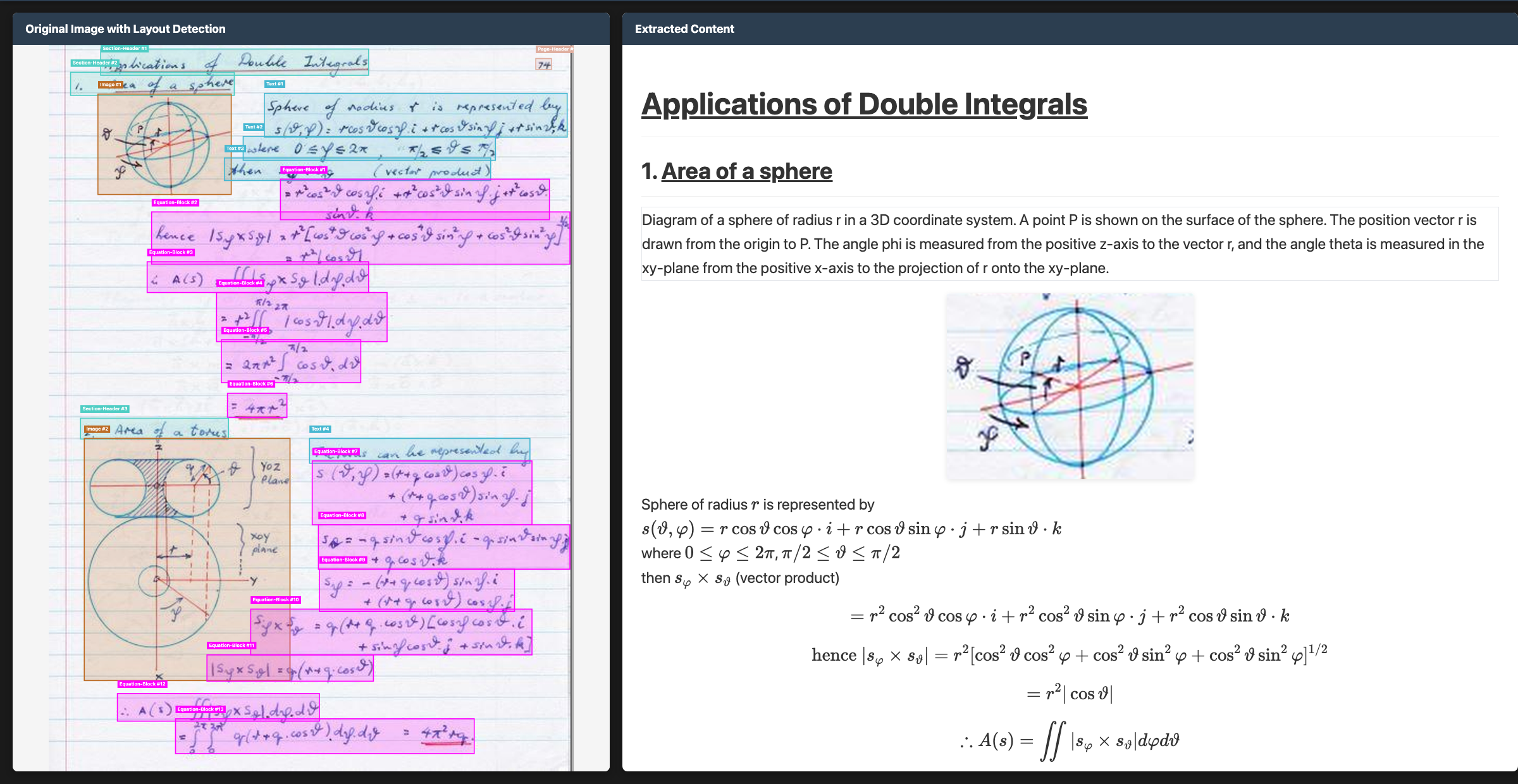
- Convert documents to markdown, html, or json with detailed layout information
- Support for 90+ languages (benchmark below)
- Excellent handwriting support
- Reconstructs forms accurately, including checkboxes
- Strong performance with tables, math, and complex layouts
- Extracts images and diagrams, and adds captions and structured data
- Two inference modes: local (HuggingFace) and remote (vLLM server)
Quickstart
The easiest way to start is with the CLI tools:
pip install chandra-ocr
With vLLM (recommended, lightweight install)
chandra_vllm
chandra input.pdf ./output
With HuggingFace (requires torch)
pip install chandra-ocr[hf]
chandra input.pdf ./output --method hf
Interactive streamlit app
pip install chandra-ocr[app]
chandra_app
Benchmarks
Multilingual performance was a focus for us with Chandra 2. There isn't a good public multilingual OCR benchmark, so we made our own. This tests tables, math, ordering, layout, and text accuracy.
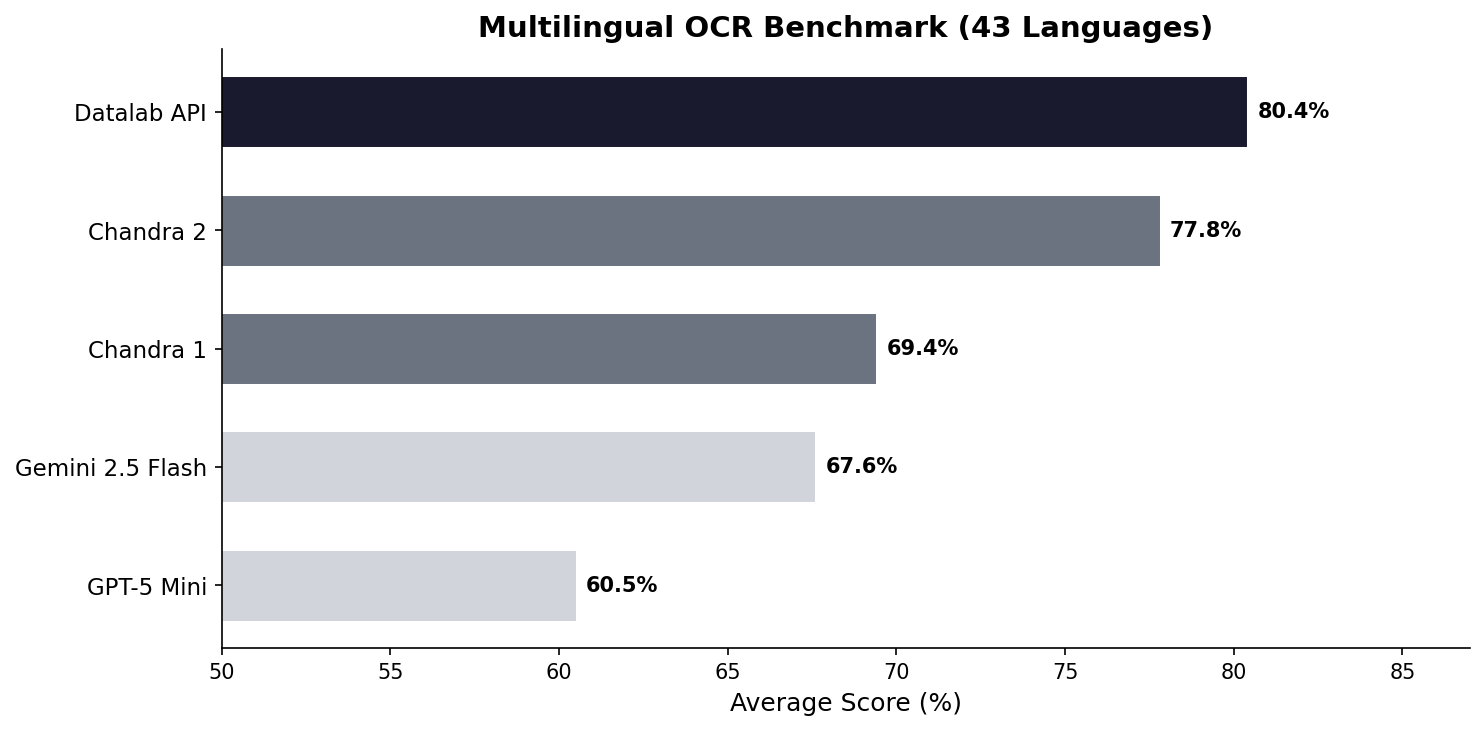
See full scores below. We also have a full 90-language benchmark.
We also benchmarked Chandra 2 with the widely accepted olmocr benchmark:
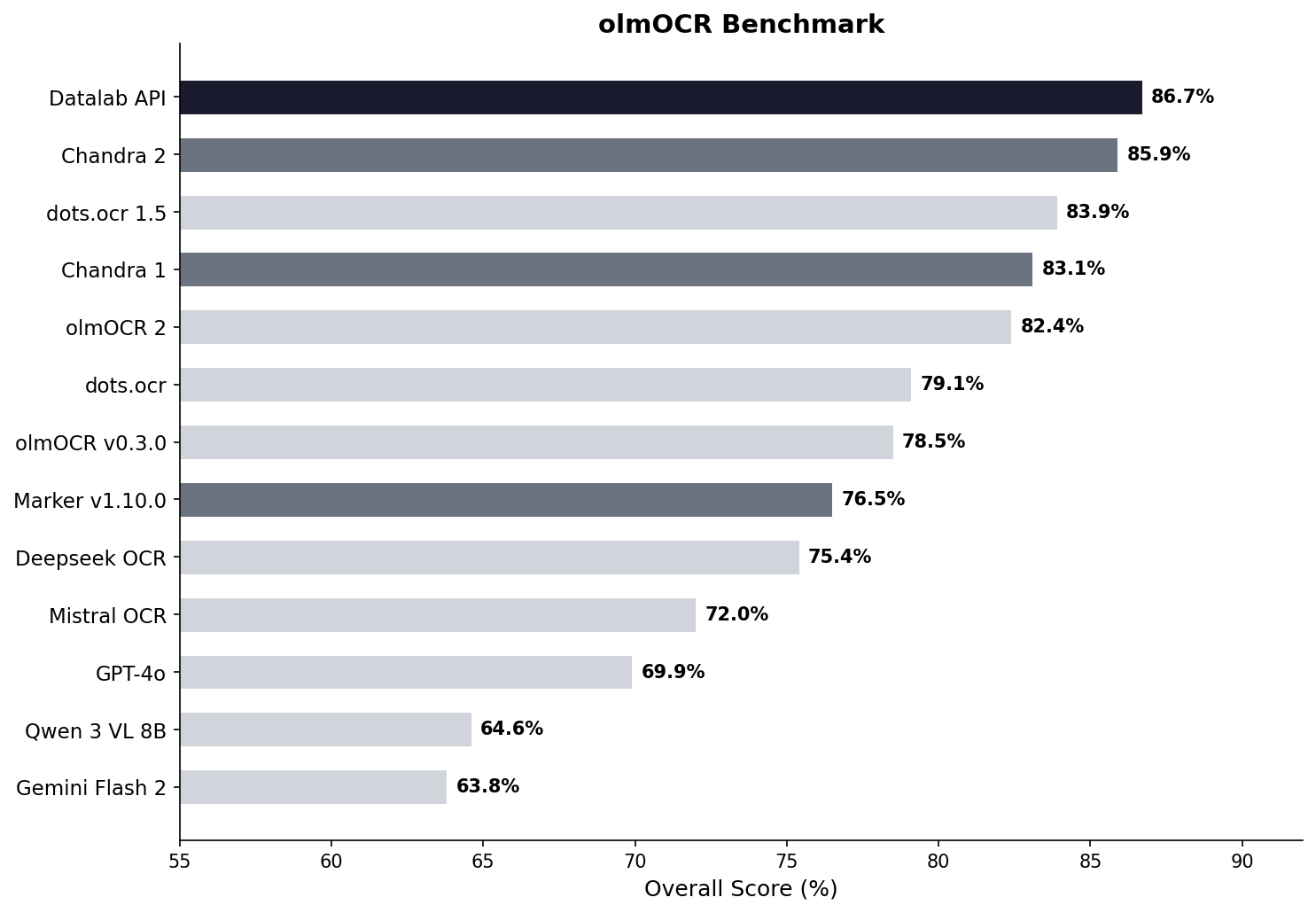
See full scores below.
Examples
| Type | Name | Link | |------|--------------------------|-------------------------------------------------------------------------------------------------------------| | Math | CS229 Textbook | View | | Math | Handwritten Math | View | | Math | Chinese Math | View | | Tables | Statistical Distribution | View | | Tables | Financial Table | View | | Forms | Registration Form | View | | Forms | Lease Form | View | | Handwriting | Cursive Writing | View | | Handwriting | Handwritten Notes | View | | Languages | Arabic | View | | Languages | Japanese | View | | Languages | Hindi | View | | Languages | Russian | View | | Other | Charts | View | | Other | Chemistry | View |
Installation
Package
# Base install (for vLLM backend)
pip install chandra-ocr
With HuggingFace backend (includes torch, transformers)
pip install chandra-ocr[hf]
With all extras
pip install chandra-ocr[all]
If you're using the HuggingFace method, we also recommend installing flash attention for better performance.
From Source
git clone https://github.com/datalab-to/chandra.git
cd chandra
uv sync
source .venv/bin/activate
Usage
CLI
Process single files or entire directories:
# Single file, with vllm server (see below for how to launch vllm)
chandra input.pdf ./output --method vllm
Process all files in a directory with local model
chandra ./documents ./output --method hf
CLI Options:
--method [hf|vllm]: Inference method (default: vllm)--page-range TEXT: Page range for PDFs (e.g., "1-5,7,9-12")--max-output-tokens INTEGER: Max tokens per page--max-workers INTEGER: Parallel workers for vLLM--include-images/--no-images: Extract and save images (default: include)--include-headers-footers/--no-headers-footers: Include page headers/footers (default: exclude)--batch-size INTEGER: Pages per batch (default: 28 for vllm, 1 for hf)
Each processed file creates a subdirectory with:
<filename>.md- Markdown output<filename>.html- HTML output<filename>_metadata.json- Metadata (page info, token count, etc.)- Extracted images are saved directly in the output directory
Streamlit Web App
Launch the interactive demo for single-page processing:
chandra_appvLLM Server (Optional)
For production deployments or batch processing, use the vLLM server:
chandra_vllmThis launches a Docker container with optimized inference settings. Configure via environment variables:
VLLMAPIBASE: Server URL (default:http://localhost:8000/v1)VLLMMODELNAME: Model name for the server (default:chandra)VLLM_GPUS: GPU device IDs (default:0)
datalab-to/chandra-ocr-2 model.
Configuration
Settings can be configured via environment variables or a local.env file:
# Model settings
MODEL_CHECKPOINT=datalab-to/chandra-ocr-2
MAXOUTPUTTOKENS=12384
vLLM settings
VLLMAPIBASE=http://localhost:8000/v1
VLLMMODELNAME=chandra
VLLM_GPUS=0
Commercial usage
This code is Apache 2.0, and our model weights use a modified OpenRAIL-M license (free for research, personal use, and startups under $2M funding/revenue, cannot be used competitively with our API). To remove the OpenRAIL license requirements, or for broader commercial licensing, visit our pricing page here.
Benchmark table
| Model | ArXiv | Old Scans Math | Tables | Old Scans | Headers and Footers | Multi column | Long tiny text | Base | Overall | Source | |:--------------------------|:--------:|:--------------:|:--------:|:---------:|:-------------------:|:------------:|:--------------:|:--------:|:--------------:|:--------------:| | Datalab API | 90.4 | 90.2 | 90.7 | 54.6 | 91.6 | 83.7 | 92.3 | 99.9 | 86.7 ± 0.8 | Own benchmarks | | Chandra 2 | 86.9 | 89.1 | 92.1 | 51.1 | 91.4 | 82.1 | 93.7 | 99.9 | 85.8 ± 0.8 | Own benchmarks | | dots.ocr 1.5 | 85.9 | 85.5 | 90.7 | 48.2 | 94.0 | 85.3 | 81.6 | 99.7 | 83.9 | dots.ocr repo | | Chandra 1 | 82.2 | 80.3 | 88.0 | 50.4 | 90.8 | 81.2 | 92.3 | 99.9 | 83.1 ± 0.9 | Own benchmarks | | olmOCR 2 | 83.0 | 82.3 | 84.9 | 47.7 | 96.1 | 83.7 | 81.9 | 99.6 | 82.4 | olmocr repo | | dots.ocr | 82.1 | 64.2 | 88.3 | 40.9 | 94.1 | 82.4 | 81.2 | 99.5 | 79.1 ± 1.0 | dots.ocr repo | | olmOCR v0.3.0 | 78.6 | 79.9 | 72.9 | 43.9 | 95.1 | 77.3 | 81.2 | 98.9 | 78.5 ± 1.1 | olmocr repo | | Datalab Marker v1.10.0 | 83.8 | 69.7 | 74.8 | 32.3 | 86.6 | 79.4 | 85.7 | 99.6 | 76.5 ± 1.0 | Own benchmarks | | Deepseek OCR | 75.2 | 72.3 | 79.7 | 33.3 | 96.1 | 66.7 | 80.1 | 99.7 | 75.4 ± 1.0 | Own benchmarks | | Mistral OCR API | 77.2 | 67.5 | 60.6 | 29.3 | 93.6 | 71.3 | 77.1 | 99.4 | 72.0 ± 1.1 | olmocr repo | | GPT-4o (Anchored) | 53.5 | 74.5 | 70.0 | 40.7 | 93.8 | 69.3 | 60.6 | 96.8 | 69.9 ± 1.1 | olmocr repo | | Qwen 3 VL 8B | 70.2 | 75.1 | 45.6 | 37.5 | 89.1 | 62.1 | 43.0 | 94.3 | 64.6 ± 1.1 | Own benchmarks | | Gemini Flash 2 (Anchored) | 54.5 | 56.1 | 72.1 | 34.2 | 64.7 | 61.5 | 71.5 | 95.6 | 63.8 ± 1.2 | olmocr repo |
Multilingual benchmark table
The table below covers the 43 most common languages, benchmarked across multiple models. For a comprehensive evaluation across 90 languages (Chandra 2 vs Gemini 2.5 Flash only), see the full 90-language benchmark.
| Language | Datalab API | Chandra 2 | Chandra 1 | Gemini 2.5 Flash | GPT-5 Mini | |---|:---:|:---:|:---:|:---:|:---:| | ar | 67.6% | 68.4% | 34.0% | 84.4% | 55.6% | | bn | 85.1% | 72.8% | 45.6% | 55.3% | 23.3% | | ca | 88.7% | 85.1% | 84.2% | 88.0% | 78.5% | | cs | 88.2% | 85.3% | 84.7% | 79.1% | 78.8% | | da | 90.1% | 91.1% | 88.4% | 86.0% | 87.7% | | de | 93.8% | 94.8% | 83.0% | 88.3% | 93.8% | | el | 89.9% | 85.6% | 85.5% | 83.5% | 82.4% | | es | 91.8% | 89.3% | 88.7% | 86.8% | 97.1% | | fa | 82.2% | 75.1% | 69.6% | 61.8% | 56.4% | | fi | 85.7% | 83.4% | 78.4% | 86.0% | 84.7% | | fr | 93.3% | 93.7% | 89.6% | 86.1% | 91.1% | | gu | 73.8% | 70.8% | 44.6% | 47.6% | 11.5% | | he | 76.4% | 70.4% | 38.9% | 50.9% | 22.3% | | hi | 80.5% | 78.4% | 70.2% | 82.7% | 41.0% | | hr | 93.4% | 90.1% | 85.9% | 88.2% | 81.3% | | hu | 88.1% | 82.1% | 82.5% | 84.5% | 84.8% | | id | 91.3% | 91.6% | 86.7% | 88.3% | 89.7% | | it | 94.4% | 94.1% | 89.1% | 85.7% | 91.6% | | ja | 87.3% | 86.9% | 85.4% | 80.0% | 76.1% | | jv | 87.5% | 73.2% | 85.1% | 80.4% | 69.6% | | kn | 70.0% | 63.2% | 20.6% | 24.5% | 10.1% | | ko | 89.1% | 81.5% | 82.3% | 84.8% | 78.4% | | la | 78.0% | 73.8% | 55.9% | 70.5% | 54.6% | | ml | 72.4% | 64.3% | 18.1% | 23.8% | 11.9% | | mr | 80.8% | 75.0% | 57.0% | 69.7% | 20.9% | | nl | 90.0% | 88.6% | 85.3% | 87.5% | 83.8% | | no | 89.2% | 90.3% | 85.5% | 87.8% | 87.4% | | pl | 93.8% | 91.5% | 83.9% | 89.7% | 90.4% | | pt | 97.0% | 95.2% | 84.3% | 89.4% | 90.8% | | ro | 86.2% | 84.5% | 82.1% | 76.1% | 77.3% | | ru | 88.8% | 85.5% | 88.7% | 82.8% | 72.2% | | sa | 57.5% | 51.1% | 33.6% | 44.6% | 12.5% | | sr | 95.3% | 90.3% | 82.3% | 89.7% | 83.0% | | sv | 91.9% | 92.8% | 82.1% | 91.1% | 92.1% | | ta | 82.9% | 77.7% | 50.8% | 53.9% | 8.1% | | te | 69.4% | 58.6% | 19.5% | 33.3% | 9.9% | | th | 71.6% | 62.6% | 47.0% | 66.7% | 53.8% | | tr | 88.9% | 84.1% | 68.1% | 84.1% | 78.2% | | uk | 93.1% | 91.0% | 88.5% | 87.9% | 81.9% | | ur | 54.1% | 43.2% | 28.1% | 57.6% | 16.9% | | vi | 85.0% | 80.4% | 81.6% | 89.5% | 83.6% | | zh | 87.8% | 88.7% | 88.3% | 70.0% | 70.4% | | Average | 80.4% | 77.8% | 69.4% | 67.6% | 60.5% |
Full 90-language benchmark table
We also have a more comprehensive evaluation covering 90 languages, comparing Chandra 2 against Gemini 2.5 Flash. The average scores are lower than the 43-language table above because this includes many lower-resource languages. Chandra 2 averages 72.7% vs Gemini 2.5 Flash at 60.8%.
See the full 90-language results.
Throughput
Benchmarked with vLLM on a single NVIDIA H100 80GB GPU using a diverse mix of documents (math, tables, scans, multi-column layouts) from the olmOCR benchmark set. This set is significantly slower than real-world usage - we estimate 2 pages/s in real-world usage.
| Configuration | Pages/sec | Avg Latency | P95 Latency | Failure Rate | |---|:---:|:---:|:---:|:---:| | vLLM, 96 concurrent sequences | 1.44 | 60s | 156s | 0% |
Credits
Thank you to the following open source projects:


