
A widget-based sidebar for Emacs that displays contextual information (stats, outline, backlinks, links) for vulpea notes
#+title: vulpea-ui #+author: Boris Buliga
Visual tools for [[https://github.com/d12frosted/vulpea][vulpea]] notes: a per-note sidebar of widgets, plus standalone views like the schema dashboard.
#+begin_html



- Features
- Two ways to see your notes: a per-note sidebar of widgets, and standalone views
- Configurable per-frame sidebar (position, size, auto-hide)
- Built-in widgets: outline, backlinks, unlinked mentions, forward links, outgoing mentions, stats, schema health
- Schema dashboard: a collection-wide view of how every note measures up to its schema
- Collection view: a sortable table over a filtered set of notes, with dired-style marks and bulk actions (tags, metadata, delete, your own function)
- Built on [[https://github.com/d12frosted/vui.el][vui]] components, with an easy API for your own widgets
- Installation
- Emacs 29.1+
- [[https://github.com/d12frosted/vulpea][vulpea]] 2.5.0+
- [[https://github.com/d12frosted/vui.el][vui]] 1.3.0+
- [[https://github.com/BurntSushi/ripgrep][ripgrep]] - optional, used by the [[*Unlinked mentions widget][unlinked mentions widget]]
#+begin_src emacs-lisp (package-install 'vulpea-ui) #+end_src
** Using straight.el
#+begin_src emacs-lisp (straight-use-package 'vulpea-ui) #+end_src
** Using elpaca
#+begin_src emacs-lisp (elpaca vulpea-ui) #+end_src
- Usage
;; Open sidebar (vulpea-ui-sidebar-open)
;; Or toggle with a keybinding (global-set-key (kbd "C-c v s") #'vulpea-ui-sidebar-toggle) #+end_src
** Automatic sidebar
To automatically open the sidebar when entering org-mode buffers:
#+begin_src emacs-lisp (add-hook 'org-mode-hook #'vulpea-ui-sidebar-open) #+end_src
- Configuration
#+begin_src emacs-lisp ;; Position: 'right (default), 'left, 'top, 'bottom (setq vulpea-ui-sidebar-position 'right)
;; Size of the sidebar. A float is a fraction of the frame (0.0-1.0), ;; an integer is a column/line count. See the docstring for the full ;; set of options. (setq vulpea-ui-sidebar-size 0.33) #+end_src
** Outline widget
#+begin_src emacs-lisp ;; Maximum heading depth (nil = unlimited) (setq vulpea-ui-outline-max-depth 3) #+end_src
** Schema health widget
Flags how the notes in the current file measure up to the vulpea schema(s) that apply to them - and that means every note in the file, the file-level note and each heading-level note, not just whichever one the sidebar is anchored on. A file can hold several notes (a heading with its own =:ID:=, tags and metadata is a note in its own right), so an =:execution:= heading's missing field is no longer hidden behind a schema-less =:journal:= file.
With a single schema-bearing note it reads as one status: nothing unless a schema applies, a green =healthy= line when it conforms, or its violations otherwise. With several it breaks the file down per note - the file-level note first, then headings in document order - each violated note under its title (click it to jump there), with a trailing count for any notes that are clean. Each violation has a =fix= button that prompts for a corrected value and writes it back into that note (a heading's field lands in the heading, not the top of the file), and the field name jumps to it. Files whose IDs live only on headings work too. Needs a vulpea with the schema validation engine (the =fix= button needs =vulpea-schema-fix-violation=).
#+begin_src emacs-lisp ;; Glyphs - portable text by default; swap in nerd-font / all-the-icons ;; glyphs if you prefer (setq vulpea-ui-schema-health-ok-glyph "✓") (setq vulpea-ui-schema-health-issue-glyph "✗") (setq vulpea-ui-schema-health-bullet "●") #+end_src
The faces =vulpea-ui-schema-health-ok-face= / =-error-face= / =-warning-face= / =-field-face= / =-message-face= / =-action-face= / =-note-face= inherit =success= / =error= / =warning= / =bold= / =shadow= / =link= / =bold=, so they follow your theme.
** Backlinks widget
#+begin_src emacs-lisp ;; Show/hide content previews (setq vulpea-ui-backlinks-show-preview t)
;; Characters before/after link in prose previews (setq vulpea-ui-backlinks-prose-chars-before 30) (setq vulpea-ui-backlinks-prose-chars-after 50)
;; Filter which notes appear in backlinks ;; (function receiving vulpea-note, return non-nil to include) (setq vulpea-ui-backlinks-note-filter (lambda (note) (not (member "archive" (vulpea-note-tags note)))))
;; Filter by context type ;; t = all types, or a list of: meta, header, table, list, quote, code, footnote, prose (setq vulpea-ui-backlinks-context-types t)
;; Sorting: nil (no sorting), 'title-asc, 'title-desc, or custom function (setq vulpea-ui-backlinks-sort 'title-asc) #+end_src
** Link types
By default only =id:= links count as note-to-note links in the backlinks and links widgets, link statistics, and the collection backlink-count column. If other link types carry your note graph - for example =denote:= links whose identifiers double as note IDs - add them:
#+begin_src emacs-lisp (setq vulpea-ui-link-types '("id" "denote")) #+end_src
The destination of a link of a listed type must be a note ID. Counting collection backlinks over more than one type requires a vulpea version where =vulpea-db-query-backlink-counts= accepts a list of types.
** Behaviour options
#+begin_src emacs-lisp ;; Auto-hide sidebar when switching to non-vulpea buffers ;; When nil, sidebar remains visible with stale content (setq vulpea-ui-sidebar-auto-hide t)
;; Start widgets collapsed (setq vulpea-ui-default-widget-collapsed nil)
;; Auto-refresh sidebar on save and idle (enabled by default) (setq vulpea-ui-auto-refresh t)
;; Idle delay before auto-refresh (in seconds) (setq vulpea-ui-auto-refresh-delay 1.5) #+end_src
** Performance
For large org files or many backlinks, enable fast parsing:
#+begin_src emacs-lisp ;; Skip org-mode hooks during parsing (faster but may cause issues ;; if your setup depends on mode hooks for org-element parsing) (setq vulpea-ui-fast-parse t) #+end_src
- Commands
- Sidebar keybindings
=TAB=, =S-TAB=, and =RET= are inherited from =vui-mode=. =q= and =g= are sidebar-specific.
For quick navigation to any widget, consider [[https://github.com/d12frosted/ace-link-vui][ace-link-vui]].
- Schema dashboard
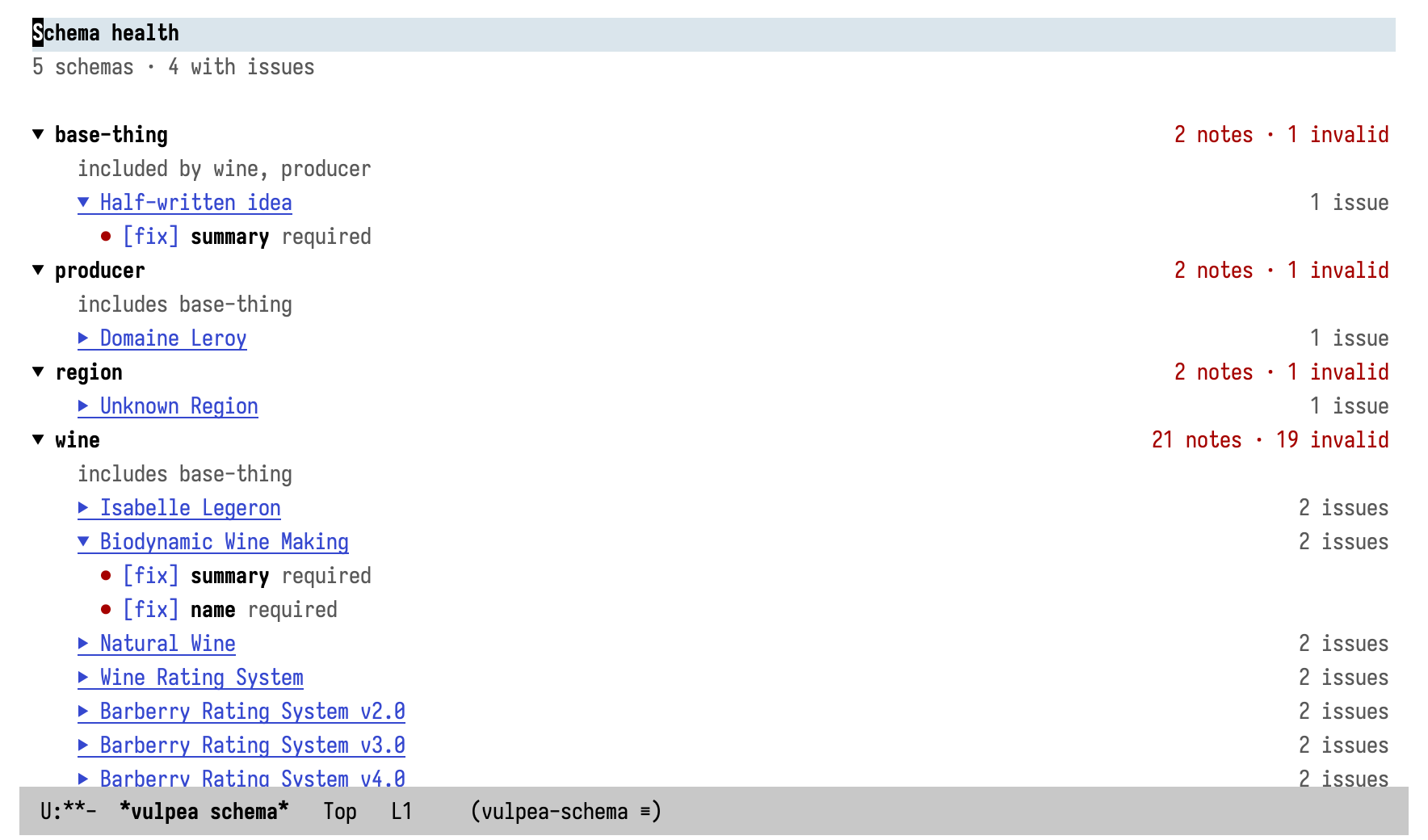
The schema dashboard is vulpea-ui's first standalone view: a dedicated buffer rather than a sidebar widget. Where the schema health widget answers "is /this/ note healthy?", the dashboard answers it for the whole collection. =M-x vulpea-ui-schema-dashboard= opens a =vulpea schema= buffer listing every registered schema with how many notes it covers and how many are invalid, sorted so the schemas needing attention come first and unused ones sink to the bottom. =:include= relationships are annotated both ways (=includes= / =included by=).
Schemas with violations start expanded; their invalid notes start collapsed. Expand a note to its individual violations, each showing the field, a terse reason, and a =fix= button. Fixing pops the note open at that field, prompts for a corrected value, then re-indexes and refreshes so the note drops off once it is healthy, so you always see what you are fixing and can fix or skip each one on its own. The field name jumps to the note without fixing. =g= rescans, =q= buries the buffer. The scan is one query plus an in-memory pass, so it stays fast on a large collection. Needs a vulpea with =vulpea-schema-collection-health= (the =fix= button additionally needs =vulpea-schema-fix-violation=).
- Collection view
=M-x vulpea-ui-collection= completes over your saved views; free input is parsed as a query, so =wine -beer #red? level:0 country:France= works straight from the prompt (bare words require a tag, =-tag= excludes one, =#tag?= means any-of, =level:=, =dir:=, =title:=, =body:= (file content), =todo:= and =KEY:VALUE= / =KEY:*= condition on the rest). The syntax is exactly what the mode line prints as the filter summary, so the description you see is a query you can type. Empty input opens the whole collection. Press =?= inside the view for a menu of everything it can do; the mode line shows how many notes matched out of the whole collection, how many are marked, the active filter, and averages for numeric meta columns (=:142/4231 {rating avg 8.4}=).
Filters are refined without leaving the buffer (=/= prefix) and columns are added and removed on the fly (=c= prefix), so a typical session is: open everything, narrow by a tag or two, add the meta columns you care about, mark, act, and save the result as a named view with =w=.
Views are plists. Save them in =vulpea-ui-collection-views= (or press =w= in a collection buffer to save the current one):
#+begin_src emacs-lisp (setq vulpea-ui-collection-views '(("wines" . (:filter (:tags-all ("wine") :level 0) :columns (title (meta "country") (meta "producer") tags modified) :sort ("Modified" . t))))) #+end_src
The =:filter= plist supports =:tags-all=, =:tags-any=, =:tags-none=, =:level= (0 for file-level notes), =:directory= (absolute prefix or a relative path component), =:title= (regexp), =:meta= (alist of =(KEY . VALUE)= conditions, =(KEY . t)= for mere presence) and =:predicate= (any function on the note). The cheapest condition is pushed down to the database, the rest is applied in memory.
Columns: =title=, =context= (file title and outline path of a heading note - tells apart a dozen rows all called "Tasks"), =tags=, =(meta KEY)=, =todo=, =priority=, =scheduled=, =deadline=, =created=, =modified=, =links= (outgoing link count), =backlinks= (incoming link count, one grouped query for the whole table), =aliases= and =file=. Any column takes =:name= and =:width= overrides, e.g. =(title :width 60)=. Widths fit the content by default (the defaults act as caps); a column you resize by hand keeps its width and is pinned into the view when you save it.
A view without =:columns= gets adaptive defaults: columns are derived from the notes being shown, so empty ones never appear - title always, context when heading-level notes are present, tags and todo when some note carries them, plus the backlink count (sort by it to surface your hub notes). Ad-hoc views come sorted by title. Set =vulpea-ui-collection-default-columns= to an explicit list to opt out.
Keybindings:
| Key | Action | |-------+---------------------------------------------------| | =RET= | Visit the note | | =o= | Visit the note in another window | | =C-o= | Preview the note without leaving the table | | =SPC= | Show the row's full values | | =m= | Mark the note at point (or the region's rows) | | =u= | Unmark the note at point (or the region's rows) | | =U= | Unmark all | | =t= | Invert marks | | =% m= | Mark notes whose title matches a regexp | | =% t= | Mark notes carrying a tag | | =+= | Add a tag to the selection | | =-= | Remove a tag from the selection | | =e= | Edit the field of the column at point | | =E= | Remove a metadata field from the selection | | =T= | Set a todo state on the selection | | =Z= | Undo the last batch edit (one level) | | =G= | Group rows by a column (Emacs 30+) | | === | Narrow to the value of the cell at point | | =D= | Delete the selected notes (with confirmation) | | =x= | Apply a function to the selection | | =y= | Copy the selection as an org list of links | | =Y= | Export the selection to an org buffer | | =d= | Open the selection's files in dired, pre-marked | | =/ t= | Require a tag | | =/ T= | Exclude a tag | | =/ s= | Narrow titles live (updates as you type) | | =/ g= | Narrow by file content (ripgrep when available) | | =/ d= | Scope to a directory | | =/ m= | Condition on a metadata field | | =/ l= | Filter by level | | =/ k= | Remove a single filter condition | | =/ /= | Clear the filter | | =c a= | Add a column | | =c k= | Remove a column | | =w= | Save the current view | | =g= | Re-query and refresh | | =S= | Sort by column at point (=tabulated-list-mode=) | | =?= | Menu with all of the above |
=e= is context-aware: on the tags column it rewrites the tags of the note at point (completion, prefilled); on a meta column it reads a value for that key - prefilled from the note at point - and sets it on the selection; anywhere else it prompts for the key. =T= sets a todo state on the selection's heading-level notes (empty input clears it). =Z= undoes the last batch edit precisely: adding a tag only strips it from notes that gained it, meta edits restore each note's previous values, and todo edits restore the old states.
=== is the drill-down gesture: it adds a filter condition from the cell at point - a tag from the tags column, the value of a meta cell, a todo state, or the note's directory from the context and file columns. See "France", press ===, see the wines. Hovering a truncated cell shows its full value, and =SPC= prints the whole row as =column: value= lines.
Actions apply to the marked notes, or to the note at point when nothing is marked (=y= and =Y= fall back to the whole view instead). Marks are keyed by note id, so they survive sorting and re-querying. Edits touching more than one note ask first and list the notes they are about to change. Bulk tag and metadata edits go through vulpea's batch operations (=vulpea-tags-batch-add= and friends), so they need a vulpea recent enough to provide them. Deleting removes the files of file-level notes; heading-level notes are skipped.
=d= hands the selection off to dired with every file pre-marked, so batch rename, moving between directories, wdired and shell commands come from dired instead of being reimplemented here.
A view's =:filter= can also carry =:source=, a function returning the candidate notes, with the rest of the filter applied on top. vulpea already ships the interesting queries, so janitor dashboards are one saved view away:
#+begin_src emacs-lisp (add-to-list 'vulpea-ui-collection-views '("orphans" . (:filter (:source vulpea-db-query-orphan-notes)))) #+end_src
Collection buffers are bookmarkable: =C-x r m= records the view and jumping to the bookmark re-opens it. =org-store-link= works too, and the =vulpea-collection:= link type turns any note into a dashboard - =[[vulpea-collection:wine level:0][my cellar]]= opens the live view when followed (the path is a saved view name or a query). Saved views are managed with =vulpea-ui-collection-rename-view= and =vulpea-ui-collection-delete-view= (also in the =?= menu).
Like the sidebar, the view refreshes itself when vulpea's background extraction lands changes in the database (vulpea 2.6+), coalescing bulk syncs into a single refresh. Only visible buffers re-query immediately; hidden ones wait until they are shown again.
Saved views also show up as a =Collections= widget in the sidebar (one click from any note to a view), and any view can be embedded in a note as an org dynamic block:
#+begin_src org ,#+BEGIN: vulpea-collection :query "wine rating:*" :columns (title (meta "rating")) ,#+END: #+end_src
=C-c C-x x= (=org-dynamic-block-insert=) offers the block; titles render as =id:= links, and =:view "name"= reuses a saved view.
- Default widgets
#+begin_html

Shows character count, word count, and link count for the current note.
** Schema health widget
Validates every note in the current file against its vulpea schema(s), covering both the file-level note and each heading-level note (a heading with its own =:ID:=, tags and metadata is a note in its own right).
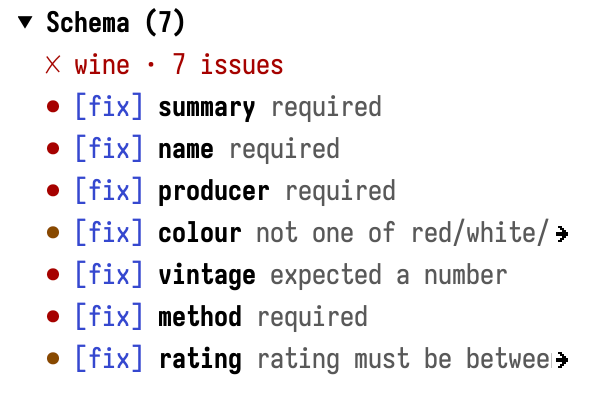
A single schema-bearing note reads as one status - a green =healthy= line when it conforms, or its violations otherwise, each a severity-coloured bullet (red for structural problems, amber for value problems), the field and a terse reason:
#+begin_html
When the file holds several notes it breaks them down per note - the file-level note first, then headings in document order - so a violation on a heading is never hidden behind a schema-less =:journal:= file:
#+begin_html
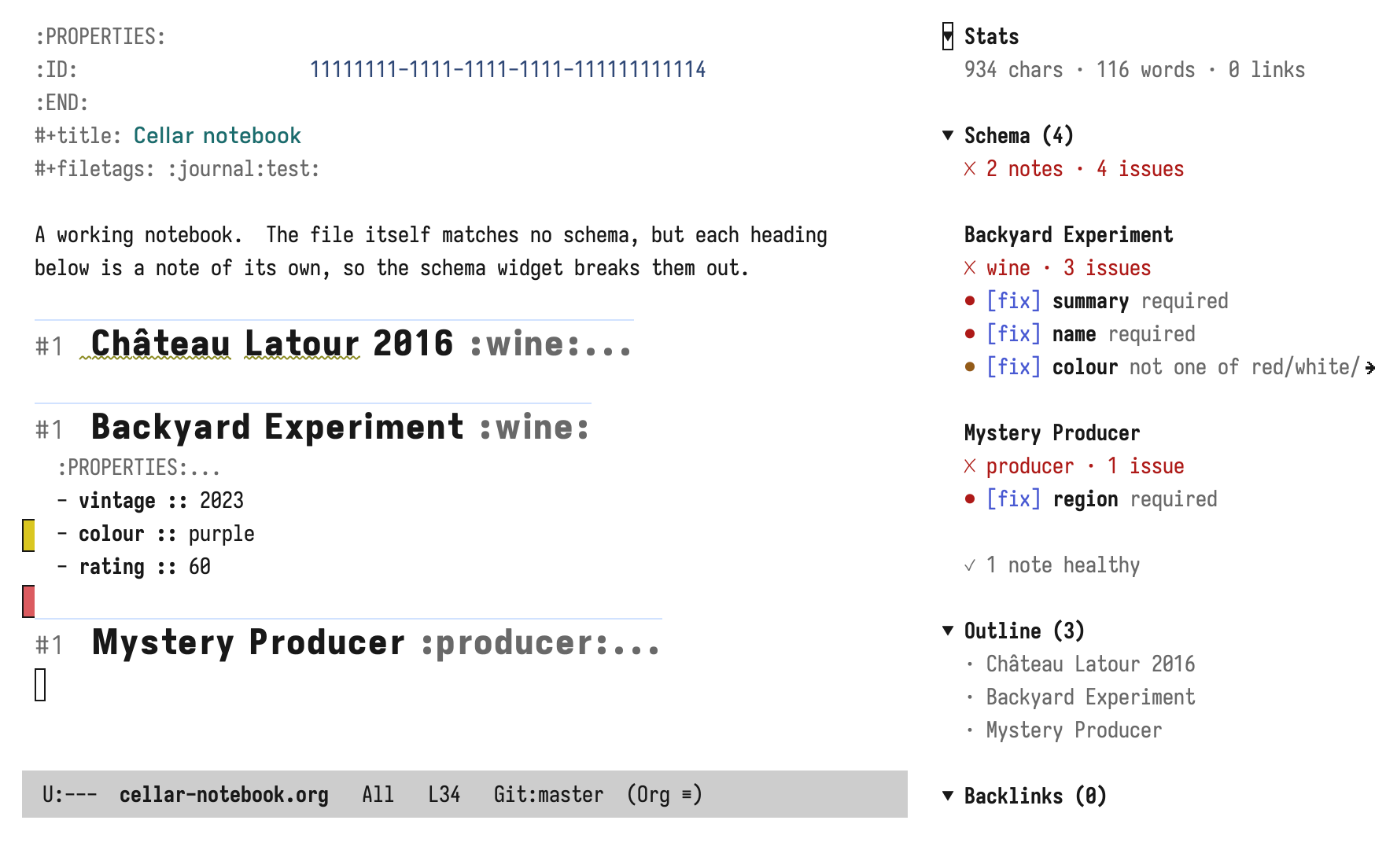
Every violation has a =fix= button that prompts for a value and writes it back into that note (a heading's field lands in the heading, not the top of the file), and the field name jumps to it. Files whose IDs live only on headings work too. Shown only when some note in the file bears a schema.
** Outline widget
#+begin_html
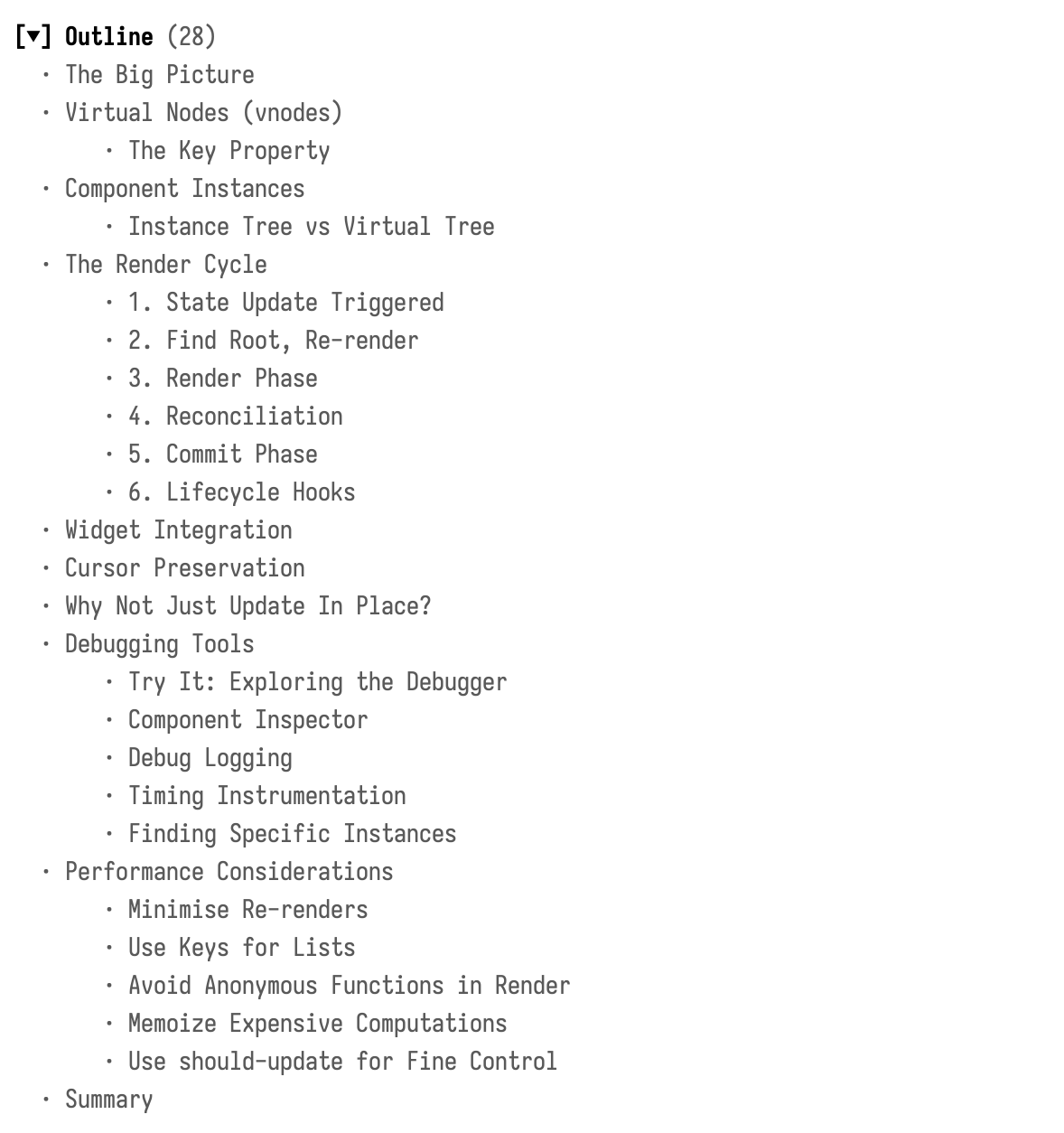
Displays the heading structure of the note. Click headings to navigate.
** Backlinks widget
#+begin_html
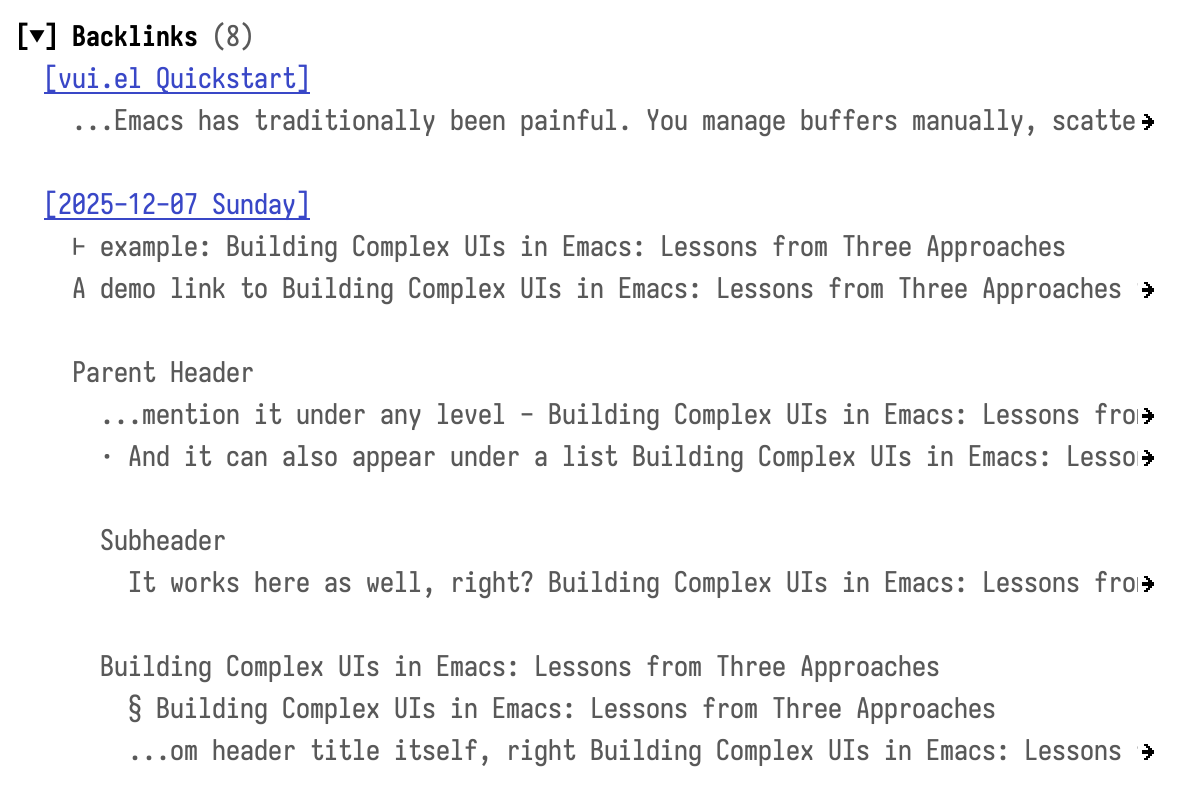
Shows notes that link to the current note, grouped by file with:
- Heading path context (where in the document the link appears)
- Links targeting a heading-level ID of the current file are included
- Content preview with context type indicators:
** Unlinked mentions widget
Shows notes that mention the current note's title or one of its aliases as plain text, without an =id:= link pointing back - the notes you may want to link. Mentions are grouped by the mentioning note; click a context line to jump to it.
Unlike the other widgets, this one loads asynchronously: scanning the whole collection for a note's title is expensive, so the search is delegated to [[https://github.com/BurntSushi/ripgrep][ripgrep]] via =vulpea-note-unlinked-mentions-async= and the widget shows a =Searching…= state until results arrive. Results are cached until you switch notes or refresh the sidebar (=g= / =vulpea-ui-sidebar-refresh=); an idle soft-refresh reuses the cache.
If ripgrep is not on =exec-path= the widget reports it instead of failing. To disable the widget entirely:
#+begin_src emacs-lisp (vulpea-ui-unregister-widget 'unlinked-mentions) #+end_src
To hide specific notes from the results without changing the search, set =vulpea-ui-unlinked-mentions-note-filter= to a predicate on the mentioning note, e.g. to drop notes carrying an =index= tag:
#+begin_src emacs-lisp (setq vulpea-ui-unlinked-mentions-note-filter (lambda (note) (not (member "index" (vulpea-note-tags note))))) #+end_src
To instead exclude notes from the search itself (collection-wide, affecting both mention widgets), customise =vulpea-mentions-note-filter=.
** Links widget
#+begin_html
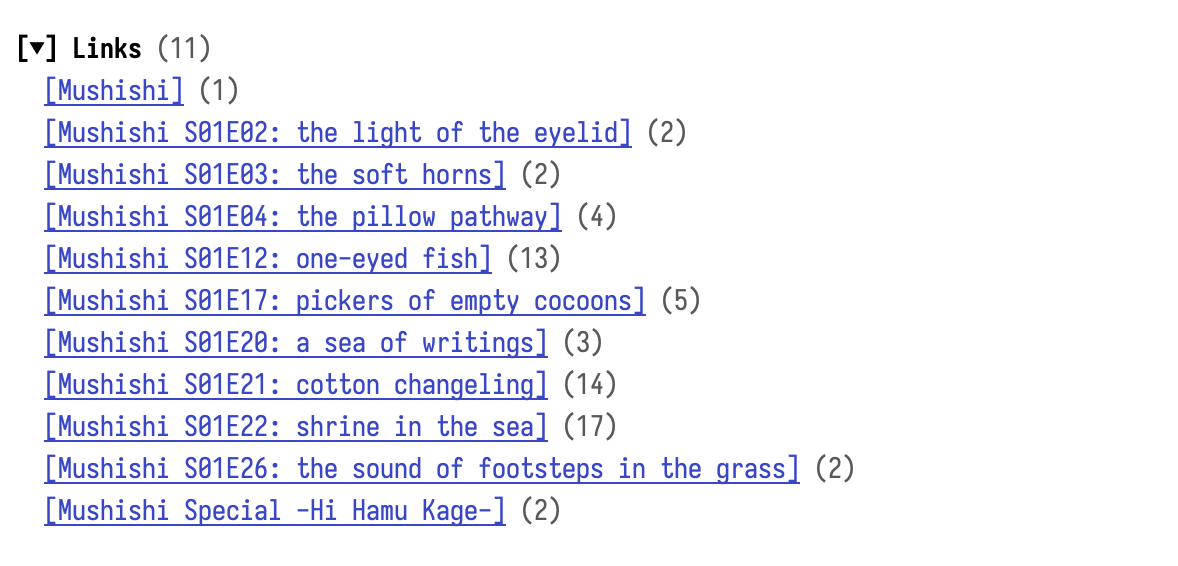
Shows notes that the current note links to.
** Outgoing mentions widget
The mirror of the [[*Unlinked mentions widget][unlinked mentions widget]]: instead of notes that mention this one without linking back, it shows existing notes that this note mentions as plain text without an =id:= link to them - the notes you may want to link out to. Suggestions are grouped by the note you could link to; click a context line to jump to the mention in the current note, or use the =link= button before it to convert that occurrence into an =id:= link in place. Each group also has a =link all= button that links every occurrence for that note at once. Linking re-checks the live buffer before editing, so a suggestion that has gone stale (the surrounding text changed, or you already linked it) is simply skipped. It keeps your place in the sidebar and does not re-scan, so the suggestion stays listed (and point stays put) until you refresh with =g= or save - which makes it easy to link several in a row. Which notes count as candidates is controlled by =vulpea-mentions-note-filter= (file-level notes by default).
Like the unlinked mentions widget it loads asynchronously via ripgrep (=vulpea-buffer-unlinked-mentions-async=), scanning the note's live buffer so unsaved edits are included. It shows a =Searching…= state until results arrive and caches them until you switch notes or refresh the sidebar (=g= / =vulpea-ui-sidebar-refresh=).
If ripgrep is not on =exec-path= the widget reports it instead of failing. To disable the widget entirely:
#+begin_src emacs-lisp (vulpea-ui-unregister-widget 'outgoing-mentions) #+end_src
To hide specific candidate notes from the results without changing the search, set =vulpea-ui-outgoing-mentions-note-filter= to a predicate on the candidate note, e.g. to drop notes carrying an =index= tag:
#+begin_src emacs-lisp (setq vulpea-ui-outgoing-mentions-note-filter (lambda (note) (not (member "index" (vulpea-note-tags note))))) #+end_src
- Widget Registration
** Built-in widgets
vulpea-ui registers these widgets by default:
| Widget | Order | Component | |---------------------+-------+--------------------------------------| | =stats= | 100 | =vulpea-ui-widget-stats= | | =outline= | 200 | =vulpea-ui-widget-outline= | | =backlinks= | 300 | =vulpea-ui-widget-backlinks= | | =unlinked-mentions= | 350 | =vulpea-ui-widget-unlinked-mentions= | | =links= | 400 | =vulpea-ui-widget-links= | | =outgoing-mentions= | 450 | =vulpea-ui-widget-outgoing-mentions= |
** Registering widgets
#+begin_src emacs-lisp (vulpea-ui-register-widget 'my-widget :component 'my-custom-widget-component :predicate #'my-note-predicate ; optional: only show when this returns non-nil :order 150) ; optional: default 100 #+end_src
** Modifying widget properties
=vulpea-ui-widget-set= updates a single property on an already-registered widget. This works for any widget, including the built-in ones, so you can customise them without redefining anything.
#+begin_src emacs-lisp ;; Change a widget's order (vulpea-ui-widget-set 'stats :order 50)
;; Attach a predicate to a built-in widget (vulpea-ui-widget-set 'outline :predicate #'my/show-outline-p)
;; Remove a widget (vulpea-ui-unregister-widget 'links) #+end_src
** Toggling a widget per note
Built-in widgets have no predicate by default, so they are shown for every note. You can install one with =vulpea-ui-widget-set= to decide per note whether the widget shows up. A common recipe is a global default variable combined with an org property that overrides it on individual notes.
The example below hides the =outline= widget by default and shows it only on notes that set =:OUTLINE: t=. Flip =my/vulpea-ui-always-show-outline= to =t= to invert the default, in which case =:OUTLINE: nil= hides the widget on specific notes.
#+begin_src emacs-lisp (defvar my/vulpea-ui-always-show-outline nil "When non-nil, show the outline widget unless a note opts out.")
(defun my/vulpea-ui-show-outline-p (note) "Return non-nil if the outline widget should be shown for NOTE. An `OUTLINE' property on the note overrides the default variable." (if-let* ((props (vulpea-note-properties note)) (entry (assoc "OUTLINE" props))) (not (equal (cdr entry) "nil")) my/vulpea-ui-always-show-outline))
(vulpea-ui-widget-set 'outline :predicate #'my/vulpea-ui-show-outline-p) #+end_src
The same pattern works for any widget (=stats=, =backlinks=, =links=, or your own).
** How it works
- Widgets are filtered by their =:predicate= (if any) against the current note
- Remaining widgets are sorted by =:order= (ascending)
- Each widget's =:component= is rendered
- Custom widgets
#+begin_src emacs-lisp (vui-defcomponent my-custom-widget () "My custom widget." :render (let ((note (use-vulpea-ui-note))) (vui-component 'vulpea-ui-widget :title "My Widget" :count 42 :children (lambda () (vui-text "Custom content here"))))) #+end_src
Register the widget:
#+begin_src emacs-lisp (vulpea-ui-register-widget 'my-widget :component 'my-custom-widget :order 250) ; after outline, before backlinks #+end_src
For context-specific widgets (e.g., only for notes with a certain tag):
#+begin_src emacs-lisp (defun my-project-note-p (note) "Return non-nil if NOTE is a project note." (member "project" (vulpea-note-tags note)))
(vulpea-ui-register-widget 'project-tasks :component 'my-project-tasks-widget :predicate #'my-project-note-p :order 150) #+end_src
- Utility Functions
Cleans org-mode markup from text for display purposes:
#+begin_src emacs-lisp (vulpea-ui-clean-org-markup text) #+end_src
Transformations:
- Links: =[[url][title]]= → =title=, =[[url]]= → =url= (bare =[[id:...]]= links are removed)
- Drawers: =:PROPERTIES:...:END:= blocks are removed
- Metadata: =#+TITLE:=, =#+FILETAGS:=, etc. lines are removed
- Whitespace: multiple spaces/tabs collapsed to single space
- Faces
- Related Projects
- [[https://github.com/d12frosted/vulpea-journal][vulpea-journal]] - Daily journaling with calendar, navigation, and "on this day" widgets
- [[https://github.com/d12frosted/ace-link-vui][ace-link-vui]] - Ace-link style navigation for VUI buffers
- License
This program is free software: you can redistribute it and/or modify it under the terms of the GNU General Public License as published by the Free Software Foundation, either version 3 of the License, or (at your option) any later version.
- Support


