
A working vidsrc.to/vidsrc.me extractor as an api. Proof of concept and educational.(depreciated) instead use https://github.com/cool-dev-guy/vidsrc.ts
vidsrc-api
IMPORTANT
UPDATE : PROJECT ABANDONED FOR LIMITED TIME
MOVED TO https://github.com/cool-dev-guy/vidsrc.ts
- The providers changed a lot in their code structure.
- And vidsrc.to is no more...
- So project moved to NEW https://github.com/cool-dev-guy/vidsrc.ts


STATUS- WORKING - (UPDATED MAR/31/24)
- Added stable fixes for most of the sources so it wont break too often.
- Everything Works currently and the speed has also increased in the latest commit dut o use of non-blocking async functions.
- Still the code may have some bugs,so feel free to post bugs in the issue section :)
About
- ### Deploying methods.
- #### Vercel Project is easy to deploy on vercel. 1. Fork this repo. 2. Open vercel and create new project and choose your forked repo. 3. Use the default settings and click deploy. 4. Your build will surely fail because of this 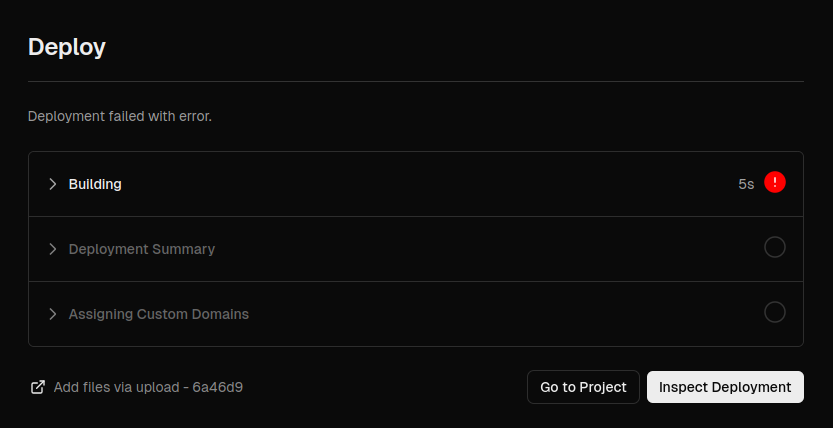 *vercel's latest update.Node.js version 20.x dosent fully support python. 6. Now open the project's settings and scroll down.Now you can see a row caled
 Node Version. CHANGE it to 18.x 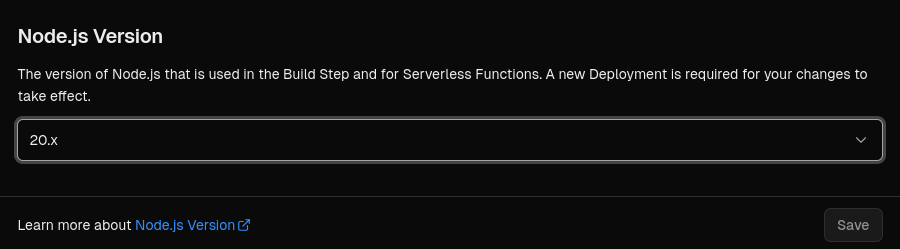 *there's an detailed explanation in this issue link_ - #### Vercel easy Or if vercel fixes this bug,you can use this button.But vercel didnt fix this yet.
IMPORTANT : Vercel is facing a bug recently so setting node version to 18.x is a fix for it. *there's an detailed explanation in this issue link_
1.Fork and Clone the repo. 2.Create a virtial env if you want.
3.install the deps.[pip install -r requirements.txt]
4.open models/utils.py and change the value of BASE to your api-base-url/deployment-base-url.( for subtitle ) 5.install uvicorn via pip install uvicorn & run it using uvicorn.[uvicorn main:app --reload --port=8000]
- If you liked the project and updates
buy me a coffee:)

- If any issues,drop an issue on
github issues.
FEATURES
- async support - Most process are async but still some fixes are needed.
- very fast results
- subtitle support for every sources.
NOTES
- Dont overload the deployment.
- This api is made for educational purpouse only. This is just a simple scrapper built arround
https://github.com/Ciarands vidsrc downloader.This project was only made to prevent ads and redirects caused by the iframes
- This api isnt a copy of the inspired project,but its a complete reqrite of code to make it work as an api and use async style to give vary fast results.
- Dont perform bulk request to the api and store the m3u8's returned,cuz they may not work after 24 hours or so.This api scrape websites that have
video on demand feature so storing it is useless.
USAGE (GET)
- example base url:
- endpoints:
/vidsrc/{db_id} - vidsrc.to
- /vsrcme/{db_id} - vidsrc.me
- /streams/{db_id} - get streams from all 4 sources in one request.
- /subs/?url={subtitle_url@opensubtitles.org}
- parameters:
s - season (series only)
- e - episodes (series only)
- l - language(subtitle)
- example url (movie) :
https://api.vercel.app/vidsrc/ttXXXXXX - example url (series) :
https://api.vercel.app/vidsrc/ttXXXXXX?s=1&e=2
RESPONSE SCEMA
[UPDATE] Added a common response scheam for the endpoints,so every source is an element of an array.And the api retruns an array.
Working
{
    "status":200,
    "info":"success",
    "sources":[
      {
        "name": "SOURCE_NAME",
        "data": {
          "stream": "FILE.m3u8",
          "subtitle": [
            {
              "lang":"LANGUAGE",
              "file":"FILE.srt"
            }
            {
              "lang":"LANGUAGE2",
              "file":"FILE2.srt"
            }
          ]
        }
      },
      {
        "name": "SOURCE_NAME2",
        "data": {
          "stream": "FILE2.m3u8",
          "subtitle": [
            {
              "lang":"LANGUAGE",
              "file":"FILE.srt"
            }
            {
              "lang":"LANGUAGE2",
              "file":"FILE2.srt"
            }
          ]
        }
      }
    ]
}
Error/Stream Unavailable
{
    "status":200,
    "info":"success",
    "sources":[]
}
ERROR CODES
OTHER PROJECTS
- cool-proxy - A proxy made in C++


