
The best HTTP Static File Server, write with golang+vue
gohttpserver (not maintained)
Alternatives
doc
- Goal: Make the best HTTP File Server.
- Features: Human-friendly UI, file uploading support, direct QR-code generation for Apple & Android install package.
- 目标: 做最好的HTTP文件服务器
- 功能: 人性化的UI体验,文件的上传支持,安卓和苹果安装包的二维码直接生成。
Requirements
Tested with go-1.16Screenshots
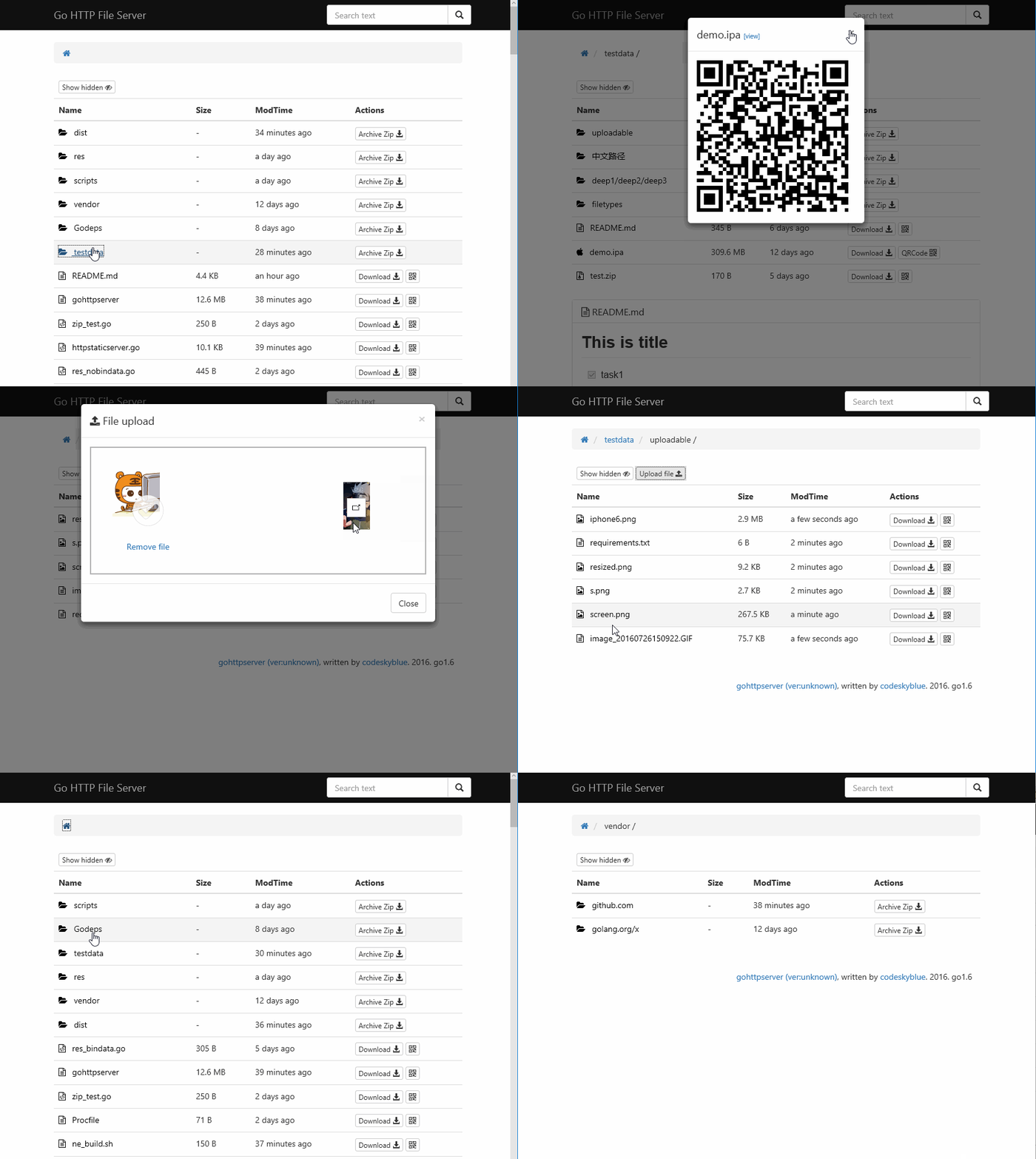
Features
- [x] Support QRCode code generate
- [x] Breadcrumb path quick change
- [x] All assets package to Standalone binary
- [x] Different file type different icon
- [x] Support show or hide hidden files
- [x] Upload support (auth by token or session)
- [x] README.md preview
- [x] HTTP Basic Auth
- [x] Partial reload pages when directory change
- [x] When only one dir under dir, path will combine two together
- [x] Directory zip download
- [x] Apple ipa auto generate .plist file, qrcode can be recognized by iphone (Require https)
- [x] Plist proxy
- [ ] Download count statistics
- [x] CORS enabled
- [ ] Offline download
- [ ] Code file preview
- [ ] Edit file support
- [x] Global file search
- [x] Hidden work
downloadandqrcodein small screen - [x] Theme select support
- [x] OK to working behide Nginx
- [x] \.ghs.yml support (like \.htaccess)
- [ ] Calculate md5sum and sha
- [ ] Folder upload
- [ ] Support sort by size or modified time
- [x] Add version info into index page
- [ ] Add api
/-/info/some.(apk|ipa)to get detail info - [x] Add api
/-/apk/info/some.apkto get android package info - [x] Auto tag version
- [x] Custom title support
- [x] Support setting from conf file
- [x] Quick copy download link
- [x] Show folder size
- [x] Create folder
- [x] Skip delete confirm when alt pressed
- [x] Support unzip zip file when upload(with form: unzip=true)
Installation
$ go install github.com/codeskyblue/gohttpserver@latestOr download binaries from github releases
If you are using Mac, simply run command
$ brew install codeskyblue/tap/gohttpserverUsage
Listen on port 8000 of all interfaces, and enable file uploading.$ gohttpserver -r ./ --port 8000 --uploadUse command gohttpserver --help to see more usage.
Docker Usage
share current directory$ docker run -it --rm -p 8000:8000 -v $PWD:/app/public --name gohttpserver codeskyblue/gohttpserverShare current directory with http basic auth
$ docker run -it --rm -p 8000:8000 -v $PWD:/app/public --name gohttpserver \
  codeskyblue/gohttpserver \
  --auth-type http --auth-http username1:password1 --auth-http username2:password2
Share current directory with openid auth. (Works only in netease company.)
$ docker run -it --rm -p 8000:8000 -v $PWD:/app/public --name gohttpserver \
  codeskyblue/gohttpserver \
  --auth-type openid
To build image yourself, please change the PWD to the root of this repo.
$ cd gohttpserver/
$ docker build -t codeskyblue/gohttpserver -f docker/Dockerfile .
Authentication options
- Enable basic http authentication
$ gohttpserver --auth-type http --auth-http username1:password1 --auth-http username2:password2- Use openid auth
$ gohttpserver --auth-type openid --auth-openid https://login.example-hostname.com/openid/- Use oauth2-proxy with
$ gohttpserver --auth-type oauth2-proxyX-Auth-Request-Email as userId and X-Auth-Request-Fullname as user's display name.
Please config your oauth2 reverse proxy yourself.
More about oauth2-proxy.
All required headers list as following.
|header|value| |---|---| |X-Auth-Request-Email| userId | |X-Auth-Request-Fullname| user's display name(urlencoded) | |X-Auth-Request-User| user's nickname (mostly email prefix) |
- Enable upload
$ gohttpserver --upload- Enable delete and Create folder
$ gohttpserver --deleteAdvanced usage
Add access rule by creating a.ghs.yml file under a sub-directory. An example:
---
upload: false
delete: false
users:
- email: "codeskyblue@codeskyblue.com"
delete: true
upload: true
token: 4567gf8asydhf293r23rIn this case, if openid auth is enabled and user "codeskyblue@codeskyblue.com" has logged in, he/she can delete/upload files under the directory where the .ghs.yml file exits.
token is used for upload. see upload with curl
For example, in the following directory hierarchy, users can delete/uploade files in directory foo, but he/she cannot do this in directory bar.
root -
|-- foo
| |-- .ghs.yml
| -- world.txt
-- bar
-- hello.txt</code></pre>
User can specify config file name with
--conf, see example config.yml.
To specify which files is hidden and which file is visible, add the following lines to
.ghs.yml
<pre><code class="lang-yaml">accessTables:
- regex: block.file
allow: false - regex: visual.file
allow: true</code></pre>
ipa plist proxy
This is used for server on which https is enabled. default use <https://plistproxy.herokuapp.com/plist>
<pre><code class="lang-bash">$ gohttpserver --plistproxy=https://someproxyhost.com/</code></pre>
Test if proxy works:
<pre><code class="lang-sh">$ http POST https://someproxyhost.com/plist < app.plist { "key": "18f99211" } $ http GET https://someproxyhost.com/plist/18f99211
show the app.plist content</code></pre>
If your ghs running behide nginx server and have https configed. plistproxy will be disabled automaticly.
Upload with CURL
For example, upload a file named foo.txt to directory somedir
<pre><code class="lang-sh">$ curl -F file=@foo.txt localhost:8000/somedir {"destination":"somedir/foo.txt","success":true}
upload with token
$ curl -F file=@foo.txt -F token=12312jlkjafs localhost:8000/somedir {"destination":"somedir/foo.txt","success":true}
upload and change filename
$ curl -F file=@foo.txt -F filename=hi.txt localhost:8000/somedir
{"destination":"somedir/hi.txt","success":true}</code></pre>
Upload zip file and unzip it (zip file will be delete when finished unzip)
<pre><code class="lang-">$ curl -F file=@pkg.zip -F unzip=true localhost:8000/somedir {"success": true}</code></pre>
Note:
\/:*<>| are not allowed in filenames.
Deploy with nginx
Recommended configuration, assume your gohttpserver listening on 127.0.0.1:8200
<pre><code class="lang-">server { listen 80; server_name your-domain-name.com;
location / { proxy_pass http://127.0.0.1:8200; # here need to change proxy_redirect off; proxysetheader Host $host; proxysetheader X-Real-IP $remote_addr; proxysetheader X-Forwarded-For $proxyaddxforwardedfor; proxysetheader X-Forwarded-Proto $scheme;
clientmaxbody_size 0; # disable upload limit } }</code></pre>
gohttpserver should started with
--xheaders argument when behide nginx.
Refs: <http://nginx.org/en/docs/http/ngxhttpcoremodule.html#clientmaxbodysize>
gohttpserver also support
--prefix flag which will help to when meet / is occupied by other service. relative issue <https://github.com/codeskyblue/gohttpserver/issues/105>
Usage example:
<pre><code class="lang-bash"># for gohttpserver $ gohttpserver --prefix /foo --addr :8200 --xheaders</code></pre>
Nginx settigns
<pre><code class="lang-">server { listen 80; server_name your-domain-name.com;
location /foo { proxy_pass http://127.0.0.1:8200; # here need to change proxy_redirect off; proxysetheader Host $host; proxysetheader X-Real-IP $remote_addr; proxysetheader X-Forwarded-For $proxyaddxforwardedfor; proxysetheader X-Forwarded-Proto $scheme;
clientmaxbody_size 0; # disable upload limit } }</code></pre>
FAQ
How the query is formated
The search query follows common format rules just like Google. Keywords are seperated with space(s), keywords with prefix - will be excluded in search results.
hello world means must contains hello and world
hello -world means must contains hello but not contains world`
Developer Guide
Depdencies are managed by govendor
- Build develop version. assets directory must exists
$ go build
$ ./gohttpserver
- Build single binary release
$ go build
Theme are defined in assets/themes directory. Now only two themes are available, "black" and "green".
Reference Web sites
- Core lib Vue
- Icon from
explorericon.html>
- Code Highlight
- Markdown Parser
- Markdown CSS
- Upload support
- ScrollUp
- Clipboard
- Underscore
Go Libraries
- vfsgen Not using now
- go-bindata-assetfs Not using now
History
The old version is hosted at
LICENSE
This project is licensed under MIT. 


