
The Encyclopedia of Kubernetes clusters

The Encyclopedia of Kubernetes clusters
Clusterpedia





This name Clusterpedia is inspired by Wikipedia. It is an encyclopedia of multi-cluster to synchronize, search for, and simply control multi-cluster resources.
Clusterpedia can synchronize resources with multiple clusters and provide more powerful search features on the basis of compatibility with Kubernetes OpenAPI to help you effectively get any multi-cluster resource that you are looking for in a quick and easy way.
The capability of Clusterpedia is not only to search for and view but also simply control resources in the future, just like Wikipedia that supports for editing entries.

Clusterpedia is a Cloud Native Computing Foundation sandbox project.
If you want to join the clusterpedia channel on CNCF slack, please get invite to CNCF slack and then join the #clusterpedia channel.
Why Clusterpedia
Clusterpedia can be deployed as a standalone platform or integrated with Cluster API, Karmada, Clusternet, vCluster, KubeVela and other multi-cloud platformsAutomatic synchronization of clusters managed by multi-cloud platforms
The clusterpedia can automatically synchronize the resources within the cluster managed by the multi-cloud platform.Users do not need to maintain Clusterpedia manually, Clusterpedia can work as well as the internal components of the multi-cloud platforms.
Lean More About Interfacing to Multi-Cloud Platforms
More retrieval features and compatibility with Kubernetes OpenAPI
- Support for retrieving resources using
kubectl,client-goorcontroller-runtime/client, client-go example - The resource metadata can be retrived via API or client-go/metadata
- Rich retrieval conditions: Filter by cluster/namespace/name/creation, Search by parent or ancestor owner,Multi-Cluster Label Selector, Enhanced Field Selector, Custom Search Conditions, etc.
Support for importing Kubernetes 1.10+
Automic conversion of different versions of Kube resources and support for multiple version of resources
- Even if you import different version of Kube, we can still use the same resource version to retrieve resources
For example, we can use>v1,v1beta2,v1beta1version to retrieve the Deployments resources in different clusters.
Notes: The version of deployments isv1beta1in Kubernetes 1.10 and it isv1in Kubernetes 1.24.
$ kubectl get --raw "/apis/clusterpedia.io/v1beta1/resources/apis/apps" | jq
{
  "kind": "APIGroup",
  "apiVersion": "v1",
  "name": "apps",
  "versions": [
    {
      "groupVersion": "apps/v1",
      "version": "v1"
    },
    {
      "groupVersion": "apps/v1beta2",
      "version": "v1beta2"
    },
    {
      "groupVersion": "apps/v1beta1",
      "version": "v1beta1"
    }
  ],
  "preferredVersion": {
    "groupVersion": "apps/v1",
    "version": "v1"
  }
}
A single API can be used to retrieve different types of resources
- Use
Collection Resourceto retrieve different types of resources, such asDeployment,DaemonSet,StatefulSet.
$ kubectl get collectionresources
NAME            RESOURCES
any             *
workloads       deployments.apps,daemonsets.apps,statefulsets.apps
kuberesources   .,.admission.k8s.io,.admissionregistration.k8s.io,.apiextensions.k8s.io,.apps,.authentication.k8s.io,.authorization.k8s.io,.autoscaling,.batch,.certificates.k8s.io,.coordination.k8s.io,.discovery.k8s.io,.events.k8s.io,.extensions,.flowcontrol.apiserver.k8s.io,.imagepolicy.k8s.io,.internal.apiserver.k8s.io,.networking.k8s.io,.node.k8s.io,.policy,.rbac.authorization.k8s.io,.scheduling.k8s.io,*.storage.k8s.io
Diverse policies and intelligent synchronization
- Wildcards can be used to sync all types of resources within a specified group or cluster.
- Support for synchronizing all custom resources
- The type and version of resources that Clusterpedia is synchroizing with can be adapted to you CRD and AA changes
Unify the search entry for master clusters and multi-cluster resources
- Based on Aggregated API, the entry portal for multi-cluster retrieval is the same as that of the master cluster(IP:PORT)
Very low memory usage and weak network optimization
- Optimized caches used by informer, so the memory usage is very low for resource synchronization.
- Automatic start/stop synchronization based on cluster health status
High availability
No dependency on specific storage components
Clusterpedia does not care about storage components and uses the storage layer to attach specific storage components, and will also add storage layers for graph databases and ES in the futureArchitecture
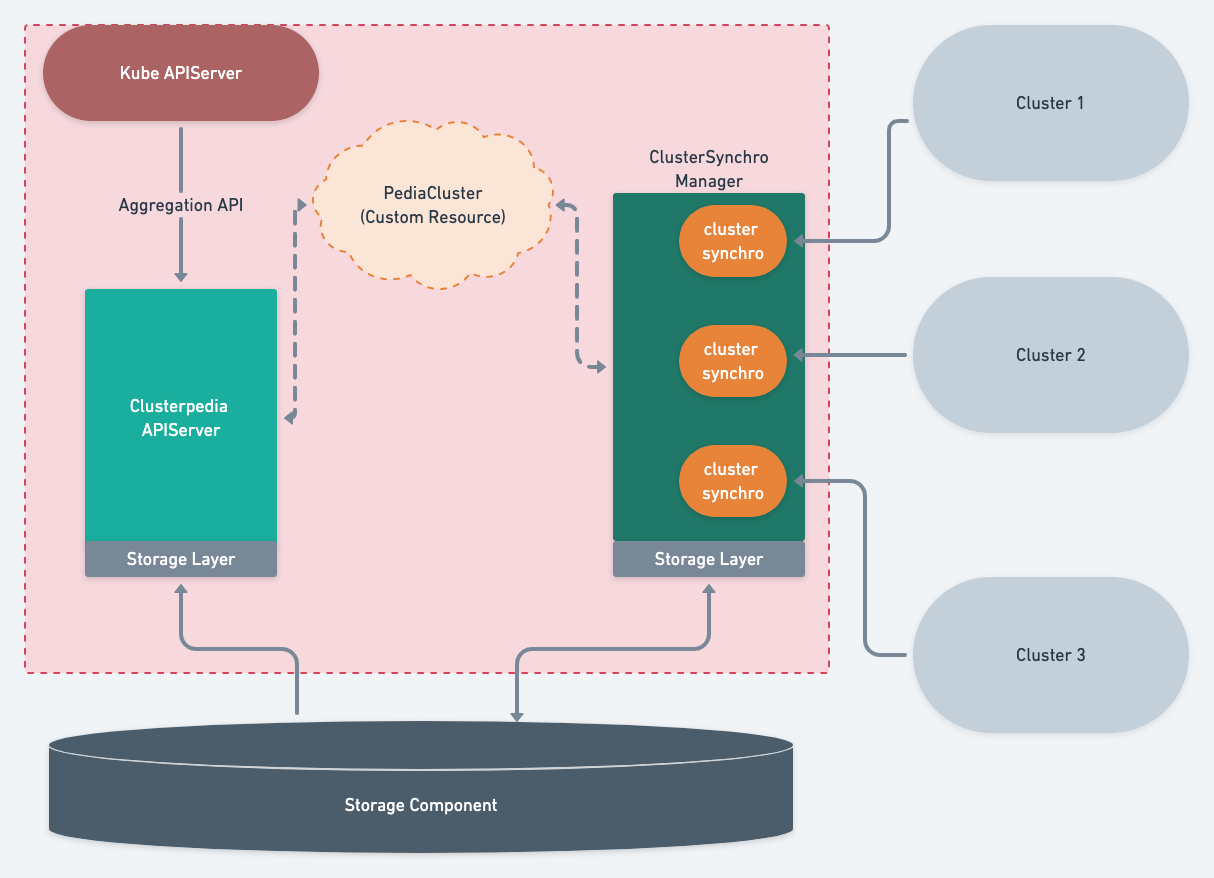
- Clusterpedia APIServer: Register to
Kubernetes APIServerby the means of Aggregated API and provide services through a unified entrance - ClusterSynchro Manager: Manage the cluster synchro that is used to synchronize cluster resources
- Storage Layer: Connect with a specific storage component and then register to Clusterpedia APIServer and ClusterSynchro Manager via a storage layer interface
- Storage Component: A specific storage facility such as MySQL, PostgreSQL, Redis or other Graph Databases
Clusterpedia also provides a Default Storage Layer that can connect with MySQL and PostgreSQL.
Clusterpedia does not care about the specific storage components used by users,
you can choose or implement the storage layer according to your own needs,
and then register the storage layer in Clusterpedia as a plug-in
Installation | Import Clusters | Sync Cluster Resources
Search Label and URL Query
|Role| Search label key|URL query| | -- | --------------- | ------- | |Filter cluster names|search.clusterpedia.io/clusters|clusters|
|Filter namespaces|search.clusterpedia.io/namespaces|namespaces|
|Filter resource names|search.clusterpedia.io/names|names|
|Fuzzy Search by resource name|internalstorage.clusterpedia.io/fuzzy-name|-|
|Since creation time|search.clusterpedia.io/since|since|
|Before creation time|search.clusterpedia.io/before|before|
|Specified Owner UID|search.clusterpedia.io/owner-uid|ownerUID|
|Specified Owner Seniority|search.clusterpedia.io/owner-seniority|ownerSeniority|
|Specified Owner Name|search.clusterpedia.io/owner-name|ownerName|
|Specified Owner Group Resource|search.clusterpedia.io/owner-gr|ownerGR|
|Order by fields|search.clusterpedia.io/orderby|orderby|
|Set page size|search.clusterpedia.io/size|limit|
|Set page offset|search.clusterpedia.io/offset|continue|
|Response include Continue|search.clusterpedia.io/with-continue|withContinue
|Response include remaining count|search.clusterpedia.io/with-remaining-count|withRemainingCount
|Custom Where SQL|-|whereSQL|
|Get only the metadata of the collection resource | - |onlyMetadata |
|Specify the groups of any collectionresource | - | groups |
|Specify the resources of any collectionresource | - | resources |
Both Search Labels and URL Query support same operators as Label Selector:
exist,not exist=,==,!=in,notin
Usage Samples
You can search for resources configured in PediaCluster, Clusterpedia supports two types of resource search:- Resources that are compatible with Kubernetes OpenAPI
Collection Resource
$ kubectl api-resources | grep clusterpedia.io
collectionresources     clusterpedia.io/v1beta1  false   CollectionResource
resources               clusterpedia.io/v1beta1  false   Resources
Use a compatible way with Kubernetes OpenAPI
It is possible to search resources via URL, but usingkubectl may be more convenient if
you configured the cluster shortcuts for kubectl.
We can use kubectl --cluster <cluster name> to specify the cluster, if <cluster name> is clusterpedia, it meas it is a multi-cluster search operation.
First check which resources are synchronized. We cannot find a resource until it is properly synchronized:
$ kubectl --cluster clusterpedia api-resources NAME                  SHORTNAMES   APIVERSION                     NAMESPACED   KIND configmaps            cm           v1                             true         ConfigMap events                ev           v1                             true         Event namespaces            ns           v1                             false        Namespace nodes                 no           v1                             false        Node pods                  po           v1                             true         Pod services              svc          v1                             true         Service daemonsets            ds           apps/v1                        true         DaemonSet deployments           deploy       apps/v1                        true         Deployment replicasets           rs           apps/v1                        true         ReplicaSet statefulsets          sts          apps/v1                        true         StatefulSet cronjobs              cj           batch/v1                       true         CronJob jobs                               batch/v1                       true         Job clusters                           cluster.kpanda.io/v1alpha1     false        Cluster ingressclasses                     networking.k8s.io/v1           false        IngressClass ingresses             ing          networking.k8s.io/v1           true         Ingress clusterrolebindings                rbac.authorization.k8s.io/v1   false        ClusterRoleBinding clusterroles                       rbac.authorization.k8s.io/v1   false        ClusterRole roles                              rbac.authorization.k8s.io/v1   true         Role
$ kubectl --cluster cluster-1 api-resources ...
Search in Multiple Clusters
Usage of multi-cluster search in documents
Get deployments in the kube-system namespace of all clusters:
$ kubectl --cluster clusterpedia get deployments -n kube-system CLUSTER NAME READY UP-TO-DATE AVAILABLE AGE cluster-1 coredns 2/2 2 2 68d cluster-2 calico-kube-controllers 1/1 1 1 64d cluster-2 coredns 2/2 2 2 64dGet deployments in the two namespaces kube-system and default of all clusters:
$ kubectl --cluster clusterpedia get deployments -A -l "search.clusterpedia.io/namespaces in (kube-system, default)" NAMESPACE CLUSTER NAME READY UP-TO-DATE AVAILABLE AGE kube-system cluster-1 coredns 2/2 2 2 68d kube-system cluster-2 calico-kube-controllers 1/1 1 1 64d kube-system cluster-2 coredns 2/2 2 2 64d default cluster-2 dd-airflow-scheduler 0/1 1 0 54d default cluster-2 dd-airflow-web 0/1 1 0 54d default cluster-2 hello-world-server 1/1 1 1 27d default cluster-2 openldap 1/1 1 1 41d default cluster-2 phpldapadmin 1/1 1 1 41dGet deployments in the kube-system and default namespaces in cluster-1 and cluster-2:
$ kubectl --cluster clusterpedia get deployments -A -l "search.clusterpedia.io/clusters in (cluster-1, cluster-2),\ search.clusterpedia.io/namespaces in (kube-system,default)" NAMESPACE CLUSTER NAME READY UP-TO-DATE AVAILABLE AGE kube-system cluster-1 coredns 2/2 2 2 68d kube-system cluster-2 calico-kube-controllers 1/1 1 1 64d kube-system cluster-2 coredns 2/2 2 2 64d default cluster-2 dd-airflow-scheduler 0/1 1 0 54d default cluster-2 dd-airflow-web 0/1 1 0 54d default cluster-2 hello-world-server 1/1 1 1 27d default cluster-2 openldap 1/1 1 1 41d default cluster-2 phpldapadmin 1/1 1 1 41dGet deployments in the kube-system and default namespaces in cluster-1 and cluster-2:
$ kubectl --cluster clusterpedia get deployments -A -l "search.clusterpedia.io/clusters in (cluster-1, cluster-2),\ search.clusterpedia.io/namespaces in (kube-system,default),\ search.clusterpedia.io/orderby=name" NAMESPACE CLUSTER NAME READY UP-TO-DATE AVAILABLE AGE kube-system cluster-2 calico-kube-controllers 1/1 1 1 64d kube-system cluster-1 coredns 2/2 2 2 68d kube-system cluster-2 coredns 2/2 2 2 64d default cluster-2 dd-airflow-scheduler 0/1 1 0 54d default cluster-2 dd-airflow-web 0/1 1 0 54d default cluster-2 hello-world-server 1/1 1 1 27d default cluster-2 openldap 1/1 1 1 41d default cluster-2 phpldapadmin 1/1 1 1 41dSearch a specific cluster
Usage of specified cluster search in documents
If you want to search a specific cluster for any resource therein, you can add --cluster to specify the cluster name:
$ kubectl --cluster cluster-1 get deployments -A NAMESPACE CLUSTER NAME READY UP-TO-DATE AVAILABLE AGE calico-apiserver cluster-1 calico-apiserver 1/1 1 1 68d calico-system cluster-1 calico-kube-controllers 1/1 1 1 68d calico-system cluster-1 calico-typha 1/1 1 1 68d capi-system cluster-1 capi-controller-manager 1/1 1 1 42d capi-kubeadm-bootstrap-system cluster-1 capi-kubeadm-bootstrap-controller-manager 1/1 1 1 42d capi-kubeadm-control-plane-system cluster-1 capi-kubeadm-control-plane-controller-manager 1/1 1 1 42d capv-system cluster-1 capv-controller-manager 1/1 1 1 42d cert-manager cluster-1 cert-manager 1/1 1 1 42d cert-manager cluster-1 cert-manager-cainjector 1/1 1 1 42d cert-manager cluster-1 cert-manager-webhook 1/1 1 1 42d clusterpedia-system cluster-1 clusterpedia-apiserver 1/1 1 1 27m clusterpedia-system cluster-1 clusterpedia-clustersynchro-manager 1/1 1 1 27m clusterpedia-system cluster-1 clusterpedia-internalstorage-mysql 1/1 1 1 29m kube-system cluster-1 coredns 2/2 2 2 68d tigera-operator cluster-1 tigera-operator 1/1 1 1 68dsearch.clusterpedia.io/clusters, the support for other complex queries is same as that for multi-cluster search.
If you want to learn about the details of a resource, you need to specify which cluster it is:
$ kubectl --cluster cluster-1 -n kube-system get deployments coredns -o wide CLUSTER NAME READY UP-TO-DATE AVAILABLE AGE CONTAINERS IMAGES SELECTOR cluster-1 coredns 2/2 2 2 68d coredns registry.aliyuncs.com/google_containers/coredns:v1.8.4 k8s-app=kube-dnsFind the related pods by the name of the deployment
First view the deployments in default namespace
$ kubectl --cluster cluster-1 get deployments NAME READY UP-TO-DATE AVAILABLE AGE fake-pod 3/3 3 3 104d test-controller-manager 0/0 0 0 7d21hUse owner-name to specify Owner Name and use owner-seniority to promote the Owner's seniority.
$ kubectl --cluster cluster-1 get pods -l "search.clusterpedia.io/owner-name=fake-pod,search.clusterpedia.io/owner-seniority=1" NAME READY STATUS RESTARTS AGE fake-pod-698dfbbd5b-74cjx 1/1 Running 0 12d fake-pod-698dfbbd5b-tmcw7 1/1 Running 0 3s fake-pod-698dfbbd5b-wvtvw 1/1 Running 0 3sLean More About Search by Parent or Ancestor Owner
Search for Collection Resource
Clusterpedia can also perform more advanced aggregation of resources. For example, you can useCollection Resource to get a set of different resources at once.
Let's first check which Collection Resource currently Clusterpedia supports:
$ kubectl get collectionresources NAME RESOURCES any * workloads deployments.apps,daemonsets.apps,statefulsets.apps kuberesources .,.admission.k8s.io,.admissionregistration.k8s.io,.apiextensions.k8s.io,.apps,.authentication.k8s.io,.authorization.k8s.io,.autoscaling,.batch,.certificates.k8s.io,.coordination.k8s.io,.discovery.k8s.io,.events.k8s.io,.extensions,.flowcontrol.apiserver.k8s.io,.imagepolicy.k8s.io,.internal.apiserver.k8s.io,.networking.k8s.io,.node.k8s.io,.policy,.rbac.authorization.k8s.io,.scheduling.k8s.io,*.storage.k8s.ioBy getting workloads, you can get a set of resources aggregated by deployments, daemonsets, and statefulsets, and Collection Resource also supports for all complex queries.
kubectl get collectionresources workloads will get the corresponding resources of all namespaces in all clusters by default:
$ kubectl get collectionresources workloads CLUSTER GROUP VERSION KIND NAMESPACE NAME AGE cluster-1 apps v1 DaemonSet kube-system vsphere-cloud-controller-manager 63d cluster-2 apps v1 Deployment kube-system calico-kube-controllers 109d cluster-2 apps v1 Deployment kube-system coredns-coredns 109dAdd the collection of Daemonset in cluster-1 and some of the above output is cut out
Due to the limitation of kubectl, you cannot use complex queries in kubectl and can only be queried by URL Query.
Proposals
Perform more complex control over resources
In addition to resource search, similar to Wikipedia, Clusterpedia should also have simple capability of resource control, such as watch, create, delete, update, and more.In fact, a write action is implemented by double write + warning response.
We will discuss this feature and decide whether we should implement it according to the community needs
Notes
Multi-cluster network connectivity
Clusterpedia does not actually solve the problem of network connectivity in a multi-cluster environment. You can use tools such as tower to connect and access sub-clusters, or use submariner or skupper to solve cross-cluster network problems.Contact
If you have any question, feel free to reach out to us in the following ways:If you want to join the clusterpedia channel on CNCF slack, please get invite to CNCF slack and then join the #clusterpedia channel.
Contributors
Made with contrib.rocks.
License
Copyright 2023 the Clusterpedia Authors. All rights reserved.Licensed under the Apache License, Version 2.0.


