
A feature-rich TUI client for Discord
Concord
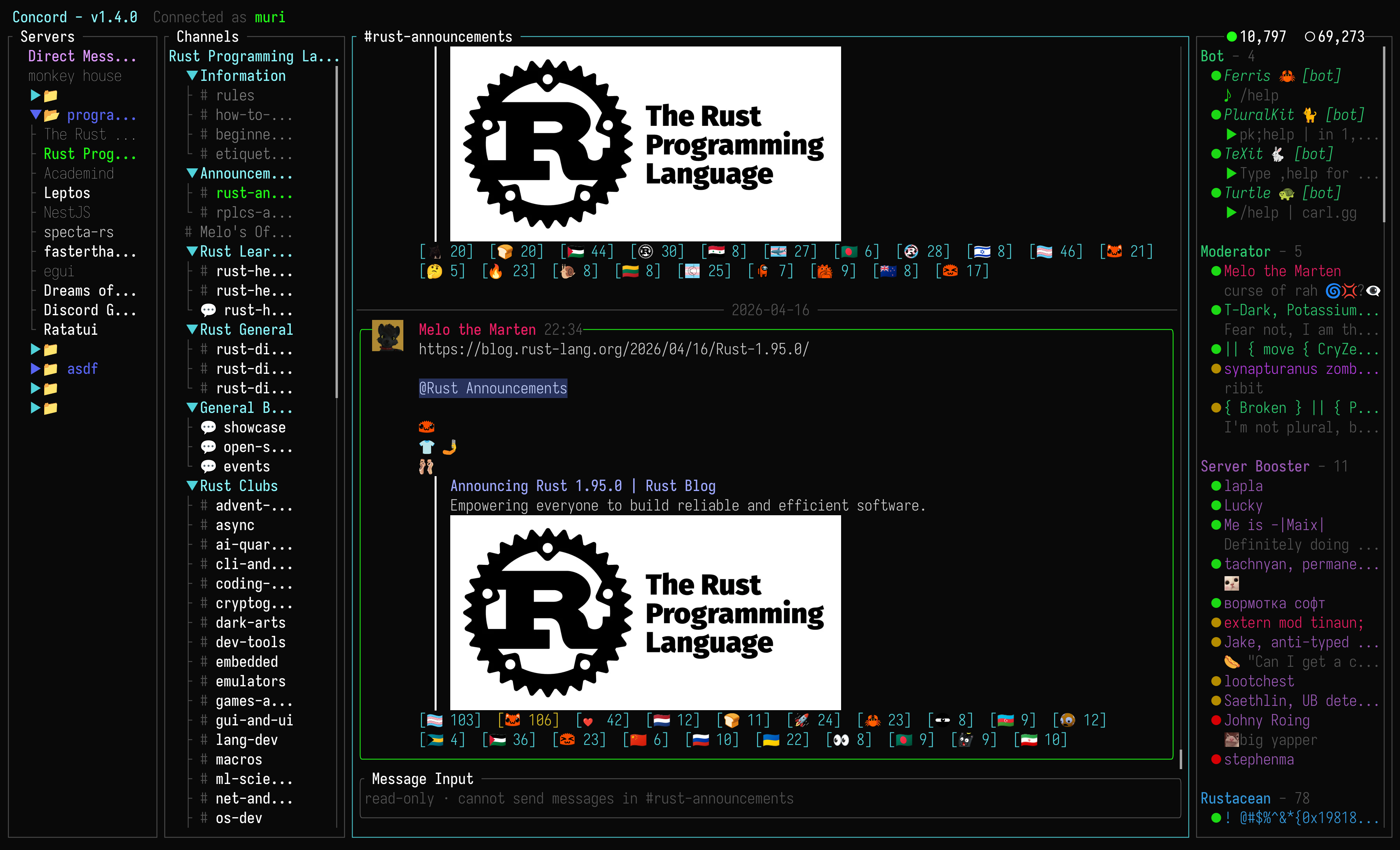
Concord is a feature-rich TUI client for Discord, written in Rust with ratatui.
Table of contents
Installation
Release builds include voice playback and stream broadcasting.
Cargo
cargo install concord --lockedCargo installations compile Concord locally and require the build dependencies listed below.
Homebrew
brew install concord
or install the latest release from tap
brew install chojs23/tap/concord
npm
npm install -g @chojs23/concordNix
# nixpkgs
nix profile install nixpkgs#concord-tui
Latest GitHub release
nix profile install github:chojs23/concord
Gentoo
This package is maintained by a community contributor and is not yet available in Gentoo GURU.
Install the darwincereska overlay:
eselect repository add darwincereska git https://codeberg.org/darwincereska/gentoo-overlay.git
emaint sync -r darwincereska
emerge -av net-im/concord
Prebuilt releases
Download an archive for Linux, macOS, or Windows from the latest GitHub release, or run the release installer:
curl --proto '=https' --tlsv1.2 -LsSf https://github.com/chojs23/concord/releases/latest/download/concord-installer.sh | shpowershell -ExecutionPolicy Bypass -c "irm https://github.com/chojs23/concord/releases/latest/download/concord-installer.ps1 | iex"The installer places concord under $CARGO_HOME/bin.
Runtime requirements
macOS 13 or later is required. Linux release builds need these packages:
# Fedora
sudo dnf install alsa-lib libva mesa-libEGL pipewire-libs xdg-desktop-portal
Debian or Ubuntu
sudo apt install libasound2 libegl1 libpipewire-0.3-0 libva-drm2 libva2 xdg-desktop-portal
Arch Linux
sudo pacman -S alsa-lib libva mesa pipewire xdg-desktop-portal
Screen sharing requires the portal backend for your desktop environment. Concord uses native H.264 hardware encoding when available: VA API on Linux, VideoToolbox on macOS, and Media Foundation on Windows. If hardware encoding is unavailable, Concord falls back to software encoding.
Build from source
Build dependencies and commands
Install the Rust stable toolchain and the native dependencies for your platform:
# macOS
xcode-select --install
brew install cmake pkg-config
brew install nasm # Intel only
Fedora
sudo dnf install alsa-lib-devel clang-devel cmake gcc gcc-c++ libva-devel nasm pipewire-devel pkgconf-pkg-config
Debian or Ubuntu
sudo apt install build-essential cmake libasound2-dev libclang-dev libpipewire-0.3-dev libva-dev nasm pkg-config
Arch Linux
sudo pacman -S alsa-lib base-devel clang cmake libva mesa nasm pipewire pkgconf
Windows source builds require the MSVC Rust toolchain, Visual Studio 2022 Build Tools with Desktop development with C++, CMake, and NASM.
git clone https://github.com/chojs23/concord.git
cd concord
cargo build --release
To keep voice support without stream broadcasting:
cargo build --release --no-default-features --features voice-playbackTo build without local voice playback, microphone, or stream broadcasting:
cargo build --release --no-default-featuresThe same feature flags can be passed to cargo install concord --locked.
Features
Authentication
- Token : paste an existing Discord token.
- Email / Password : login with credentials. MFA (TOTP, SMS) is fully supported.
- QR Code : scan the code from the Discord mobile app.
- CONCORDTOKEN env var : set
CONCORDTOKEN=your-tokenbefore launching Concord. It overrides everycredentials.storemode (auto,keychain,plain).
By default, tokens are saved in the system keychain when available. In the default auto mode, Concord falls back to its state directory when keychain storage is unavailable. See the Security section below for details.
Voice calls
- Voice calls with push-to-talk
- Noise suppression
- Watch and broadcast screen shares
Guilds & Channels
- View, filter, and create forum/media posts (active / archived)
- Switch channels, threads, and posts with the fuzzy channel switcher (
Space,Space)
Messaging
- Search messages with filters using
/ @mentionautocomplete- Send custom emoji your account cannot use directly as image links when enabled
- Rich content display (embeds, attachments, stickers, and mentions)
- Detect URLs in message bodies and markdown links, then open them in your default browser
Markdown Rendering & Code syntax highlighting
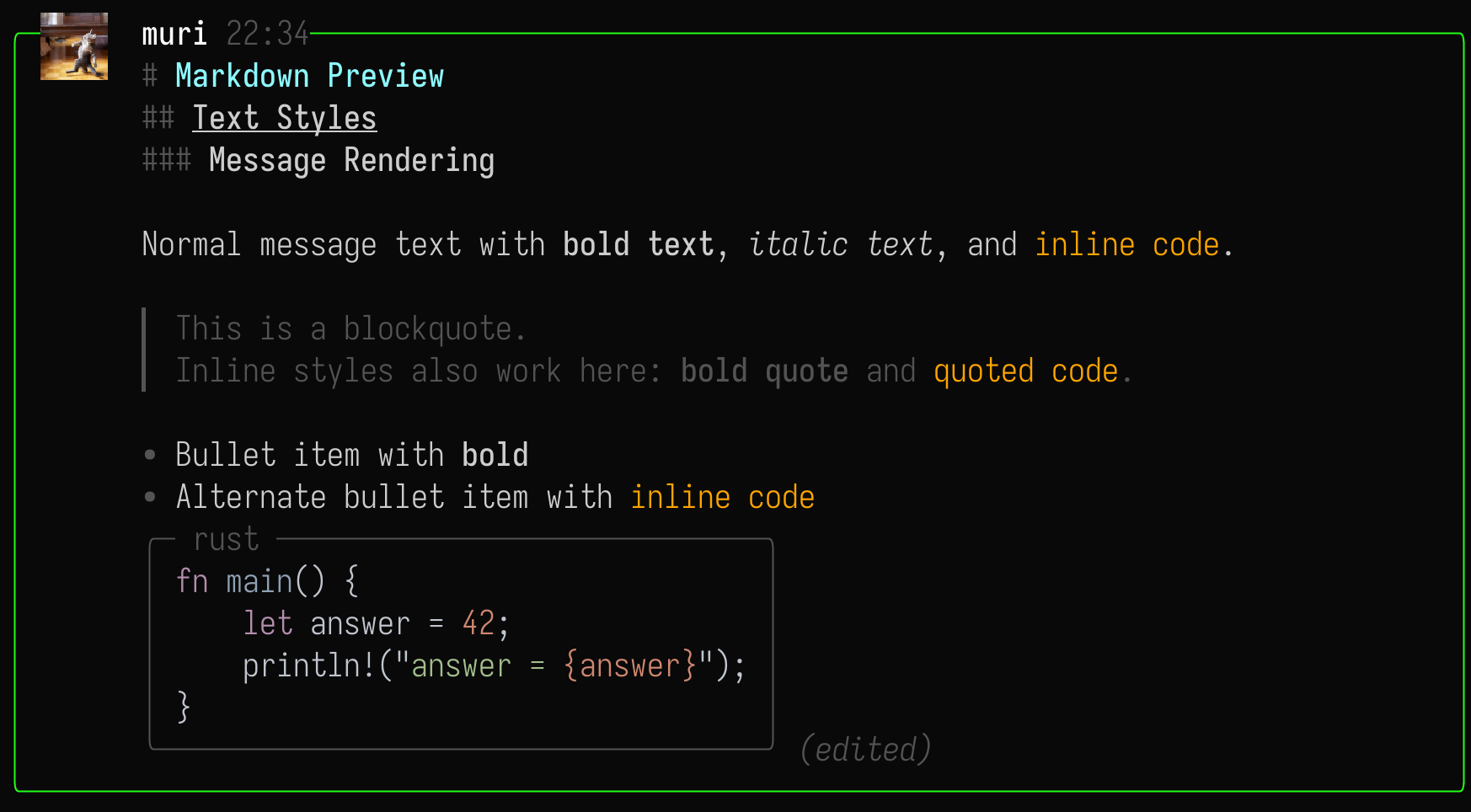
Concord renders a practical subset of Discord-style Markdown in message bodies:
- Headings:
# H1,## H2,### H3 - Quotes:
> quoted text - Bullets:
- itemand* item - Inline styles:
bold,italic,underline,strikethrough - Fenced code blocks with optional language labels, rendered as compact boxes with syntax highlighting
- Raw URLs and markdown link destinations are underlined and can be opened from message actions
Media Support
Image rendering is powered by ratatui-image. On startup, Concord queries the terminal to detect the best available graphics protocol. Supported protocols:
- Kitty Graphics Protocol - Kitty, WezTerm, Ghostty, etc.
- iTerm2 Inline Images - iTerm2, WezTerm, mintty, etc.
- Sixel - foot, mlterm, xterm (if compiled with Sixel support), etc.
- Halfblocks (fallback) - works on any terminal, but uses block characters instead of true pixels.
External media playback is off by default. You can enable it with Display options menu. Video and audio playback, including live streams, uses mpv. Make sure mpv is installed and in your PATH. YouTube playback depends on your local mpv setup, such as yt-dlp support.
To broadcast, join a voice channel, open its channel actions, choose Share screen or use voice shortcut. Linux screen capture depends on the active X11 or Wayland support.
Rich Presence
- Concord serves the local discord-ipc
socket, detects connected apps, and
- Only apps that speak Discord's Rich Presence (RPC/IPC) protocol are detected.
- Toggle with sharerichpresence
under[presence]inconfig.toml
Notifications
- Notification inbox (
n ) with Unreads and Mentions tabs. - Custom notification sounds using WAV files
- Voice join and leave notification sounds while you are connected to voice
Navigation & Keyboard shortcuts
> ⚠️ Keymap action names and default bindings may have breaking changes between releases.
All default key settings in this section can be customized. See Keymap options for the config and supported actions.
With default vim-style navigation:
| Key | Action | | ----------------------------------------- | ----------------------------------------------- | | 1 2 3 4 | Focus pane | | Tab / Shift+Tab | Cycle focus forward / backward | | h / l, ← / → | Move focus left / right | | j / k, ↑ / ↓, Ctrl+n / Ctrl+p | Move down / up | | J, K / H, L | Scroll viewport | | Ctrl+d / Ctrl+u | Half-page scroll | | Alt+h/l/←/→ | Resize focused pane width | | gg / G | Jump or scroll to top / bottom | | Enter | Open or activate the selected item | | / | Filter Guilds/Channels, search Messages/Members | | Space | Open leader shortcut window | | i | Text insert mode, or forum post composer | | Esc / q | Close popup, cancel mode, or go back | | q | Quit Concord |
Ctrl+n and Ctrl+p are fixed row movement keys. The default j and k row movement keys are SelectNext and SelectPrevious and can be changed in keymap.toml.
Leader key
Press Space to open the leader shortcut window.
| Key sequence | Action | | ---------------- | --------------------------------- | | Space, 1 | Toggle the Servers pane | | Space, 2 | Toggle the Channels pane | | Space, 4 | Toggle the Members pane | | Space, a | Open actions for the focused pane | | Space, p | Open my profile settings | | Space, o | Choose concord option category | | Space, n | Open the notification inbox | | Space, v | Open voice shortcuts | | Space, Space | Open the fuzzy channel switcher |
Message shortcuts
These shortcuts act on the selected message when the Messages pane is focused.
| Key | Action | | --- | -------------------------- | | y | Copy message text | | r | Add or remove a reaction | | R | Reply | | d | Delete | | e | Edit | | o | Open URL | | x | Play video or audio | | v | Open the attachment viewer |
Action menus
Press Space, a to open actions for the focused pane. The menu shows the available shortcuts and dims actions that do not apply to the current selection.
Composer
The composer supports copied file attachments and editing the current draft in $EDITOR. Pending uploads appear above the input before sending.
Emoji picker
Supports searching and selecting emoji with the picker. Press : to open the picker, then type to filter.
When emojisaslinks is enabled, custom emoji your account cannot send directly are inserted as Discord image links instead.
Bot commands
When the composer input starts with /, Concord shows available application commands.
Configuration
Concord reads config.toml, keymap.toml, and theme.toml from $XDGCONFIGHOME/concord when XDGCONFIGHOME is set, or from the platform config directory otherwise.
Machine-local UI state and fallback credentials are stored in $XDGSTATEHOME/concord, or in ~/.local/state/concord when XDGSTATEHOME is not set.
App options
<details> <summary>Default config</summary>
<pre><code class="lang-toml">[display]
Image protocol: auto, iterm2, kitty, sixel, or halfblocks.
image_protocol = "auto"Master switch that hides all image previews when true.
disableimagepreview = falseShow user avatars next to messages and in profile views.
show_avatars = trueRender inline image previews for attachments and embeds.
show_images = trueAllow video and audio media to open in an external player.
media_playback = falsePreview quality: efficient, balanced, high, or original.
imagepreviewquality = "balanced"Attachment viewer quality: efficient, balanced, high, or original.
attachmentviewerquality = "original"Render custom Discord emoji as images when possible.
showcustomemoji = trueCrop avatars into circles instead of showing square images.
circular_avatars = false[composer]
Send custom emoji your account cannot use directly as image links.
emojisaslinks = false[presence]
Relay Rich Presence from local apps as your activity.
sharerichpresence = true[credentials]
Credential storage: auto, keychain, or plain.
auto tries the system keychain first and falls back to the state file.
store = "auto"[notifications]
Show desktop notifications for Discord messages that pass notification rules.
desktop_notifications = trueOptional notification icon to include in notifications. May not work on all platforms.
When unset, no icon is used. It must either be a name of an icon (typically in /usr/share/icons)
or a path to an icon.
notification_icon = "/path/to/icon.svg"Optional WAV files for message, voice join/leave notification sounds.
When unset, Concord uses built-in generated tones.
notification_sound = "/path/to/message.wav" voicejoinsound = "/path/to/join.wav" voiceleavesound = "/path/to/leave.wav"[voice]
Join or update Discord voice with Concord self-muted.
self_mute = falseJoin or update Discord voice with Concord self-deafened.
self_deaf = falseOptional CPAL device IDs chosen from Voice Options. When omitted or no longer
available, Concord uses the current system default input or output device.
input_source = "CoreAudio:input-id"
output_source = "CoreAudio:output-id"
Allow microphone transmit while this session is joined and not self-muted.
allowmicrophonetransmit = falseRequire holding the configured shortcut to transmit.
pushtotalk = falseGlobal push-to-talk shortcut. The key works even when Concord is not focused.
Modifiers can be combined before the key, for example "control+shift+F8".
pushtotalk_shortcut = "F8"Reduce steady background microphone noise.
noise_suppression = trueVoice activity threshold in dB. Lower values transmit quieter input.
microphone_sensitivity = -30Microphone input volume percentage, from 0 to 200.
microphone_volume = 100Received voice playback volume percentage, from 0 to 200.
voiceoutputvolume = 100</code></pre>macOS may require Input Monitoring permission for Concord or the terminal that started it. On Linux Wayland, the compositor manages global shortcuts, so Concord cannot guarantee that the shortcut input also reaches the focused application.
</details><br>
Key bindings
See Keymap options for the config format and supported actions.
<details> <summary>Default keymap config</summary>
<pre><code class="lang-toml">[keymap] leader = "space" StartComposer = "i" OpenPaneFilter = "/" ClosePopup = "q" OpenDebugLog = "" FocusGuildPane = "1" FocusChannelPane = "2" FocusMessagePane = "3" FocusMemberPane = "4" SelectNext = "j" SelectPrevious = "k" CycleFocusNext = { keys = ["tab", "l", "right"] } CycleFocusPrevious = { keys = ["<S-tab>", "h", "left"] } HalfPageDown = "<C-d>" HalfPageUp = "<C-u>" ScrollViewportDown = "J" ScrollViewportUp = "K" JumpTop = "gg" JumpBottom = "G" ScrollHorizontalLeft = "H" ScrollHorizontalRight = "L" ResizePaneLeft = { keys = ["<A-h>", "<A-left>"] } ResizePaneRight = { keys = ["<A-l>", "<A-right>"] } Quit = "q" CopyMessage = "y" ReactMessage = "r" ReplyMessage = "R" DeleteMessage = "d" EditMessage = "e" OpenMessageUrl = "o" PlayMedia = "x" ViewMessageAttachment = "v" ToggleGuildPane = "<leader>1" ToggleChannelPane = "<leader>2" ToggleMemberPane = "<leader>4" OpenFocusedPaneAction = "<leader>a" OpenCurrentUserProfile = "<leader>p" OpenOptions = "<leader>o" OpenNotificationInbox = "<leader>n" ChannelSwitcher = "<leader><leader>" VoiceDeafen = "<leader>vd" VoiceMute = "<leader>vm" ToggleStream = "<leader>vs" VoiceLeave = "<leader>vl"
[keymap.groups] "<leader>v" = "Voice"
[keymap.notificationinboxactions] MarkRead = "r" MarkAllRead = "a"
[keymap.guild_actions] MarkAsRead = "m" ToggleMute = "u" LeaveServer = "l" FolderSettings = "r"
[keymap.channel_actions] JoinVoice = "e" LeaveVoice = "l" ToggleStream = "s" WatchStream = "w" VoiceParticipantAudio = "a" ShowPinnedMessages = "p" ShowThreads = "t" MarkAsRead = "m" ToggleMute = "u"
[keymap.message_actions] CopyMessage = "y" ReactMessage = "r" ReplyMessage = "R" DeleteMessage = "d" EditMessage = "e" OpenMessageUrl = "o" RemoveMessageEmbeds = "D" PlayMedia = "x" ViewMessageAttachment = "v" GoToReferencedMessage = "g" ShowMessageProfile = "p" PinMessage = "P" OpenThread = "t" ShowReactionUsers = "u" OpenPollVotePicker = "c"
[keymap.member_actions] ShowProfile = "p"
[keymap.thread_actions] MarkAsRead = "m" ToggleFollow = "f" Close = "c" Lock = "l" Edit = "e" CopyLink = "y" ToggleMute = "u" NotificationSettings = "n" Pin = "P" Delete = "d" CopyId = "i"
[keymap.composer] OpenEditor = "<C-e>" PasteClipboard = "<C-v>" InsertNewline = { keys = ["<C-j>", "<S-enter>", "<C-enter>", "<A-enter>"] } Submit = "enter" Close = "esc" ClearInput = "<C-c>" RemoveLastAttachment = "delete" DeletePreviousChar = "backspace" DeletePreviousWord = { keys = ["<A-backspace>", "<C-backspace>", "<C-w>"] } DeleteToLineStart = "<C-u>" DeleteToLineEnd = "<C-k>" MoveCursorUp = "up" MoveCursorDown = "down" MoveCursorWordLeft = "<C-left>" MoveCursorLeft = "left" MoveCursorWordRight = "<C-right>" MoveCursorRight = "right" MoveCursorHome = "home" MoveCursorEnd = "end" ToggleReplyPing = "<A-p>"
Theme
See Theme options for available groups, values, and border shapes.
Default theme config
# Complete Highlight Group reference with Concord's built-in defaults.
Copy this configuration to theme.toml in the Concord config directory,
then keep only the groups you want to override.
#
A group accepts link, foreground, background, bold, italic, dim,
underline, and strikethrough. Colors accept none, terminal_default, a
canonical lowercase ANSI name, or six-digit RGB such as #39ff14. none
clears that color channel after inheritance. A linked group inherits fields
it does not set. Use link = "none" to detach a built-in link.
Border shapes are UI geometry rather than Highlight Group styles. An omitted
surface uses default. These values reproduce Concord's built-in layout.
[ui.border]
default = "plain"
composer = "rounded"
message = "rounded"
forum = "rounded"
[highlight.Normal] foreground = "terminal_default" background = "terminal_default"
[highlight.Strong] bold = true
[highlight.Emphasis] italic = true
[highlight.Muted] dim = true
[highlight.Title] link = "Strong"
[highlight.Heading] link = "Strong"
[highlight.Decoration] link = "Muted"
[highlight.Hint] link = "Muted"
[highlight.Description] link = "Muted"
[highlight.Shortcut] link = "Muted"
[highlight.Activity] link = "Muted"
[highlight.ChannelTypeMarker] link = "Muted"
[highlight.FieldLabel] link = "Muted"
[highlight.SearchContext] link = "Muted"
[highlight.Timestamp] link = "Muted"
[highlight.Placeholder] link = "Muted"
[highlight.Disabled] link = "Muted"
[highlight.Loading] link = "Muted"
[highlight.Edited] link = "Muted" italic = true
[highlight.Unavailable] link = "Muted" strikethrough = true
[highlight.LoginTitle] link = "Title" foreground = "cyan"
[highlight.LoginHint] link = "Muted"
[highlight.PaneTitle] link = "Title"
[highlight.ModalTitle] link = "Title"
[highlight.ComposerTitle] link = "Title"
[highlight.HeaderTitle] link = "Title" foreground = "cyan"
[highlight.HeaderLabel] link = "Muted"
[highlight.MessageAuthor] link = "Strong"
[highlight.MessageTimestamp] link = "Timestamp"
[highlight.CategoryHeading] link = "Heading"
[highlight.MemberGroupHeading] link = "Heading"
[highlight.MessageSecondary] link = "Muted"
[highlight.ForumSecondary] link = "Muted"
[highlight.EmbedAuthor] link = "Emphasis"
[highlight.EmbedTitle] link = "Strong" foreground = "blue"
[highlight.EmbedFieldName] link = "Strong" underline = true
[highlight.EmbedFooter] link = "Muted" italic = true
[highlight.CodeBlockBorder] link = "Border" dim = true
[highlight.ScrollbarTrack] link = "ScrollbarThumb" dim = true
[highlight.UnavailableEmoji] link = "Unavailable"
[highlight.HeaderError] link = "Error" bold = true
[highlight.HeaderWarning] link = "Warning" bold = true
[highlight.Border] foreground = "dark_gray"
[highlight.FocusBorder] foreground = "cyan"
[highlight.Selection] foreground = "cyan" background = "none" bold = true dim = false
[highlight.SelectionBorder] foreground = "green" bold = true
[highlight.PaneBorder] link = "Border"
[highlight.FocusedPaneBorder] link = "FocusBorder" bold = true
[highlight.LoginBorder] link = "FocusBorder"
[highlight.ComposerBorder] link = "Border"
[highlight.ActiveComposerBorder] link = "FocusBorder" bold = true
[highlight.ModalBorder] link = "FocusBorder" bold = true
[highlight.ComposerPickerBorder] link = "FocusBorder"
[highlight.SelectedRow] link = "Selection"
[highlight.SelectionMarker] link = "Selection"
[highlight.ActiveField] foreground = "cyan" bold = true
[highlight.ActiveTab] link = "Selection"
[highlight.MessageSelectedBorder] link = "SelectionBorder"
[highlight.ForumBorder] link = "FocusBorder"
[highlight.ForumSelectedBorder] link = "SelectionBorder"
[highlight.ScrollbarThumb] foreground = "#AAAAAA"
[highlight.UnreadNotice] foreground = "cyan" bold = true
[highlight.Editing] foreground = "yellow"
[highlight.Reaction] foreground = "cyan"
[highlight.SelfReaction] foreground = "yellow"
[highlight.PresenceOnline] foreground = "green"
[highlight.PresenceIdle] foreground = "#B48C00"
[highlight.PresenceDnd] foreground = "red"
[highlight.PresenceOffline] link = "Normal" dim = true
[highlight.VoiceDisabled] foreground = "yellow"
[highlight.VoiceConnection] foreground = "yellow" bold = true
[highlight.FolderFallback] foreground = "cyan"
[highlight.NavigationActive] foreground = "green" bold = true
[highlight.NavigationMentioned] foreground = "#FFA500"
[highlight.NavigationNotified] foreground = "terminal_default"
[highlight.NavigationUnread] foreground = "terminal_default"
[highlight.MentionBadge] foreground = "#FFA500"
[highlight.NotificationBadge] foreground = "terminal_default"
[highlight.JoinedVoiceChannel] foreground = "yellow" bold = true
[highlight.VoiceSpeaking] foreground = "green" bold = true
[highlight.ReplyPingEnabled] foreground = "cyan"
[highlight.Tag] foreground = "cyan"
[highlight.RelationshipFriend] foreground = "green"
[highlight.RelationshipIncoming] foreground = "yellow"
[highlight.RelationshipOutgoing] foreground = "yellow"
[highlight.RelationshipBlocked] foreground = "red"
[highlight.RelationshipNone] foreground = "terminal_default" dim = true
[highlight.GaugeFill] foreground = "cyan"
[highlight.MessageBody] foreground = "terminal_default"
[highlight.MarkdownHeading1] link = "Heading" foreground = "cyan"
[highlight.MarkdownHeading2] link = "Heading" underline = true
[highlight.MarkdownHeading3] link = "Heading"
[highlight.MarkdownQuote] foreground = "dark_gray"
[highlight.MarkdownMarker] foreground = "dark_gray"
[highlight.MessageAttachment] foreground = "cyan"
[highlight.ImageOverflow] link = "MessageAttachment" bold = true
[highlight.InlineCode] foreground = "#FFA500"
[highlight.MessageLink] foreground = "cyan" underline = true
[highlight.MentionSelf] foreground = "yellow" background = "#5C4C23"
[highlight.MentionOther] foreground = "#C1CEF7" background = "#28325C"
[highlight.MentionRole] Discord supplies the foreground and a darker role-color background by default. This group controls colored role mentions that do not notify the current user. Notifying role mentions use MentionSelf with the Discord role foreground.
[highlight.MentionPickerRole] foreground = "magenta"
[highlight.EmbedGutter] foreground = "red"
[highlight.EmbedLink] foreground = "blue" underline = true
[highlight.CommandName] link = "MessageSecondary" foreground = "#5865F2"
[highlight.SystemThreadName] foreground = "cyan" bold = true
[highlight.PollAnswerSelected] foreground = "terminal_default" bold = true
[highlight.PollWinner] foreground = "terminal_default" bold = true
[highlight.UnreadBanner] foreground = "terminal_default" background = "#5865F2"
[highlight.UnreadDivider] foreground = "#ED4245"
[highlight.ForumPinnedBadge] foreground = "yellow" bold = true
[highlight.BotBadge] link = "Normal" background = "#5865F2" bold = true
[highlight.Error] foreground = "red"
[highlight.Warning] foreground = "yellow"
[highlight.Success] foreground = "green"
[highlight.Info] foreground = "cyan"
Performance
Concord is designed to stay lightweight in normal terminal use. In observed typical use, it usually uses about 20-40 MB of memory.
Image-heavy screens can temporarily use more memory because compressed image bytes need to be decoded before they can be rendered in the terminal. When many images are loaded, memory can briefly rise to around 100-200 MB while decoding and then drop again as work completes and caches are pruned.
Debug mode
Run CONCORD_DEBUG=1 concord. Logs are written to concord.log in the Concord config directory.
FAQ
Can my account be blocked?
There are some path that did trigger a temporary block:
- If your account is new or has a low reputation, some actions may trigger a block.
- Trying to create a new DM channel and send a message to an unknown user(meaning there was no pre-existing DM created through the Discord client) can immediately block your account temporarily.
- Sending a message in an existing one-to-one DM may also trigger a temporary account block if you only recently started messaging that person or have little conversation history with them.
- Some features that requires a hCapcha challenge.
That said, Concord is not an official Discord client. Using unofficial clients, automated user accounts, or self-bots can violate Discord's TOS, so there is always some risk. Use it at your own discretion.
Security
- By default, tokens are stored in the system keychain when available.
- The
CONCORD_TOKENenvironment variable lets you provide a token without writing it to disk. This avoids leaving plaintext on disk, but the token is visible in/proc/<pid>/environand in process listings while Concord is running. - In
credentials.store = "auto", Concord falls back to plain text credentials under Concord's state directory when keychain storage is unavailable. Inkeychainmode, Concord does not fall back to plain storage. Keep fallback credential files secure and do not share them. You can use a token from that file to log in to the official Discord client, so treat it like a password. - On Unix, the fallback credential's parent directory is created with
0700and the credential file with0600permissions.
Contributing
Any issues, pull requests, and feedback are welcome. See CONTRIBUTING.md for details.
License
Concord is licensed under GPL-3.0-only.


