
🪶 Lightweight OpenAI drop-in replacement for Kubernetes
ialacol (l-o-c-a-l-a-i)
🚧 being rewritten from Python to Rust/WebAssembly, see details
Introduction
ialacol (pronounced "localai") is a lightweight drop-in replacement for OpenAI API.
It is an OpenAI API-compatible wrapper ctransformers supporting GGML/GPTQ with optional CUDA/Metal acceleration.
ialacol is inspired by other similar projects like LocalAI, privateGPT, local.ai, llama-cpp-python, closedai, and mlc-llm, with a specific focus on Kubernetes deployment.
Features
- Compatibility with OpenAI APIs, compatible with langchain.
- Lightweight, easy deployment on Kubernetes clusters with a 1-click Helm installation.
- Streaming first! For better UX.
- Optional CUDA acceleration.
- Compatible with Github Copilot VSCode Extension, see Copilot
Supported Models
See Receipts below for instructions of deployments.
- LLaMa 2 variants, including OpenLLaMA, Mistral, openchat3.5 and zephyr.
- StarCoder variants
- WizardCoder
- StarChat variants
- MPT-7B
- MPT-30B
- Falcon
UI
ialacol does not have a UI, however it's compatible with any web UI that support OpenAI API, for example chat-ui after PR #541 merged.
Assuming ialacol running at port 8000, you can configure chat-ui to use zephyr-7b-beta.Q4KM.gguf served by ialacol.
MODELS=[ { "name": "zephyr-7b-beta.Q4KM.gguf", "displayName": "Zephyr 7B β", "preprompt": "<|system|>\nYou are a friendly chatbot who always responds in the style of a pirate.</s>\n", "userMessageToken": "<|user|>\n", "userMessageEndToken": "</s>\n", "assistantMessageToken": "<|assistant|>\n", "assistantMessageEndToken": "\n", "parameters": { "temperature": 0.1, "top_p": 0.95, "repetition_penalty": 1.2, "top_k": 50, "maxnewtokens": 4096, "truncate": 999999 }, "endpoints" : [{ "type": "openai", "baseURL": "http://localhost:8000/v1", "completion": "chat_completions" }] } ]</code></pre>
openchat3.5.Q4K_M.gguf <pre><code class="lang-shell">MODELS=
[ { "name": "openchat3.5.Q4K_M.gguf", "displayName": "OpenChat 3.5", "preprompt": "", "userMessageToken": "GPT4 User: ", "userMessageEndToken": "<|endofturn|>", "assistantMessageToken": "GPT4 Assistant: ", "assistantMessageEndToken": "<|endofturn|>", "parameters": { "temperature": 0.1, "top_p": 0.95, "repetition_penalty": 1.2, "top_k": 50, "maxnewtokens": 4096, "truncate": 999999, "stop": ["<|endofturn|>"] }, "endpoints" : [{ "type": "openai", "baseURL": "http://localhost:8000/v1", "completion": "chat_completions" }] } ]</code></pre>
Blogs
- Use Code Llama (and other open LLMs) as Drop-In Replacement for Copilot Code Completion
- Containerized AI before Apocalypse 🐳🤖
- Deploy Llama 2 AI on Kubernetes, Now
- Cloud Native Workflow for Private MPT-30B AI Apps
- Offline AI 🤖 on Github Actions 🙅♂️💰
Quick Start
Kubernetes
ialacol offer first class citizen support for Kubernetes, which means you can automate/configure everything compare to runing without.
To quickly get started with ialacol on Kubernetes, follow the steps below:
<pre><code class="lang-sh">helm repo add ialacol https://chenhunghan.github.io/ialacol helm repo update helm install llama-2-7b-chat ialacol/ialacol</code></pre>
By defaults, it will deploy Meta's Llama 2 Chat model quantized by TheBloke.
Port-forward
<pre><code class="lang-sh">kubectl port-forward svc/llama-2-7b-chat 8000:8000</code></pre>
Chat with the default model
llama-2-7b-chat.ggmlv3.q4_0.bin using curl
<pre><code class="lang-sh">curl -X POST \ -H 'Content-Type: application/json' \ -d '{ "messages": [{"role": "user", "content": "How are you?"}], "model": "llama-2-7b-chat.ggmlv3.q4_0.bin", "stream": false}' \ http://localhost:8000/v1/chat/completions</code></pre>
Alternatively, using OpenAI's client library (see more examples in the
examples/openai folder).
<pre><code class="lang-sh">openai -k "sk-fake" \ -b http://localhost:8000/v1 -vvvvv \ api chatcompletions.create -m llama-2-7b-chat.ggmlv3.q40.bin \ -g user "Hello world!"</code></pre>
Configuration
All configuration is done via environmental variable.
| Parameter | Description | Default | Example | | :----------------------------------| :------------------------------------------------------------------- | :------ | :--------------------------------------------------------------------------- | |
DEFAULTMODELHGREPOID | The Hugging Face repo id to download the model | None | TheBloke/orcamini3B-GGML | | DEFAULTMODELHGREPOREVISION | The Hugging Face repo revision | main | gptq-4bit-32g-actorder_True | | DEFAULTMODELFILE | The file name to download from the repo, optional for GPTQ models | None | orca-mini-3b.ggmlv3.q4_0.bin | | MODETYPE | Model type to override the auto model type detection | None | gptq, gptbigcode, llama, mpt, replit, falcon, gpt_neox gptj | | LOGGING_LEVEL | Logging level | INFO | DEBUG | | TOP_K | top-k for sampling. | 40 | Integers | | TOP_P | top-p for sampling. | 1.0 | Floats | | REPETITION_PENALTY | rp for sampling. | 1.1 | Floats | | LASTNTOKENS | The last n tokens for repetition penalty. | 1.1 | Integers | | SEED | The seed for sampling. | -1 | Integers | | BATCH_SIZE | The batch size for evaluating tokens, only for GGUF/GGML models | 8 | Integers | | THREADS | Thread number override auto detect by CPU/2, set 1 for GPTQ models | Auto | Integers | | MAX_TOKENS | The max number of token to generate | 512 | Integers | | STOP | The token to stop the generation | None | <|endoftext> | | CONTEXT_LENGTH | Override the auto detect context length | 512 | Integers | | GPU_LAYERS | The number of layers to off load to GPU | 0 | Integers | | TRUNCATEPROMPTLENGTH | Truncate the prompt if set | 0 | Integers |
Sampling parameters including
TOPK, TOPP, REPETITIONPENALTY, LASTNTOKENS, SEED, MAXTOKENS, STOP can be override per request via request body, for example:
<pre><code class="lang-sh">curl -X POST \ -H 'Content-Type: application/json' \ -d '{ "messages": [{"role": "user", "content": "Tell me a story."}], "model": "llama-2-7b-chat.ggmlv3.q40.bin", "stream": false, "temperature": "2", "topp": "1.0", "top_k": "0" }' \ http://localhost:8000/v1/chat/completions</code></pre>
will use
temperature=2, topp=1 and topk=0for this request.
Run in Container
Image from Github Registry
There is a image hosted on ghcr.io (alternatively CUDA11,CUDA12,METAL,GPTQ variants).
<pre><code class="lang-sh">docker run --rm -it -p 8000:8000 \ -e DEFAULTMODELHGREPOID="TheBloke/Llama-2-7B-Chat-GGML" \ -e DEFAULTMODELFILE="llama-2-7b-chat.ggmlv3.q4_0.bin" \ ghcr.io/chenhunghan/ialacol:latest</code></pre>
From Source
For developers/contributors
Python
<pre><code class="lang-bash">python3 -m venv .venv source .venv/bin/activate python3 -m pip install -r requirements.txt DEFAULTMODELHGREPOID="TheBloke/stablecode-completion-alpha-3b-4k-GGML" DEFAULTMODELFILE="stablecode-completion-alpha-3b-4k.ggmlv1.q40.bin" LOGGINGLEVEL="DEBUG" THREAD=4 uvicorn main:app --reload --host 0.0.0.0 --port 9999</code></pre>
Docker
Build image
<pre><code class="lang-sh">docker build --file ./Dockerfile -t ialacol .</code></pre>
Run container
<pre><code class="lang-sh">export DEFAULTMODELHGREPOID="TheBloke/orcamini3B-GGML" export DEFAULTMODELFILE="orca-mini-3b.ggmlv3.q4_0.bin" docker run --rm -it -p 8000:8000 \ -e DEFAULTMODELHGREPOID=$DEFAULTMODELHGREPOID \ -e DEFAULTMODELFILE=$DEFAULTMODELFILE ialacol</code></pre>
GPU Acceleration
To enable GPU/CUDA acceleration, you need to use the container image built for GPU and add
GPULAYERS environment variable. GPULAYERS is determine by the size of your GPU memory. See the PR/discussion in llama.cpp to find the best value.
CUDA 11
deployment.image = ghcr.io/chenhunghan/ialacol-cuda11:latest
deployment.env.GPU_LAYERS is the layer to off loading to GPU.
CUDA 12
deployment.image = ghcr.io/chenhunghan/ialacol-cuda12:latest
deployment.env.GPU_LAYERS is the layer to off loading to GPU.
Only llama, falcon, mpt and gpt_bigcode(StarCoder/StarChat) support CUDA.
Llama with CUDA12
<pre><code class="lang-sh">helm install llama2-7b-chat-cuda12 ialacol/ialacol -f examples/values/llama2-7b-chat-cuda12.yaml</code></pre>
Deploys llama2 7b model with 40 layers offloadind to GPU. The inference is accelerated by CUDA 12.
StarCoderPlus with CUDA12
<pre><code class="lang-sh">helm install starcoderplus-guanaco-cuda12 ialacol/ialacol -f examples/values/starcoderplus-guanaco-cuda12.yaml</code></pre>
Deploys Starcoderplus-Guanaco-GPT4-15B-V1.0 model with 40 layers offloadind to GPU. The inference is accelerated by CUDA 12.
CUDA Driver Issues
If you see
CUDA driver version is insufficient for CUDA runtime version when making the request, you are likely using a Nvidia Driver that is not compatible with the CUDA version.
Upgrade the driver manually on the node (See here if you are using CUDA11 + AMI). Or try different version of CUDA.
Metal
To enable Metal support, use the image
ialacol-metal built for metal.
deployment.image = ghcr.io/chenhunghan/ialacol-metal:latest
For example
<pre><code class="lang-sh">helm install llama2-7b-chat-metal ialacol/ialacol -f examples/values/llama2-7b-chat-metal.yaml.yaml</code></pre>
GPTQ
To use GPTQ, you must
deployment.image = ghcr.io/chenhunghan/ialacol-gptq:latest
deployment.env.MODEL_TYPE = gptq
For example
<pre><code class="lang-sh">helm install llama2-7b-chat-gptq ialacol/ialacol -f examples/values/llama2-7b-chat-gptq.yaml.yaml</code></pre>
<pre><code class="lang-sh">kubectl port-forward svc/llama2-7b-chat-gptq 8000:8000 openai -k "sk-fake" -b http://localhost:8000/v1 -vvvvv api chatcompletions.create -m gptqmodel-4bit-128g.safetensors -g user "Hello world!"</code></pre>
Tips
Copilot
ialacol can be use as a copilot client as GitHub's Copilot is almost identical API as OpenAI completion API.
However, few things need to keep in mind:
- Copilot client sends a lenthy prompt, to include all the related context for code completion, see copilot-explorer, which give heavy load on the server, if you are trying to run
ialacol locally, opt-in TRUNCATEPROMPT_LENGTH environmental variable to truncate the prompt from the beginning to reduce the workload.
- Copilot sends request in parallel, to increase the throughput, you probably need a queue like text-inference-batcher.
Start two instances of ialacol:
<pre><code class="lang-bash">gh repo clone chenhunghan/ialacol && cd ialacol && python3 -m venv .venv && source .venv/bin/activate && python3 -m pip install -r requirements.txt LOGGING_LEVEL="DEBUG" THREAD=2 DEFAULTMODELHGREPOID="TheBloke/stablecode-completion-alpha-3b-4k-GGML" DEFAULTMODELFILE="stablecode-completion-alpha-3b-4k.ggmlv1.q4_0.bin" TRUNCATEPROMPTLENGTH=100 # optional uvicorn main:app --host 0.0.0.0 --port 9998 uvicorn main:app --host 0.0.0.0 --port 9999</code></pre>
Start tib, pointing to upstream ialacol instances.
<pre><code class="lang-bash">gh repo clone ialacol/text-inference-batcher && cd text-inference-batcher && npm install UPSTREAMS="http://localhost:9998,http://localhost:9999" npm start</code></pre>
Configure VSCode Github Copilot to use tib.
<pre><code class="lang-json">"github.copilot.advanced": { "debug.overrideEngine": "stablecode-completion-alpha-3b-4k.ggmlv1.q4_0.bin", "debug.testOverrideProxyUrl": "http://localhost:8000", "debug.overrideProxyUrl": "http://localhost:8000" }</code></pre>
Creative v.s. Conservative
LLMs are known to be sensitive to parameters, the higher
temperature leads to more "randomness" hence LLM becomes more "creative", topp and topk also contribute to the "randomness"
If you want to make LLM be creative.
<pre><code class="lang-sh">curl -X POST \ -H 'Content-Type: application/json' \ -d '{ "messages": [{"role": "user", "content": "Tell me a story."}], "model": "llama-2-7b-chat.ggmlv3.q40.bin", "stream": false, "temperature": "2", "topp": "1.0", "top_k": "0" }' \ http://localhost:8000/v1/chat/completions</code></pre>
If you want to make LLM be more consistent and genereate the same result with the same input.
<pre><code class="lang-sh">curl -X POST \ -H 'Content-Type: application/json' \ -d '{ "messages": [{"role": "user", "content": "Tell me a story."}], "model": "llama-2-7b-chat.ggmlv3.q40.bin", "stream": false, "temperature": "0.1", "topp": "0.1", "top_k": "40" }' \ http://localhost:8000/v1/chat/completions</code></pre>
Roadmap
- [x] Support
starcoder model type via ctransformers, including:
- StarChat <https://huggingface.co/TheBloke/starchat-beta-GGML>
- StarCoder <https://huggingface.co/TheBloke/starcoder-GGML>
- StarCoderPlus <https://huggingface.co/TheBloke/starcoderplus-GGML>
- [x] Mimic restof OpenAI API, including
GET /models and POST /completions
[ ] GPU acceleration (CUDA/METAL)
[ ] Support POST /embeddings backed by huggingface Apache-2.0 embedding models such as Sentence Transformers and hkunlp/instructor
[ ] Suuport Apache-2.0 fastchat-t5-3b
[ ] Support more Apache-2.0 models such as codet5p and others listed here
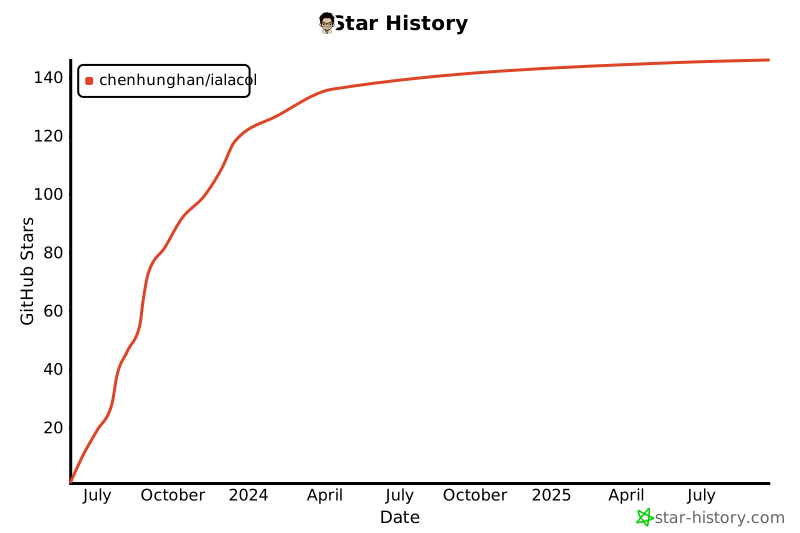
Star History
Receipts
Llama-2
Deploy Meta's Llama 2 Chat model quantized by TheBloke.
7B Chat
<pre><code class="lang-sh">helm repo add ialacol https://chenhunghan.github.io/ialacol helm repo update helm install llama2-7b-chat ialacol/ialacol -f examples/values/llama2-7b-chat.yaml</code></pre>
13B Chat
<pre><code class="lang-sh">helm repo add ialacol https://chenhunghan.github.io/ialacol helm repo update helm install llama2-13b-chat ialacol/ialacol -f examples/values/llama2-13b-chat.yaml</code></pre>
70B Chat
<pre><code class="lang-sh">helm repo add ialacol https://chenhunghan.github.io/ialacol helm repo update helm install llama2-70b-chat ialacol/ialacol -f examples/values/llama2-70b-chat.yaml</code></pre>
OpenLM Research's OpenLLaMA Models
Deploy OpenLLaMA 7B model quantized by rustformers.
ℹ️ This is a base model, likely only useful for text completion.
<pre><code class="lang-sh">helm repo add ialacol https://chenhunghan.github.io/ialacol helm repo update helm install openllama-7b ialacol/ialacol -f examples/values/openllama-7b.yaml</code></pre>
VMWare's OpenLlama 13B Open Instruct
Deploy OpenLLaMA 13B Open Instruct model quantized by TheBloke.
<pre><code class="lang-sh">helm repo add ialacol https://chenhunghan.github.io/ialacol helm repo update helm install openllama-13b-instruct ialacol/ialacol -f examples/values/openllama-13b-instruct.yaml</code></pre>
Mosaic's MPT Models
Deploy MosaicML's MPT-7B model quantized by rustformers. ℹ️ This is a base model, likely only useful for text completion.
<pre><code class="lang-sh">helm repo add ialacol https://chenhunghan.github.io/ialacol helm repo update helm install mpt-7b ialacol/ialacol -f examples/values/mpt-7b.yaml</code></pre>
Deploy MosaicML's MPT-30B Chat model quantized by TheBloke.
<pre><code class="lang-sh">helm repo add ialacol https://chenhunghan.github.io/ialacol helm repo update helm install mpt-30b-chat ialacol/ialacol -f examples/values/mpt-30b-chat.yaml</code></pre>
Falcon Models
Deploy Uncensored Falcon 7B model quantized by TheBloke.
<pre><code class="lang-sh">helm repo add ialacol https://chenhunghan.github.io/ialacol helm repo update helm install falcon-7b ialacol/ialacol -f examples/values/falcon-7b.yaml</code></pre>
Deploy Uncensored Falcon 40B model quantized by TheBloke.
<pre><code class="lang-sh">helm repo add ialacol https://chenhunghan.github.io/ialacol helm repo update helm install falcon-40b ialacol/ialacol -f examples/values/falcon-40b.yaml</code></pre>
StarCoder Models (startcoder, startchat, starcoderplus, WizardCoder)
starchat-beta model quantized by TheBloke.
<pre><code class="lang-sh">helm repo add starchat https://chenhunghan.github.io/ialacol helm repo update helm install starchat-beta ialacol/ialacol -f examples/values/starchat-beta.yaml</code></pre>
WizardCoder model quantized by TheBloke.
<pre><code class="lang-sh">helm repo add starchat https://chenhunghan.github.io/ialacol helm repo update helm install wizard-coder-15b ialacol/ialacol -f examples/values/wizard-coder-15b.yaml</code></pre>
Pythia Models
pythia-70m model with only 70 millions paramters (~40MB) quantized by rustformers.
<pre><code class="lang-sh">helm repo add ialacol https://chenhunghan.github.io/ialacol helm repo update helm install pythia70m ialacol/ialacol -f examples/values/pythia-70m.yaml</code></pre>
RedPajama Models
RedPajama 3B model
<pre><code class="lang-sh">helm repo add ialacol https://chenhunghan.github.io/ialacol helm repo update helm install redpajama-3b ialacol/ialacol -f examples/values/redpajama-3b.yaml</code></pre>
StableLM Models
stableLM` 7B model
helm repo add ialacol https://chenhunghan.github.io/ialacol
helm repo update
helm install stablelm-7b ialacol/ialacol -f examples/values/stablelm-7b.yaml
Development
python3 -m venv .venv
source .venv/bin/activate
python3 -m pip install -r requirements.txt
pip freeze > requirements.txt


