
Claude Code Starter Kit CLI — scaffold Claude-ready projects
@ccsk/cli
Install a complete Claude Code kit — and pick the version — in one command.
ccsk init





Stop hand-rollingCLAUDE.md, agents, rules, and docs for every repo.ccsk initinstalls the ccsk-kit Claude Code harness as a plugin and materializes its contract into your project — with a version picker so you choose the stable kit or opt into a beta.
Highlights
- 🚀 One command to productive —
ccsk initand your repo is Claude-ready. - 🎚️ Pick your kit version — an interactive picker lists available versions; stable by default, prereleases opt-in (
--pre/--version). Discover withccsk versions. - 🧩 Plugin + materialized contract — installs the
ccsk@ccsk-kitClaude Code plugin (the/ccsk:commands, agents, skills) and copiesCLAUDE.md,.claude/rules,docs/, and.ccsk/into your project. - 📦 Fetches & caches — shallow-clones the kit and caches it at
~/.ccsk/kit/<version>for fast re-installs. - 🔐 Auth-aware — detects SSH /
ghCLI and guides you if access is missing (the kit repo is private). - 🛟 Non-destructive re-init — never silently overwrites: an existing file is backed up to
.bak(or kept, with the ccsk copy written alongside as.ccsk.bak). Your.ccsk/memory is always preserved;uninstallkeeps it by default (and backs it up before any purge). - 🎨 Optional extras — tool setup (gh · RTK · context-mode · Serena MCP), ADD methodology, and design references — all skippable.
- 💻 Cross-platform & CI-friendly — macOS / Linux / Windows;
-yfor non-interactive runs.
Quick start
A global CLI tool, not a project dependency. Requires Node ≥ 20.
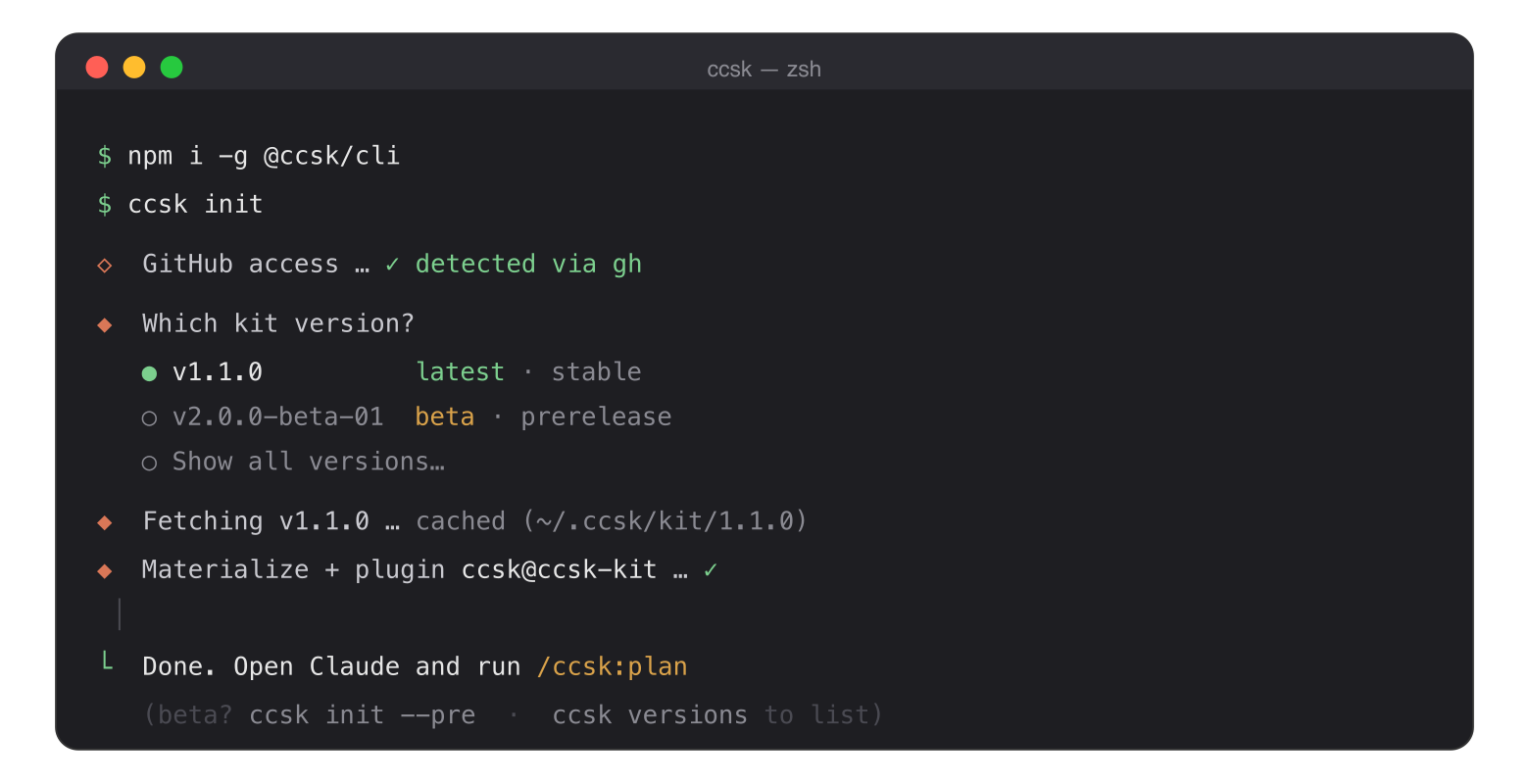
npm i -g @ccsk/cli
or: pnpm add -g @ccsk/cli · yarn global add @ccsk/cli · bun add -g @ccsk/cli
ccsk auth          # verify GitHub access (kit repo is private) ccsk versions      # see available kit versions (stable + beta) ccsk init          # install — pick a version when prompted claude             # open Claude Code /ccsk:plan <goal>  # start the Build Cadence (v2 kit)
How it works
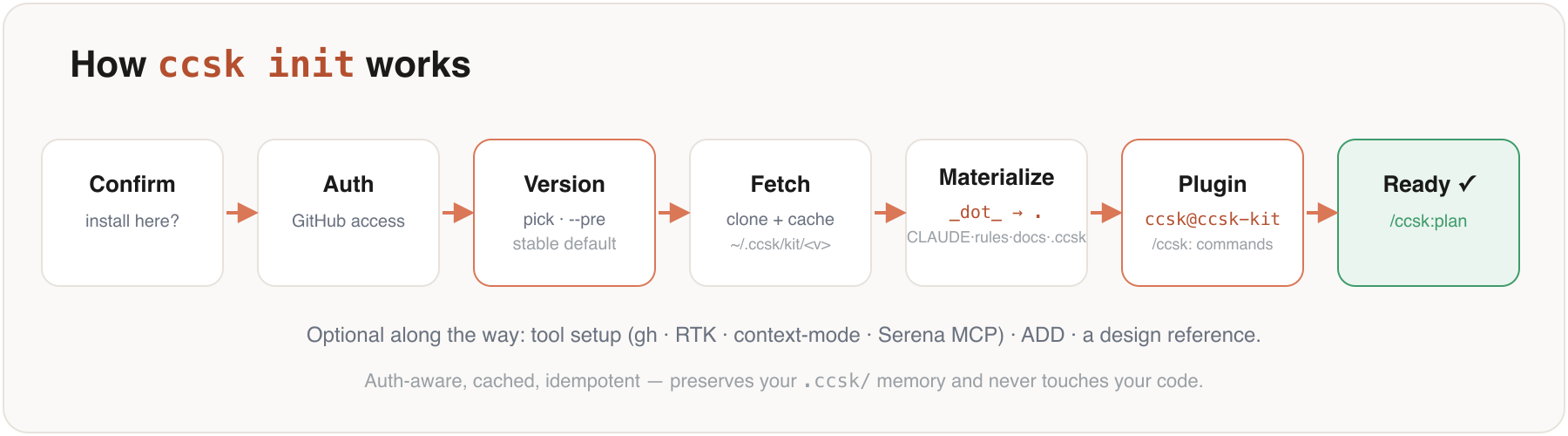
ccsk init is auth-aware, cached, and non-destructive — it never silently overwrites a file you've edited (it asks how to handle conflicts and always keeps a copy — see Safe re-init & backups), preserves your .ccsk/ memory, and never touches your code. It also writes a fenced block to your .gitignore (AI artifacts ignored by default) and installs a Claude Code plugin.
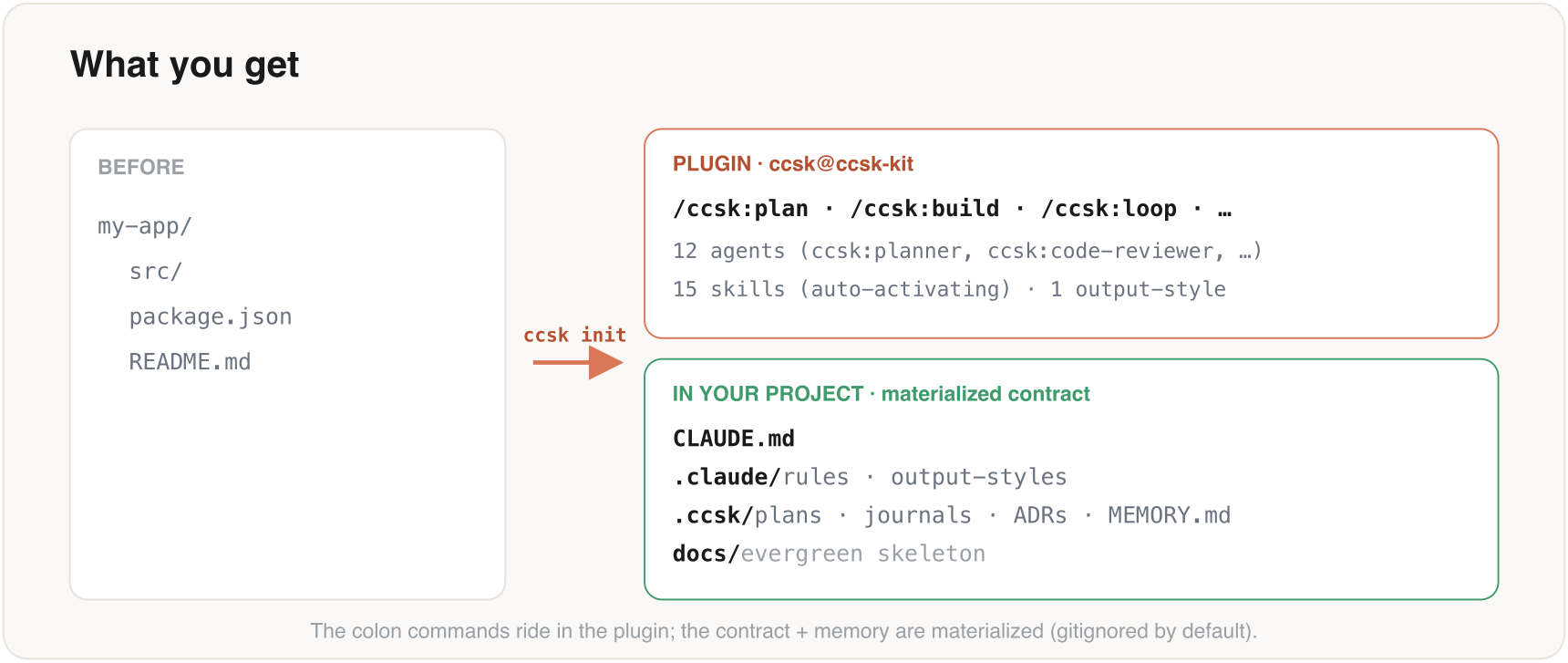
Two things land — the plugin provides the /ccsk: commands, agents, and skills; the contract (CLAUDE.md, .claude/rules, docs/, .ccsk/) is materialized into your project (a plugin can't own project-root files):
See the ccsk-kit repo for the Build Cadence (Frame → Forge → Prove → Sign-off) and the full method.
Safe re-init & backups
Re-running ccsk init in an existing project is safe: it never silently overwrites a file you've touched. When kit files already exist, you get a three-way choice — applied to every conflicting file — and the install always proceeds (it never aborts midway):
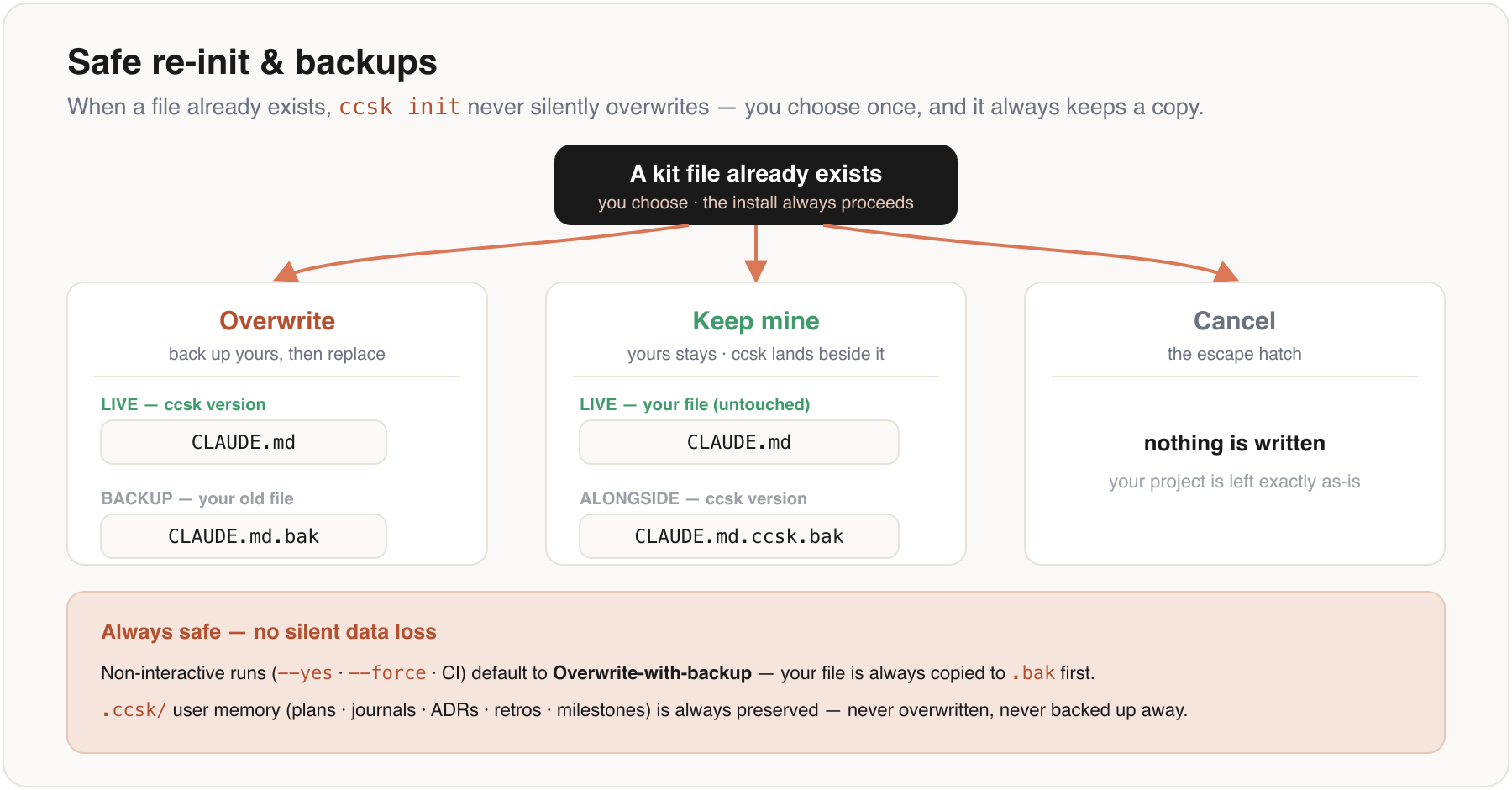
- Overwrite — your existing file is backed up to
<name>.<ext>.bak, then the ccsk version is written in its place. Your edits stay recoverable. - Keep mine — your file is left untouched and the ccsk version is written alongside as
<name>.<ext>.ccsk.bak, so you can diff or merge on your own terms. - Cancel — abort the install (the escape hatch); your project is left exactly as-is.
--yes, --force, or CI) default to the safe Overwrite-with-backup behavior — a file is never destroyed without a .bak copy first. Your .ccsk/ memory (plans, journals, ADRs, retros, milestones) is always preserved — never overwritten, never backed up away.
Kit versions & channels
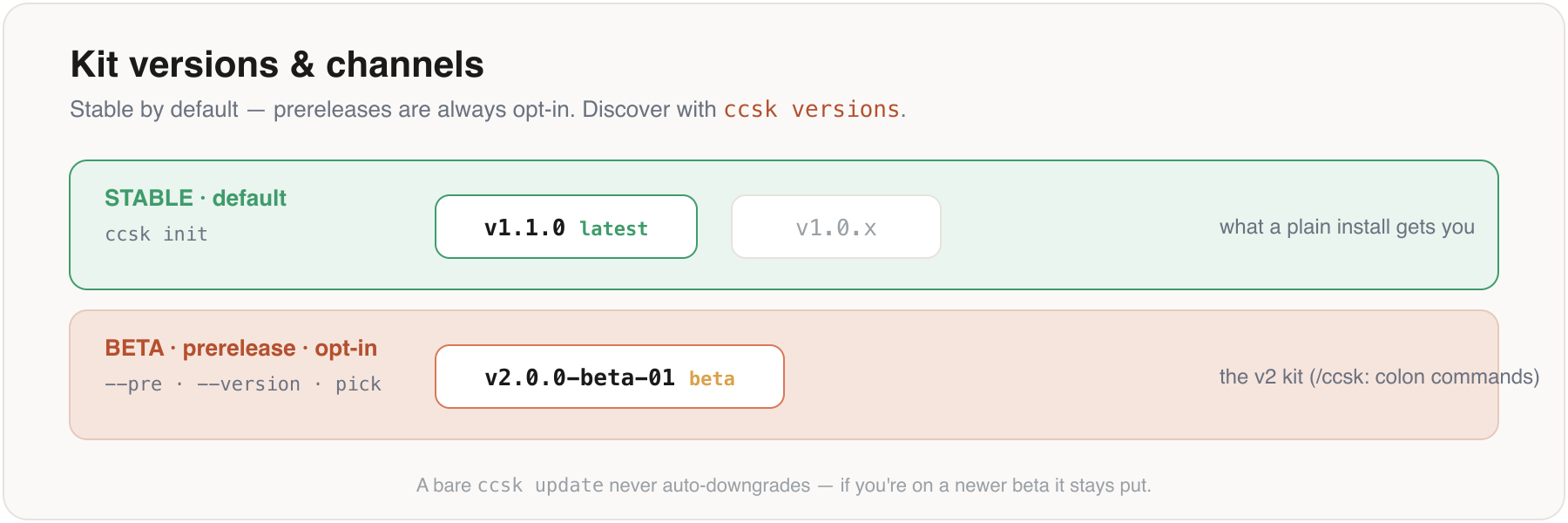
The CLI is version-aware: stable by default, prereleases opt-in. A plain ccsk init (or --yes/CI) installs the latest stable kit; you reach a beta only via the interactive picker, --pre, or an exact --version.
ccsk versions                       # list available (remote) + cached + current
ccsk versions --all --pre           # include every prerelease
ccsk init                           # interactive: pick a version (default = latest stable)
ccsk init --pre                     # newest prerelease (e.g. the v2 beta)
ccsk init --version 2.0.0-beta-01   # an exact version (a leading v is fine too)
Heads-up (current state): the v2 kit (/ccsk:colon commands) ships as the prerelease2.0.0-beta-01; the latest stable is v1.1.0 (older/ccsk-planhyphen commands). So a defaultccsk initinstalls v1.1.0 — use--pre/--version 2.0.0-beta-01/ the picker to get v2. A bareccsk updatenever auto-downgrades: if you're on a newer beta it stays put.
Command reference
| Command | What it does | Key flags | |---|---|---| | ccsk init [path] | Install the kit (picker + plugin + materialize) | --version <v> · --pre · --force · --no-plugin · --plugin-scope <project\|user> · --no-setup · --no-add · -y, --yes | | ccsk versions | List available + cached + current kit versions | --all · --pre · --json | | ccsk auth | Check GitHub auth (kit repo is private) | — | | ccsk update [version] | Update CLI + kit templates + plugin together | --path <dir> · --force · --kit-version <v> · --pre · --plugin-scope <…> · --no-templates · --no-plugin | | ccsk cache | Manage cached kit versions (annotates current/(beta)/cached) | -l, --list · --version <v> · --clear · --clear-all | | ccsk uninstall [path] | Remove the kit (preserves memory by default) | --purge-memory (backs up to .ccsk.bak-<ts>/ first) · -y, --yes | | ccsk doctor | Diagnose Node / git / auth / cache | — | | ccsk design [path] | Add a DESIGN.md reference (70+ design systems) | — | | ccsk donate | Support the maintainer via VietQR | — |
Global: -h, --help · -v, --version. Env: CCSK_DEBUG=1 (stack traces) · CI=1 (disable prompts).
ccsk init --version 1.2.0 --no-add -y   # pin a kit version, skip ADD, non-interactive
ccsk init --pre                          # opt into the newest prerelease kit
ccsk update --no-plugin                  # refresh CLI + templates, leave the plugin
ccsk uninstall --purge-memory            # remove everything (memory backed up first)
update is a three-layer, non-aborting operation: it self-updates the CLI, re-materializes the kit templates (preserving your memory), and runs claude plugin update ccsk — all pinned to one resolved version so the plugin and templates never drift. The CLI self-update always runs, but the kit layers (templates + plugin) are materialized only in an existing ccsk project (a dir with .ccsk/ or materialized .claude/skills/ccsk-*) — so running ccsk update in an unrelated directory won't scatter kit files there. To install into a fresh dir anyway, name it with --path <dir> or pass --force.
Tool setup
ccsk init offers an optional setup pass (skip with --no-setup) that wires, idempotently and without aborting on failure:
ghCLI — installed if missing (for GitHub auth to the private kit repo).- RTK-AI — installs
rtkand runsrtk initto enable its Claude Code hook. - context-mode — registers the
context-modeMCP server (+ prints the manual plugin steps). - Serena — registers the Serena MCP server (skipped if
uv/uvxis absent).
ccsk plugin itself is installed by init (skip with --no-plugin); if the claude CLI isn't found, init prints a hint and you can re-run later.
Works with ADD
ADD (AI-Driven Development) is a methodology where AI writes the code while humans own direction and verification — Specify → Scenarios → Contract → Tests → Build → Verify. ccsk init can install it (npx @pilotspace/add; skip with --no-add):
- ccsk scaffolds Claude Code's plugin (commands/agents/skills) + rules, docs, and
.ccsk/memory. - ADD adds the specification-first, test-driven loop on top.
Privacy
initwrites a fenced block to your project.gitignorethat ignores AI artifacts (.ccsk/, loop logs, …) by default, with commented opt-in lines to commit the contract/memory for team sharing.initrecords the installed version locally (~/.ccsk/install.json) and sends optional, fire-and-forget install telemetry (GitHub username + an email you may decline). No code is ever read or uploaded.
Troubleshooting
| Issue | Fix | | --- | --- | | command not found: ccsk | Add your global bin to PATH. npm: $(npm prefix -g)/bin. bun: ~/.bun/bin. | | Permission denied (publickey) / GitHub authentication required | Run ccsk auth and follow the steps (SSH keys, or gh auth login). | | Plugin step skipped | The claude CLI wasn't found — install Claude Code, then re-run ccsk init. | | No stable kit release yet in CI | A non-interactive run won't auto-pick a prerelease — pass --version <v> or --pre. | | Spinner shows raw text | Expected in CI or when piped — animations degrade gracefully. | | Something else is off | Run ccsk doctor, or CCSK_DEBUG=1 ccsk <cmd> for stack traces. |
Contributing
Contributions welcome — open an issue first for anything beyond small fixes.
- Conventional commits:
feat:,fix:,docs:,refactor:,test:,chore: - Cross-platform: test on macOS / Linux / Windows when possible.
- Keep it tight: no new global tooling without discussion.
Support the project
ccsk donate # buy the maintainer a coffee via VietQRLinks & license
- Kit → ccsk-kit · Issues → ccsk-cli/issues · Discussions → ccsk-cli/discussions
- License → MIT (see LICENSE)


