
Docker stack for Symfony 4 - NGINX / PHP7-FPM / MySQL / ELK / Redis / RabbitMQ
Last updated Mar 27, 2025
87
Stars
30
Forks
0
Issues
0
Stars/day
Attention Score
26
Language breakdown
Dockerfile 100.0%
▸ Files
click to expand
README
Docker stack for Symfony projects
 :octocat:


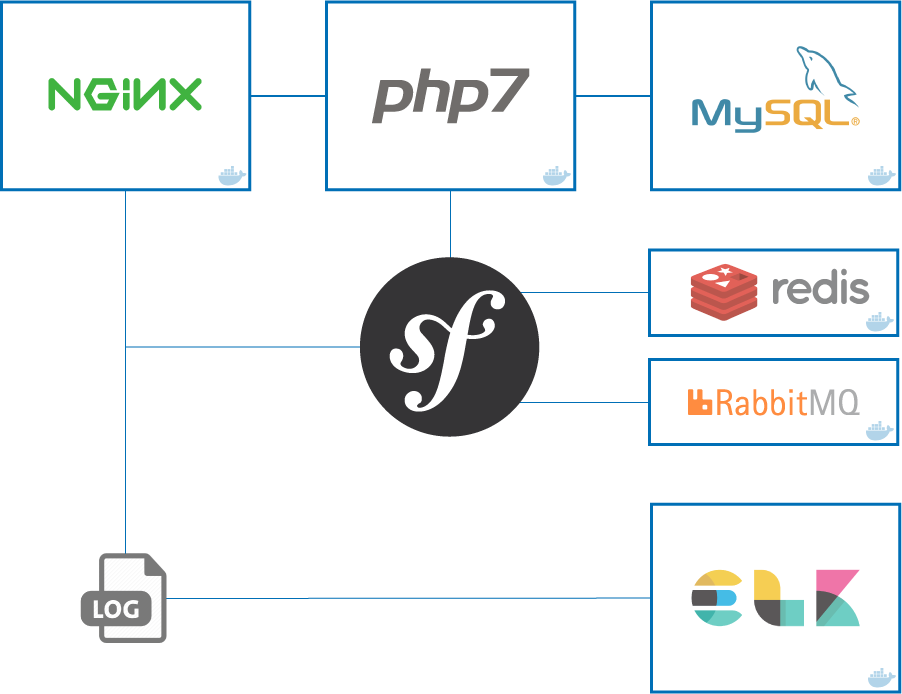
Basic info
Previous requirements
This stack needs docker and docker-compose to be installed.
Installation
- Create a
.envfile from.env.distand adapt it according to the needs of the application
$ cp .env.dist .env && nano .env- Due to an Elasticsearch 6 requirement, we may need to set a host's sysctl option and restart (More info):
$ sudo sysctl -w vm.maxmapcount=262144- Build and run the stack in detached mode (stop any system's ngixn/apache2 service first)
$ docker-compose build
$ docker-compose up -d- Get the bridge IP address
$ docker network inspect bridge | grep Gateway | grep -o -E '[0-9\.]+'
    # OR an alternative command
$ ifconfig docker0 | awk '/inet:/{ print substr($2,6); exit }'- Update your system's hosts file with the IP retrieved in step 3
- Prepare the Symfony application
#...
        DATABASEURL=mysql://dbuser:dbpassword@mysql:3306/dbname
        #...
2. Composer install & update the schema from the container
$ docker-compose exec php bash
        $ composer install
$ symfony doctrine:schema:update --force- (Optional) Xdebug: Configure your IDE to connect to port
9001with keyPHPSTORM
How does it work?
We have the following docker-compose built images:
nginx: The Nginx webserver container in which the application volume is mounted.php: The PHP-FPM container in which the application volume is mounted too.mysql: The MySQL database container.elk: Container which uses Logstash to collect logs, send them into Elasticsearch and visualize them with Kibana.redis: The Redis server container.rabbitmq: The RabbitMQ server/administration container.
docker-compose ps should result in the following running containers:
Name                          Command               State              Ports

container_mysql         /entrypoint.sh mysqld            Up      0.0.0.0:3306->3306/tcp
container_nginx         nginx                            Up      443/tcp, 0.0.0.0:80->80/tcp
container_phpfpm        php-fpm                          Up      0.0.0.0:9000->9000/tcp
container_redis         docker-entrypoint.sh redis ...   Up      6379/tcp
container_rabbit        rabbitmq:3-management            Up      4369/tcp, 5671/tcp, 0.0.0.0:5672->5672/tcp, 15671/tcp, 25672/tcp, 0.0.0.0:15672->15672
container_elk           /usr/bin/supervisord -n -c ...   Up      0.0.0.0:5044->5044/tcp, 0.0.0.0:5601->5601/tcp, 0.0.0.0:9200->9200/tcp, 9300/tcp
Usage
Once all the containers are up, our services are available at:
- Symfony app:
http://symfony.dev:80 - Mysql server:
symfony.dev:3306 - Redis:
symfony.dev:6379 - Elasticsearch:
symfony.dev:9200 - Kibana:
http://symfony.dev:5601 - RabbitMQ:
http://symfony.dev:15672
:tada: Now we can stop our stack with docker-compose down and start it again with docker-compose up -d
Software based on eko/docker-symfony and maxpou/docker-symfony


