
🔥🔥🔥 🚀 重复编码老瞎忙,⚡️写来写去那几行, 🌱 不知工具在何方?🍻 八哥智能一键帮!
Last updated Jun 14, 2026
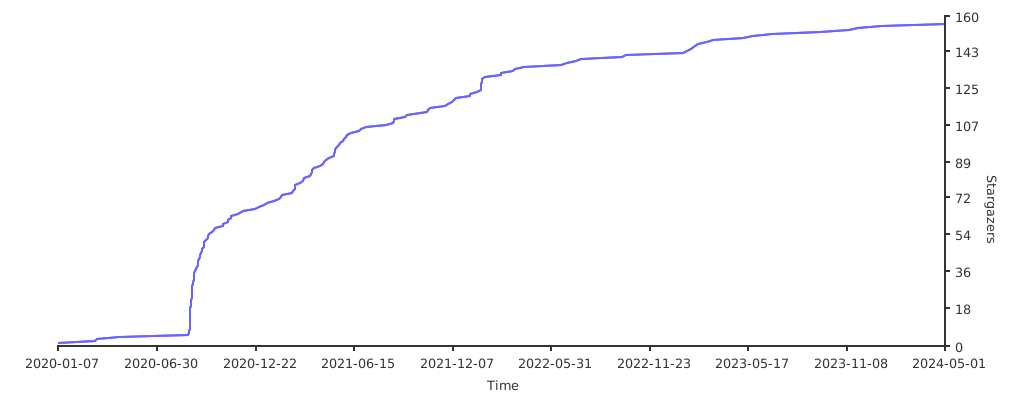
153
Stars
32
Forks
0
Issues
0
Stars/day
Attention Score
53
Language breakdown
Java 74.4%
HTML 22.3%
Shell 3.3%
▸ Files
click to expand
README
D8gerAutoCode




IDEA Code Automatically Generate Plugin • For Java Version

中文说明
Attention
The latest version is 4.1 is approved by the official on 10th, May. If you can't fetch it, then click here to downloadPreface
As JetBrains' said, I believe that you should be good use of tools will save you precious hours on your busing work.I always wonder, "If someone else has already solved the repeating work, why do I need to repeat it again?"
Well, that's a valid question for my drive to find the repeat parts at daily work and develop this plugin to save my time.
Quick Start
ZN程序员福利Convention
- The general problem provides standard solutions
- The personalized problem only provides example solutions
Original design intention
- Remove the fixed duplication coding for improving efficiency in development
- Provide available code templates that can be used without modification
- Support code directory configuration, only by self-guided package intelligent programming can be done in one-click
- Support user-defined configuration, you can specify which file to be generated
Features
Camel-Underline-Uppercase-Uncapitalize-Lowercase can be converted to each other by shortcutalt+shift+cmd+U- The comments of generated codes support English(Default) | Chinese Simplified(Optional) configuration
JSON formatting and single line text conversion, supporting section and whole document, default shortcutalt+shift+cmd+J|S- Generating
data table definition SQL|Mo|Mapper|Handler, single table addition, deletion, modification and search with paging in one click - Under the help of SwaggerApi generating
Vo|Controllerwith friendly document description, in addition to this, supportingVofield automatic sorting - For smart coding, you just need one shortcut default as
alt+shift+cmd+D - Supporting customer configuration, for example, specify the author who you are
- Reserve easter eggs, you can try to edit the blank file in IDEA and type
d8gerto get the default configuration template Reserve easter eggs, edit the blank file in IDEA and enternasato get the NASA configuration file template. This is very useful and efficient for handling multi-lines, especially SQL field naming processing.Reserve easter eggs, edit the blank file in IDEA and enterregexto get some commonly used regular expressions. Other code Easter eggs will be added later.- For automatic sorting
Vofield , you just need one shortcut default asalt+shift+cmd+O
Using manual(v3.0+)
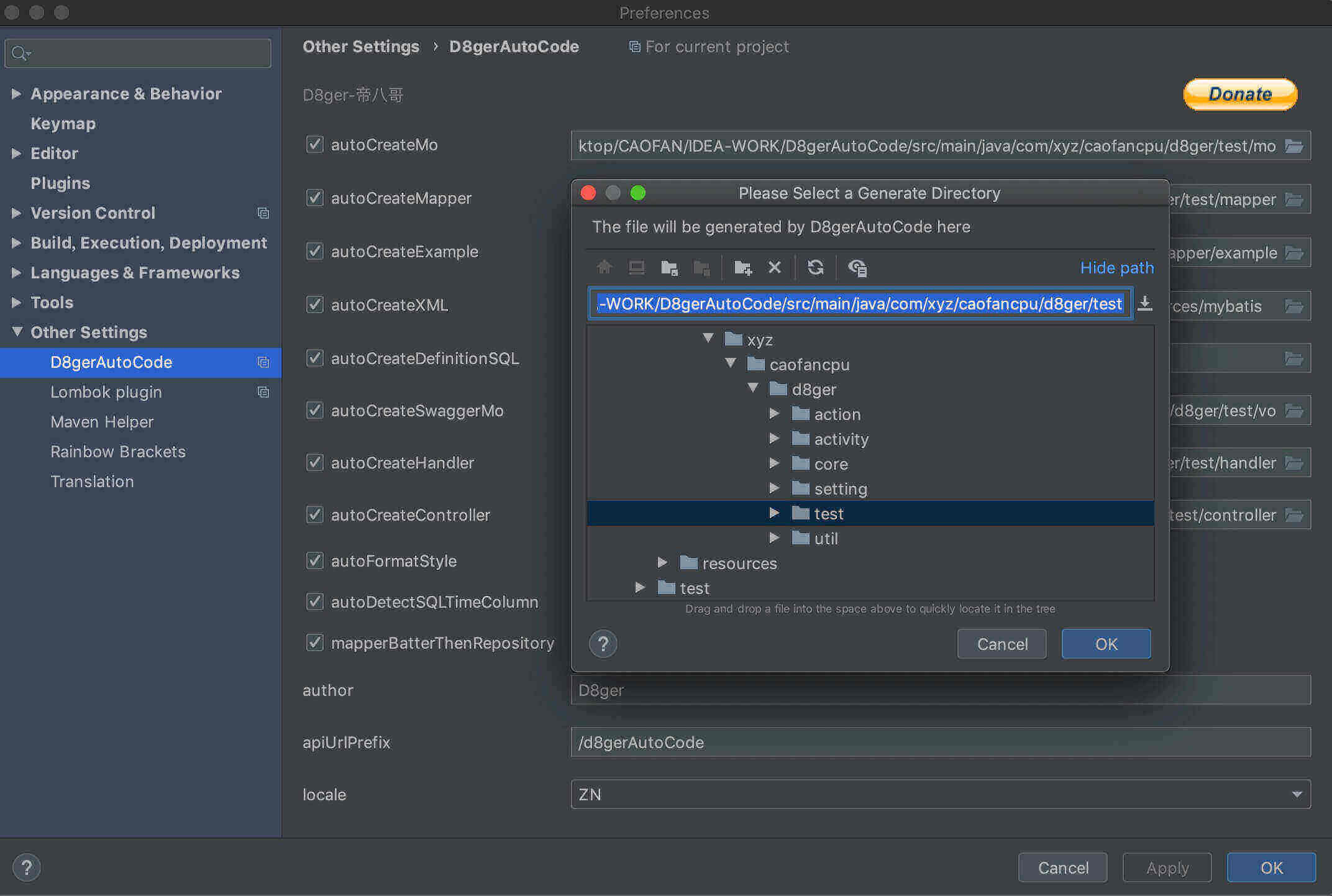
1.Open the configuration box to set the generation parameters,Preference --> Other Settings --> D8gerAutoCode
2.Check the file to be generated and choose the generation path, rewrite author、apiUrlPrefix and locale, and click the button to save your configuration.
Using manual(under v3.0)
- Create Model Class
- Select the class name and press the (default) shortcut
alt+shift+cmd+D
- Under the default configuration,
D8gerAutoCodedirectory anddata table SQL definitionsand Web codes will be generated
- So, What you need to do:
Mo.java should be moved into the model directory
- Add non-null constraints to xx.sql as required
- If you generated the Controller.java file, please note the interface returns type of Object, it should be modified to the project's uniform return type
- In the above steps the xx.java file will report some errors, don't worry, these just require you to import packages
- Default configuration file template for easter egg:
resource root directory of the module where the Model class is located, create d8ger.properties property configuration file
- Type d8ger and click on Tools-> D8ger-> D8gerMore, and you will find some surprise
Regex template for easter egg:
regex and click on Tools-> D8ger-> D8gerMore, and you will find some surpriseNASA template for easter egg:
nasa and click on Tools-> D8ger-> D8gerMore, and you will get the NASA manualCamel-Underline-Uppercase-Uncapitalize-Lowercase circle convert by one-click
alt + shift + cmd + U, youll find the changed word- You will get the following default configuration information
 (you can't sign my name for the pits you dug!)
        -
apiUrlPrefix (the interface url prefix should be configured as the project interface unified URL prefix)
- generate file output directory under a multi-module project
- As for boolean configuration items, let you choose which files need to be generated, and specify output directory is optional
> By the way, these default shortcuts used in Mac OS, if you use Windows just take
cmd into ctrl.
How to install
<a href="https://plugins.jetbrains.com/plugin/13576-d8gerautocode" target="_blank">
<img src="https://cdn.jsdelivr.net/gh/YiiGuxing/TranslationPlugin@master/images/button-install.png" alt="Get from Marketplace" title="Get from Marketplace">
</a>
Preference --> Plugins --> Marketplace --> type D8 --> install
IDEA official plugin library installation
As for Source installation requires you're familiar with Gradle, I will add more details about how to develop a plugin by Gradle later
Bug & Question
- Known issues
> Modify the d8ger.properties file before generating code, the configuration file does not take effect
<pre><code class="lang-">Solution
- If you upgrade version 3.0+, you won
t see it again. cmd + s to force refreshing .properties file and you will solve it.The icon of plugin shows error like this: red square with a cross

Solution
1.This issue is caused by Intellij IDEA of new version feature.
2.Try to upgrade the version of Intellij util 2019.3.(greater than 2019.2.), you'll fix it.
Other issues, please come to join room
VersionRoadHistory
- 4.1
- 4.0(HIGH.START)
- 3.4
- 3.2
alt + shift + cmd + U to find out.
- 3.1
locale problem when selected as ZN, and before the 3.0 versions comment was English default.
- Fix SQL definition in x.sql file ✌️.
- Fix batch insert records in xMapper.xml file cause id, createTime, updateTime all should be according to the Database.
- Optimization: Config item autoDetectSQLTimeColumn now is more intelligent. If you checked, createTime and updateTime would be generated perfectly in there right position.
- 3.0
- Addition:
- Grand celebration for D8gerAutoCode getting his face! Now you can config the generated property parameters by setting GUI.
- First, Open the configuration box to set the generation parameters, Preference --> Other Settings --> D8gerAutoCode
- Then, Check the file to be generated and choose the generation path, rewrite author、apiUrlPrefix and locale, and click the button to save your configuration.
- Optimization: Support project level setting parameters for non-invasive, d8ger.properties should exist invisible.
- Adjustment: Remove the generated params by d8ger.properties file, replace of D8gerAutoCode setting GUI.
- 2.5
- Addition:
- Add autoDetectSQLTimeColumn configuration for supporting disable default generating createtime and updatetime column definition in SQL.
- Add mapperBatterThenRepository configuration for supporting custom mapper annotation in both SpringMVC and SpringBoot.
- Add selectOneByExample in Mapper.java for supporting query one record.
- Add insertSelectiveWithId in Mapper.java for supporting insert non null field and null field will be filled with the database default value.
- Optimization: 'cause id is the primary key, all insert operations should exclude id column.
- BugFix:
- Generation update_time column definition remove the rare comma.
- Troubleshooting the rare dir named D8gerAutoCode, now you can see it only with unspecified directory configuration.
- Adjustment: Remove ServiceInterface and ServiceImpl, 'cause I think Handler is more suitable.
- 2.4
- Addition: One-click to beauty MySQL, isn't fragrant?
- Optimization: String parsing performance.
- Attention: Select your MySQL text, ctrl + alt + shift + B will back a surprise.
- 2.3
- BugFix: Json format bug.
- Addition:
- NASA easter eggs, try to type nasa in the blank file in IDEA to get the nasa-template.
- NASA easter eggs, multi-lines can be batch handled with the nasa-template, special for sql columns.
- Optimization:
- Optimize some regex performance.
- Support linebreak or comma as the delimiter.
- Support windows linebreak when rendering origin code.
- Attention:
- When execute auto-coding, you should be careful at the linebreak, it maybe different from your project config.
- Adjustment:
- Icons changed for align, friendly view etc.
- The manual of this plugin has been moved to my <a href="http://www.debuggerpowerzcy.top/home/2020/03/14/D8gerAutoCode%E6%8F%92%E4%BB%B6%E4%BD%BF%E7%94%A8%E6%8C%87%E5%8D%97/">website</a>.
- 2.1
- BugFix: add Uncapitalize, and the circle is Camel-Underline-Uppercase-Uncapitalize-Lowercase.
- Optimization: Optimize some regex performance.
- Attention: Regex easter eggs add some very useful regex search-replace skills hidden in JetBrains's IDE products. Try to learn, and you will save much time at working.
- 2.0
- BugFix: Modify method name in Controller.java.
- Addition:
- Remove repeat work of moving file into directories for smart coding.
- Camel-Underline-Uppercase-Lowercase can be converted to each other by shortcut alt + shift + cmd + U.
- Regex easter eggs, try to type regex in the blank file in IDEA to find it.
- Optimization: Optimize source code and improve performance.
- Attention: If the icon of plugin shows error(red square with a cross), try to upgrade the version of Intellij util 2019.3.(greater than 2019.2.).
- 1.24
- BugFix: Update method named updateBatchByPrimaryKeySelective in mapper.xml.
- Addition: Set default language English and you can config it as Chinese Simplified, as before, typing d8ger for the latest configuration template.
- Attention: You should configure your database connection like allowMultiQueries=true` for supporting batchUpdate operation.
- 1.23
- 1.22
- 1.21
- 1.20
Contribute
- Please give me a 🌟
- Raise demand, write the repetitive problems you often handled at daily work in issue
- Invite me to sit at the 🍦 shop
 微信 |
 支付宝 |
 MiXin |
Thanks

With JetBrains team's open source certificate supporting, this project will continue to develop in the spirit of open source


