
Infinity Grid Trading Algorithm for the Kraken Cryptocurrency Exchange.
⚠️ This project will be archived soon, please migrate to https://github.com/btschwertfeger/infinity-grid
Infinity Grid Trading Algorithm for the Kraken Exchange





⚠️ Disclaimer: This software was initially designed for private use only.
Please note that this project is independent and not endorsed by Kraken or
Payward Ltd. Users should be aware that they are using third-party software,
and the authors of this project are not responsible for any issues, losses, or
risks associated with its usage. **Payward Ltd. and Kraken are in no way
associated with the authors of this package and documentation.**>
There is no guarantee that this software will work flawlessly at this or later
times. Of course, no responsibility is taken for possible profits or losses.
This software probably has some errors in it, so use it at your own risk. Also
no one should be motivated or tempted to invest assets in speculative forms of
investment. By using this software you release the author(s) from any
liability regarding the use of this software.
The kraken-infinity-grid is a trading algorithm that uses grid trading strategies that places buy and sell orders in a grid-like manner, while following the principle of buying low and selling high. It is designed for trading cryptocurrencies on the Kraken Spot exchange, is written in Python and uses the python-kraken-sdk library to interact with the Kraken API.
The algorithm requires a PostgreSQL or SQLite database and can be run either locally or in a Docker container (recommended). The algorithm can be configured to use different trading strategies, such as GridHODL, GridSell, SWING, and cDCA.
While the verbosity levels of logging provide useful insights into the algorithms's behavior, the Telegram notifications can be used to receive updates on the algorithms's activity and exceptions. For this the algorithm requires two different Telegram bot tokens and chat IDs, one for regular notifications and one for exception notifications (see Setup for more information).
Documentation:
- https://kraken-infinity-grid.readthedocs.io/en/latest/
- https://kraken-infinity-grid.readthedocs.io/en/stable/
- https://github.com/btschwertfeger/kraken-pnl-calculator
📚 Fundamental concepts
kraken-infinity-grid is a sophisticated trading algorithm designed for automated cryptocurrency trading using a grid strategy. This approach is particularly effective in volatile markets, where frequent price fluctuations allow for consistent profit opportunities through structured buying and selling patterns.
📈 The core idea: Grid trading
At its essence, grid trading aims to capitalize on market volatility by setting a series of buy and sell orders at predefined intervals. The algorithm operates within a "grid" of prices, purchasing assets when prices dip and selling them as prices rise. This systematic approach helps in capturing small gains repeatedly, leveraging the natural oscillations in market prices.
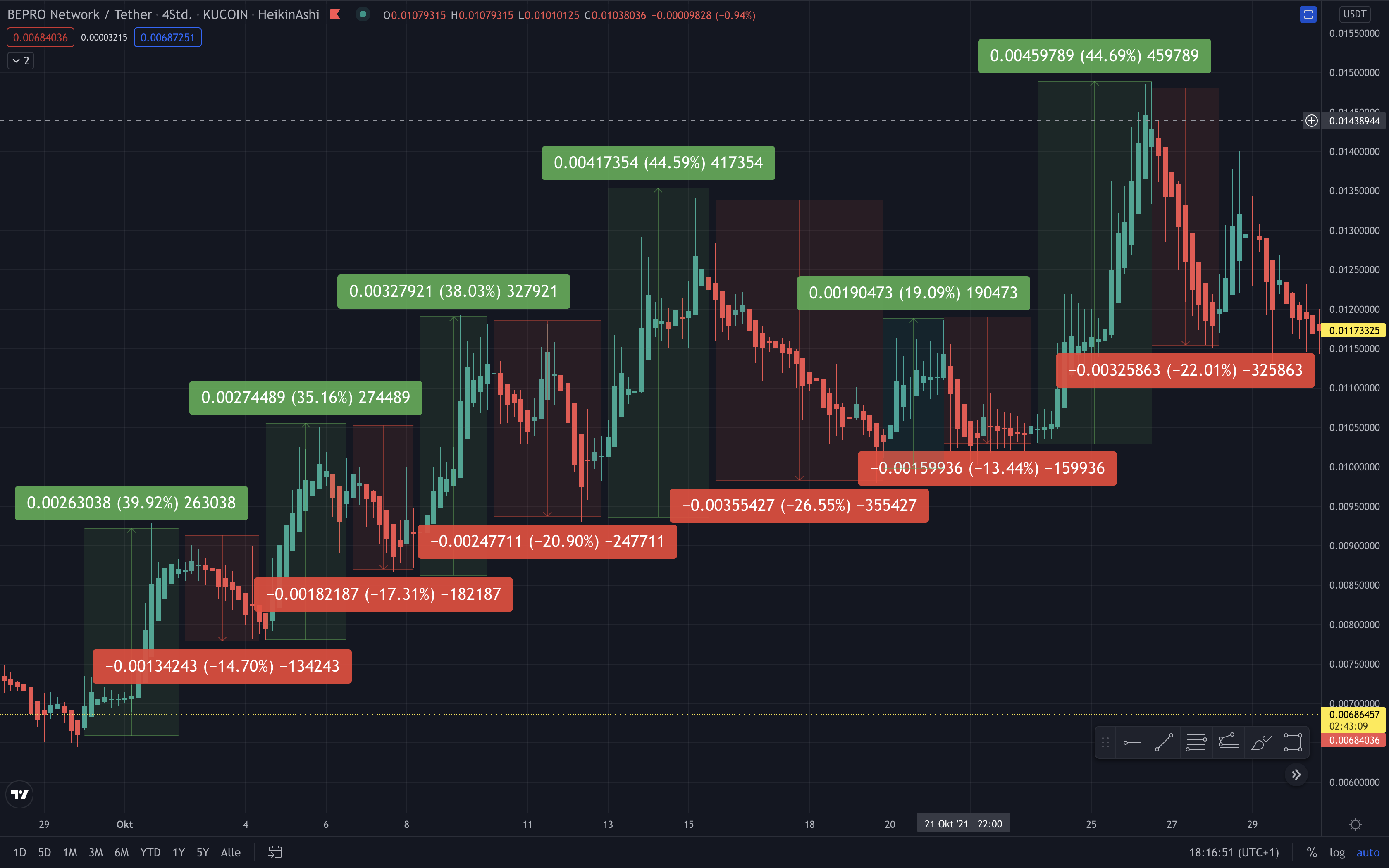
All currency pairs mentioned here are for illustrative purposes only.
📊 Key Elements of Grid Trading
- Intervals: Unlike fully static systems,
kraken-infinity-griduses
- Volatility Advantage: High volatility is a friend to grid traders. The
- Consistent Position Sizing: Each trade involves a consistent volume in
📉 Risk Management and Reinvestment
- Risk Mitigation: The algorithm inherently incorporates risk management by
- Reinvestment Mechanism: Accumulated profits can be reinvested, enhancing
📊 Available strategies
Each of the following strategies is designed to leverage different aspects of market behavior, providing flexibility and adaptability to traders depending on their risk tolerance, market outlook, and investment goals.
GridHODL
The GridHODL strategy operates on a predefined grid system where buy and sell orders are placed at fixed intervals below and above the current market price, respectively. This strategy is designed to capitalize on market fluctuations by buying low and selling high, ensuring gradual accumulation of the base currency over time.
Technical Breakdown:
- Order Placement: The algorithm dynamically adjusts $n$ buy orders
- Execution: Upon execution of a buy order, a corresponding sell order is
- Accumulation: Unlike traditional trading strategies, GridHODL is designed
This strategy is particularly effective in sideways, slightly, and high volatile markets, where frequent price oscillations allow for regular execution of the grid orders. Accumulating the base currency over time can lead to significant gains, especially when prices rise after a long accumulation phase.
GridSell
The GridSell is a complementary approach to GridHODL, focusing on liquidating the purchased base currency in each trade cycle to realize immediate profits. The key distinction is that each sell order matches the total quantity bought in the preceding buy order.
Technical Breakdown:
- Order Logic: For every buy order executed (e.g., purchasing $100 worth of
- Profit Realization: The strategy ensures that profits are locked in at
- Risk Mitigation: By liquidating the entire bought amount, the GridSell
SWING
The SWING strategy builds upon GridHODL but introduces a mechanism to capitalize on significant upward price movements by selling accumulated base currency at higher levels.
Technical Breakdown:
- Market Adaptation: This strategy tracks the highest buy price within a
- Sell Execution: Unlike
GridHODL, which focuses on buying and selling in
- Continuous Accumulation: Even as it initiates sell orders above the
- Profit Maximization: This dual approach allows traders to benefit from
⚠️ It also starts selling the already existing base currency above the
current price. This should be kept in mind when choosing this
strategy.
cDCA
The cDCA (Custom Dollar-Cost Averaging) strategy diverges from traditional DCA by incorporating dynamic interval adjustments to optimize long-term accumulation of the base currency.
Technical Breakdown:
- Fixed Interval Purchases: Unlike time-based DCA, cDCA places buy orders at
- No Sell Orders: cDCA focuses purely on accumulation. It consistently buys
- Adaptive Buy Orders: The algorithm adapts to rising prices by shifting buy
- Long-Term Growth: This strategy is ideal for traders with a long-term
🚀 Setup
Preparation
Before installing and running the kraken-infinity-grid, you need to make sure to clearly understand the available trading strategies and their configuration. Avoid running the algorithm with real money before you are confident in the algorithm's behavior and performance!
- In order to trade at the Kraken Cryptocurrency

- [optional] The algorithm leverages Telegram Bots to send notifications about
- Create two bots, name as you wish via: https://telegram.me/BotFather. - Start the chat with both new Telegram bots and write any message to ensure that the chat ID is available in the next step. - Get the bot token from the BotFather and access https://api.telegram.org/bot<your bot token here>/getUpdates to receive your chat ID. - Save the chat IDs as well as the bot tokens for both of them, we'll need them later.
This repository contains a docker-compose.yaml file that can be used to run the algorithm using docker compose. The docker-compose.yaml also provides a default configuration for the PostgreSQL database. To run the algorithm, follow these steps:
Running the algorithm
Pure Python process
To run the algorithm as a pure Python process, follow these steps:
- Install the package via pip:
python3 -m venv venv
   source venv/bin/activate
pip install kraken-infinity-grid- The algorithm can be started via the command-line interface. For using a
--sqlite-file option. The SQLite database is created
automatically if it does not exist, otherwise the existing database is used.
See more configuration options within the configuration section.
kraken-infinity-grid \
       --api-key <your-api-key> \
       --secret-key <your-api-secret> \
       run \
       --strategy "GridHODL" \
       ...
       --sqlite-file=/path/to/sqlite.db
Docker Compose
The repository of the kraken-infinity-grid contains a docker-compose.yaml file that can be used to run the algorithm using Docker Compose. This file also provides a default configuration for the PostgreSQL database. To run the algorithm, follow these steps:
- Clone the repository:
git clone https://github.com/btschwertfeger/kraken-infinity-grid.git- Build the Docker images:
docker system prune -a
docker compose build --no-cache- Configure the algorithm either by ensuring the environment variables
docker-compose.yaml..
- Run the algorithm:
docker compose up # -d- Check the logs of the container and the Telegram chat for updates.
🛠 Configuration
| Variable | Type | Description | | ------------------------------ | ------------------ | -------------------------------------------------------------------------------------------------------------------------------------------------------------------------------------------------------------------------------------------------------------------------------------------------------------- | | KRAKENAPIKEY | str | Your Kraken API key. | | KRAKENSECRETKEY | str | Your Kraken secret key. | | KRAKENRUNNAME | str | The name of the instance. Can be any name that is used to differentiate between instances of the kraken-infinity-grid. | | KRAKENRUNUSERREF | int | A reference number to identify the algorithms's orders. This can be a timestamp or any integer number. Use different userref's for different algorithms! | | KRAKENBOTVERBOSE | int/(-v,-vv) | Enable verbose logging. | | KRAKENDRYRUN | bool | Enable dry-run mode (no actual trades). | | KRAKENRUNBASE_CURRENCY | str | The base currency e.g., BTC. | | KRAKENRUNQUOTE_CURRENCY | str | The quote currency e.g., USD. | | KRAKENRUNAMOUNTPERGRID | float | The amount to use per grid interval e.g., 100 (USD). | | KRAKENRUNINTERVAL | float | The interval between orders e.g., 0.04 to have 4 % intervals. | | KRAKENRUNNOPENBUY_ORDERS | int | The number of concurrent open buy orders e.g., 5. The number of always open buy positions specifies how many buy positions should be open at the same time. If the interval is defined to 2%, a number of 5 open buy positions ensures that a rapid price drop of almost 10% that can be caught immediately. | | KRAKENRUNMAX_INVESTMENT | str | The maximum investment amount, e.g. 1000 USD. | | KRAKENRUNFEE | float | A custom fee percentage, e.g. 0.0026 for 0.26 % fee. | | KRAKENRUNSTRATEGY | str | The trading strategy (e.g., GridHODL, GridSell, SWING, or cDCA). | | KRAKENRUNTELEGRAM_TOKEN | str | The Telegram bot token for notifications. | | KRAKENRUNTELEGRAMCHATID | str | The Telegram chat ID for notifications. | | KRAKENRUNEXCEPTION_TOKEN | str | The Telegram bot token for exception notifications. | | KRAKENRUNEXCEPTIONCHATID | str | The Telegram chat ID for exception notifications. | | KRAKENRUNDB_USER | str | The PostgreSQL database user. | | KRAKENRUNDB_NAME | str | The PostgreSQL database name. | | KRAKENRUNDB_PASSWORD | str | The PostgreSQL database password. | | KRAKENRUNDB_HOST | str | The PostgreSQL database host. | | KRAKENRUNDB_PORT | int | The PostgreSQL database port. | | KRAKENRUNSQLITE_FILE | str | The path to a local SQLite database file, e.g., /path/to/sqlite.db, will be created if it does not exist. If a SQLite database is used, the PostgreSQL database configuration is ignored. |
📡 Monitoring
Trades as well as open positions can be monitored at Kraken.

Additionally, the algorithm can be configured to send notifications about the current state of the algorithm via Telegram Bots (see Preparation).

🚨 Troubleshooting
- Only use release versions of the
kraken-infinity-grid. Themasterbranch
- Check the permissions of your API keys and the required permissions on the
- If you get some Cloudflare or rate limit errors, please check your Kraken
- Use different API keys for different algorithms, because the nonce
- Kraken often has maintenance windows. Please check the status page at
- When encountering errors like "Could not find order '...'. Retry 3/3 ...",
Backtesting
- The
tools/directory contains some backtesting tries, but this is still to
📝 Notes
This project follows semantic versioning (v<Major>.<Minor>.<Patch>). Here's what each part signifies:
- Major: This denotes significant changes that may introduce new features or
- Minor: This level indicates additions of new features or extensions to
- Patch: Here, you'll find bug fixes, documentation updates, and changes
🔭 References
- https://github.com/btschwertfegr/python-kraken-sdk


