
Sample code for the talk "Infrastructure-as-code: running microservices on AWS with Docker, ECS, and Terraform"
Infrastructure as Code Talk
This repo contains the sample code for the talk Infrastructure-as-code: running microservices on AWS with Docker, Terraform, and ECS. It includes a couple sample Dockerized microservices and the Terraform code to deploy them on AWS:
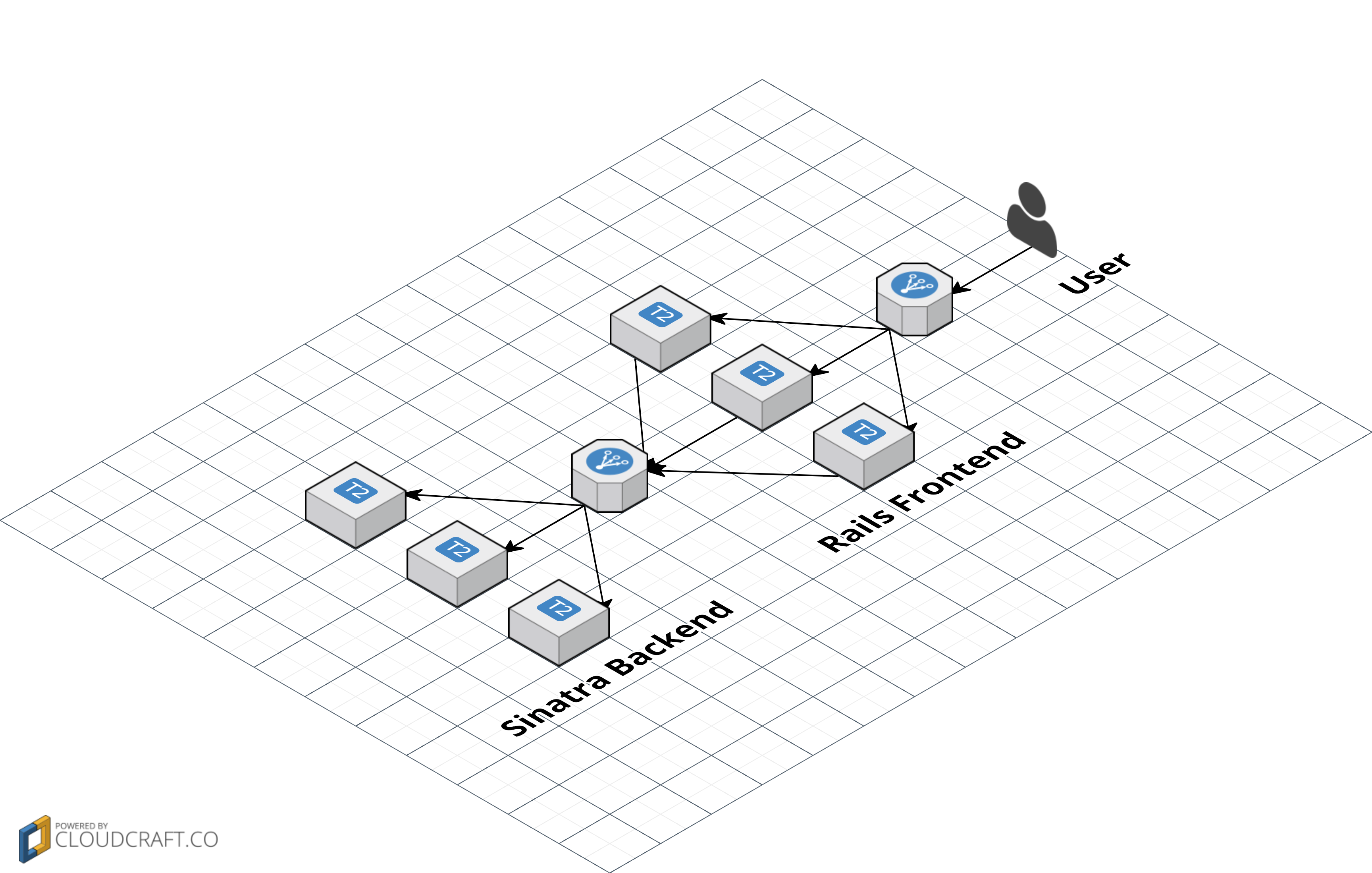
Note: This repo is for demonstration purposes only and should NOT be used to run anything important. For production-ready version of this code and many other types of infrastructure, check out Gruntwork.
Quick start
Running the microservices locally
To run the rails-frontend and sinatra-backend on your local dev box:
- Install Docker.
docker-compose up- Test sinatra-backend by going to http://localhost:4567.
- Test the rails-frontend (and its connectivity to the sinatra-backend) by going to http://localhost:3000.
docker-compose.yml file mounts rails-frontend and sinatra-backend folders as volumes in each Docker image, so
any changes you make to the apps on your host OS will automatically be reflected in the running Docker container. This
lets you do iterative "make-a-change-and-refresh" style development.
Deploying the microservices in AWS
To deploy the microservices to your AWS account, see the terraform-configurations README.
Using your own Docker images
By default, docker-compose.yml and the terraform-configurations are using the gruntwork/rails-frontend and gruntwork/sinatra-backend Docker images. These are images I pushed to the Gruntwork Docker Hub account to make it easy for you to try this repo quickly. Obviously, in the real world, you'll want to use your own images instead.
Follow Docker's documentation to create your own Docker images and fill in the new image id and tag in:
docker-compose.yml: theimageattribute forrailsfrontendorsinatrabackend.terraform-configurations/terraform.tfvars: therailsfrontendimageandrailsfrontendversionor
sinatrabackendimage and sinatrabackendversion variables.
Overview of the repo
Here's an overview of what's in this repo:
- An example sinatra-backend microservice that just returns the text "Hello, World". This app
- An example rails-frontend microservice that makes an HTTP call to the sinatra-backend and
- A docker-compose.yml file to deploy both Docker containers so you can see how the two
- Terraform configurations to deploy both Docker containers on Amazon's
More info
For more info, check out the talk Infrastructure-as-code: running microservices on AWS with Docker, Terraform, and ECS, including the video and slides. For a deeper look at Terraform, check out the book Terraform: Up & Running.


