
Creating infrastructure and running applications using different platforms
InfraForm

Unified interface for automation cross different technologies and platforms. Infraform allows you to:
- Run common built-in operations (aka scenarios) or write/provide your own and let Infraform handle the execution
- Use templated scenarios - one scenario, many ways to render it
- Execute scenarios locally or on remote host(s)
- Make use of different technologies to run the scenarios - Ansible, Python, Terraform, Podman, Docker, ...
- Adjusts the host accordingly it it isn't ready to run the chosen technology (Ansible, Terraform ...)
Hope you'll enjoy using it and if not, let us know and open an issue :)
Requirements
- Linux (developed and tested on Fedora)
- Python>=3.7
Installation
git clone https://github.com/bregman-arie/infraform && cd infraform virtualenv ~/ifrvenv && source ~/ifrvenv/bin/activate pip install .
Usage Examples
List Scenarios
ifr list
Scenarios
Scenario file is one that ends with .ifr or ifr.j2 suffix. It uses the YAML format with the following directives:
description:  # the description of the scenario
platform:     # the platform or tool to use (e.g. terraform, ansible, shell, python, etc.)
files:        # the files to copy to the workspace to be used during the execution of the scenario
 - file1
 - file2
 - directory1
vars:         # variables which will be used for executing the scenario
  x: 2
  y: 'value'
dockerfile: | # used for building an image and running a container using that image
 ...
Infraform provides you with a couple of built-in scenarios you can list with ifr list
To see the content of scenario, run infraform show <scenario_name>
Read more about "Scenarios" here
Supported platforms and tooling
InfraForm is able to execute using the following technologies
Name | Comments :------ |:------: Terraform | Provision infrastucture using Terraform HCL files Podman | Run containers using Podman Docker | Run containers using Docker
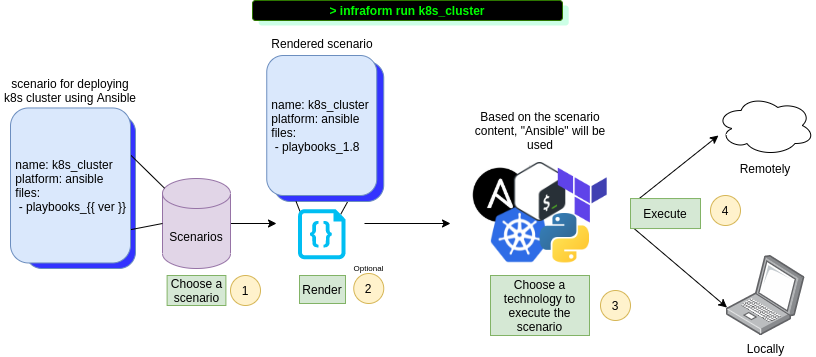
Possibly too detailed workflow
The following is a description of what InfraForm does when you run a scenario
- Validates the scenario you've specified exists (the .ifr file)
- If a workspace already exists (.infraform/
) it removes it. A new workspace is then created - Iterates over the hosts specified (if not specific, then it uses localhost)
- Copies the scenario file (.ifr) and all the related content to the directory on the remote/local host
- Checks the host is ready for executing the scenario by running chosen platform check command(s)
- Runs possible pre-commands. This depends highly on the platform used
- Executes the scenario using the platform default run command (e.g. Terraform -> terraform apply)
Contributions
To contribute to the project, use GitHub pull requests.


