
Template for integrating RISC Zero and Ethereum using Foundry
RISC Zero Foundry Template
[!WARNING]
This repository has been deprecated. After serving the community well, this template is now superseded by the Boundless Foundry Template. All new projects should use the Boundless Foundry Template for the latest features and ongoing support. Thank you for your understanding. 🙏
Prove computation with the [RISC Zero zkVM][docs-zkvm] and verify the results in your Ethereum contract.
This repository implements an example application on Ethereum utilizing RISC Zero as a [coprocessor][blog-coprocessor] to the smart contract application. It provides a starting point for building powerful new applications on Ethereum that offload work that is computationally intensive (i.e. gas expensive), or difficult to implement in Solidity (e.g. ed25519 signature verification, or HTML parsing).
Integrate with [Steel][steel-repo] to execute view calls and simulate transactions on Ethereum. Check out the [ERC-20 counter][erc20-counter] demo to see an example.
Overview
Here is a simplified overview of how devs can integrate RISC Zero, including with [Bonsai][docs-bonsai] proving, into their Ethereum smart contracts:
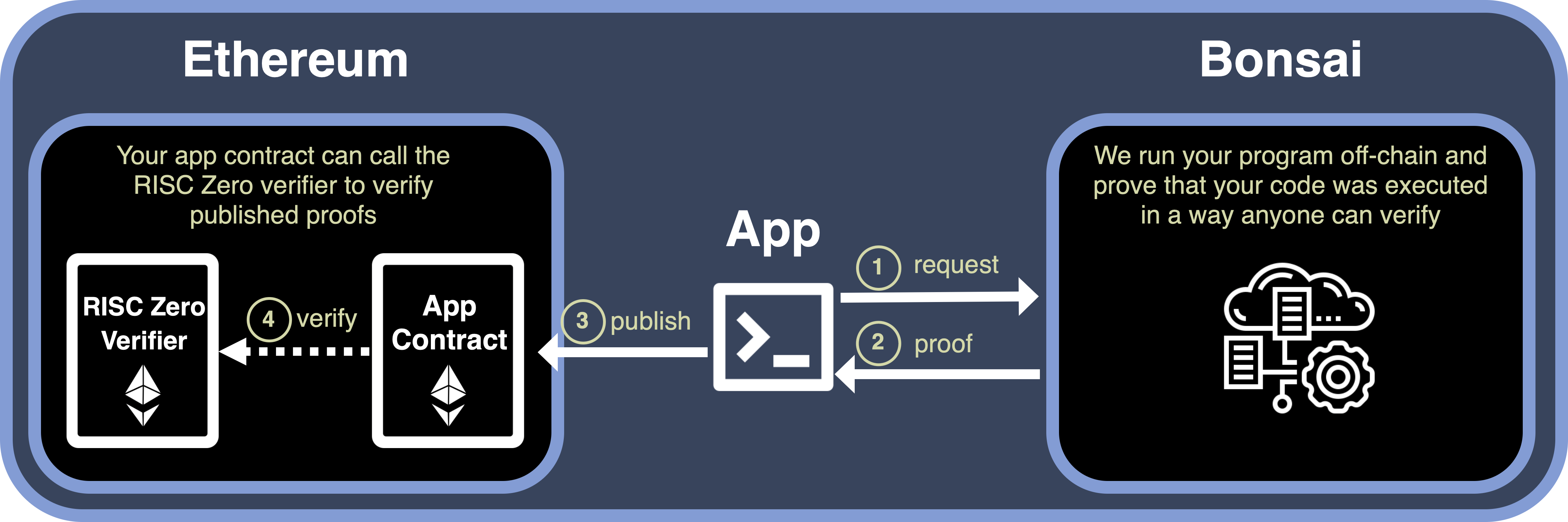
- Run your application logic in the [RISC Zero zkVM][docs-zkvm]. The provided publisher app sends an off-chain proof request to the [Bonsai] proving service.
- [Bonsai][docs-bonsai] generates the program result, written to the [journal][term-journal], and a SNARK proof of its correctness.
- The publisher app submits this proof and journal on-chain to your app contract for validation.
- Your app contract calls the [RISC Zero Verifier][docs-verifier] to validate the proof. If the verification is successful, the journal is deemed trustworthy and can be safely used.
Dependencies
First, [install Rust][install-rust] and [Foundry][install-foundry], and then restart your terminal.
# Install Rust
curl https://sh.rustup.rs -sSf | sh
Install Foundry
curl -L https://foundry.paradigm.xyz | bash
Next, you will use rzup to install cargo-risczero.
To install rzup, run the following command and follow the instructions:
curl -L https://risczero.com/install | bashNext we can install the RISC Zero toolchain by running rzup:
rzup installYou can verify the installation was successful by running:
cargo risczero --versionNow you have all the tools you need to develop and deploy an application with [RISC Zero][homepage-risczero].
Quick Start
First, install the RISC Zero toolchain using the instructions above.
Now, you can initialize a new RISC Zero project at a location of your choosing:
forge init -t risc0/risc0-foundry-template ./my-projectCongratulations! You've just started your first RISC Zero project.
Your new project consists of:
- a zkVM program (written in Rust), which specifies a computation that will be proven;
- a app contract (written in Solidity), which uses the proven results;
- a publisher which makes proving requests to [Bonsai][docs-bonsai] and posts the proof to Ethereum.
Build the Code
- Update git submodules.
git submodule update --init- Builds for zkVM program, the publisher app, and any other Rust code.
cargo build- Build your Solidity smart contracts.
cargo build needs to run first to generate the ImageID.sol contract.
forge buildRun the Tests
- Tests your zkVM program.
cargo test- Test your Solidity contracts, integrated with your zkVM program.
RISC0DEVMODE=true forge test -vvv- Run the same tests, with the full zkVM prover rather than dev-mode, by setting
RISC0DEVMODE=false.
RISC0DEVMODE=false forge test -vvvProducing the [Groth16 SNARK proofs][groth16] for this test requires running on an x86 machine with [Docker][install-docker] installed, or using Bonsai. Apple silicon is currently unsupported for local proving, you can find out more info in the relevant issues here and here.
Develop Your Application
To build your application using the RISC Zero Foundry Template, you’ll need to make changes in three main areas:
- Guest Code: Write the code you want proven in the methods/guest folder. This code runs off-chain within the RISC Zero zkVM and performs the actual computations. For example, the provided template includes a computation to check if a given number is even and generate a proof of this computation.
- Smart Contracts: Write the on-chain part of your project in the contracts folder. The smart contract verifies zkVM proofs and updates the blockchain state based on the results of off-chain computations. For instance, in the EvenNumber example, the smart contract verifies a proof that a number is even and stores that number on-chain if the proof is valid.
- Publisher Application: Adjust the publisher example in the apps folder. The publisher application bridges off-chain computation with on-chain verification by submitting proof requests, receiving proofs, and publishing them to the smart contract on Ethereum.
Configuring Bonsai
Note: To request an API key complete the form here.
With the Bonsai proving service, you can produce a [Groth16 SNARK proof][Groth16] that is verifiable on-chain. You can get started by setting the following environment variables with your API key and associated URL.
export B # see form linked above
export B # provided with your api key
Now if you run forge test with RISC0DEVMODE=false, the test will run as before, but will additionally use the fully verifying RiscZeroGroth16Verifier contract instead of MockRiscZeroVerifier and will request a SNARK receipt from Bonsai.
RISC0DEVMODE=false forge test -vvvDeterministic Builds
By setting the environment variable RISC0USEDOCKER a containerized build process via Docker will ensure that all builds of your guest code, regardless of the machine or local environment, will produce the same [image ID][image-id]. The [image ID][image-id], and its importance to security, is explained in more detail in our [developer FAQ][faq].
RISC0USEDOCKER=1 cargo buildNote: This requires having Docker installed and in your PATH. To install Docker see [Get Docker][install-docker].
Deploy Your Application
When you're ready, follow the deployment guide to get your application running on [Sepolia][sepolia] or Ethereum Mainnet.
Project Structure
Below are the primary files in the project directory
.
├── Cargo.toml                      // Configuration for Cargo and Rust
├── foundry.toml                    // Configuration for Foundry
├── apps
│   ├── Cargo.toml
│   └── src
│       └── lib.rs                  // Utility functions
│       └── bin
│           └── publisher.rs        // Example app to publish program results into your app contract
├── contracts
│   ├── EvenNumber.sol              // Basic example contract for you to modify
│   └── ImageID.sol                 // Generated contract with the image ID for your zkVM program
├── methods
│   ├── Cargo.toml
│   ├── guest
│   │   ├── Cargo.toml
│   │   └── src
│   │       └── bin                 // You can add additional guest programs to this folder
│   │           └── is_even.rs      // Example guest program for checking if a number is even
│   └── src
│       └── lib.rs                  // Compiled image IDs and tests for your guest programs
└── tests
    ├── EvenNumber.t.sol            // Tests for the basic example contract
    └── Elf.sol                     // Generated contract with paths the guest program ELF files.
[docs-bonsai]: https://dev.risczero.com/api/generating-proofs/remote-proving [install-foundry]: https://getfoundry.sh/ [install-docker]: https://docs.docker.com/get-docker/ [groth16]: https://www.risczero.com/news/on-chain-verification [docs-verifier]: https://dev.risczero.com/api/blockchain-integration/contracts/verifier [docs-zkvm]: https://dev.risczero.com/zkvm [homepage-risczero]: https://www.risczero.com/ [Sepolia]: https://www.alchemy.com/overviews/sepolia-testnet [blog-coprocessor]: https://www.risczero.com/news/a-guide-to-zk-coprocessors-for-scalability [faq]: https://dev.risczero.com/faq#zkvm-application-design [image-id]: https://dev.risczero.com/terminology#image-id [install-rust]: https://doc.rust-lang.org/cargo/getting-started/installation.html [term-journal]: https://dev.risczero.com/terminology#journal [steel-repo]: https://github.com/risc0/risc0-ethereum/tree/main/crates/steel [erc20-counter]: https://github.com/risc0/risc0-ethereum/tree/main/examples/erc20-counter


