
A fast Rust CLI for interacting with Solana programs via IDL api
orquestra-cli
A fast Rust CLI for interacting with Solana programs via orquestra.dev.
Upload your Anchor IDL to orquestra once, or point the CLI directly at a local IDL JSON file — this tool turns every instruction into an interactive prompt, builds the transaction, and optionally signs and sends it to Solana using your local keypair.
Features
- List instructions — fetch and display all instructions for your program
- Interactive run — fuzzy-select an instruction, answer prompted questions for each arg and account
- Find PDA — derive program-derived addresses by fuzzy-selecting a PDA account and supplying seed values
- Local IDL file mode — point the CLI at a Solana/Anchor IDL JSON file and operate fully offline without an Orquestra account
- Auto-fill signers — if a keypair is configured, signer accounts are pre-filled with your public key
- Auto-derive PDAs — PDA accounts whose seeds are fully resolvable from your inputs are derived silently; fixed-address accounts (systemprogram, tokenprogram, etc.) are filled automatically
- Sign & send — signs the built transaction with your local keypair and broadcasts to Solana via JSON-RPC
- Keypair-free mode — prints the base58-encoded unsigned transaction for manual wallet signing
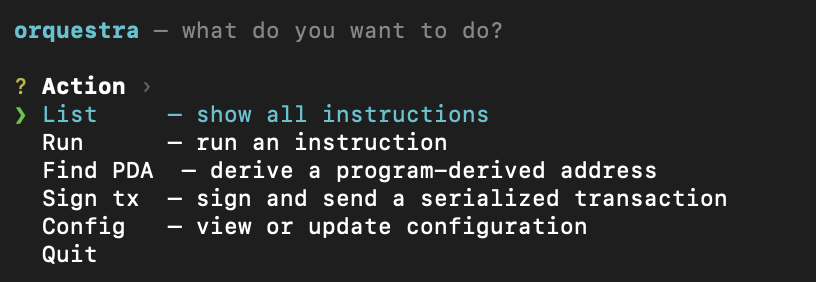
- Interactive menu — run
orquestrawith no arguments to get a top-level action picker - Persistent config — stores settings in
~/.config/orquestra/config.toml
Installation
One-liner (macOS & Linux)
curl -fsSL https://raw.githubusercontent.com/berkayoztunc/orquestra-cli/master/install.sh | shDetects OS/arch, grabs latest release binary, installs to /usr/local/bin.
Homebrew (macOS)
brew tap berkayoztunc/orquestra-cli https://github.com/berkayoztunc/orquestra-cli
brew install orquestra-cli
Download binary
Grab the latest binary for your platform from the Releases page.
| Platform | File | |----------------|-----------------------------------------------| | macOS arm64 | orquestra-vX.X.X-aarch64-apple-darwin.tar.gz | | macOS x8664 | orquestra-vX.X.X-x8664-apple-darwin.tar.gz | | Linux x8664 | orquestra-vX.X.X-x8664-unknown-linux-gnu.tar.gz | | Linux arm64 | orquestra-vX.X.X-aarch64-unknown-linux-gnu.tar.gz |
Extract and move to your PATH:
tar -xzf orquestra-*.tar.gz
mv orquestra /usr/local/bin/
Build from source
Requires Rust 1.75+.
git clone https://github.com/berkayoztunc/orquestra-cli
cd orquestra-cli
cargo build --release
binary is at target/release/orquestra
Install as an agent skill
This repository also ships a top-level SKILL.md, so agent frameworks that support skills can install it directly.
npx skills add berkayoztunc/orquestra-cliUseful variants:
# list skills found in repo
npx skills add berkayoztunc/orquestra-cli -l
install to all supported agents/targets
npx skills add berkayoztunc/orquestra-cli --all
Setup
The CLI has two operating modes. Choose the one that fits your workflow:
| Mode | When to use | |------|-------------| | API mode (default) | You have an Orquestra account and API key. All instruction metadata is fetched from the cloud. | | Local IDL file mode | You have a Solana/Anchor IDL JSON file locally and prefer not to use the Orquestra API. Works fully offline. |
API mode setup
1. Get your project ID and API key
Sign in at orquestra.dev, upload your Anchor IDL, and generate an API key from the dashboard.
2. Configure the CLI
orquestra config set \
  --project-id <your-project-id> \
  --api-key    <your-api-key>    \
  --rpc        https://api.mainnet-beta.solana.com \
  --keypair    ~/.config/solana/id.json
| Flag | Description | Default | |----------------|----------------------------------------------------------|--------------------------------------| | --project-id | Orquestra project slug or program address | — | | --api-key | X-API-Key header value from the dashboard | — | | --rpc | Solana RPC endpoint | https://api.mainnet-beta.solana.com | | --keypair | Path to Solana keypair JSON (standard CLI format) | — | | --api-base | Orquestra API base URL | https://api.orquestra.build |
The keypair is optional. Without it the CLI prints the unsigned base58 transaction for you to sign with any wallet.
3. Verify config
orquestra config showproject_id : my-program
apikey : skt*y123
rpc_url : https://api.mainnet-beta.solana.com
keypair_path: /Users/alice/.config/solana/id.json
apibaseurl: https://api.orquestra.build
idl_path : (not set)Local IDL file mode setup
If you have a Solana/Anchor IDL JSON file (e.g. exported from anchor build or downloaded from the chain), you can skip the Orquestra API entirely.
1. Point the CLI at your IDL file
orquestra config set \
  --idl     /path/to/program.json \
  --rpc     https://api.mainnet-beta.solana.com \
  --keypair ~/.config/solana/id.json
| Flag | Description | |------------|---------------------------------------------------| | --idl | Absolute or relative path to the IDL JSON file | | --rpc | Solana RPC endpoint used for sign & send | | --keypair| Path to Solana keypair JSON (optional) |
When idl_path is set the CLI operates in file mode — no Orquestra account or API key required.
To switch back to API mode, clear the field: orquestra config set --idl ""
2. Verify config
orquestra config showprogram_id : (not set)
api_key : (not set)
rpc_url : https://api.mainnet-beta.solana.com
keypair_path: /Users/alice/.config/solana/id.json
apibaseurl: https://api.orquestra.dev
idl_path : /path/to/program.jsonSupported IDL format
The CLI parses the native Solana/Anchor IDL JSON format — the same file produced by anchor build (found at target/idl/<program>.json) or fetchable via anchor idl fetch <program-id>.
Supported Borsh argument types: string, u8, u16, u32, u64, u128, i8, i16, i32, i64, i128, bool, pubkey.
Complex/nested struct types require API mode.
Usage
orquestra list▸ 4 instructions in my-program
initialize Initializes a new vault account deposit Deposit tokens into the vault withdraw Withdraw tokens from the vault close Close the vault and reclaim rent
Run an instruction (interactive)
orquestra runFuzzy-select from the instruction list, then answer each prompt:
? Select instruction  › deposit
Instruction: deposit
Arguments   amount (u64): 1000000
Accounts   authority [signer]: Gk3...abc  (pre-filled from keypair)   vault [mut]:        Fv9...xyz
──────────────────────────────────────── Summary   Instruction : deposit   Args        :     amount = 1000000   Accounts    :     authority = Gk3...abc     vault     = Fv9...xyz   Fee payer   : Gk3...abc ────────────────────────────────────────
? Build transaction for 'deposit'? › Yes
✓ Transaction built successfully!   Estimated fee : 5000 lamports
? Sign and send transaction to Solana? › Yes
✓ Transaction confirmed!   Signature : 5KtP...Xz   Explorer  : https://explorer.solana.com/tx/5KtP...Xz
Run a specific instruction directly
orquestra run depositSkips the selection menu and goes straight to the argument prompts.
Without a keypair
If no keypair is configured the CLI prints the unsigned transaction:
Base58 encoded transaction (unsigned):
  4h8nK3F9x2rP...vQm7L2wN
Sign with your wallet and broadcast to Solana.   https://orquestra.dev/docs/sign-and-send
Find PDA (interactive)
orquestra pdaFuzzy-select from the list of PDA accounts defined in your program's IDL, enter seed values, and the CLI derives the address:
▸ 2 PDA accounts in my-program (BUYu...)
? Select PDA account  › vault (owner)
Seed values   owner (publicKey): Gk3...abc
✓ PDA derived!
Address:   Fv9...xyz   Bump:      254   Program:   BUYu...
Seeds:   const  vault_seed        [76617...]   arg    owner             = Gk3...abc [0a1b...]
Derive a specific PDA directly
orquestra pda vaultSkips the selection menu and goes straight to seed prompts.
Command reference
orquestra                              # interactive top-level menu
orquestra list
orquestra run [INSTRUCTION]
orquestra pda [ACCOUNT]
orquestra config set [--project-id] [--api-key] [--rpc] [--keypair] [--api-base] [--idl]
orquestra config show
orquestra config reset                  # interactively update config values
orquestra --version
orquestra --help
Keypair format
The CLI uses the standard Solana CLI keypair format — a JSON file containing a 64-byte array:
[12,34,56,...] // 64 bytes: first 32 = secret seed, last 32 = public keyGenerate one with the Solana CLI:
solana-keygen new --outfile ~/.config/solana/id.jsonLicense
This project is licensed under the MIT License. See LICENSE for details.


