
EHR Management Using Blockchain
Last updated May 12, 2026
16
Stars
7
Forks
0
Issues
0
Stars/day
Attention Score
9
Language breakdown
No language data available.
▸ Files
click to expand
README
Blockchain-For-EHR-Management-Medishield
A decentralized system for managing electronic health records using blockchain and IPFS.Introduction
The aim of this framework is firstly to implement blockchain technology for EHR and secondly to provide secure storage of electronic records by defining granular access rules for the users of the proposed framework. Moreover, this framework also discusses the scalability problem faced by the blockchain technology in general via use of off-chain storage of the records. This framework provides the EHR system with the benefits of having a scalable, secure and integral blockchain-based solution.
Installation
The projects requires NodeJS and npm to work. Instructions to install all other dependencies are given below.
Node modules
- Move to the project directory and open it in your terminal.
- Run
npm installto install project dependenccties.
Ganache
- Go to Ganache homepage and download.
- If you are on Linux, you must have received an .appimage file. Follow installation instructions available here.
IPFS
- Download and install ipfs in your system link on this to follow this step :
Local server
- Install Node lite-server by running the following command on your terminal
npm install -g lite-server
Metamask
- Metamask is a browser extension available for Google Chrome, Mozilla Firefox and Brave Browser.
- Go to the this link and add Metamask to your browser.
Getting the dApp running
Configuration
1. Ganache
- Open Ganache and click on settings in the top right corner.
- Under Server tab:
- Under Accounts & Keys tab:
2. IPFS
- Fire up your terminal and run
ipfs init - Then run
ipfs config --json API.HTTPHeaders.Access-Control-Allow-Origin "[\"*\"]"

  ipfs config --json API.HTTPHeaders.Access-Control-Allow-Credentials "[\"true\"]"

ipfs config --json API.HTTPHeaders.Access-Control-Allow-Methods "[\"PUT\", \"POST\", \"GET\"]"- Run
ipfs daemonin terimal.
3. Metamask
- After installing Metamask, click on the metamask icon on your browser.
- Click on TRY IT NOW, if there is an announcement saying a new version of Metamask is available.
- Click on continue and accept all the terms and conditions after reading them.
- Stop when Metamask asks you to create a new password. We will come back to this after deploying the contract in the next section.
Smart Contract
- Install Truffle using
npm install truffle -g - Compile Contracts using
truffle compile
1. Starting your local development blockchain
- Open Ganache.
- Make sure to configure it the way mentioned above.
- Open new Terminal and deploy contracts using
truffle migrate - If you change contents of any contract , replace existing deployment using
truffle migrate --reset
Running the dApp
1. Connecting Metamask to our local blockchain
- Connect metamask to localhost:7485
- Click on import account
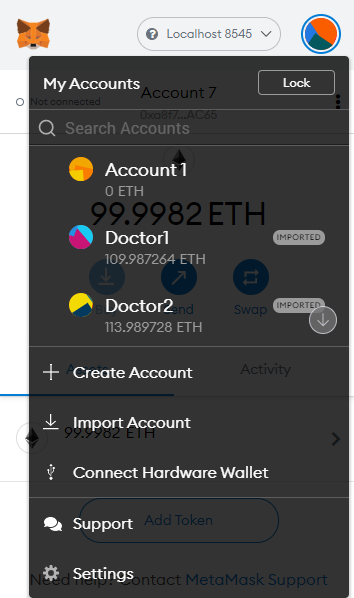
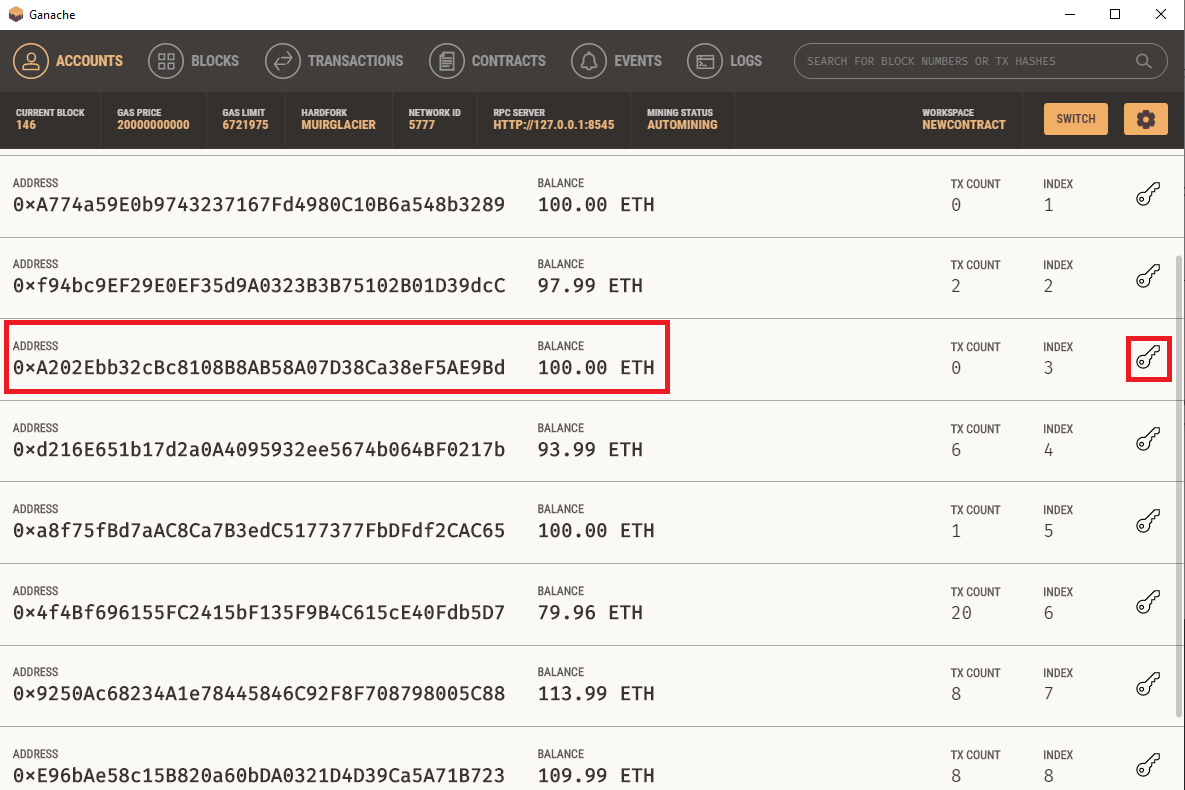
- Select any account from ganache and copy the private key to import account into metaMask
2. Start a local server
- Open a new terminal window and navigate to
/YOURPROJECTDIRECTORY/app/. - Run
npm start. - Open
localhost:3000on your browser. - That's it! The dApp is up and running locally.


