
MetaTrader 5 Solution for macOS Silicon M Series. Run MT5 seamlessly via Docker and perform algorithmic trading with Python.
⚡ SiliconMetaTrader5 🍏📈
Ultimate MetaTrader 5 & Python Solution for macOS Apple Silicon
 [
[
 ]()
]()
Developer: Bahadir Umut Iscimen | 🇹🇷 Türkçe Oku
[!NOTE]
💡 Clarification: This project does NOT replace the native MetaTrader 5 application installed on your computer. It runs a separate, headless MT5 instance via Docker to enable Python communication and algorithmic trading on macOS. This is an end-to-end solution developed to run MT5 seamlessly on macOS Silicon devices and to perform professional algorithmic trading with a Python client.
[!CAUTION]
⚠️ Usage Purpose & Production Warning: This infrastructure is designed to make strategy development, backtesting, and forward-testing incredibly comfortable in the macOS environment. However, for live (production) trading that requires millisecond precision or involves high capital, using a physical PC or server with native Windows (no emulation layer) is strictly recommended.
📦 What's Inside This Repository?
- 🐳
docker/: High-performance MT5 runtime built on Wine + QEMU. - 🖥
docker_kasm/: KasmVNC-based MT5 runtime variant. - 🐍
client/: Custom Python client package (siliconmetatrader5). - 🧪
tests/: Validation and connection health scripts.
🆕 Release 1.2.3
KasmVNC Runtime Added
A second runtime variant now exists underdocker_kasm/. This variant keeps the same siliconmetatrader5 bridge model and replaces the old x11vnc + noVNC desktop layer with KasmVNC.
Use it from the docker_kasm/ directory:
cd docker_kasm docker compose down -v docker compose build docker compose upAccess:
- 🌐 KasmVNC UI: http://localhost:3000
- Build-time installs Wine-side Python, VC runtime, and Python bridge dependencies.
- Runtime installs MetaTrader 5 into the persistent prefix and opens the desktop for first broker login.
- MT5 state, broker login, and downloaded history persist in
/config. - Build-time uses
Xvfbonly for Wine installer steps. Runtime GUI is KasmVNC.
Python Client 1.2.3
siliconmetatrader5==1.2.3 is the current client version. This release fixes the packaged bridge server layout.
python3 -m pip install --upgrade siliconmetatrader5==1.2.3🏗 System Architecture & Workflow
Visualizing the bridge between Apple Silicon, Docker Emulation, and Python.
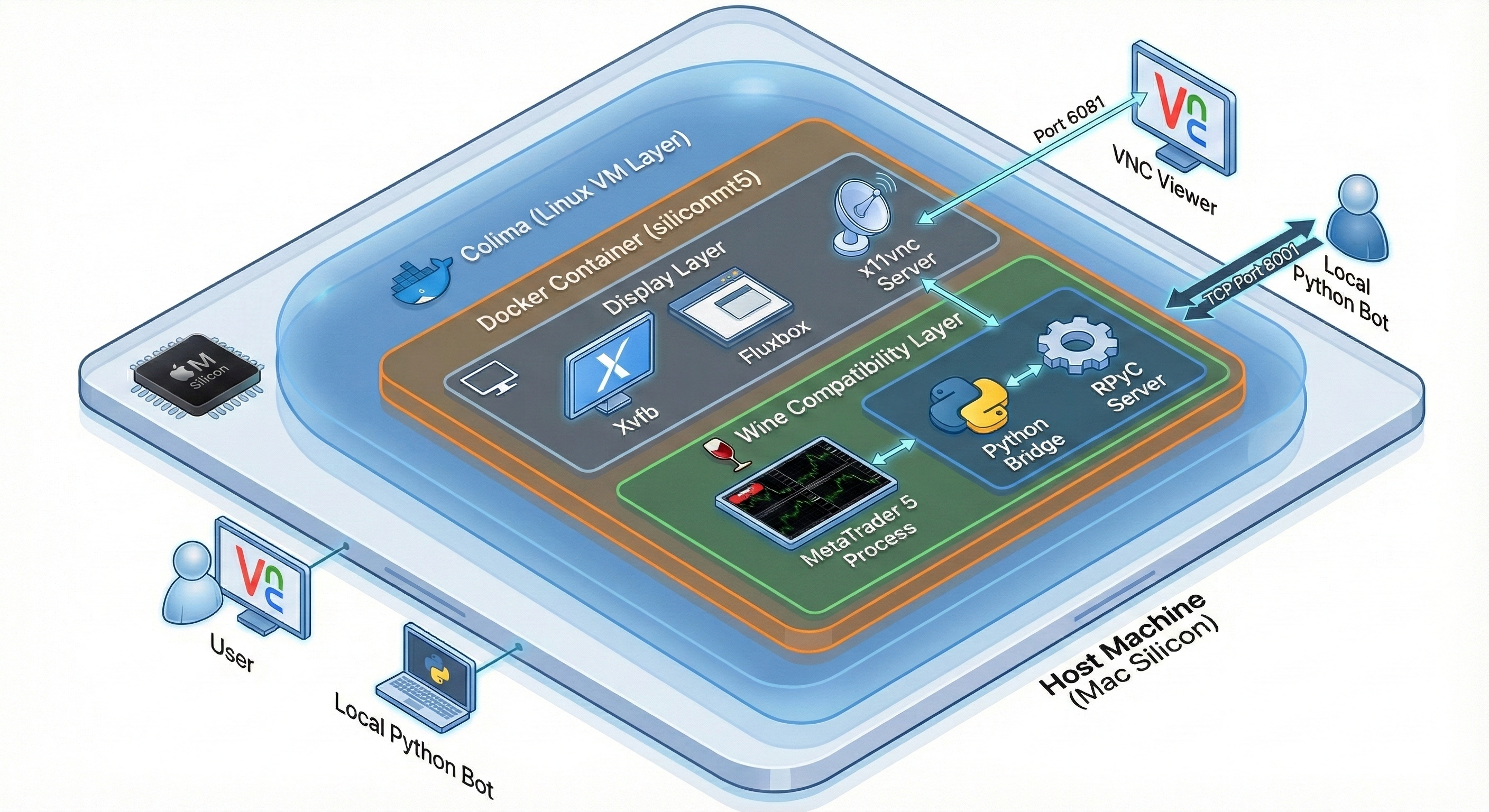
📸 Screenshots
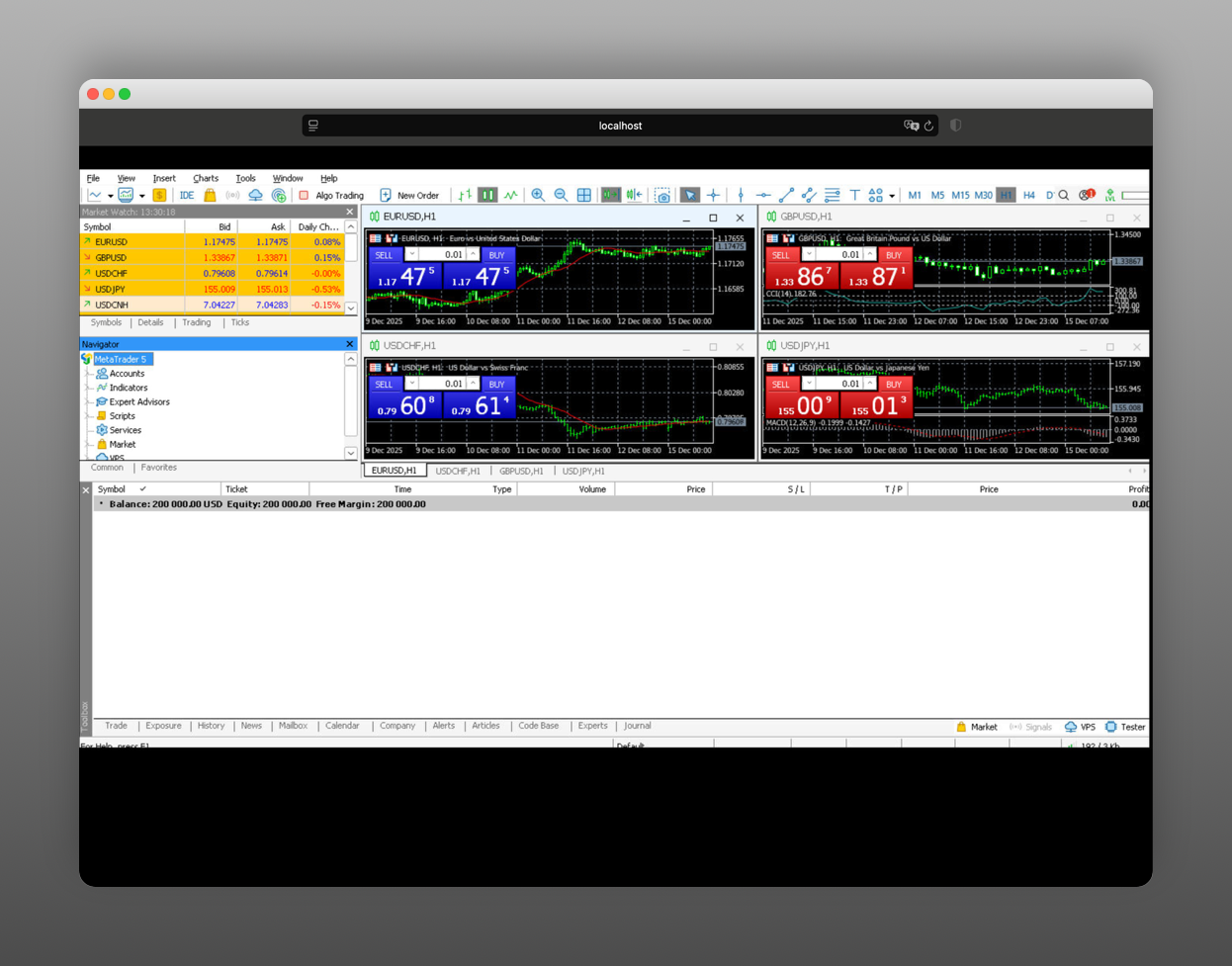
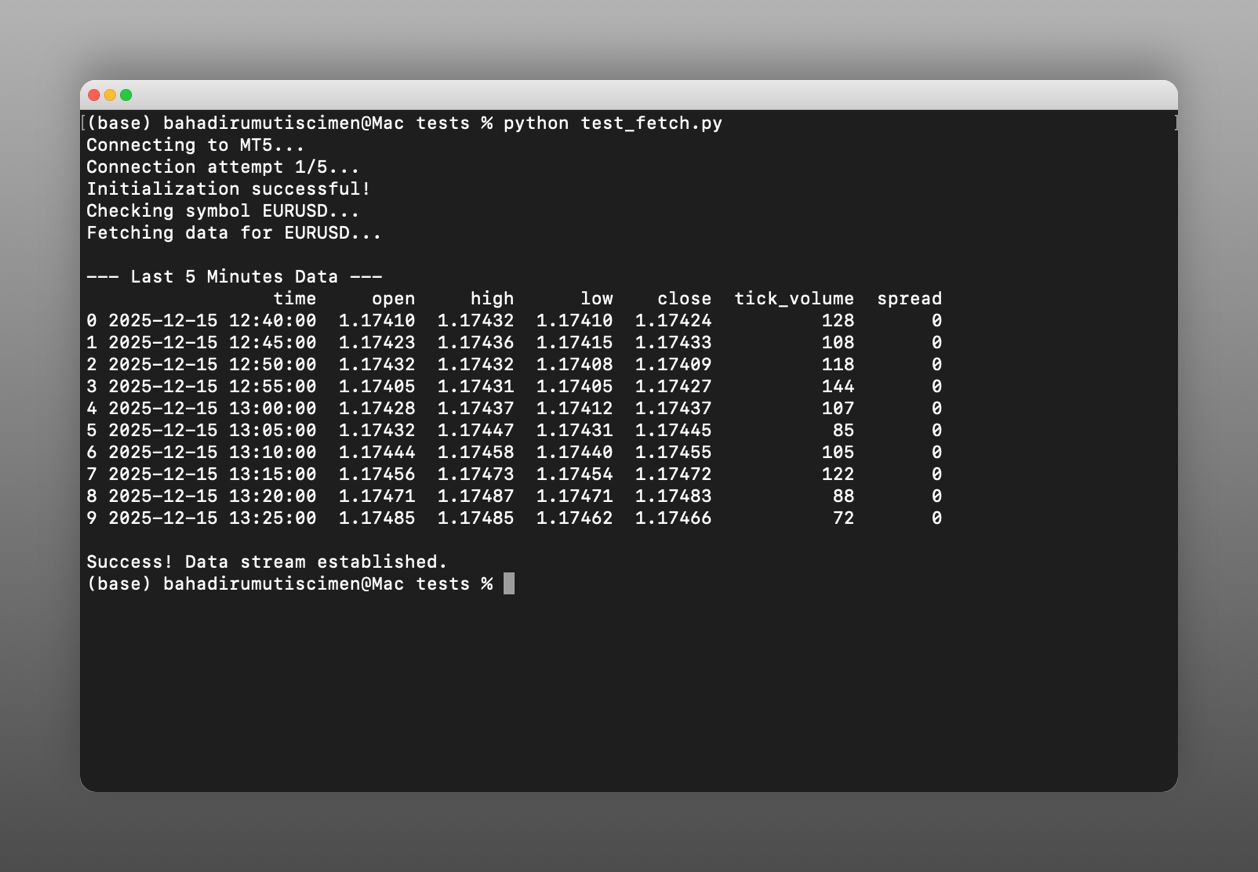
Left: Running on Localhost (VNC) | Right: Python Data Fetching
📡 Data Retrieval Methods
Choose the right method for your specific trading/backtesting scenario:
| 🎯 Use Case | 🛠 Recommended Method | | :--- | :--- | | Live Monitor / Fresh Bars | copyratesfrom_pos() | | Backtest / Historic Data | copyratesfrom() / copyratesrange() |
Example Implementation:
# 🟢 Live Data Fetching liverates = mt5.copyratesfrompos("EURUSD", mt5.TIMEFRAME_M5, 0, 500)
🕒 Historical Backtesting
histrates = mt5.copyratesrange("EURUSD", mt5.TIMEFRAMEM5, dtfrom, dtto)
🚀 Zero-to-Hero Setup Guide
Starting from scratch? Follow these steps to get your automated trading engine running on macOS.
1️⃣ Preparation
Open your Terminal and install the foundational tools:# 1. Install Homebrew (skip if you already have it)
/bin/bash -c "$(curl -fsSL https://raw.githubusercontent.com/Homebrew/install/HEAD/install.sh)"
2. Install Emulation & Container required packages
brew install colima docker qemu lima lima-additional-guestagents2️⃣ Start the Emulation Engine (Colima)
We configure Colima with x86_64 emulation to ensure Docker handles MT5 seamlessly on Apple Silicon.# Optional: Reset if Colima state is broken
colima delete -f
colima start --arch x86_64 --vm-type=qemu --cpu 4 --memory 8
3️⃣ Initialize the MT5 Server
cd docker
docker context use colima
Option A: Foreground (See live logs - Recommended for first setup)
docker compose up --build
Option B: Detached (Run in background once stable)
docker compose up --build -d
[!IMPORTANT]
Key Notes for Initialization:
* ⏳ Build Time: The first build takes roughly 5-10 minutes.
* 🖥 Booting UI: Transitioning from a black screen to the MT5 interface may take 25-30 minutes during the very first run.
* 🌐 Visual Access: Go to http://localhost:6081/vnc.html .
* 🔑 First Action: Navigate to File > Open an Account, search for your broker, and log in manually.
* 📊 Data Sync Warning: After broker login, historical bars are loaded in the background. Wait 5-10 minutes before running tests/bots; seeingNo datain the first minutes is normal. The larger yourMaxBarsvalue is, the longer this initial sync can take.
4️⃣ Install the Python Client
Link your Python environment to the new Docker instance:python3 -m pip install --upgrade siliconmetatrader5==1.2.35️⃣ Verify Connection
Run the built-in tests to ensure smooth data flow:python tests/test_fetch.py
python tests/test_plot.py⚙️ Advanced Configuration
🌍 Timezone Customization
The default container timezone isEurope/Istanbul. To change this, edit docker/compose.yaml:
environment:
- TZ=America/New_York # Options: UTC, Asia/Tokyo, etc.🖥 Screen Resolution & Performance
Adjust visual settings indocker/start.sh:
# Resolution setup
Xvfb :100 -ac -screen 0 1366x768x24 &
Window Manager (Optional - May increase VNC latency)
openbox &
cd docker && docker compose up --build -d
📊 MT5 History Depth (MaxBars)
To access deeper bar history for heavy backtesting, editdocker/mt5cfg.ini:
MaxBars=100000 # Options: 5000, 500000, 100000, 250000, 500000, 1000000💻 Example Usage
A quick boilerplate to start fetching data instantly:
import pandas as pd
from siliconmetatrader5 import MetaTrader5
Initialize Bridge
mt5 = MetaTrader5(host="localhost", port=8001, keepalive=True)
if not mt5.initialize():     raise RuntimeError("🚨 MT5 initialization failed!")
Fetch Live Data
rateslive = mt5.copyratesfrompos("EURUSD", mt5.TIMEFRAME_M15, 0, 150)
print(pd.DataFrame(rates_live).tail())
Graceful Exit
mt5.close()
🆕 Client Updates (Important)
Check your version: python3 -m pip show siliconmetatrader5
🛠 Core Improvements
- Connection Lifecycle (
closevsshutdown):
close() disconnects the current process.
* shutdown() completely stops the remote MT5 terminal (Use carefully in multi-bot setups).
- Timeout Semantics: Active per-call timeout is removed. Use
keepalive=Truefor long-running bots. - Watchdog Support: New methods
startwatchdog(...),stopwatchdog(), andhealth_status()added to detect frozen bridges. - Reliability: Direct remote call dispatch, normalized error codes (
TIMEOUT,CONNECTIONCLOSED), andmarketbook_releaseforwarding fixes.
🛡 Challenges & Architectural Solutions
- Architecture Mismatch: Mitigated crash loops by enforcing QEMU-based full
x86_64emulation instead of Rosetta. - IPC Timeout Patterns: Integrated retry-oriented behavior in the Python client to counter emulation pressure.
- SSL/TLS Compatibility: Embedded necessary Windows/Wine dependencies for secure, reliable broker communication.
🔁 Daily Routine Checklist
▶️ Start the System:
if colima status 2>/dev/null | grep -q "colima is running"; then echo "Colima is ready 🟢" else colima start fi cd docker && docker compose up -d⏹ Stop the System Safely:
cd docker && docker compose down colima stop❓ FAQ (Frequently Asked Questions)
Q: I rebooted my Mac, what do I run?
Run the start script from the repository root. Make sure Colima starts first, then launch Docker compose.
Q: My MT5 screen stays black via VNC. What do I do?
Ensure Colima is running inQEMU/x86_64mode. Stop detached mode and rundocker compose up --buildin the foreground to monitor error logs.
Q: How do I cleanly stop everything?
Run cd docker && docker compose down and let the containers terminate gracefully before shutting down Colima.
☕ Support the Project
If this project saves you time or contributes to your trading workflow, you can support it with USDT on the TRC20 network.
☕ Support via USDT (TRC20)
TMh8eS5EPRL77Z7L4KhsKmccSNLgf6Rfta


