
🌊 Interactive CLI tool to update GitHub Actions to latest versions with SHA pinning
Actions Up!




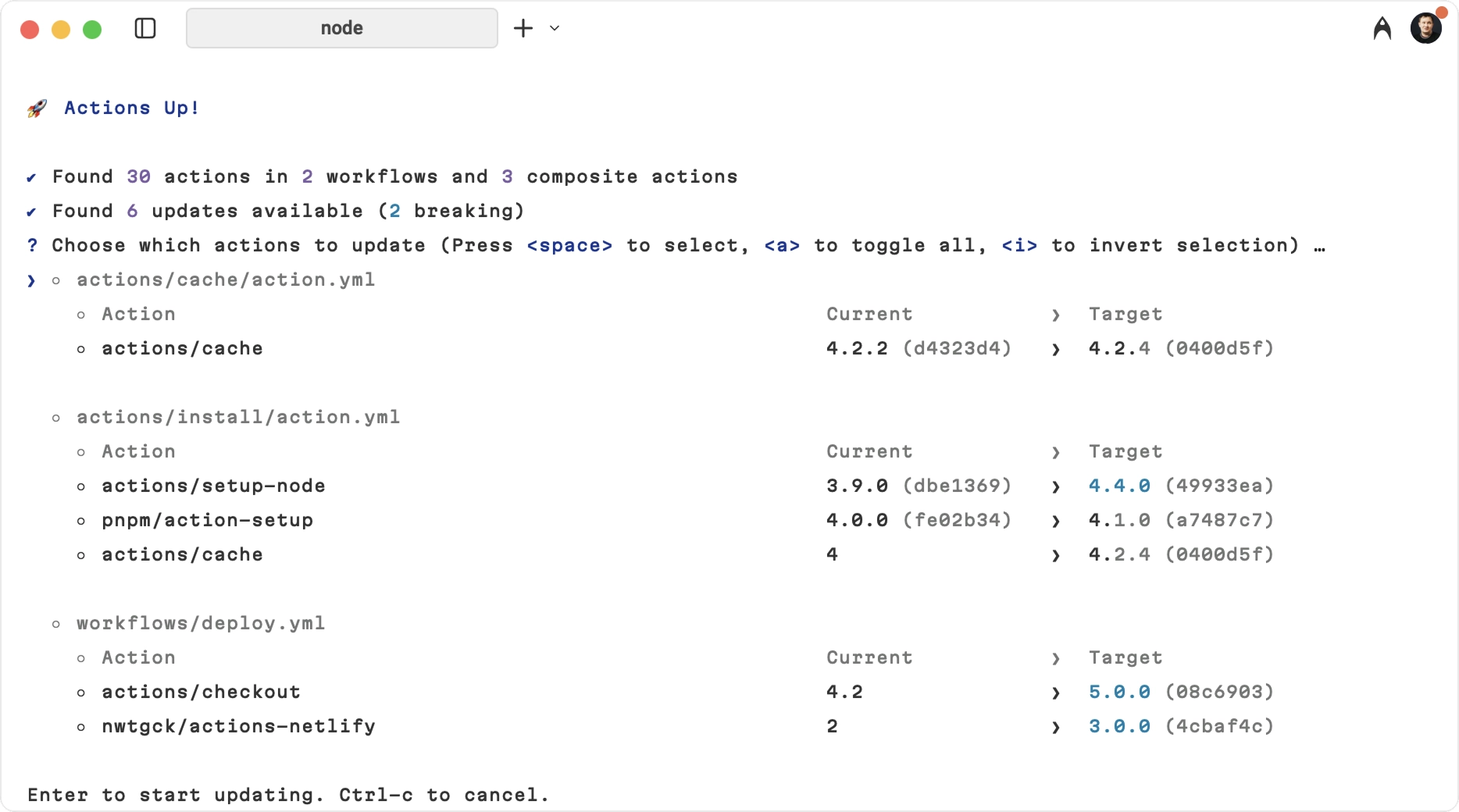
Actions Up scans your workflows and composite actions to discover every referenced GitHub Action, then checks for newer releases.
Interactively upgrade and pin actions to exact commit SHAs for secure, reproducible CI, or preserve tag-style references when you need to stay on tags.
Features
- Auto-discovery: Scans all workflows (
.github/workflows/*.yml) and
.github/actions/*/action.yml and root
action.yml/action.yaml)
- Reusable Workflows: Detects and updates reusable workflow calls at the job
- Flexible update styles: Use SHA pinning by default, or preserve tag-style
--style preserve
- Batch Updates: Update multiple actions at once
- Interactive Selection: Choose which actions to update
- Breaking Changes Detection: Warns about major version updates
- Fast & Efficient: Optimized API usage with deduped lookups
- CI/CD Integration: Use in GitHub Actions workflows for automated PR checks
Why
Keeping GitHub Actions updated is critical and time-consuming. Actions Up scans all workflows, highlights available updates, and can pin actions to SHAs for reproducibility.
| Without Actions Up | With Actions Up | | :----------------------------- | :------------------------------- | | Check each action manually | Scan all workflows in seconds | | Risk using vulnerable versions | SHA pinning for maximum security | | 30+ minutes per repository | Under 1 minute total |
Security Motivation
GitHub Actions run arbitrary code in your CI. If a job has secrets available, any action used in that job can read the environment and exfiltrate those secrets. A compromised action or a mutable version tag is a direct path to leakage.
Actions Up reduces risk by:
- Pinning actions to commit SHAs to prevent tag hijacking
- Making outdated actions visible and showing exactly what runs in CI
- Warning about major updates so you can review changes before applying them
push, workflow_dispatch, schedule, and
pullrequesttarget triggers (and on fork PRs if explicitly enabled). Always
scope workflow permissions to the minimum required.
Installation
Quick use (no installation)
npx actions-upGlobal installation
npm install -g actions-upPer-project
npm install --save-dev actions-upAlternatively, you can install Actions Up with Homebrew
brew install actions-upUsage
Interactive Mode (Default)
Run in your repository root:
npx actions-upThis will:
- Scan all
.github/workflows/.ymland.github/actions//action.ymlfiles,
action.yml/action.yaml
- Check for available updates
- Show an interactive list to select updates
- Apply selected updates with SHA pinning by default
Auto-Update Mode
Skip all prompts and update everything:
npx actions-up --yes
or
npx actions-up -y
Dry Run Mode
Check for updates without making any changes:
npx actions-up --dry-runJSON Mode
Output a machine-readable JSON report instead of the interactive UI:
npx actions-up --json--json is report-only: it never writes files, skips the interactive prompt, and cannot be combined with --yes.
Custom Directory
By default, Actions Up scans .github.
Use --dir to choose another directory, and pass it multiple times to scan several directories:
npx actions-up --dir .gitea
npx actions-up --dir .github --dir ./other/.github
Recursive Scanning
Use --recursive (-r) to scan YAML workflow/composite-action files recursively in the selected directories:
npx actions-up -r
npx actions-up --dir ./gh-repo-defaults -r
When --recursive is used without --dir, Actions Up scans from the current directory (.).
Branch References
By default, actions pinned to branch refs (e.g., @main, @release/v1) are skipped to avoid changing intentionally floating references. Skipped entries are listed in the output. To include them in update checks, pass --include-branches.
Quiet Mode
Use --quiet (-q) to hide the skipped and blocked-update warnings (for example, actions intentionally pinned to branches). Other output — results, applied updates, and errors — is unchanged.
npx actions-up --yes --quietUpdate Mode
By default, Actions Up allows major updates. Use --mode to limit updates:
npx actions-up --mode minor
npx actions-up --mode patch
In minor and patch modes, Actions Up tries to find the newest compatible tag first (for example, from @v4 in minor mode it will choose the latest v4.x.y). If no compatible version exists, that action is skipped.
Update Style
By default, Actions Up writes updates as pinned SHAs:
npx actions-up --style shaUse --style preserve to keep the current reference style:
npx actions-up --style preservepreserve keeps tag references on tags and SHA references on SHAs. Tag refs also keep their granularity, so actions/checkout@v5 updates to actions/checkout@v6, while actions/checkout@v5.0 updates to actions/checkout@v6.0. A SHA-pinned action continues updating to the latest resolved SHA.
GitHub Actions Integration
Automated PR Checks
You can integrate Actions Up into your CI/CD pipeline to automatically check for outdated actions on every pull request. This helps maintain security and ensures your team stays aware of available updates.
Create
.github/workflows/check-actions-updates.yml.
yaml name: Check for outdated GitHub Actions on: pull_request: types: [edited, opened, synchronize, reopened]- Updates available: ${report.summary.totalUpdates}jobs: check-actions: name: Check for GHA updates runs-on: ubuntu-latest permissions: contents: read pull-requests: write issues: write steps: - name: Checkout repository uses: actions/checkout@v4
- name: Setup Node.js uses: actions/setup-node@v4 with: node-version: '20'
- name: Install actions-up run: npm install -g actions-up
- name: Run actions-up check id: actions-check env: GITHUBTOKEN: ${{ secrets.GITHUBTOKEN }} run: | set -euo pipefail echo "## GitHub Actions Update Check" >> $GITHUBSTEPSUMMARY echo "" >> $GITHUBSTEPSUMMARY
# Run actions-up and capture machine-readable output echo "Running actions-up to check for updates..." actions-up --json > actions-up-report.json
UPDATE_COUNT=$(node -pe "JSON.parse(require('node:fs').readFileSync('actions-up-report.json', 'utf8')).summary.totalUpdates")
# Create formatted output if [ "$UPDATE_COUNT" -gt 0 ]; then echo "Found $UPDATECOUNT GitHub Actions with available updates" >> $GITHUBSTEP_SUMMARY echo "" >> $GITHUBSTEPSUMMARY echo "<details>" >> $GITHUBSTEPSUMMARY echo "<summary>Click to see JSON report</summary>" >> $GITHUBSTEPSUMMARY echo "" >> $GITHUBSTEPSUMMARY echo '</code></pre>json' >> $GITHUBSTEPSUMMARY cat actions-up-report.json >> $GITHUBSTEPSUMMARY echo '<pre><code class="lang-">' >> $GITHUBSTEPSUMMARY echo "</details>" >> $GITHUBSTEPSUMMARY
# Create detailed markdown report with better formatting node --input-type=module <<'EOF' import { readFileSync, writeFileSync } from 'node:fs'
let report = JSON.parse(readFileSync('actions-up-report.json', 'utf8')) let lines = [ '## GitHub Actions Update Report', '', '### Summary',
, '', '### Updates', '', ]- \for (let update of report.updates) { let file = update.action.file ?? 'unknown' let currentVersion = update.currentVersion ?? 'unknown' let latestVersion = update.latestVersion ?? 'unknown' lines.push(
${update.action.name}\in \${file}\: \${currentVersion}\→ \${latestVersion}\, ) }npx actions-uplines.push('') lines.push('Run
locally to review and apply updates.')${report}writeFileSync('actions-up-report.md', lines.join('\n')) EOF
echo "has-updates=true" >> $GITHUB_OUTPUT echo "update-count=$UPDATECOUNT" >> $GITHUBOUTPUT else echo "All GitHub Actions are up to date!" >> $GITHUBSTEPSUMMARY
{ echo "## GitHub Actions Update Report" echo "" echo "### All GitHub Actions in this repository are up to date!" echo "" echo "No action required. Your workflows are using the latest versions of all GitHub Actions." } > actions-up-report.md
echo "has-updates=false" >> $GITHUB_OUTPUT echo "update-count=0" >> $GITHUB_OUTPUT fi
- name: Comment PR with updates if: github.eventname == 'pullrequest' && github.event.pullrequest.head.repo.fullname == github.repository uses: actions/github-script@v7 with: script: | const fs = require('fs'); const report = fs.readFileSync('actions-up-report.md', 'utf8'); const hasUpdates = '${{ steps.actions-check.outputs.has-updates }}' === 'true';
// Check if we already commented const comments = await github.paginate(github.rest.issues.listComments, { owner: context.repo.owner, repo: context.repo.repo, issue_number: context.issue.number });
const botComment = comments.find(comment => comment.user.type === 'Bot' && comment.body.includes('GitHub Actions Update Report') );
const commentBody =
--- Generated by actions-up | Last check: ${new Date().toISOString()}
;// Only comment if there are updates or if we previously commented if (hasUpdates || botComment) { if (botComment) { // Update existing comment await github.rest.issues.updateComment({ owner: context.repo.owner, repo: context.repo.repo, comment_id: botComment.id, body: commentBody }); console.log('Updated existing comment'); } else { // Create new comment only if there are updates await github.rest.issues.createComment({ owner: context.repo.owner, repo: context.repo.repo, issue_number: context.issue.number, body: commentBody }); console.log('Created new comment'); } } else { console.log('No updates found and no previous comment exists - skipping comment'); }
// Add or update PR labels based on status const labels = await github.rest.issues.listLabelsOnIssue({ owner: context.repo.owner, repo: context.repo.repo, issue_number: context.issue.number });
const hasOutdatedLabel = labels.data.some(label => label.name === 'outdated-actions');
if (hasUpdates && !hasOutdatedLabel) { // Add label if updates are found try { await github.rest.issues.addLabels({ owner: context.repo.owner, repo: context.repo.repo, issue_number: context.issue.number, labels: ['outdated-actions'] }); console.log('Added outdated-actions label'); } catch (error) { console.log('Could not add label (might not exist in repo):', error.message); } } else if (!hasUpdates && hasOutdatedLabel) { // Remove label if no updates try { await github.rest.issues.removeLabel({ owner: context.repo.owner, repo: context.repo.repo, issue_number: context.issue.number, name: 'outdated-actions' }); console.log('Removed outdated-actions label'); } catch (error) { console.log('Could not remove label:', error.message); } }
- name: Fail if outdated actions found if: steps.actions-check.outputs.has-updates == 'true' run: | echo "::error:: Found ${{ steps.actions-check.outputs.update-count }} outdated GitHub Actions. Please update them before merging." echo "" echo "You can update them by running: npx actions-up" echo "Or manually update the versions in your workflows." exit 1</code></pre>
Example
Regular Actions
# Before
- uses: actions/checkout@v3
- uses: actions/setup-node@v3
After running actions-up
- uses: actions/checkout@08c6903cd8c0fde910a37f88322edcfb5dd907a8 # v5.0.0
- uses: actions/setup-node@49933ea5288caeca8642d1e84afbd3f7d6820020 # v4.4.0
Reusable Workflows
Actions Up also detects and updates reusable workflow calls:
# Before jobs: call-workflow: uses: org/repo/.github/workflows/ci.yml@v1.0.0 with: config: productionAfter running actions-up
jobs: call-workflow: uses: org/repo/.github/workflows/ci.yml@a1b2c3d4e5f6 # v2.0.0 with: config: productionAdvanced Usage
GitHub Token
Use
GITHUB_TOKEN(or a PAT) to raise API rate limits from 60 to 5000 requests/hour.GITHUBTOKEN=yourtoken_here npx actions-upOr in GitHub Actions:
- name: Check for updates env: GITHUBTOKEN: ${{ secrets.GITHUBTOKEN }} run: npx actions-up --jsonSkipping Updates
Use CLI excludes or YAML ignore comments.
npx actions-up --exclude "my-org/." --exclude "./internal-.*"Updates released less than 1 day ago are skipped by default. This cool-down protects against supply-chain attacks through freshly published releases. Use
--min-ageto change the threshold, or set it to0to disable the cool-down:npx actions-up --min-age 7Ignore comments (file/block/next-line/inline):
# actions-up-ignore-fileactions-up-ignore-next-line
- uses: actions/checkout@v3
- uses: actions/setup-node@v3 # actions-up-ignore
actions-up-ignore-start
- uses: actions/cache@v3
actions-up-ignore-end
Why Actions Up?
Interactive CLI for developers who want control over GitHub Actions updates.
- vs. Dependabot/Renovate: Dependabot and Renovate update via pull requests;
- vs. pinact: pinact is a CLI to pin and update Actions and reusable
- Zero-config:
npx actions-upruns immediately. - Breaking change warnings: Major updates are flagged before applying.
Contributing
See Contributing Guide.
License
MIT © Azat S.


