
AWS-native knowledge graph RAG framework unifying two graph-retrieval methodologies — Microsoft GraphRAG community summarization and LightRAG dual-level keyword search — on Amazon Bedrock, Neptune, and OpenSearch. Multi-hop QA over document corpora, with incremental indexing and multilingual support.
Unified Knowledge Graph RAG on AWS


🇰🇷 한국어 README · 🤝 Contributing
An AWS-native knowledge graph RAG (Retrieval-Augmented Generation) framework that turns large multilingual document corpora into knowledge graphs and answers questions over them with multi-hop graph traversal.
It reimplements two retrieval methodologies — Microsoft's GraphRAG ("From Local to Global: A Graph RAG Approach to Query-Focused Summarization") and LightRAG ("Simple and Fast Retrieval-Augmented Generation") — over a single AWS-native stack. The two are selectable per query and share one ingestion, indexing, caching, multilingual, and hybrid (lexical + semantic + graph) search infrastructure; only the retrieval algorithm differs.
Highlights
- Two methodologies, one stack. GraphRAG community-summary (auto/drift/global/local/simple) and LightRAG dual-level keyword (mix/hybrid/naive), chosen per query viasearch_strategy.
- Incremental indexing. The DynamoDB document-status registry (aws.dynamodb) diffs a corpus by content hash and re-indexes only new/changed documents, merging into the live graph (idempotent upserts; deletions remove a document's exclusive artifacts).
- Prompt tuning.run-prompt-tuningprofiles a corpus (domain/language/persona/entity-types) and emits domain-adaptedcustom_prompts.
- Standalone visualization & graph-aware evaluation.run-visualizationrenders from exported graph data without re-ingesting; thegraph_awareevaluator scores entity/relationship coverage.
- Hexagonal architecture. Ports & adapters + registries make storage backends, retrieval strategies, evaluators, and renderers pluggable. See docs/design.md.
📋 Table of Contents
- ✨ Features & Advantages
- 🏛️ Architecture Overview
- 🚀 Installation
- 📖 Usage
- 🧪 Testing & Quality
- 🔒 Security & Disclaimer
- 🤝 Contributing
- 📄 License
- 📚 References
✨ Features & Advantages
🏗️ AWS-Native Design
- AWS service integration: Bedrock, Neptune, OpenSearch, S3, and DynamoDB
- Scalable: parallel, batched processing for large document corpora
- Caching: local + S3-synced stage cache with task retry to avoid recomputation
- Security: S3 encryption and private-VPC deployment
🚀 Triple Hybrid Search Architecture
- Semantic Search: High-quality vector search based on Amazon Bedrock embedding models
- Lexical Search: Precise keyword matching using BM25 algorithm
- Relationship-based Search: Connectivity analysis through knowledge graph traversal
- Result Optimization: Enhanced search accuracy with the RRF (Reciprocal Rank Fusion) algorithm and Amazon Bedrock reranking models
🧠 Advanced Knowledge Graph Processing
- Precise Entity Resolution: Automatic detection and integration of duplicate entities
- Topic Clustering: Efficient community detection based on Leiden algorithm
- Complex Reasoning: Multi-hop reasoning capabilities across document boundaries
- Source Transparency: Verifiable information sources provided for all responses
🔍 Two Selectable Methodologies, One Infrastructure
Pick per query viasearch_strategy; both share the same ingestion, indexing,
caching, multilingual, and hybrid-scoring stack — only the retrieval algorithm differs.
- GraphRAG (community-summary):
simple(direct),local(entity-focused),
global (community-based), drift (progressive exploration), auto (LLM router)
- LightRAG (dual-level keyword):
mix,hybrid,naive— high/low keyword
♻️ Incremental Indexing
- Content-hash delta detection: a DynamoDB document-status registry fingerprints
- Deletion lineage: removing a document deletes only its exclusive artifacts
🎯 Comprehensive Evaluation Framework
- LangChain-based Evaluation:
correctnessandpartial_correctnessvia built-in evaluators - RAGAS Metrics: answer correctness, answer relevancy, faithfulness, context precision, and context recall
- Graph-aware Evaluation: entity/relationship coverage (recall of expected
🔧 User Support
- Domain-specific Prompts: customizable per-prompt overrides via config
- Automatic Prompt Tuning: profile a corpus (domain/language/persona/entity-types)
run-prompt-tuning)
- Flexible Configuration: detailed option adjustment through YAML configuration files
- Comprehensive Monitoring: structured logging and performance metrics
🌍 Multilingual Support
- Automatic Language Processing: translation during indexing/search, language-aware
📊 Visualization & Analytics Tools
- Interactive Graph: Node2Vec + UMAP graph visualization
- Network Analysis: centrality metrics and graph statistics
- Standalone CLI: render from exported graph data without re-ingesting (
run-visualization)
🧱 Hexagonal Architecture
- Ports & adapters: pluggable storage/retrieval backends and a registry for
CLAUDE.md)
🏛️ Architecture Overview
The framework implements a sophisticated indexing and retrieval pipeline:
Data Ingestion Pipeline
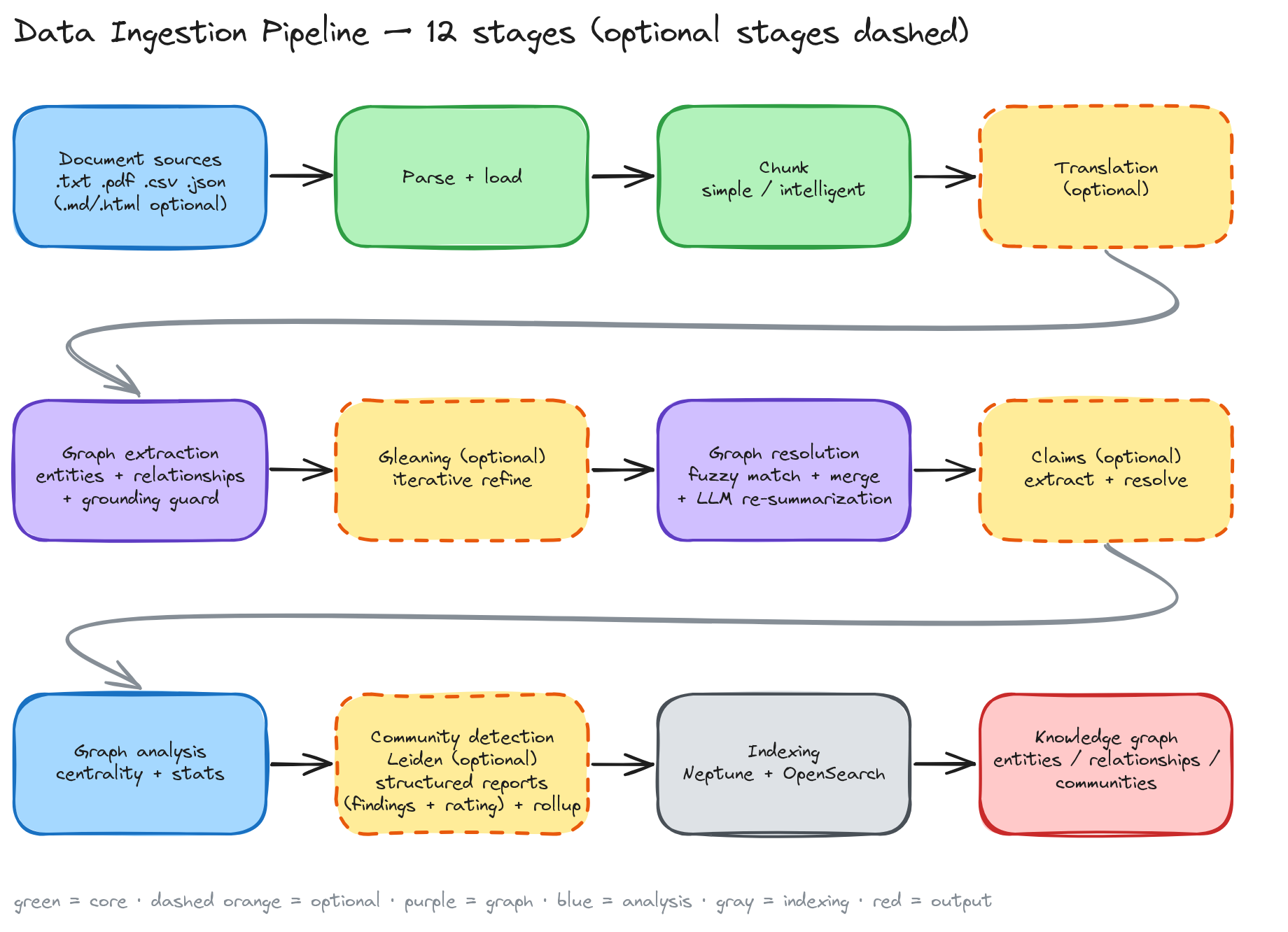
Core Stages:
- Document Loading/Parsing: PDF, TXT, CSV, JSON out of the box (plus MD/HTML when the optional
unstructuredextra is installed) - Text Chunking: Simple/intelligent strategies with context preservation
- Graph Extraction: Entity/relationship extraction via LLM
- Graph Resolution: Fuzzy matching and deduplication of entities/relationships
- Graph Analysis: Centrality metrics (degree, betweenness, PageRank, eigenvector) and graph statistics
- Community Detection: Leiden algorithm for topic clustering
- Indexing: Storage backend integration (OpenSearch + Neptune)
Optional Stages:
- Translation: Multi-language support with automatic language detection
- Gleaning: Iterative graph refinement for improved accuracy
- Claim Extraction/Resolution: Factual assertions extraction and validation
processing.claim_extraction.enabled, off by default). When enabled,
claims are embedded into a dedicated index and injected into local/simple
search context as covariates.
Key Features:
- Incremental Indexing: content-hash delta detection + merge (DynamoDB registry)
- Resumable Pipeline: Stage checkpointing for interrupted runs
- Comprehensive Caching: S3 sync with local cache management
- Parallel Processing: Batch optimization and concurrent execution
- Configurable Strategies: Flexible processing approaches per stage
- Error Handling: Optional continuation on stage failures
Retrieval Pipeline
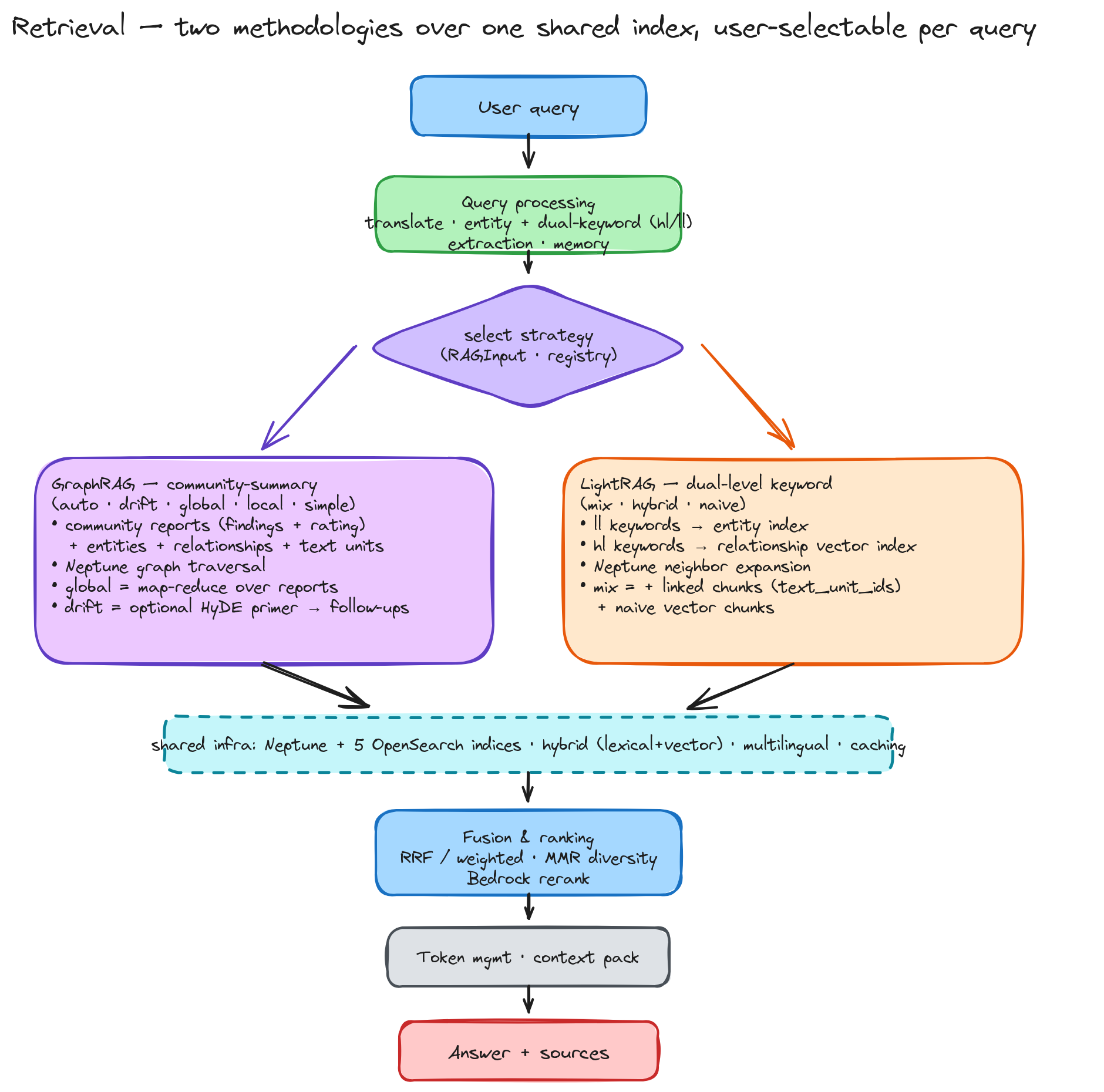
Multi-Strategy Architecture
The framework offers two retrieval methodologies — GraphRAG community-summary and LightRAG dual-level keyword — sharing one ingestion/indexing/caching/ hybrid-search infrastructure and selectable per query via RAGInput.search_strategy. The GraphRAG auto strategy automatically selects the optimal approach based on query analysis.
GraphRAG strategies
Simple Strategy: Direct OpenSearch retrieval for basic queries
- Vector and keyword search without graph traversal
- Fastest response time for straightforward questions
- Ideal for factual lookups and simple information retrieval
- Identifies key entities in the query
- Performs graph traversal to find related entities and relationships
- Combines graph context with vector/keyword search results
- Optimal for detailed analysis of specific entities or concepts
- Leverages community detection results for comprehensive coverage
- Uses map-reduce approach for large-scale information synthesis
- Dynamic community selection based on query relevance
- Best for high-level insights and thematic analysis
- Starts with initial search and iteratively refines based on results
- Expands context through multiple search rounds
- Convergence detection prevents infinite loops
- Excellent for complex, multi-faceted questions requiring exploration
LightRAG strategies (dual-level keyword)
Mix / Hybrid Strategy: Extracts high-level and low-level keywords (KeywordsExtractionPrompt), then queries the relationship vector index (high-level) + entity index (low-level) with Neptune neighborhood expansion. mix additionally blends naive vector chunk retrieval. Both run through the same HybridScorer (lexical + semantic + graph, RRF + Bedrock rerank).
Naive Strategy: Pure vector chunk retrieval — the LightRAG baseline, useful as a fast lexical/semantic fallback and for comparison evaluation.
Component Architecture
Dual Retriever System:
- Neptune Graph DB: Relationship traversal and entity-centric search
- OpenSearch: Vector similarity and keyword matching with BM25
- Language detection and translation (if needed)
- Entity extraction using LLM
- Strategy selection based on query characteristics
- Multi-retriever coordination and result fusion
- RRF (Reciprocal Rank Fusion): Combines scores from different retrievers
- Diversity Filtering: Reduces redundancy in search results
- LLM Reranking: Context-aware result prioritization using Bedrock models
- Hybrid Scoring: Weighted combination of lexical and semantic similarity
- Token Management: Dynamic context sizing within model limits
- Priority Scoring: Relevance-based content selection
- Memory Integration: Conversational context tracking for multi-turn queries
- Entity Tracking: Maintains entity focus across conversation turns
🚀 Installation
Prerequisites
- Python 3.10–3.12 (
uvrecommended) - AWS CLI configured with appropriate permissions
- AWS Services deployed and accessible (provision them yourself, or use the
Quick Start
# Clone the repository (replace <repository-url> with this repo's Git URL)
git clone <repository-url>
cd unified-kg-rag-on-aws
Install the framework (uv recommended; or: pip install -e .)
uv sync --extra dev
Copy and configure settings
cp config-template.yaml config.yaml
Edit config.yaml with your AWS service endpoints
Copy and configure environment variables (if using username/password authentication)
cp .env-template .env
Edit .env file with your OpenSearch credentials if not using IAM authentication
📦 Provision the AWS stack (optional)
The framework talks to existing AWS services — it does not create them. You have two ways to get those services in place:
- Already have them? Skip this section. Just put your Bedrock region and your
config.yaml
and go straight to Usage.
- Starting from scratch? The repo ships an **optional, batteries-included AWS
iac/ that provisions the entire stack for you
— VPC + endpoints, a Neptune cluster, an OpenSearch domain, the DynamoDB
doc-status table, an S3 cache bucket, an ECS Fargate data plane, a Step
Functions ingestion pipeline, CloudWatch dashboards/alarms, and an optional
Bedrock Guardrail — with Well-Architected defaults (private-VPC isolation, KMS
at-rest encryption, enforced TLS, least-privilege IAM).
Using the CDK app is a short, self-contained flow:
cd iac
python -m venv .venv && . .venv/bin/activate
pip install -r requirements.txt
See what would be created — no AWS changes, no cost:
cdk synth
First time in this account/region only:
cdk bootstrap
Deploy everything (creates billable resources — see the cost note below):
cdk deploy --all
After the deploy finishes, CloudFormation prints the Neptune / OpenSearch / S3 outputs — copy those endpoints into your config.yaml, and you're ready to ingest and query.
💡 Heads-up on cost & teardown. Deploying creates Neptune and OpenSearch
(both billed hourly) plus, in public network mode, NAT gateways. In the
defaultdevprofile everything tears down cleanly withcdk destroy --all.
For production, review the hardening flags (usecmk,deletionprotection,
Multi-AZ sizing, vpcflowlogs, …) first.
The iac/README.md is the full reference: every stack, all -c key=value configuration knobs, VPC reuse, the region-pinned Bedrock Guardrail two-step, cdk-nag validation, and how to kick off an ingestion run via Step Functions once the stack is up.
Environment Configuration
If your OpenSearch cluster uses username/password authentication instead of IAM, create a .env file:
cp .env-template .envThen edit the .env file with your OpenSearch credentials:
# OpenSearch Authentication (only required if use_iam is false in config.yaml)
OPENSEARCHUSERNAME=youropensearch_username
OPENSEARCHPASSWORD=youropensearch_passwordNote: The .env file is only needed when useiam: false is set in your config.yaml OpenSearch configuration. If you're using IAM authentication (useiam: true), you can skip this step.
📖 Usage
All behavior is driven by config.yaml (schema: config-template.yaml). The five CLIs (pyproject scripts) cover the full workflow:
# 1) Index a corpus (full 12-stage pipeline; incremental when DynamoDB is enabled)
run-ingestion --source-directory ./source --config-path config.yaml
2) Query — GraphRAG (community-summary) or LightRAG (dual-level keyword)
run-rag --query "What are the main themes?" --search-strategy global --config-path config.yaml
run-rag --query "How are Alice and Acme related?" --search-strategy mix --config-path config.yaml
run-rag --interactive --use-memory --conversation-id my-session --config-path config.yaml
3) Evaluate (langchain + ragas + graph-aware)
run-eval --eval-data-path eval_data.json --config-path config.yaml
4) Visualize an exported graph (no re-ingestion)
run-visualization --data-path visualization_data.json --output-dir ./viz --config-path config.yaml
5) Auto-tune prompts to a domain corpus
run-prompt-tuning --source-directory ./source --output tuned_prompts.yaml --config-path config.yaml
Choosing a strategy — GraphRAG: simple (direct vector/lexical), local (entity-centric), global (community-summary, map-reduce), drift (iterative), auto (LLM router). LightRAG: mix / hybrid / naive (dual-level keyword).
See the User Guide for configuration, CLI flags, the Python API, and incremental indexing, and the Design Doc for architecture and algorithms.
🧪 Testing & Quality
uv run pytest -m "not aws"                    # AWS-free tests (unit/integration/property)
uv run pytest -m "not aws" --cov=unifiedkgrag # with coverage
uv run ruff check unifiedkgrag tests
uv run mypy unifiedkgrag- The
awsmarker isolates tests that need real AWS services; they are excluded in CI. - DynamoDB/S3 are tested with
moto; Neptune/OpenSearch with port-based in-memory fakes. - CI (
.github/workflows/): ruff/black/isort/mypy + pytest+coverage gate, plus a non-blocking ASH security scan.
🔒 Security & Disclaimer
This project is a **reference framework provided for educational and illustrative purposes**. It is offered "AS IS" without warranty of any kind (see LICENSE). **It should not be deployed to a production environment without your own additional security testing, threat modeling, and hardening.**
- Run it in your own AWS account against your own resources; you are responsible
- The optional CDK stack (
iac/) provides secure defaults (private-VPC
- Enable the Bedrock Guardrail (
aws.bedrock.guardrail) and apply rate limiting
- To report a security issue, see SECURITY.md — please do not
🤝 Contributing
We welcome contributions! Please see our Contributing Guidelines for details.
For extension recipes (adding a search strategy, storage backend, evaluator, or renderer), see CONTRIBUTING.md and CLAUDE.md — most extensions are a registry registration and need no dispatch-code edits.
📄 License
This project is licensed under the Apache-2.0 License - see the LICENSE file for details.
📚 References
GraphRAG (Microsoft)
- From Local to Global: A Graph RAG Approach to Query-Focused Summarization
- GraphRAG: Unlocking LLM Discovery on Narrative Private Data
- GraphRAG: New Tool for Complex Data Discovery Now on GitHub
- GraphRAG Auto-Tuning Provides Rapid Adaptation to New Domains
- Introducing DRIFT Search: Combining Global and Local Search Methods to Improve Quality and Efficiency
- GraphRAG: Improving Global Search via Dynamic Community Selection
- LazyGraphRAG: Setting a New Standard for Quality and Cost
- Introducing GraphRAG 1.0
- Microsoft GraphRAG Library
🙏 Acknowledgments
Thanks to Jihyeon Kang for significant contributions to the library's feature development and validation, and to Yusuke Tanimiya for a thorough review and real-corpus testing — both of which strengthened the framework ahead of release.
🏢 About
Maintained by AWS under the awslabs organization. Licensed under Apache-2.0. Contributions welcome — see CONTRIBUTING.md.


