
Run web applications on AWS Lambda
AWS Lambda Web Adapter
A tool to run web applications on AWS Lambda
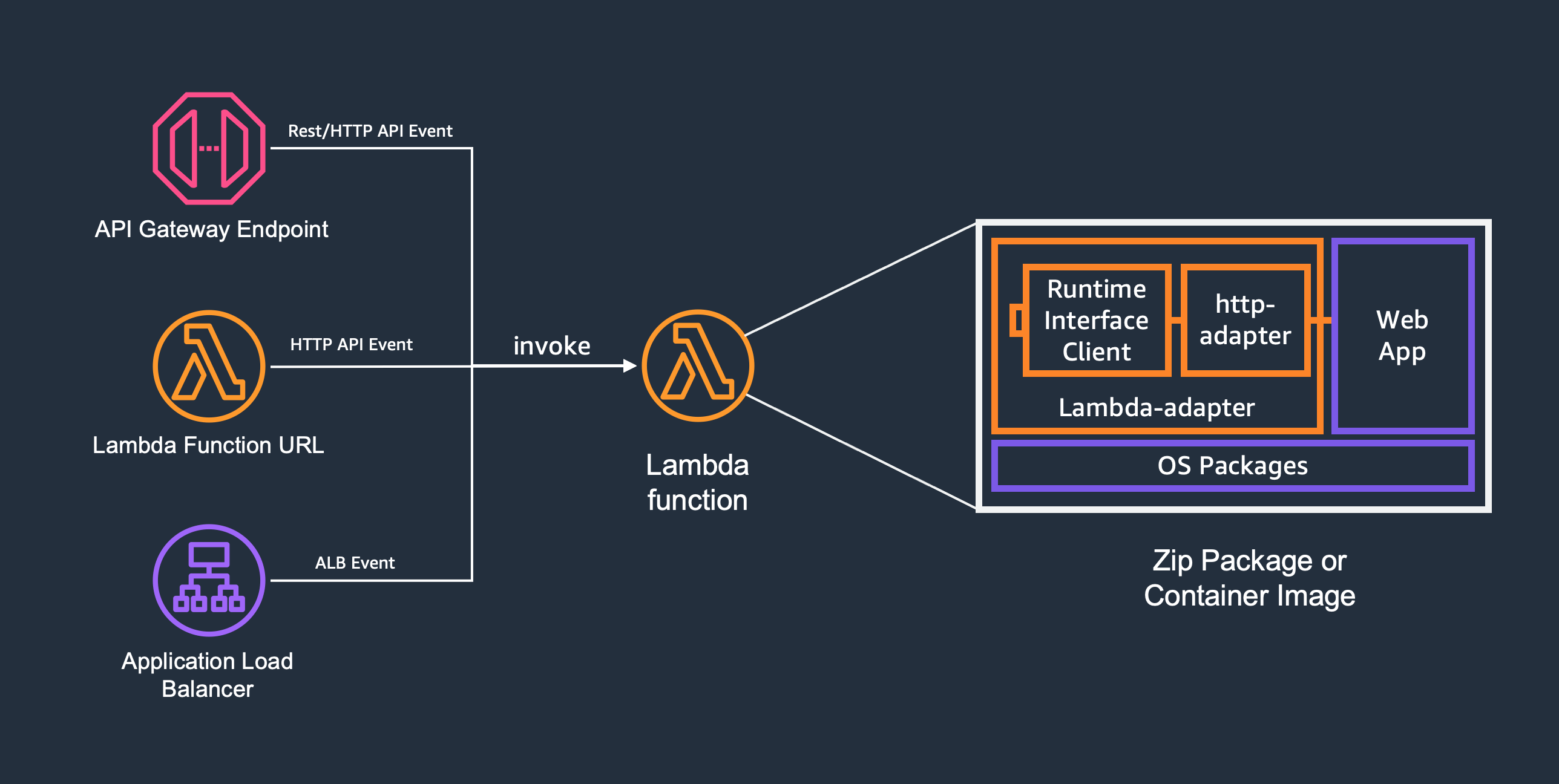
AWS Lambda Web Adapter allows developers to build web apps (http api) with familiar frameworks (e.g. Express.js, Next.js, Flask, SpringBoot, ASP.NET and Laravel, anything speaks HTTP 1.1/1.0) and run it on AWS Lambda. The same docker image can run on AWS Lambda, Amazon EC2, AWS Fargate, and local computers.
Features
- Run web applications on AWS Lambda
- Supports Amazon API Gateway Rest API and Http API endpoints, Lambda Function URLs, and Application Load Balancer
- Supports Lambda managed runtimes, custom runtimes and docker OCI images
- Supports Lambda Managed Instances for multi-concurrent request handling
- Supports any web frameworks and languages, no new code dependency to include
- Automatic encode binary response
- Enables graceful shutdown
- Supports response payload compression
- Supports response streaming
- Supports multi-tenancy via tenant ID propagation
- Supports non-http event triggers
Quick Start
Docker Images
Add one line to your Dockerfile:
COPY --from=public.ecr.aws/awsguru/aws-lambda-adapter:1.0.1 /lambda-adapter /opt/extensions/lambda-adapterPre-compiled multi-arch images (x8664 and arm64) are available at public.ecr.aws/awsguru/aws-lambda-adapter. Non-AWS base images may be used since the Runtime Interface Client ships with the Lambda Web Adapter.
Zip Packages
- Attach the Lambda Web Adapter layer to your function:
arn:aws:lambda:${AWS::Region}:753240598075:layer:LambdaAdapterLayerX86:28
- arm64: arn:aws:lambda:${AWS::Region}:753240598075:layer:LambdaAdapterLayerArm64:28
- Set environment variable
AWSLAMBDAEXEC_WRAPPERto/opt/bootstrap - Set function handler to your startup script, e.g.
run.sh
Configurations
The readiness check port/path and traffic port can be configured using environment variables. These environment variables can be defined either within docker file or as Lambda function configuration.
| Environment Variable | Description | Default | |-----------------------------------------|---------------------------------------------------------------------------------|--------------| | AWSLWAPORT | traffic port (falls back to PORT) | "8080" | | AWSLWAREADINESSCHECKPORT | readiness check port | AWSLWAPORT | | AWSLWAREADINESSCHECKPATH | readiness check path | "/" | | AWSLWAREADINESSCHECKPROTOCOL | readiness check protocol: "http" or "tcp" | "http" | | AWSLWAREADINESSCHECKHEALTHY_STATUS | HTTP status codes considered healthy (e.g., "200-399") | "100-499" | | AWSLWAASYNC_INIT | enable asynchronous initialization for long initialization functions | "false" | | AWSLWAREMOVEBASEPATH | the base path to be removed from request path | None | | AWSLWAENABLE_COMPRESSION | enable gzip/br compression for response body (buffered mode only) | "false" | | AWSLWAINVOKEMODE | Lambda function invoke mode: "buffered" or "responsestream" | "buffered" | | AWSLWAPASSTHROUGHPATH | the path for receiving event payloads from non-http triggers | "/events" | | AWSLWAAUTHORIZATION_SOURCE | a header name to be replaced to Authorization | None | | AWSLWAERRORSTATUSCODES | HTTP status codes that will cause Lambda invocations to fail (e.g. "500,502-504") | None | | AWSLWALAMBDARUNTIMEAPIPROXY | overwrites AWSLAMBDARUNTIMEAPI to allow proxying request | None |
Deprecation Notice: The following non-namespaced environment variables are deprecated and will be removed in version 2.0:
HOST,READINESSCHECKPORT,READINESSCHECKPATH,READINESSCHECKPROTOCOL,REMOVEBASEPATH,ASYNC_INIT.
Please migrate to the>AWSLWAprefixed versions. Note:PORTis not deprecated and remains a supported fallback forAWSLWAPORT.
Additionally,AWSLWAREADINESSCHECKMINUNHEALTHYSTATUShas been removed in 1.0. UseAWSLWAREADINESSCHECKHEALTHY_STATUSinstead.
Examples
- FastAPI
- FastAPI in Zip
- FastAPI with Background Tasks
- FastAPI with Response Streaming
- FastAPI with Response Streaming in Zip
- FastAPI with Response Streaming on Lambda Managed Instances
- FastAPI Response Streaming Backend with IAM Auth
- Flask
- Flask in Zip
- Serverless Django by @efi-mk
- Express.js
- Express.js in Zip
- Next.js
- Next.js in Zip
- Next.js Response Streaming
- SpringBoot
- SpringBoot in Zip
- SpringBoot Response Streaming
- Nginx
- PHP
- Rust Actix Web in Zip
- Rust Axum in Zip
- Golang Gin
- Golang Gin in Zip
- Deno Oak in Zip
- Laravel on Lambda
- ASP.NET MVC
- ASP.NET MVC in Zip
- ASP.NET Web API in Zip
- SQS Express.js
- Bedrock Agent FastAPI
- Bedrock Agent FastAPI in Zip
- FastHTML
- FastHTML in Zip
- FastHTML with Response Streaming
- FastHTML with Response Streaming in Zip
- Remix
- Remix in Zip
- Sveltekit SSR Zip
- Datadog
- Datadog in Zip
Acknowledgement
This project was inspired by several community projects.
Migrating from 0.x to 1.0
Environment Variables
All environment variables now use the AWSLWA prefix. The old non-prefixed names still work but are deprecated and will be removed in version 2.0.
| Old (Deprecated) | New | |------------------------------|--------------------------------------------| | READINESSCHECKPORT | AWSLWAREADINESSCHECKPORT | | READINESSCHECKPATH | AWSLWAREADINESSCHECKPATH | | READINESSCHECKPROTOCOL | AWSLWAREADINESSCHECKPROTOCOL | | REMOVEBASEPATH | AWSLWAREMOVEBASEPATH | | ASYNCINIT | AWSLWAASYNCINIT |
Note:PORTis not deprecated and remains a supported fallback forAWSLWAPORT.
Readiness Check Health Status
AWSLWAREADINESSCHECKMINUNHEALTHYSTATUS has been removed. Use AWSLWAREADINESSCHECKHEALTHY_STATUS instead, which accepts comma-separated codes and ranges:
# Old
AWSLWAREADINESSCHECKMINUNHEALTHYSTATUS=400
New (equivalent)
AWSLWAREADINESSCHECKHEALTHY_STATUS=100-399
Similar Projects
Several projects also provide similar capabilities as language specific packages/frameworks.
- Serverless Java Container
- Serverless Express
- Serverless Python - Zappa
- Serverless Rails - Lamby
- Serverless PHP - Bref
Security
See SECURITY for vulnerability reporting and CONTRIBUTING for more information.
License
This project is licensed under the Apache-2.0 License.


