
This solution provides an overview of DevSecOps CICD Pipeline Implementation using AWS DevOps Services and other tools
Automatically build and deploy a Java application to Amazon EKS using a DevSecOps CI/CD pipeline
Overview:
Create a continuous integration and continuous delivery (CI/CD) pipeline that automatically builds and deploys a Java application to an Amazon Elastic Kubernetes Service (Amazon EKS) cluster on the Amazon Web Services (AWS) Cloud. This pattern uses a greeting application developed with a Spring Boot Java framework and that uses Apache Maven.This solution will be useful to build the code for a Java application, package the application artifacts as a Docker image, security scan the image, and upload the image as a workload container on Amazon EKS and can be also used as a reference to migrate from a tightly coupled monolithic architecture to a microservices architecture.
It also emphasizes on how to monitor and manage the entire lifecycle of a Java application, which ensures a higher level of automation and helps avoid errors or bugs and has been implemented with best DevSecOps Pipeline practices.
High Level Architecture:
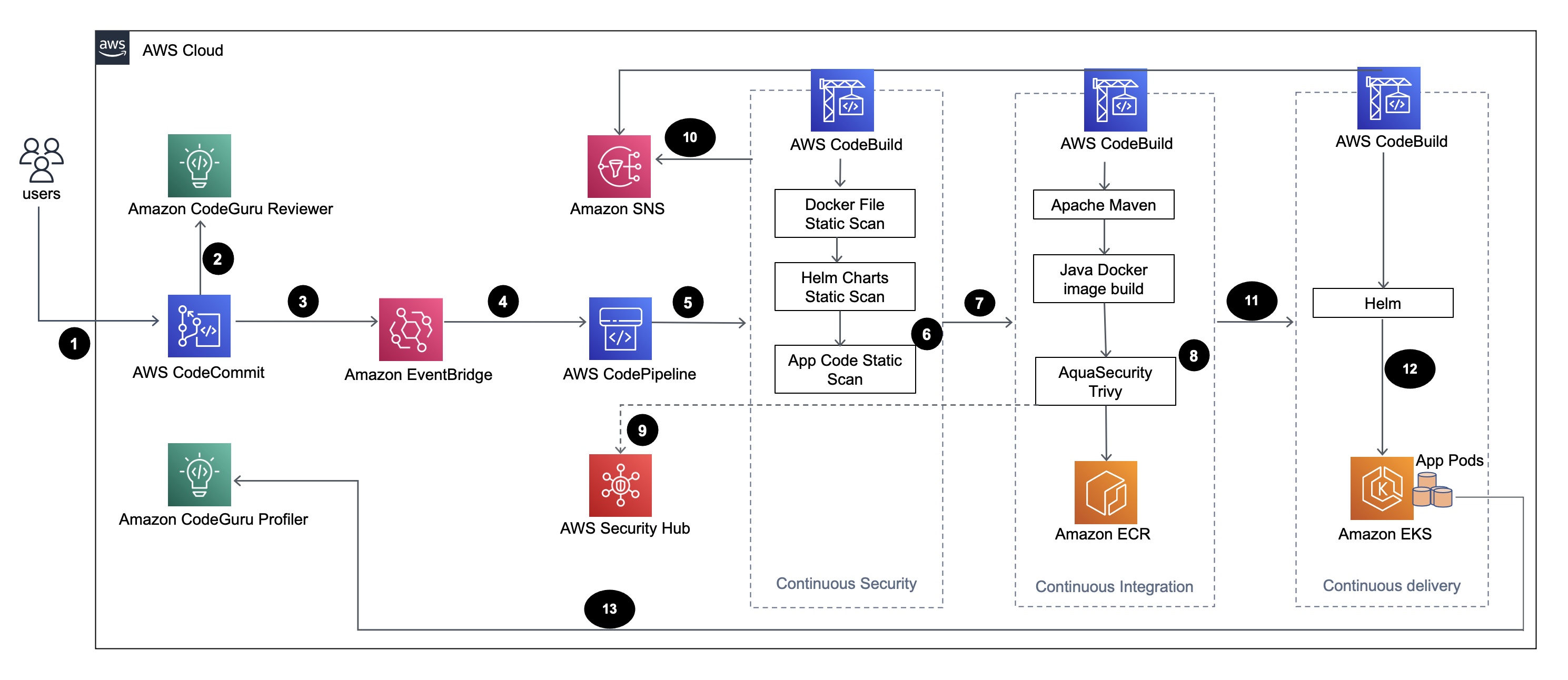
The diagram shows the following workflow:
- Developer will update the Java application code in the base branch of the AWS CodeCommit repository, creating a Pull Reqeust (PR).
- Amazon CodeGuru Reviewer automatically reviews the code as soon as a PR is submitted and does a analysis of java code as per the best practices and gives recommendations to users.
- Once the PR is merged to base branch, a AWS CloudWatch event is created.
- This AWS CloudWatch event triggers the AWS CodePipeline.
- CodePipeline runs the security scan stage (continuous security).
- CodeBuild first starts the security scan process in which Dockerfile, Kubernetes deployment Helm files are scanned using Checkov and application source code is scanned using AWS CodeGuru CLI based on incremental code changes.
- Next, if the security scan stage is successful, the build stage(continuous integration) is triggered.
- In the Build Stage, CodeBuild builds the artifact, packages the artifact to a Docker image, scans the image for security vulnerabilities by using Aqua Security Trivy, and stores the image in Amazon Elastic Container Registry (Amazon ECR).
- The vulnerabilities detected from step6 are uploaded to AWS Security Hub for further analysis by users or developers, which provides overview, recommendations, remediation steps for the vulnerabilties.
- Emails Notifications of various phases within the AWS CodePipeline are sent to the users via Amazon SNS.
- After the continuous integration phases are complete, CodePipeline enters the deployment phase (continuous delivery).
- The Docker image is deployed to Amazon EKS as a container workload (pod) using Helm charts.
- The application pod is configured with Amazon CodeGuru Profiler Agent which will send the profiling data of the application (CPU, Heap usage, Latency) to Amazon CodeGuru Profiler which is useful for developers to understand the behaviour of the application.
Code Structure:
├── README.md
├── architecture-diagram.png
├── buildspec
│   ├── buildspec.yml
│   ├── buildspec_deploy.yml
│   └── buildspec_secscan.yaml
├── cf_templates
│   ├── build_deployment.yaml
│   ├── codecommit_ecr.yaml
│   └── kubeawsauthconfigmappatch.sh
├── code
│   └── app
│       ├── Dockerfile
│       ├── pom.xml
│       └── src
│           └── main
│               ├── java
│               │   └── software
│               │       └── amazon
│               │           └── samples
│               │               └── greeting
│               │                   ├── Application.java
│               │                   └── GreetingController.java
│               └── resources
│                   └── Images
│                       └── aws_proserve.jpg
├── helm_charts
│   └── aws-proserve-java-greeting
│       ├── Chart.yaml
│       ├── templates
│       │   ├── NOTES.txt
│       │   ├── _helpers.tpl
│       │   ├── deployment.yaml
│       │   ├── hpa.yaml
│       │   ├── ingress.yaml
│       │   ├── service.yaml
│       │   ├── serviceaccount.yaml
│       │   └── tests
│       │       └── test-connection.yaml
│       └── values.dev.yaml
└── securityhub
    └── asff.tpl
Code Overview:
1) buildspec: BuildSpec yaml files, buildspec.yml (For Build Phase), buildspecdeploy.yml (For Deploy Phase), buildspecsecscan.yaml (For CodeSecurityScan Phase)buildspec
├── buildspec.yml (Build)
├── buildspec_deploy.yml (Deploy)
└── buildspec_secscan.yaml(CodeSecurityScan)2) cf_templates: Cloudformation templates and EKS aws-auth configmap changes
cf_templates ├── build_deployment.yaml (Pipeline Stack Setup) ├── codecommit_ecr.yaml (Codecommit and ECR Setup) └── kubeawsauthconfigmappatch.sh (Providing access to Pipeline to deploy helm charts to EKS cluster)3) code: Sample Spring Boot application source code (src folder), Dockerfile and pom.xml
code └── app ├── Dockerfile ├── pom.xml └── src └── main ├── java │ └── software │ └── amazon │ └── samples │ └── greeting │ ├── Application.java │ └── GreetingController.java └── resources └── Images └── aws_proserve.jpg4) helm_charts: Helm charts to deploy application to EKS Cluster
helm_charts └── aws-proserve-java-greeting ├── Chart.yaml ├── templates │ ├── NOTES.txt │ ├── _helpers.tpl │ ├── deployment.yaml │ ├── hpa.yaml │ ├── ingress.yaml │ ├── service.yaml │ ├── serviceaccount.yaml │ └── tests │ └── test-connection.yaml └── values.dev.yaml5) securityhub: ASFF template (AWS Security Finding Format, part of AWS SeurityHub service). This format will be used for uploading docker image vulnerabilties details to AWS SecurityHub
securityhub └── asff.tplSetup Procedure:
1) Upload code zip to S3 Bucket: (Ensure git and python 3.x are installed in your local workstation)
- Clone the repository to your local workstation
git clone <GitHub-Url>
- Navigate to the repository and execute the commands in order as indicated below. This will create compressed version of the entire code with .zip extension(cicdstack.zip) and will validate the zip file too:
cd <cloned-repository>
    python -m zipfile -c cicdstack.zip *
python -m zipfile -t cicdstack.zip- Sign in to the AWS Management Console, open the Amazon S3 console, and then create an S3 bucket.
2) CodeCommitECR Creation: Ensure you have previously created AWS CodeCommit and Amazon ECR and that you have retrieved the necessary parameter values. If not, you can run the CloudFormation template cftemplates/codecommitecr.yaml via AWS Console. Ensure the code in zip format is uploaded as per step 1. Give the parameter and their values:
| Parameter | Description | |--|--| |CodeCommitRepositoryBranchName |Branch-name where the code resides. Put it as main for default | | CodeCommitRepositoryName | Preferred Name of AWS CodeCommit repo to be created | |CodeCommitRepositoryS3Bucket|S3 BucketName where the code zipfile resides| | CodeCommitRepositoryS3BucketObjKey | code/cicdstack.zip | | ECRRepositoryName | Preferred Name of ECR repo to be created |
3) Setup Java CICD Pipeline: Run the cloudformation template cftemplates/builddeployment.yaml and give the parameter accordingly as mentioned below. Ensure you have the required parameter values ready with you. Note: To retrieve your EksWorkerNodeRoleARN, browse to the EC2 AWS Console and select one of your EKS Worker Node. Navigate to Security tab panel and click on IAM Role - follow that link to the Role Summary which will have display the Node IAM role and IAM role ARN.
| Parameter | Description | |--|--| | CodeBranchName |Branch name of AWS CodeCommit repo, where your code resides | | EKSClusterName |Name of your EKS Cluster (not EKSCluster ID) | | EKSCodeBuildAppName|in this case name of app helm chart (aws-proserve-java-greeting)| | EKSWorkerNodeRoleARN | ARN of EKS Worker nodes IAM role | | EKSWorkerNodeRoleName | Name of the IAM role assigned to EKS worker nodes | |EcrDockerRepository|Name of Amazon ECR repo where the docker images of your code will be stored| |EmailRecipient | Email Address where build notifications needs to be sent | | EnvType | environment, e.g: dev (since we have values.dev.yaml in helm_charts folder) | |SourceRepoName | Name of AWS CodeCommit repo, where your code resides | The creation of the Java CICD Pipeline will automatically trigger the CodePipeline too. Once the cloudformation template cftemplates/builddeployment.yaml executes successfully, go to Outputs tab of Java CICD CF Stack in AWS console and get the value of EksCodeBuildkubeRoleARN (this ARN needs to be added to configmap aws_auth of EKS cluster).
During Cloudformation execution, you will get a email notification to confirm subscription to SNS topic created. You can go ahead and confirm the subscription.
4) Enable Integration Aqua Security in AWS SecurityHub This step is required for uploading the docker image vulnerbaility findings reported by Trivy to AWS Security Hub. As of today, there is no support for cloudformation for this integration, hence this process has to be done manually. Navigate to AWS Security Hub in AWS Console and further navigate to Integrations. Search for Aqua Security and select Aqua Security: Aqua Security Integration and click on Accept findings
5) Patching aws_auth confmap with EksCodeBuildkubeRoleARN received from step3: Launch a terminal/powershell/cmd in your local workstation with aws cli installed and configured with access to EKS cluster in the AWS account.
Login to EKS cluster:
aws eks update-kubeconfig --name <EKSClusterName> --region <AWSRegion>bash cftemplates/kubeawsauthconfigmap_patch.sh <EksCodeBuildkubeRoleARN>6) Deployment: Go to CodePipeline in AWS console, and there approve the Action 'ApprovaltoDeploy' and it will run the Deploy Phase. (Ensure step 4 is completed before you go to this step) Once the Deploy phase is completed, go to logs of Deploy phase and get the URL of this app to access via browser.
Note:
a) Since, the scope of this solution is to provide an overview of identifying potential security vulnerabilities rather than fixing it via CICD pipeline, hence in this example, during Build Stage we are not actually fixing the HIGH, CRTICAL docker image vulnerabilties reported by Trivy and the pipeline passes. In real scenario, if the pipeline has to fail based on HIGH, CRTICAL vulnerbilities reported, we need to change the value of parameter --exit-code to 1 instead of 0 in line 42 in file: buildspec/buildspec.yml
b) Docker image vulnerabilities reported via Trivy are uploaded to AWS SecurityHub. Navigate to Findings under AWS SecurityHub in AWS Console. Filter the findings with State = Active and Product Name = Aqua Security. This will list down the docker image vulnerabilities in AWS Security Hub.
c) It may take 15 min to an hour for vulnerabilties to appear in AWS Security Hub.
d) Similar to Build Stage, in the CodeSecurityScan Stage, we are not fixing vulnerabilities reported for Dockerfile and HelmCharts via Checkov as per lines 28-33 in file: buildspec/buildspec_secscan.yaml and we are passing the pipeline with option --soft-fail in checkov commands for scan of Dockerfile and HelmCharts directory. In real scenario, if the pipeline has to fail based on vulnerabilities reported for Dockerfile and HelmCharts, the option --soft-fail has to be removed, that's the only change to be done.


