
AI agent runtime for Rust — type-safe state, multi-protocol serving, plugin extensibility.
Awaken






Build agent capability in Rust. Tune prompts, models, permissions, skills, and eval loops live. Serve AI SDK, AG-UI, A2A, MCP, and ACP clients from one runtime without turning each agent into a fragile script.
Docs: Awaken docs · 中文文档 · Changelog. MSRV: Rust 1.93. The published crate is awaken; awaken-agent is a compatibility republish from when the project shipped under that name.
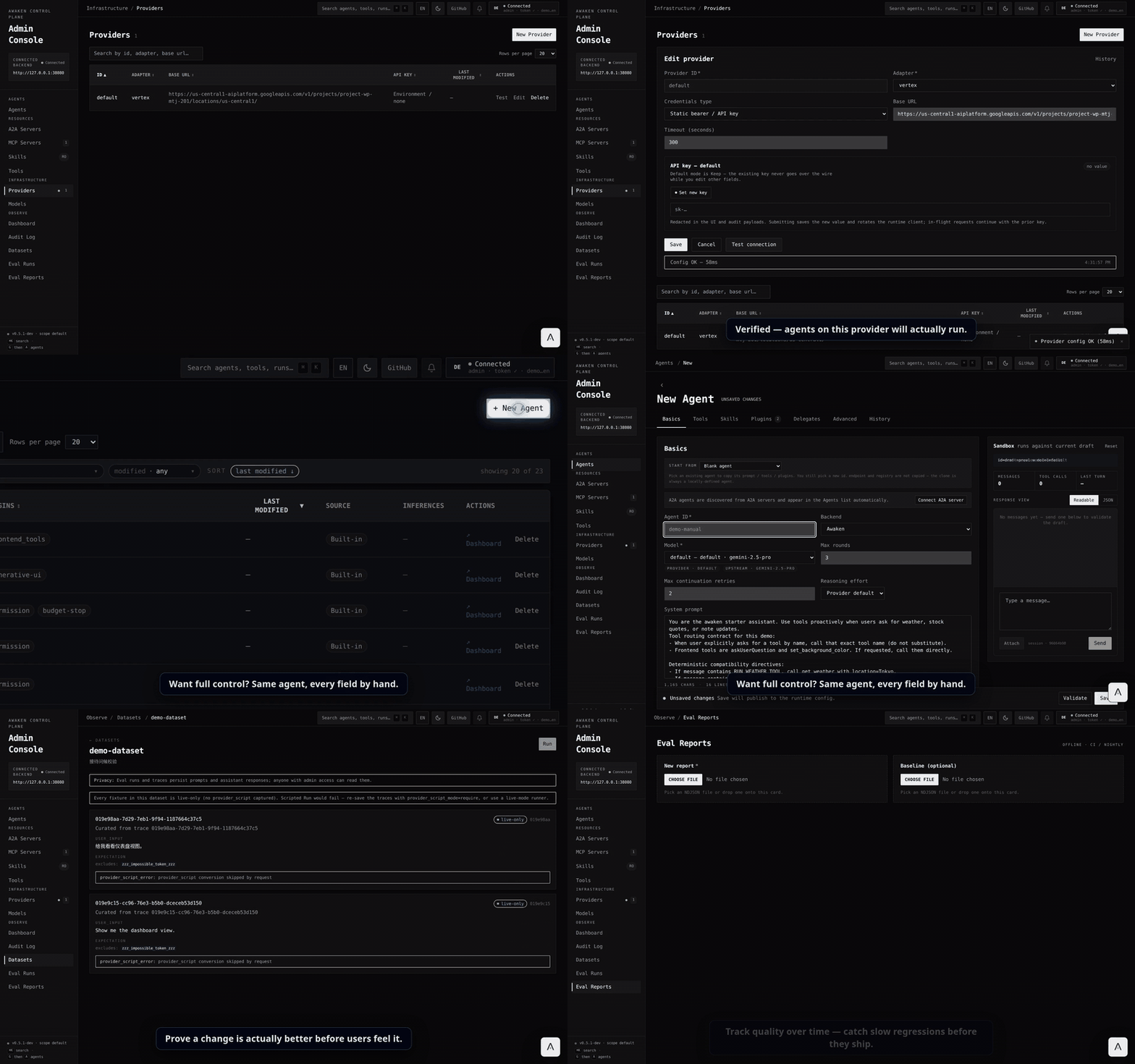
Real Gemini in the Admin Console: connect a model, describe an agent, tune it, and run a live eval.
30-second version
Start the local server and Admin Console:
AWAKENHTTPADDR=127.0.0.1:38080 \
AWAKENADMINAPIBEARERTOKEN=dev-token \
AWAKENSTORAGEDIR=./target/awaken-dev \
cargo run -p ai-sdk-starter-agent
pnpm --filter awaken-admin-console dev
Open http://127.0.0.1:3002, paste dev-token, configure a provider-backed model, then create or tune an agent. Without an API key, the starter backend uses a deterministic scripted executor so you can verify the server routes and console first.
The tune-first loop is:
Validate draft -> Preview chat -> Save snapshot -> Run task -> Inspect trace -> Capture dataset/eval -> AdjustWhy Awaken
- Code stays stable. Tools, typed state, providers, stores, and plugins live in Rust.
- Behavior tunes live. Prompts, model bindings, tool descriptions, permission rules, reminders, skills, delegates, and plugin sections change through managed config.
- One backend serves many clients. AI SDK v6, AG-UI / CopilotKit, A2A, MCP, and ACP are adapters over the same runtime event stream and run model.
- Runs are operational objects. Durable dispatch, HITL mailbox suspension, cancellation, trace capture, replay, datasets, eval runs, and audit restore are runtime/server contracts.
- State and tools are typed.
StateKey, generated JSON Schema forTypedTool, pure tool gating, and atomic commits make concurrent tool work auditable.
Tune-first workflow
Awaken treats agent behavior as managed resources, not scattered code edits. Server config writes are validated, published as registry snapshots, and auditable when stores are wired.
| Tune online | Managed by Awaken | |---|---| | Prompts, model bindings, reasoning effort, stop policies | Validate, preview, save, publish next-run registry snapshots | | Tool descriptions, allow/exclude rules, permission gates, reminders | Typed schemas, policy validation, HITL suspension/resume | | Providers, models, model pools, MCP servers, skills | Capability metadata, provider checks, failover pools, catalogs | | Traces, datasets, eval runs, audit history | Replayable records, baseline diffs, restorable config revisions |
Tools are written once and stay stable. Models, agents, prompts, skills, delegates, and policy sections are tuned through /v1/config/* or the Admin Console — Validate → Save → preview-chat → adjust.
Choose your mode
Awaken separates the agent execution loop from the service control plane.
| Mode | Start with | You own | Awaken provides | |---|---|---|---| | Runtime library | awaken / awaken-runtime | HTTP/UI/job scheduling, auth, config storage, concrete tools/providers/stores | Direct run APIs, streaming events, typed tools/state, cancellation, tool gating, HITL primitives | | Server control plane | awaken-server + awaken-stores | Deployment, tenant/auth policy, registered tools/providers, store selection | HTTP/SSE, AI SDK/AG-UI/A2A/MCP/ACP adapters, mailbox orchestration, /v1/config/*, registry snapshots, Admin Console |
Runtime mode is in-process library use inside a standard async Rust program. It is not a no_std or Tokio-free embedded target. Server mode wraps the same runtime with protocols, durable dispatch, managed config, audit/restore, trace/eval storage, and the browser workflow.
Quickstart A: server + Admin Console
Use this path when you want the tuning workflow first.
AWAKENHTTPADDR=127.0.0.1:38080 \
AWAKENADMINAPIBEARERTOKEN=dev-token \
AWAKENSTORAGEDIR=./target/awaken-dev \
cargo run -p ai-sdk-starter-agent
pnpm install pnpm --filter awaken-admin-console dev
Open http://127.0.0.1:3002, click the token pill, and paste dev-token. Configure a provider/model, create an agent, preview it, then copy the AI SDK or AG-UI route from the saved agent page.
Useful docs:
Quickstart B: runtime library
Use this path when your Rust application owns the I/O boundary and calls the runtime directly.
Prerequisites: Rust 1.93+ and an OpenAI-compatible API key.
[dependencies]
awaken = { git = "https://github.com/AwakenWorks/awaken" }
tokio = { version = "1", features = ["full"] }
async-trait = "0.1"
serde_json = "1"
These snippets follow the current main-branch API. Use the 0.5 to 0.6 migration guide when upgrading from the published 0.5 line.
export OPENAIAPIKEY=<your-key>src/main.rs:
,no_run
use awaken::engine::GenaiExecutor;
use awaken::prelude::*;
use asynctrait::asynctrait;
use serde_json::json;
use std::sync::Arc;
struct EchoTool;
#[async_trait] impl Tool for EchoTool {     fn descriptor(&self) -> ToolDescriptor {         ToolDescriptor::new("echo", "Echo", "Echo input back to the caller").with_parameters(json!({             "type": "object",             "properties": { "text": { "type": "string" } },             "required": ["text"]         }))     }
async fn execute(&self, args: JsonValue, _ctx: &ToolCallContext) -> Result<ToolOutput, ToolError> {         let text = args["text"].asstr().unwrapor_default();         Ok(ToolResult::success("echo", json!({ "echoed": text })).into())     } }
#[tokio::main] async fn main() -> Result<(), Box<dyn std::error::Error>> {     let runtime = AgentRuntimeBuilder::new()         .withagentspec(             AgentSpec::new("assistant")                 .withmodelid("gpt-4o-mini")                 .withsystemprompt("You are helpful. Use the echo tool when asked.")                 .withmaxrounds(5),         )         .with_tool("echo", Arc::new(EchoTool))         .with_provider("openai", Arc::new(GenaiExecutor::new()))         .with_model(ModelSpec::new("gpt-4o-mini", "openai", "gpt-4o-mini"))         .build()?;
let request = RunActivation::new("thread-1", vec![Message::user("Say hello using the echo tool")])         .withagentid("assistant");
let result = runtime.runtocompletion(request).await?;     println!("{}", result.response);     Ok(()) }
Use runtime.run(request, sink) instead of runtocompletion when you need to stream events to SSE, WebSocket, protocol adapters, or tests. For a longer example, see crates/awaken/examples/multi_turn.rs.
The quickstart path is covered without network access:
cargo test -p awaken --test readme_quickstart        # offline scripted provider
OPENAIAPIKEY=<key> cargo test -p awaken --test readmeliveprovider -- --ignored  # live provider
Protocols
| Protocol | Route / transport | Typical client | |---|---|---| | AI SDK v6 | POST /v1/ai-sdk/chat | React useChat() | | AG-UI | POST /v1/ag-ui/run | CopilotKit <CopilotKit> | | A2A | POST /v1/a2a/message:send | Other agents | | MCP | POST /v1/mcp | JSON-RPC 2.0 clients | | ACP | stdio via serve_stdio | Agent Client Protocol hosts |
Frontend guides: AI SDK · CopilotKit / AG-UI · HTTP SSE.
Extensions
The facade full feature pulls in the plugins below. Use default-features = false to opt out. awaken-ext-deferred-tools is a companion crate and is added as a direct dependency.
| Extension | What it does | Feature / crate | |---|---|---| | Permission | Allow/Deny/Ask rules on tool name and arguments; Ask suspends via mailbox for HITL. | permission | | Reminder | Injects context messages when a tool call matches a configured pattern. | reminder | | Observability | OpenTelemetry traces and metrics aligned with GenAI Semantic Conventions. | observability | | MCP | Connects to external MCP servers and registers their tools as native Awaken tools. | mcp | | Skills | Discovers skill packages and injects a catalog before inference. | skills | | Generative UI | Streams declarative UI components via A2UI, JSON Render, and OpenUI Lang. | generative-ui | | Deferred Tools | Hides large tool schemas behind ToolSearch and re-defers idle tools. | awaken-ext-deferred-tools |
Write your own with ToolGateHook or BeforeToolExecute — same trait signatures the built-ins use.
Architecture
awaken                   Facade crate with feature flags
├─ awaken-runtime-contract Runtime contracts: specs, tools, events, state, commit coordinator
├─ awaken-server-contract  Server/store contracts: queries, scoped stores, mailbox/outbox, staged commits
├─ awaken-runtime        Resolver, phase engine, loop runner, runtime control
├─ awaken-server         HTTP routes, SSE replay, mailbox dispatch, protocol adapters
├─ awaken-stores         Thread + run + config + mailbox + profile stores
├─ awaken-tool-pattern   Glob/regex matching used by extensions
└─ awaken-ext-*          Optional extensions and companion plugins
For details, start with Architecture and Run Lifecycle and Phases.
When this fits
- You want a Rust backend for AI agents with compile-time guarantees.
- You need to serve AI SDK, CopilotKit, A2A, MCP, and/or ACP from a single backend.
- Tools need to share state safely during concurrent execution, and runs need auditable history with checkpoints and resume.
- Operators need to tune prompts, models, permissions, skills, traces, datasets, and evals without changing code.
When it does not
- You need built-in file/shell/web tools out of the box — consider OpenAI Agents SDK, Dify, or CrewAI.
- You want a visual workflow builder — consider Dify or LangGraph Studio.
- You want Python and rapid prototyping — consider LangGraph, AG2, or PydanticAI.
- You need an LLM-managed memory subsystem where the agent decides what to remember — consider Letta.
Examples and learning paths
| Goal | Start with | Then | |---|---|---| | Build your first agent | Get Started | Build Agents | | Tune a saved agent | Use the Admin Console | Configure Agent Behavior | | See a full-stack app | AI SDK starter | CopilotKit starter | | Explore the API | Reference docs | cargo doc --workspace --no-deps --open | | Understand the runtime | Architecture | Run Lifecycle and Phases |
Examples:
| Example | What it shows | |---|---| | live_test | Basic LLM integration | | multi_turn | Multi-turn with persistent threads | | toolcall_live | Tool calling with calculator | | ai-sdk-starter | React + AI SDK v6 full-stack | | copilotkit-starter | Next.js + CopilotKit full-stack | | openui-chat | OpenUI Lang chat frontend | | admin-console | Config API management UI |
Contributing
Setup in CONTRIBUTING.md and DEVELOPMENT.md. Good first issues is the entry-point label. Conversation: GitHub Discussions.
Acknowledgement
The awaken crate name on crates.io was transferred from @brayniac, who maintained an earlier crate under the same name. Versions 0.1–0.3 of awaken on crates.io belong to that earlier project; this codebase resumes the line that previously shipped as awaken-agent 0.2.x and starts at 0.4.0 to skip past those versions. Thank you.
License
Dual-licensed under MIT or Apache-2.0.


