
A Ruby gem that beautifies the terminal's ls command, with color and font-awesome icons. :tada:
Color LS





A Ruby script that colorizes the ls output with color and icons. Here are the screenshots of working example on an iTerm2 terminal (Mac OS), oh-my-zsh with powerlevel9k theme and powerline nerd-font + awesome-config font with the Solarized Dark color theme.

If you're interested in knowing the powerlevel9k configuration to get this prompt, have a look at this gist.
Table of contents
- Flags --1
- -a (or) --all
- -A (or) --almost-all
- -d (or) --dirs
- -f (or) --files
- --help
- -l (or) --long
- --report
- --tree (or) --tree=[DEPTH]
- --gs (or) --git-status
- --sd (or) --sort-dirs or --group-directories-first
- --sf (or) --sort-files
- -t
- Combination of flags
- Installation
- Recommended configurations
- Custom configurations
- Updating
- Uninstallation
- Contributing
- License
Usage
Man pages have been added. Checkout man colorls.
Flags
- With
-1: Lists one entry per line

- With
-a(or)--all: Does not ignore entries starting with '.'

- With
-A(or)--almost-all: Does not ignore entries starting with '.', except./and../

- With
-d(or)--dirs: Shows only directories

- With
-f(or)--files: Shows only files

- With
--help: Prints a very helpful help menu

- With
-l(or)--long: Shows in long listing format

- With
--report: Shows brief report about number of files and folders shown

- With
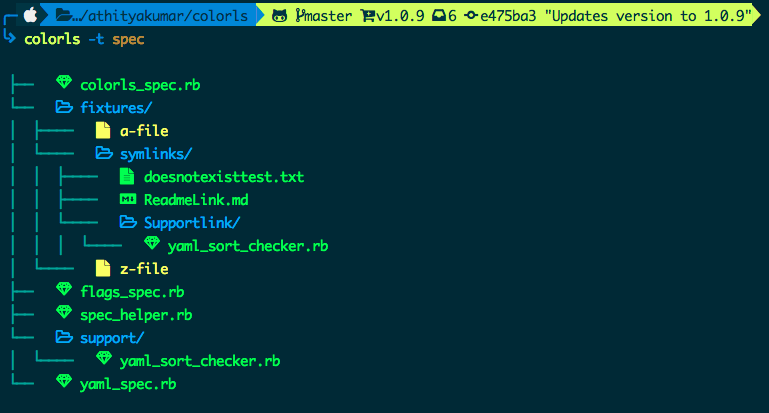
--tree(or)--tree=[DEPTH]: Shows tree view of the directory with the specified depth (default 3)
- With
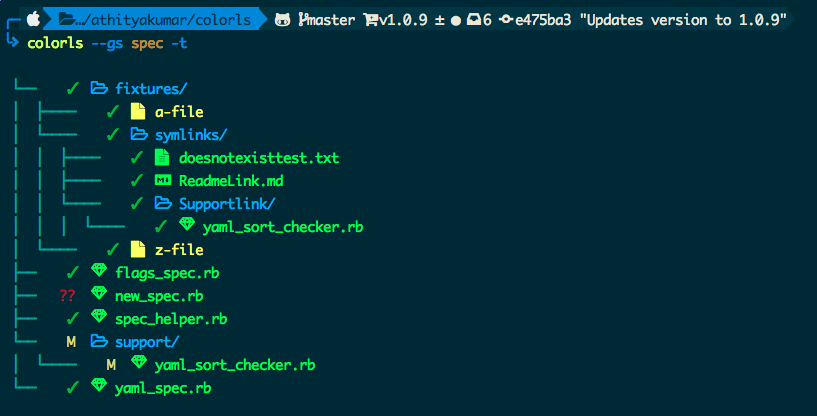
--gs(or)--git-status: Shows git status for each entry

- With
--sd(or)--sort-dirsor--group-directories-first: Shows directories first, followed by files

- With
--sf(or)--sort-files: Shows files first, followed by directories

- With
-t: Sort by modification time, newest first (NEED TO ADD IMAGE)
- With color options :
--lightor--darkcan be passed as a flag, to choose the appropriate color scheme. By default, the dark color scheme is chosen. In order to tweak any color, read Custom configurations.
Combination of flags
- Using
--gswith-t:
- Using
--gswith-l:

- Using
--sdwith-land-A:

- Using
--non-human-readablewith-l:

Installation
- Install Ruby (preferably, version >= 2.6 via a version manager like rbenv)
- Download and install a Nerd Font so you can see the library icons. Have a look at the Nerd Font README for installation instructions. We're using "Hack Nerd Font" for this guide.
Change.. and select Hack Nerd Font - Regular
Note for iTerm2 users - Please enable the Nerd Font at iTerm2 > Preferences > Profiles > Text > Non-ASCII font > Hack Regular Nerd Font Complete.
Note for HyperJS users - Please add "Hack Nerd Font" Font as an option to fontFamily in your ~/.hyper.js file.
- Install the colorls ruby gem with
gem install colorls
rbenv users - In case of load error when using lc, please try the below patch.
rbenv rehash
rehash- Enable tab completion for flags by entering following line to your shell configuration file (
~/.bashrcor~/.zshrc) :
source $(dirname $(gem which colorls))/tab_complete.shDon't forget to restart your terminal
- Start using
colorls:tada:
- Have a look at Recommended configurations and Custom configurations.
Recommended configurations
- To add some short command (say,
lc) with some flag options (say,-l,-A,--sd) by default, add this to your shell configuration file (~/.bashrc,~/.zshrc, etc.) :
alias lc='colorls -lA --sd'- For changing the icon(s) to other unicode icons of choice (select icons from here), change the YAML files in a text editor of your choice (say,
subl)
subl $(dirname $(gem which colorls))/yamlCustom configurations
You can overwrite the existing icons and colors mapping by copying the yaml files from $(dirname $(gem which colorls))/yaml into ~/.config/colorls, and changing them.
- To overwrite color mapping :
# symbol.
Let's say that you're using the dark color scheme and would like to change the color of untracked file (??) in the --git-status flag to yellow. Copy the defaut dark_colors.yaml and change it.
Check if the ~/.config/colorls directory exists. If it doesn't exist, create it using the following command:
mkdir -p ~/.config/colorlsAnd then
cp $(dirname $(gem which colorls))/yaml/darkcolors.yaml ~/.config/colorls/darkcolors.yamlIn the ~/.config/colorls/dark_colors.yaml file, change the color set for untracked from darkorange to yellow, and save the change.
untracked: yellowOr, using hex color codes:
untracked: '#FFFF00'- To overwrite icon mapping :
files.yaml and change it.
cp $(dirname $(gem which colorls))/yaml/files.yaml ~/.config/colorls/files.yaml</code></pre>
In the
~/.config/colorls/files.yaml file, add a new icon / change an existing icon, and save the change.
<pre><code class="lang-">swift: "\uF179"</code></pre>
- User contributed alias configurations :
- @rjhilgefort
Updating
Want to update to the latest version of
colorls?
<pre><code class="lang-sh">gem update colorls</code></pre>
Uninstallation
Want to uninstall and revert back to the old style? No issues (sob). Please feel free to open an issue regarding how we can enhance
colorls`.
gem uninstall colorls
Contributing
Your contributions are always welcome! Please have a look at the contribution guidelines first. :tada:
License
The MIT License (MIT) 2017 - Athitya Kumar. Please have a look at the LICENSE.md for more details.


