
VSCode extension that plays distinct sounds when Claude Code finishes a task or needs your input
Claude Notifier


Plays a sound and shows a notification when Claude Code finishes a task, needs permission, or asks a question.
Stop watching the screen — go grab a coffee and let Claude ping you when it needs you.
Works with VSCode, terminal CLI, vim, or any editor where you use Claude Code — on macOS, Windows, WSL, and Linux, including remote hosts over SSH.
What's new — 3.5.0
- Remote audio. When Claude runs on a remote host (SSH, WSL, dev container), notification sounds now play on your local machine instead of the headless remote — see Remote hosts.
- Per-session disable. Set
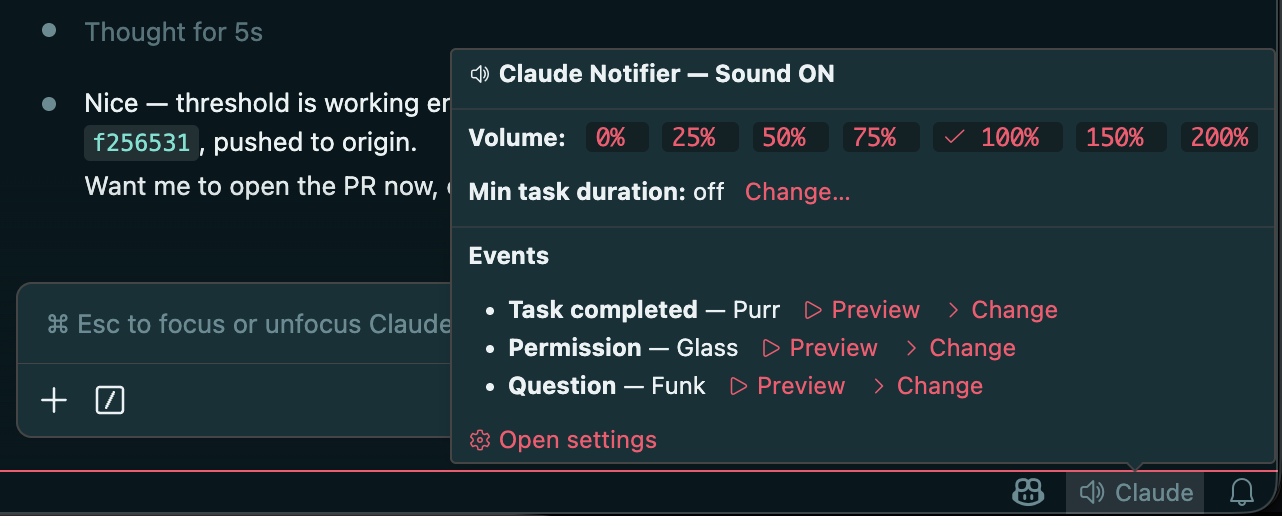
CLAUDENOTIFIERDISABLEto silence the notifier for a single shell/session — handy on shared SSH hosts (see below). - Status-bar control panel. Hover the Claude entry in the status bar for volume, per-event sound preview/swap, and the minimum-task-duration threshold.
Install
Option 1: VSCode Extension
Install from the VS Marketplace:
code --install-extension SingularityInc.claude-notifierOr search for "Claude Notifier" in the Extensions tab (Cmd+Shift+X / Ctrl+Shift+X).
The extension auto-configures everything on activation. Reload VSCode after installing.
Option 2: CLI (curl)
macOS / Linux / WSL:
curl -fsSL https://raw.githubusercontent.com/ashmitb95/claude-notifier/main/install.sh | bashTo uninstall:
curl -fsSL https://raw.githubusercontent.com/ashmitb95/claude-notifier/main/uninstall.sh | bashWindows: install the VSCode extension. It auto-configures the PowerShell hooks; no separate CLI installer is needed.
Remote hosts (SSH, WSL, dev containers)
When Claude runs on a remote host, notification sounds can play on your local machine instead of the (usually headless) remote — with your normal sound presets and volume, no terminal bell. A small cn-daemon helper runs locally, and the remote pushes events to it over an SSH reverse forward.
This is opt-in; existing local setups are unaffected. See docs/REMOTE_HOSTS.md for the one-time setup (install the daemon, add a RemoteForward line, enable claudeNotifier.remoteAudio), or run Claude Notifier: Set up remote audio… from the Command Palette to walk through it.
Configurable Settings
Open Settings → search "Claude Notifier" (Cmd+, / Ctrl+,) to set each event's notification level (sound+popup | sound | popup | off) and sound preset.
Sound presets — macOS: Basso, Blow, Bottle, Frog, Funk, Glass, Hero, Morse, Ping, Pop, Purr, Sosumi, Submarine, Tink. Windows: Windows Notify, tada, chimes, chord, ding, notify, ringin, Windows Background. On Linux the macOS names map to freedesktop XDG sounds under /usr/share/sounds/freedesktop/stereo/.
Minimum task duration threshold
claudeNotifier.minTaskDurationThreshold (seconds, default 0)
When > 0, notification sounds and popups are suppressed for any task that completes in less than this many seconds. Counted from the moment you submit the prompt. Set to 0 to disable (the default).
Useful when you're actively watching the IDE and don't need audio for sub-second roundtrips — set it to e.g. 10 and you'll only hear audio for longer-running work. Per-session marker files keep parallel Claude sessions (multiple terminals or VS Code windows) independent — each session times its own threshold.
Auto-mute when focused
claudeNotifier.autoMuteWhenFocused (boolean, default false)
When on, the task-completed sound and all popups are suppressed while the VS Code window running the task is focused — if you're already looking at it, the notification is redundant. It's scoped per-window: a task finishing in a background window still notifies, so multi-window setups aren't silenced. Permission and question sounds still play. Toggle it quickly from the status-bar panel (hover the Claude item) or the Claude Notifier: Toggle Auto-mute When Focused command.
Subagent handling
Claude Code emits an agent_id field on every hook payload that fires from inside a Task subagent. Two settings use this:
claudeNotifier.suppressSubagentInteractions (boolean, default true)
When true, permission and question hooks that originate from a subagent are silenced — no sound, no OS banner. The main agent's own permission and question prompts still notify normally. This affects only the notifier's sound and popup; the actual approve/deny dialog and question UI in Claude Code's chat are untouched.
claudeNotifier.subagentCompleted.level (default off)
A dedicated SubagentStop hook fires when a Task subagent finishes. The level defaults to off, so subagent completions are silent unless you opt in. Configurable like the other events:
claudeNotifier.subagentCompleted.level:sound+popup|sound|popup|offclaudeNotifier.subagentCompleted.sound: a sound preset (defaultPop)
How it works
- Per-session dedup. Rapid back-to-back events within a single Claude session coalesce automatically — one notification per stage, not a flood. A stage advances when you send your next prompt or after ~30 minutes of idle time.
- Bundled fallback sounds. If the configured system sound file is missing on disk, a bundled WAV plays so you still hear something.
- Defers to other notification hosts. Inside VS Code, the extension takes over from the hook fallback for the owning window. Inside cmux, the hook detects cmux's
CMUXCLAUDEHOOKCMUXBINenv var and skips its own sound + popup so cmux's native banner doesn't get double-stacked. Inside Cursor — which runs~/.claude/settings.jsonhooks from its own Composer agent — the hook detects Cursor'sCURSOR_*environment and stays silent, so you don't get a notification for work that isn't a Claude Code session. - Diagnostic log.
View → Output → Claude Notifiershows activation, signal receipts, dedup decisions, and configuration warnings — useful when debugging "I didn't get a notification."
Clickable macOS notifications (optional)
By default, macOS attributes osascript notifications to the Script Editor bundle, so clicking one opens Script Editor instead of focusing VS Code. To get clickable notifications that focus the specific window the notification fired from, install terminal-notifier:
brew install terminal-notifierOr use the bundled command — open the Command Palette and run "Claude Notifier: Install terminal-notifier (clickable macOS notifications)". It runs the brew install in an interactive VS Code terminal so you can see what's happening. Reload the window after install to enable it.
When terminal-notifier is present, the extension uses it automatically. When it's not, the extension falls back to the standard osascript notification (everything still works — clicks just open Script Editor).
Mute/unmute (CLI)
macOS / Linux / WSL:
touch ~/.claude/hooks/claude-notifier-muted   # mute
rm ~/.claude/hooks/claude-notifier-muted      # unmute
Windows PowerShell:
New-Item "$env:USERPROFILE\.claude\hooks\claude-notifier-muted"   # mute
Remove-Item "$env:USERPROFILE\.claude\hooks\claude-notifier-muted" # unmute
Disable per session (CLAUDENOTIFIERDISABLE)
The mute flag above is machine-wide. To silence the hooks for a single session only — e.g. when SSHing into a shared host so your sessions don't play sounds on someone else's machine — set CLAUDENOTIFIERDISABLE in that shell. When set (to any value other than empty/0/false), every hook exits without sound, popup, or signal; sessions in other shells are unaffected.
export CLAUDENOTIFIERDISABLE=1 # add to your shell rc to make it permanentPlatform support
| Platform | VSCode Extension | CLI Install | Hook runner | | -------- | ---------------- | ----------- | ----------------------------------------------------------- | | macOS | Yes | Yes | Node.js | | Windows | Yes | VSCode only | PowerShell | | WSL | Yes | Yes | Node.js (calls powershell.exe for sounds/notifications) | | Linux | Yes | Yes | Node.js (uses pw-play/paplay/aplay and notify-send) |
Contributing
See CONTRIBUTING.md for dev setup, the test/lint/typecheck gates, code map, and PR conventions. Bug reports and feature requests are welcome — open an issue first to discuss.
Contributors
Thanks to everyone who has contributed to this project:


