
Things 3 style GTD for Emacs — org-mode agenda views, ⌘ keybindings, context tags. Works with Doom and vanilla Emacs.
org-gtd
GTD in Emacs. No packages, no dependencies — just Elisp.



A GTD setup for org-mode, inspired by the workflow and feel of Things 3. Works with Doom Emacs and vanilla Emacs (GUI + terminal).
Not the org-gtd MELPA package. This is an independent configuration loaded directly from your config.
Quick Start
(setq my/gtd-file "~/path/to/your/gtd.org")
(load "~/dotfiles/org-gtd/org-gtd.el")
(load "~/dotfiles/org-gtd/bindings-cmd.el")
Contents: Features · Installation · Daily Workflow · How It Works · Keybindings · Demo · Scope
Features
Views
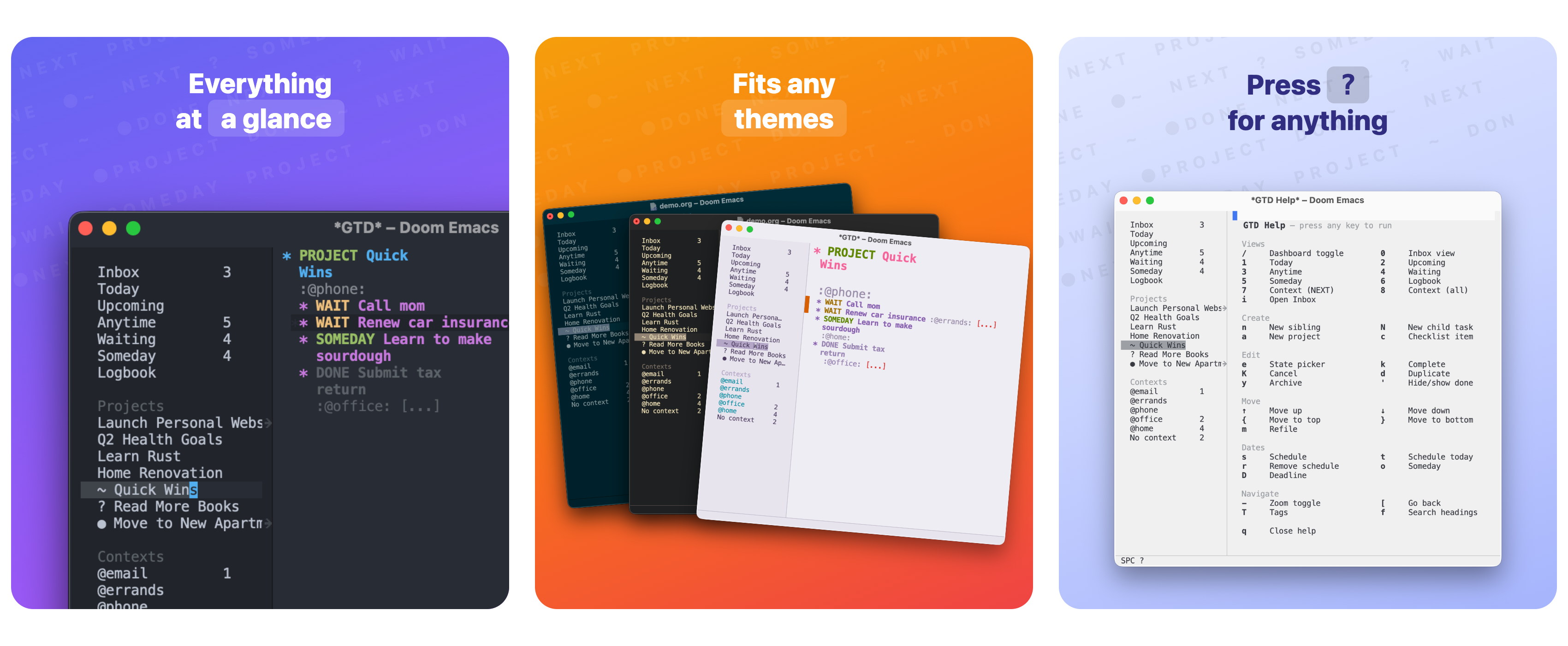
- Live dashboard — counts for every view in a 30/70 split; click a row to open it
- Agenda views — Inbox / Today / Upcoming / Anytime / Waiting / Someday / Logbook
- Dynamic context views — auto-detects all
@tags, no code changes when you add new ones - Logbook decorations — DONE entries show a checkmark prefix; CANCELLED entries show strikethrough
- Empty-state messages — views display contextual messages when no tasks match (e.g. "Nothing due today.")
- State picker —
⌘ eopens a one-line prompt; single keypress sets state or promotes a task to a top-level project - Completed tasks auto-sink — DONE/CANCELLED tasks move to the top of the done group automatically
- Smart completion — completing a task with active children prompts to complete all of them together
- Hide done —
⌘ 'toggles DONE/CANCELLED tasks in and out of view; persists across outline cycles - Direct Inbox editing — narrows to Inbox in place, no capture buffer
- Clear project states —
PROJECTstate marks active projects; indicators show active (no prefix), blocked/deferred (~), stale (●), or empty (?) - Intuitive keybindings —
⌘ kcomplete,⌘ nadd,⇧⌘Mrefile, and more - Interactive help —
SPC ?/⌘ ?opens a cheatsheet; press any key to execute the action
- Auto-save — saves on idle and on leaving insert mode; dashboard refreshes on every save
- Auto-open —
gtd.orgopens automatically on Emacs startup (configurable viamy/gtd-open-on-startup)
Installation
Setup steps
1. Clone the repository
git clone https://github.com/aravindps/org-gtd ~/dotfiles/org-gtd2. Create your gtd.org
#+TITLE: GTD
#+TODO: PROJECT NEXT WAIT SOMEDAY | DONE CANCELLED
#+TAGS: @home(h) @office(f) @standup(s) @ask(a)
- Inbox
- My First Project
** NEXT First task :@office:
** NEXT Second task :@ask:3. Load from your Emacs config
Set my/gtd-file before loading anything. This variable is required — loading without it will cause errors.
Doom Emacs (~/.config/doom/config.el):
(setq my/gtd-file "~/path/to/your/gtd.org")
(load "~/dotfiles/org-gtd/org-gtd.el")        ;; always load first (load "~/dotfiles/org-gtd/bindings-cmd.el")   ;; ⌘ keys (GUI/macOS) (load "~/dotfiles/org-gtd/bindings-ccg.el")   ;; C-c g prefix (load "~/dotfiles/org-gtd/bindings-f5.el")    ;; F5 prefix (load "~/dotfiles/org-gtd/bindings-doom.el")  ;; SPC leader (Doom only) (load "~/dotfiles/org-gtd/doom-overrides.el") ;; Doom/evil conflict fixes (load last)
Vanilla Emacs — GUI (~/.emacs or ~/.emacs.d/init.el):
(setq my/gtd-file "~/path/to/your/gtd.org")
(load "~/dotfiles/org-gtd/org-gtd.el") (load "~/dotfiles/org-gtd/bindings-cmd.el") (load "~/dotfiles/org-gtd/bindings-ccg.el")
Vanilla Emacs — terminal:
(setq my/gtd-file "~/path/to/your/gtd.org")
(load "~/dotfiles/org-gtd/org-gtd.el") (load "~/dotfiles/org-gtd/bindings-ccg.el") (load "~/dotfiles/org-gtd/bindings-f5.el")
Mouse in terminal — add (xterm-mouse-mode 1) to your config to enable mouse support. Works in iTerm2 and most modern terminals.
4. Configuration
| Variable | Default | Purpose | |----------|---------|---------| | my/gtd-file | nil | Required. Path to your GTD org file. | | my/gtd-open-on-startup | t | Open gtd.org automatically on Emacs launch. Set to nil to disable. |
5. Restart Emacs
Doom users: run doom sync before restarting.
Daily Workflow
Morning — what to work on
- Today (
SPC 1/C-c g 1) — scheduled + overdue - Context view (
SPC 7/C-c g 7) → pick@officeor@home→ all NEXT tasks for that context
During the day — adding tasks
Know the project? Open gtd.org, navigate to the project, press ⌘ n / C-c g n.
Quick thought? Press SPC i / C-c g i → narrows to Inbox → type task → SPC - / C-c g - to zoom out when done.
Triaging Inbox
Open Inbox view (SPC 0 / C-c g 0), navigate to an item, then:
⇧⌘M/C-c g M/SPC M— refile to an existing project (Shift+m everywhere; plain⌘mis macOS minimize)⌘ e/C-c g e— use the state picker to set state or promote to project
Finishing a task
⌘ k / C-c g k → marks DONE, auto-sinks into the done group within the project.
Blocked? S-Right to cycle to WAIT.
How It Works
Projects = level-1 headings with PROJECT state (or no state). Has subtask children.
Tasks = subtask headings with a state (NEXT, WAIT, SOMEDAY).
Inbox = raw unprocessed items under * Inbox. No state needed.
Task States
PROJECT → NEXT → WAIT → SOMEDAY → DONE → CANCELLED| State | Meaning | |-------|---------| | PROJECT | Marks a level-1 heading as a project | | NEXT | Ready to work on | | WAIT | Blocked / waiting on someone | | SOMEDAY | Maybe later | | DONE | Completed — auto-sinks into done group | | CANCELLED | Dropped — auto-sinks into done group |
Context Tags
Tags starting with @ are contexts. Add them to #+TAGS: in your gtd.org:
@home @office @standup @askDashboard
Opening gtd.org (or pressing SPC / / ⌘/) shows a live count dashboard in the left pane. Counts update automatically on state changes, reschedules, and saves. The Contexts section includes a "No context" row for untagged NEXT tasks.
Keybinding Reference
All actions are available across all binding systems simultaneously. Press SPC ? / ⌘ ? in Emacs for an interactive cheatsheet.
Full keybinding tables
Views
| Action | ⌘ (GUI) | C-c g / F5 | SPC (Doom) | |--------|---------|------------|------------| | Open Inbox | ⌘ i | … i | SPC i | | Dashboard | ⌘ / | … / | SPC / | | Inbox view | ⌘ 0 | … 0 | SPC 0 | | Today | ⌘ 1 | … 1 | SPC 1 | | Upcoming | ⌘ 2 | … 2 | SPC 2 | | Anytime (NEXT, no date) | ⌘ 3 | … 3 | SPC 3 | | Waiting (blocked) | ⌘ 4 | … 4 | SPC 4 | | Someday | ⌘ 5 | … 5 | SPC 5 | | Logbook | ⌘ 6 | … 6 | SPC 6 | | Context → NEXT tasks | ⌘ 7 | … 7 | SPC 7 | | Context → all tasks | ⌘ 8 | … 8 | SPC 8 |
Create
| ⌘ (GUI) | C-c g / F5 | SPC (Doom) | Action | |---------|------------|------------|--------| | ⌘ n | … n | SPC n | New sibling heading (NEXT) | | ⌘ N | … N | SPC N | New child task (NEXT) | | ⌘ C | … c | SPC c | New checklist item | | ⌥ ⌘ a | … a | SPC a | New top-level project |
Edit
| ⌘ (GUI) | C-c g / F5 | SPC (Doom) | Action | |---------|------------|------------|--------| | ⌘ e | … e | SPC e | State picker (NEXT / WAIT / SOMEDAY / DONE / CANCEL / Promote) | | ⌘ k | … k | SPC k | Complete → auto-sinks | | ⌥ ⌘ k | … K | SPC K | Cancel → auto-sinks | | ⌘ ' | … ' | SPC ' | Toggle hide DONE/CANCELLED | | ⌘ d | … d | SPC d | Duplicate subtree | | ⇧⌘Y | … Y | SPC Y | Archive subtree (Shift+y everywhere; harder to hit by mistake) |
Move
| ⌘ (GUI) | C-c g / F5 | SPC (Doom) | Action | |---------|------------|------------|--------| | ⇧⌘M | … M | SPC M | Refile to project (Shift+m on every layer; Doom SPC m free) | | ⌘ ↑ | … <up> | SPC <up> | Move subtree up | | ⌘ ↓ | … <down> | SPC <down> | Move subtree down | | ⌘{ | … { | SPC { | Move subtree to top among siblings | | ⌘} | … } | SPC } | Move subtree to bottom among siblings |
Dates
| ⌘ (GUI) | C-c g / F5 | SPC (Doom) | Action | |---------|------------|------------|--------| | ⌘ s | … s | SPC s | Schedule (date picker) | | ⌘ t | … t | SPC t | Start Today | | ⌘ r | … r | SPC r | Anytime (remove schedule) | | ⌘ o | … o | SPC o | Someday | | ⌘ D | … D | SPC D | Deadline |
Navigate
| ⌘ (GUI) | C-c g / F5 | SPC (Doom) | Action | |---------|------------|------------|--------| | ⌘ → | — | — | Narrow to subtree | | ⌘ ← | — | — | Widen to full file | | — | … - | SPC - | Toggle narrow/widen | | ⌘ | — | — | Go back (winner-undo) | | ⌘ f | … f | — | Search headings | | ⌃ ⌘ o | — | — | Switch GTD file |
Tags
| ⌘ (GUI) | C-c g / F5 | SPC (Doom) | Action | |---------|------------|------------|--------| | ⌘ T / ^ ⌘ T | … T | SPC T | Tag picker |
Tag match syntax:
| Example | Meaning | |---------|---------| | @office+NEXT | tag AND state | | @office\|@home | tag OR tag | | @office-DONE | tag but NOT done |
Promote to project — in the state picker, presspto cut a task and re-insert it as a top-level project immediately after the* Inboxheading, carrying all its children along.
Try It With demo.org
Quick-start with the included demo file
A demo.org file is included so you can try the setup without touching your real data. It covers the full GTD structure — inbox items, projects, tasks in every state, scheduled and deadline entries, and context tags.
With your existing config — just point my/gtd-file at the demo file and reload:
(setq my/gtd-file "~/dotfiles/org-gtd/demo.org")Without any config (vanilla Emacs) — launch with no init file and load everything in one shot:
emacs -Q GUI on macOS:
/Applications/Emacs.app/Contents/MacOS/Emacs -QM-: (M-x eval-expression): (progn (require 'org) (setq my/gtd-file "~/dotfiles/org-gtd/demo.org") (load "~/dotfiles/org-gtd/org-gtd.el") (load "~/dotfiles/org-gtd/bindings-cmd.el") (load "~/dotfiles/org-gtd/bindings-ccg.el") (load "~/dotfiles/org-gtd/bindings-f5.el") (find-file my/gtd-file))The dashboard opens automatically. Switch back to your real file by updating my/gtd-file and reloading.
Scope
Covers the ground level of GTD — capturing, clarifying, and doing. No weekly review automation, no calendar, no recurring tasks, no reference storage. The goal is a clean, fast task system in Emacs that gets out of your way. You bring the discipline.
File Structure
Files and load order
| File | Purpose | Load when | |------|---------|-----------| | org-gtd.el | Core: agenda views, functions, auto-sink. No user keybindings. | Always (load first) | | bindings-cmd.el | ⌘ key bindings for GUI Emacs (macOS) | GUI / Doom | | bindings-ccg.el | C-c g prefix bindings for terminal Emacs | Terminal | | bindings-f5.el | F5 prefix bindings for terminal Emacs | Terminal (alternative) | | bindings-prefix.el | Shared helper used by bindings-ccg.el and bindings-f5.el | Auto-loaded | | bindings-doom.el | SPC leader bindings — Doom Emacs only | Doom only | | doom-overrides.el | Doom/evil conflict fixes — Doom Emacs only | Doom only (load last) | | demo.org | Sample GTD file for trying the setup | Optional |
Contributing
- Fork and create a branch:
git checkout -b feature/your-idea - Keep
org-gtd.elandbindings-*.elfree of Doom macros — they must work in vanilla Emacs bindings-doom.elis Doom-only — Doom macros are fine there- Update this README if you add or change keybindings
- Open a PR with a clear description
License
GPL-3.0 — see [LICENSE for details.


