
Sending line notifications using a binary, docker or Drone CI.
drone-line






Sending line notifications using a binary, docker or Drone CI.
Register Line BOT API Trial
Please refer to LINE Business Center.
Feature
- [x] Send multiple Message.
- [x] Send Text Message.
- [x] Send Video Message.
- [x] Send Audio Message.
- [x] Send Sticker Message.
- [x] Send Location Message.
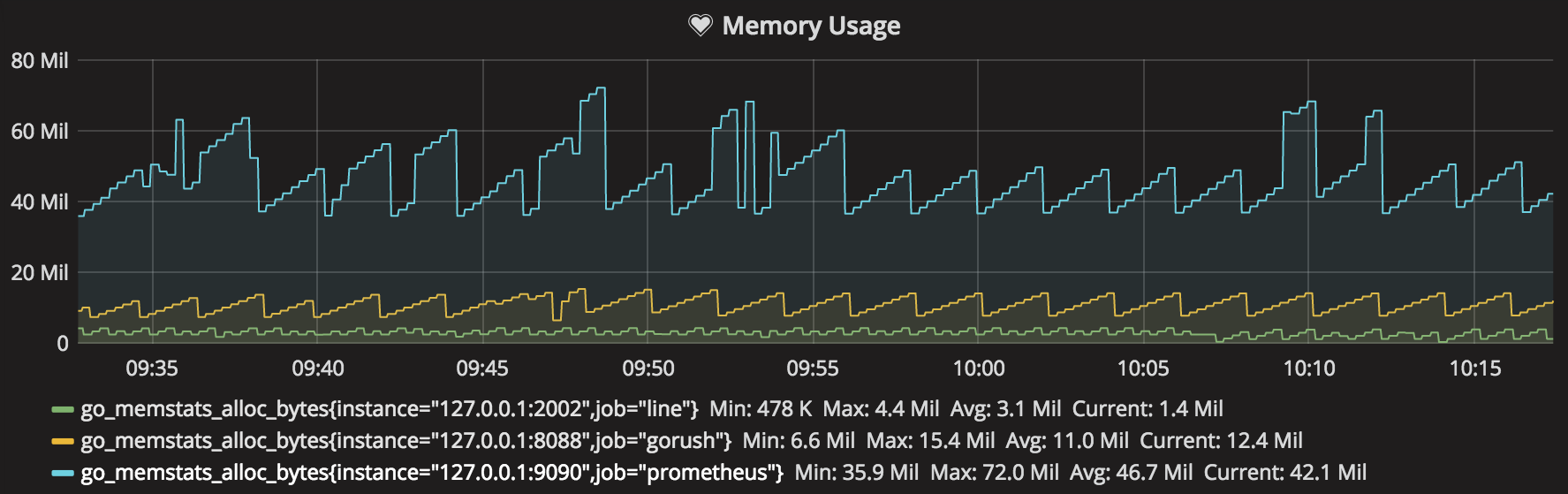
- [x] Support prometheus metrics API.
- [x] Automatically install TLS certificates from Let's Encrypt.
- [x] Support Localtunnel for webhook tunnel.
- [x] Support Line Notify.
Localtunnel allows you to easily share a web service on your local development machine without messing with DNS and firewall settings.
Memory Usage:
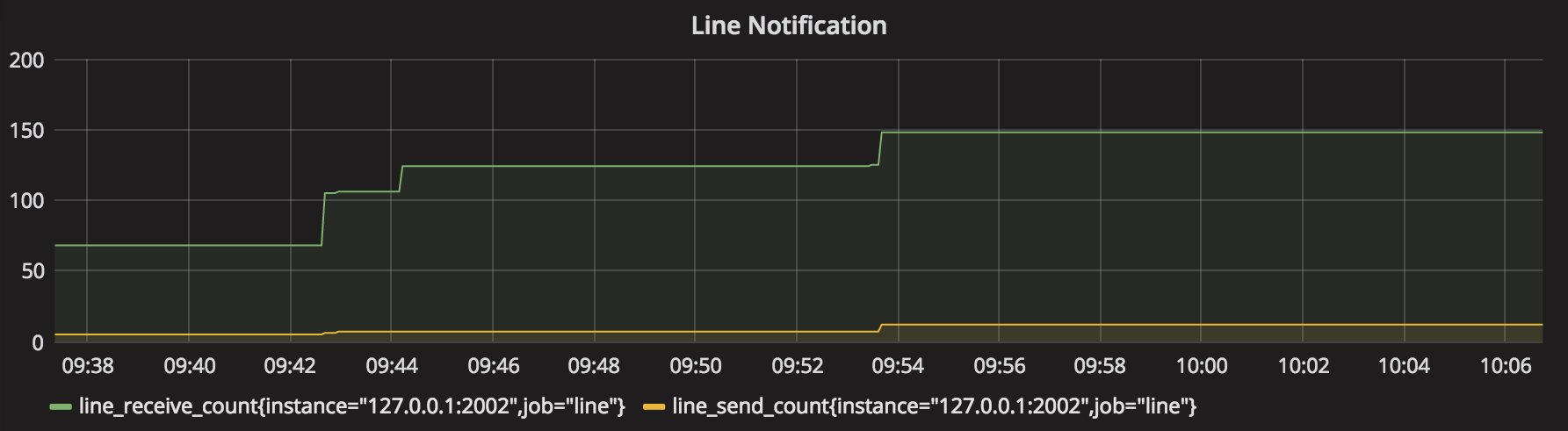
Notification Count Usage:
Build or Download a binary
The pre-compiled binaries can be downloaded from release page. Support the following OS type.
- Windows amd64/386
- Linux amd64/386
- Darwin amd64/386
Go installed
go get -u -v github.com/appleboy/drone-lineor build the binary with the following command:
make buildDocker
Build the docker image with the following commands:
make dockerUsage
There are three ways to send notification.
Usage from binary
Setup Webhook service
Setup Webhook service as default port 8088.
drone-line \
  --secret xxxx \
  --token xxxx \
  webhook
Change default webhook port to 8089.
drone-line \
  --port 8089 \
  --secret xxxx \
  --token xxxx \
  webhook
Use localtunnel to tunnel your locally running bot so that Line can reach the webhook.
drone-line \
  -s secret \
  -t token \
  --tunnel \
  --port 2002 \
  webhook
Use Let's Encrypt. Please make sure you have permission to listen on 443 port.
drone-line \
  -s secret \
  -t token \
  -autotls \
  -host example.com \
  -cache /var/www/.cache \
  --port 443 \
  webhook
Tips: Another way to use ngrok to tunnel your locally running bot so that Line can reach the webhook.
Send Notification
Setup the --to flag after fetch user id from webhook service.
drone-line \
  --secret xxxx \
  --token xxxx \
  --to xxxx \
  --message "Test Message"
Send LINE Notify
If you connect your service with LINE Notify, LINE users can easily receive notifications from it. See the documentation.
drone-line \
  --token xxxx \
  --message "Test Message" \
  notify
Usage from docker
Setup Webhook service as default port 8088.
docker run --rm \
  -e LINECHANNELSECRET=xxxxxxx \
  -e LINECHANNELTOKEN=xxxxxxx \
  appleboy/drone-line webhook
Change default webhook port to 8089.
docker run --rm \
  -e LINECHANNELSECRET=xxxxxxx \
  -e LINECHANNELTOKEN=xxxxxxx \
  -e LINE_PORT=8089 \
  appleboy/drone-line webhook
Tips: Use ngrok to tunnel your locally running bot so that Line can reach the webhook.
Send Notification
docker run --rm \
  -e LINECHANNELSECRET=xxxxxxx \
  -e LINECHANNELTOKEN=xxxxxxx \
  -e LINE_TO=xxxxxxx \
  -e LINE_MESSAGE=test \
  -e LINE_IMAGES=https://example.com/1.png \
  -e LINE_VIDEOS=https://example.com/1.mp4 \
  -e LINE_AUDIOS=https://example.com/1.mp3::1000 \
  -e LINE_STICKERS=1::1 \
  -e LINE_LOCATIONS=title::address::latitude::longitude \
  -e LINE_DELIMITER=:: \
  appleboy/drone-line
Usage from drone ci
Execute from the working directory:
docker run --rm \
  -e PLUGINCHANNELSECRET=xxxxxxx \
  -e PLUGINCHANNELTOKEN=xxxxxxx \
  -e PLUGIN_TO=xxxxxxx \
  -e PLUGIN_MESSAGE=test \
  -e PLUGIN_IMAGES=https://example.com/1.png \
  -e PLUGIN_VIDEOS=https://example.com/1.mp4 \
  -e PLUGIN_AUDIOS=https://example.com/1.mp3::1000 \
  -e PLUGIN_STICKERS=1::1 \
  -e PLUGIN_LOCATIONS=title::address::latitude::longitude \
  -e PLUGIN_DELIMITER=:: \
  -e PLUGINONLYMATCH_EMAIL=false \
  -e DRONEREPOOWNER=appleboy \
  -e DRONEREPONAME=go-hello \
  -e DRONECOMMITSHA=e5e82b5eb3737205c25955dcc3dcacc839b7be52 \
  -e DRONECOMMITBRANCH=master \
  -e DRONECOMMITAUTHOR=appleboy \
  -e DRONECOMMITAUTHOR_EMAIL=appleboy@gmail.com \
  -e DRONECOMMITMESSAGE=TestYourCommit \
  -e DRONEBUILDNUMBER=1 \
  -e DRONEBUILDSTATUS=success \
  -e DRONEBUILDLINK=http://github.com/appleboy/go-hello \
  -e DRONEJOBSTARTED=1477550550 \
  -e DRONEJOBFINISHED=1477550750 \
  -v $(pwd):$(pwd) \
  -w $(pwd) \
  appleboy/drone-line
You can get more information about how to use scp plugin in drone.
Testing
Test the package with the following command:
make test


