
k3s + Gitlab install notes
k3s + Gitlab
This document outlines the steps for utilizing [k3s] to manage a self-hosted [Gitlab] instance. This may be beneficial for individuals and organizations already leveraging [Kubernetes] for platform development. Many applications such as [Gitlab] do not need sophisticated compute clusters to operate, yet [k3s] allows us to achieve additional continuity in the management of development operations. [k3s], although slim-down, is a fully functional [Kubernetes].
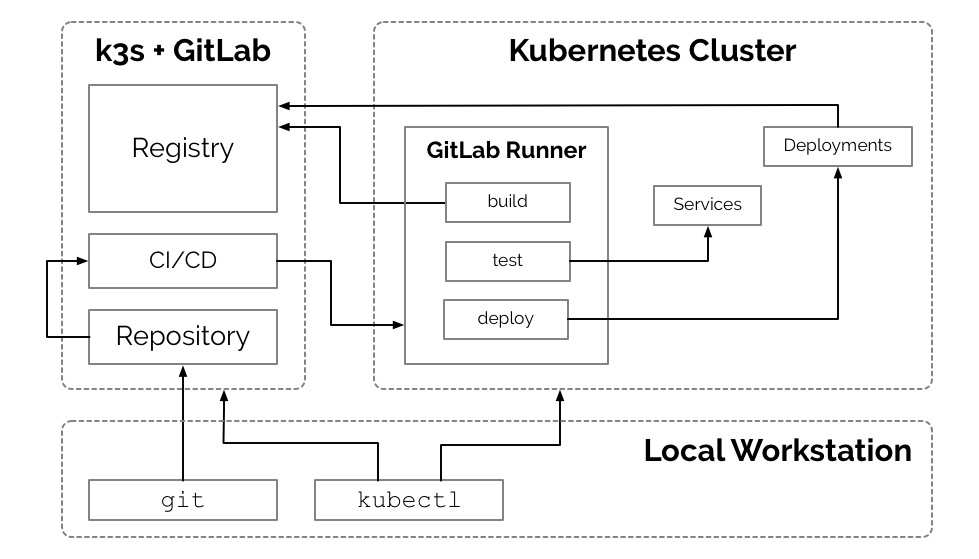
Containers have made applications like [Gitlab] incredibly portable, [Kubernetes] brings that portability to container management and [k3s] makes that portability available at the smallest of scale.
This document outlines a process for setting up a Gitlab instance in a single custom node Kubernetes ([k3s]) cluster on [Vultr]. However, there is very little difference in utilizing other vendors, such as [Digital Ocean] or [Linode].
Disclosure: Links to [Vultr], [Digital Ocean] and [Linode] are affiliate links and credit my accounts on those services if you sign up. Affiliate credit helps me offset the expense of setting up environments for developing articles and tutorials. I do not endorse any of these vendors specifically; however, they are all great choices if you are looking for alternatives or redundancies to Google, Amazon, or Microsoft. [Kubernetes] is a Cloud Native and Vendor Neutral solution, and if implemented well, the specific vendor should only be a high-level business concern.
Obtain a Server (or VM Instance)
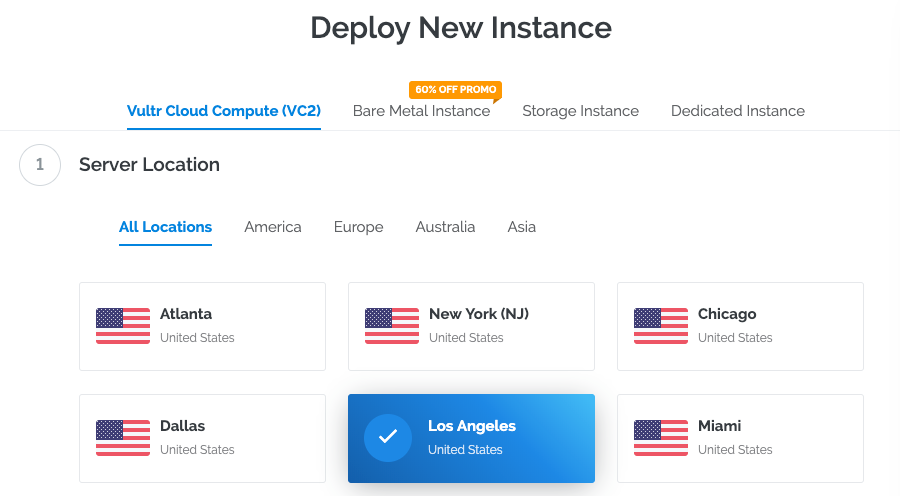
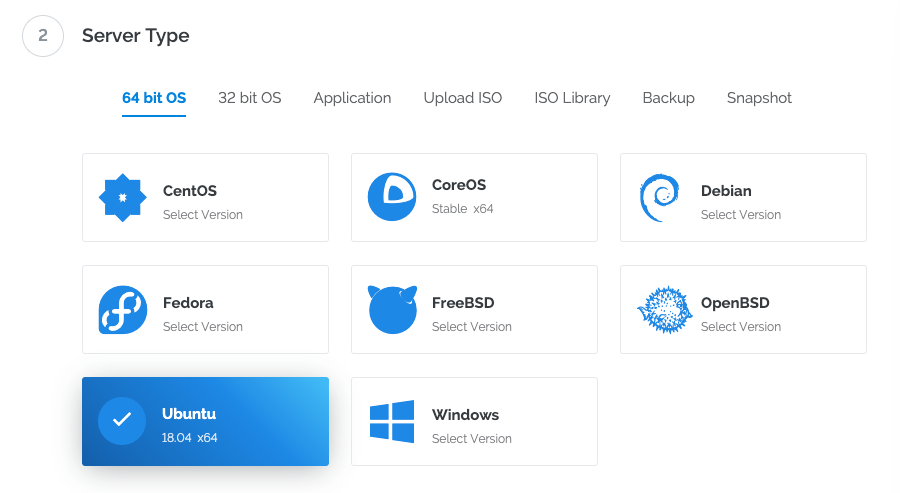
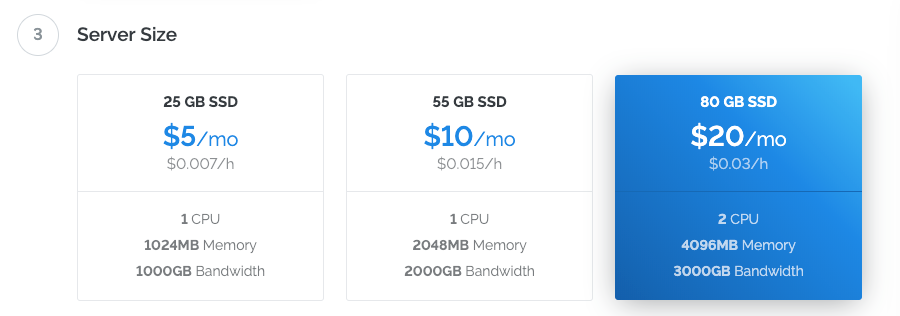
This document utilizes one Los Angeles instance of a 2 CPU / 4096MB Memory [Ubuntu 18.04] x64 server on [Vultr] with Private Networking enabled and a "Server Hostname & Label" of gitlab.apk8s.dev. At the time of this writing, the instance cost is $20/mo, or 3 cents per hour.

Configure DNS
Add DNS A records for your domain, such as: gitlab.apk8s.dev and *.gitlab.apk8s.dev pointed to the public IP address of the [Vultr] instance above. See your Domain Name / DNS provider for instructions on adding A records.
Prepare Server
Login to the new server (IP) as the root user:
ssh root@NEWSERVERIPUpgrade any outdated packages:
apt update && apt upgrade -yInstall [k3s]
[k3s] is "Easy to install. A binary of less than 40 MB. Only 512 MB of RAM required to run." this allows us to utilized Kubernetes for managing the Gitlab application container on a single node while limited the footprint of Kubernetes itself.
curl -sfL https://get.k3s.io | sh -[k3s] is now installed and the [Kubernetes] API is listening on the public IP of the server through port 6443.
Remote Access with kubectl
From your local workstation you should be able to issue a [curl] command to Kubernetes:
curl --insecure https://SERVER_IP:6443/The new [k3s] cluster should return a 401 Unauthorized response with the following payload:
{
  "kind": "Status",
  "apiVersion": "v1",
  "metadata": {
},   "status": "Failure",   "message": "Unauthorized",   "reason": "Unauthorized",   "code": 401 }
[k3s] credentials are stored on the server at /etc/rancher/k3s/k3s.yaml:
Review the contents of the generated k8s.yml file:
cat /etc/rancher/k3s/k3s.yamlThe k3s.yaml is a Kubernetes config file used by kubectl and contains (1) one cluster, (3) one user and a (2) context that ties them together. kubectl uses [contexts] to determine the cluster you wish to connect to and use for access credentials. The current-context section is the name of the context currently selected with the kubectl config use-context command.
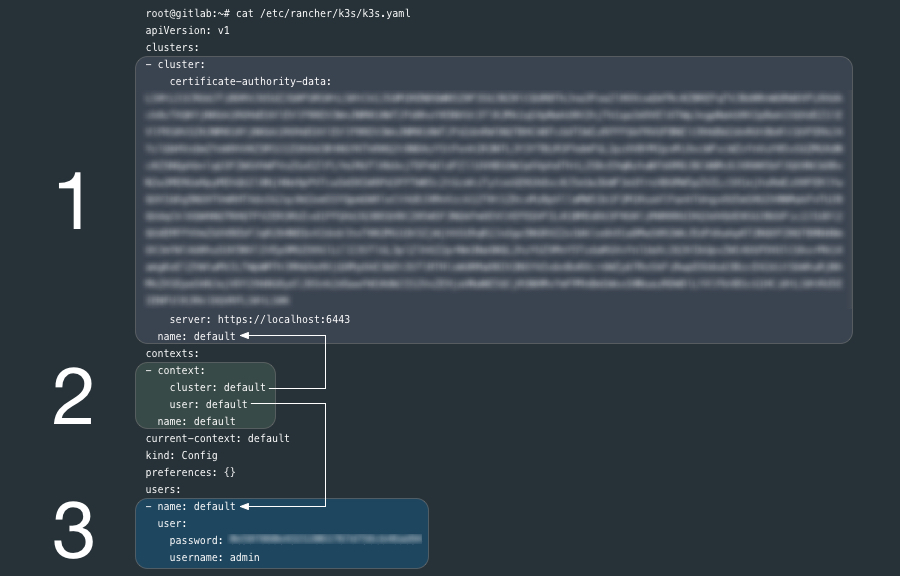
Ensure that [kubectl] is installed on your local workstation.
If you have [kubectl] installed on your local workstation, notice that the k8s.yml file on the new [k3s] node is a kubectl config file similar to the file ~/.kube/config generated by kubectl.
You can copy the entire k8s.yml file over to ~/.kube/config if you have not other contexts there already, it may also be a good practice to rename the cluster, user and context from default to something more descriptive.
If you already have clusters, user and contexts in your ~/.kube/config you can add these new entries after renaming them.
Another option is to create another file such as ~/.kube/gitlab-config and set the KUBECONFIG environment variable to point to it. Read more about kubectl [configuration options][contexts].
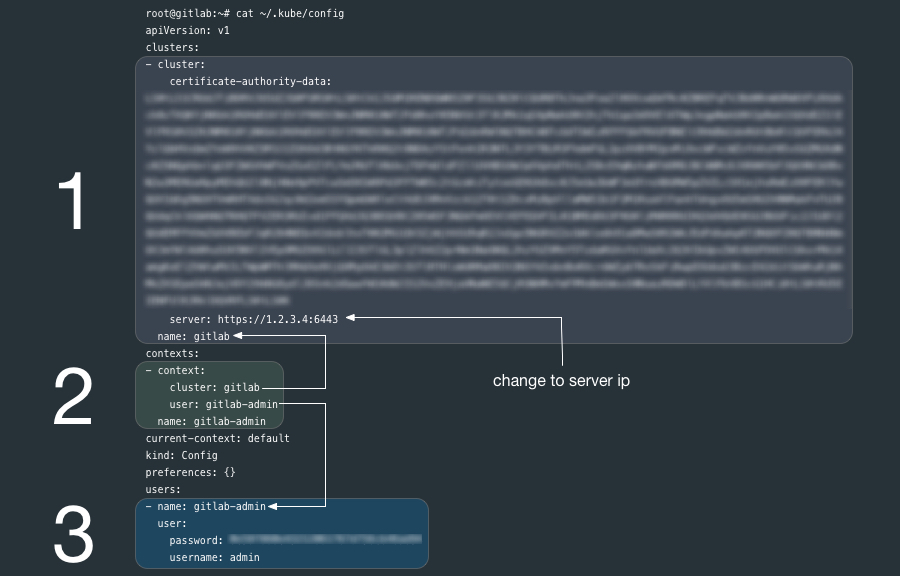
Before you being configuring [k3s] make sure kubectl pointed to the correct cluster:
kubectl config use-context gitlab-adminEnsure that you can communicate with the new [k3s] cluster by requesting a list of nodes:
kubectl get nodesIf successful, you should get output similar to the following:
NAME               STATUS   ROLES    AGE    VERSION
gitlab.apk8s.dev   Ready    <none>   171m   v1.14.1-k3s.4
Install [Cert Manager] / [Let's Encrypt]
[Gitlab] ships with [Let's Encrypt] capabilities, however, since we are running Gitlab through [k3s] (Kubernetes) [Ingress] (using [Traefik],) we need to generate Certs and provide TLS from the cluster.
Create Cert Manager's Custom Resource Definitions:
kubectl apply -f https://raw.githubusercontent.com/jetstack/cert-manager/release-0.8/deploy/manifests/00-crds.yamlInstall [Cert Manager] with the ./k8s/0000-global/001-cert-manager-helm.yml manifest (the [k3s] way):
kubectl create -f ./k8s/0000-global/001-cert-manager-helm.ymlEnsure that cert manager is now running:
kubectl get all -n cert-managerOutput:
NAME                                          READY   STATUS    RESTARTS   AGE pod/cert-manager-5d669ffbd8-2s6pm             1/1     Running   0          5m11s pod/cert-manager-cainjector-79b7fc64f-n9qdt   1/1     Running   0          5m11s pod/cert-manager-webhook-6484955794-j6cpr     1/1     Running   0          5m11s
NAME                           TYPE        CLUSTER-IP     EXTERNAL-IP   PORT(S)   AGE service/cert-manager-webhook   ClusterIP   10.43.103.18   <none>        443/TCP   5m11s
NAME                                      READY   UP-TO-DATE   AVAILABLE   AGE deployment.apps/cert-manager              1/1     1            1           5m11s deployment.apps/cert-manager-cainjector   1/1     1            1           5m11s deployment.apps/cert-manager-webhook      1/1     1            1           5m11s
NAME                                                DESIRED   CURRENT   READY   AGE replicaset.apps/cert-manager-5d669ffbd8             1         1         1       5m11s replicaset.apps/cert-manager-cainjector-79b7fc64f   1         1         1       5m11s replicaset.apps/cert-manager-webhook-6484955794     1         1         1       5m11s
Add a [ClusterIssuer] to handle the generation of Certs cluster-wide:
*NOTE: First edit ./k8s/0000-global/005-clusterissuer.yml and replace YOUREMAIL_ADDRESS with your email address.
kubectl apply -f ./k8s/0000-global/005-clusterissuer.ymlInstall Gitlab
Namespace
./k8s/1000-gitlab/000-namespace/000-namespace.yml creates the [Namespace] gitlab:
kubectl apply -f ./k8s/1000-gitlab/000-namespace/000-namespace.ymlTLS Certificate
Generate a TLS Certificate (first edit ./k8s/1000-gitlab/000-namespace/010-certs.yml and replace apk8s.dev with your domain):
kubectl apply -f ./k8s/1000-gitlab/000-namespace/010-certs.ymlServices
./k8s/1000-gitlab/100-gitlab/10-service.yml creates two [Services]. Service gitlab provides a backend service for [Ingress] to serve the Gitlab web UI. Service gitlab-tcp exposes port 32222 for interacting with Gitlab over ssh for operations such as git clone, push and pull.
kubectl apply -f ./k8s/1000-gitlab/100-gitlab/10-service.ymlDeployment
./k8s/1000-gitlab/100-gitlab/40-deployment.yml creates a Gitlab [Deployment].
kubectl apply -f ./k8s/1000-gitlab/100-gitlab/40-deployment.ymlThe Gitlab deployment launches a single [Pod] creating and mounting the directory /srv/gitlab/ on the new server for the persistent storage for configuration, logs, and data (Git repos.) containers (registry) and uploads.
- name: config-volume
          hostPath:
            path: /srv/gitlab/config
        - name: logs-volume
          hostPath:
            path: /srv/gitlab/logs
        - name: data-volume
          hostPath:
            path: /srv/gitlab/data
        - name: reg-volume
          hostPath:
            path: /srv/gitlab/reg
        - name: uploads-volume
          hostPath:
            path: /srv/gitlab/uploads
Configure Gitlab
Gitlab may take a minute or more to boot. Once Gitlab is running locate the newly generated config file gitlab.rb on the server at /srv/gitlab/config/gitlab.rb.
The initial gitlab.rb file is commented out sample configuration so you may simply back it up and add a new file with the following. Replace .apk8s.dev with your domain.
/srv/gitlab/config/gitlab.rb:
external_url 'https://gitlab.apk8s.dev'
nginx['listen_port'] = 80 nginx['listen_https'] = false nginx['proxysetheaders'] = {   'X-Forwarded-Proto' => 'https',   'X-Forwarded-Ssl' => 'on' }
gitlabrails['gitlabshellsshport'] = 32222
registryexternalurl 'https://reg.gitlab.apk8s.dev'
gitlabrails['registryenabled'] = true
registrynginx['listenport'] = 5050 registrynginx['listenhttps'] = false registrynginx['proxyset_headers'] = {   'X-Forwarded-Proto' => 'https',   'X-Forwarded-Ssl' => 'on' }
prometheus['monitor_kubernetes'] = false
Ingress
The Kubernetes [Ingress] manifest ./k8s/1000-gitlab/100-gitlab/50-ingress.yml sets up [Traefik] to direct requests to the host gitlab.apk8s.dev to backend [Service] named gitlab.
kubectl apply -f ./k8s/1000-gitlab/100-gitlab/50-ingress.ymlLogin
Browse to https://gitlab.apk8s.dev (replace top-level domain with your domain). NOTE: New [Gitlab] installs present a screen to set the admin (root) user's password. Do this immediately to prevent someone else from setting up Gitlab for you.
Note
Remember to keep the directory /srv/gitlab on the server backed up.
[Pod]: https://kubernetes.io/docs/concepts/workloads/pods/pod/ [Deployment]: https://kubernetes.io/docs/concepts/workloads/controllers/deployment/ [Ingress]: https://kubernetes.io/docs/concepts/services-networking/ingress/ [Namespace]: https://kubernetes.io/docs/concepts/overview/working-with-objects/namespaces/ [Service]: https://kubernetes.io/docs/concepts/services-networking/service/ [Services]: https://kubernetes.io/docs/concepts/services-networking/service/ [Let's Encrypt]: https://letsencrypt.org/ [ClusterIssuer]: https://docs.cert-manager.io/en/latest/tasks/issuers/ [Traefik]:https://traefik.io/ [Cert Manager]: [./k8s/0000-global/001-cert-manager-helm.yml]:./k8s/0000-global/001-cert-manager-helm.yml [contexts]: https://kubernetes.io/docs/tasks/access-application-cluster/configure-access-multiple-clusters/ [kubectl]: https://kubernetes.io/docs/tasks/tools/install-kubectl/ [k3s]: https://k3s.io/ [Vultr]: https://www.vultr.com/?ref=7418713 [Gitlab]: https://about.gitlab.com/ [Digital Ocean]: https://m.do.co/c/97b733e7eba4 [Linode]: https://www.linode.com/?r=848a6b0b21dc8edd33124f05ec8f99207ccddfde [Kubernetes]: https://kubernetes.io/ [Ubuntu 18.04]: http://releases.ubuntu.com/18.04/


