
Open Source Tool - Cybersecurity Graph Database in Neo4j
GraphKer
Open Source Tool - Cybersecurity Graph Database in Neo4j|G|r|a|p|h|K|e|r|
{ open source tool for a cybersecurity graph database in neo4j }
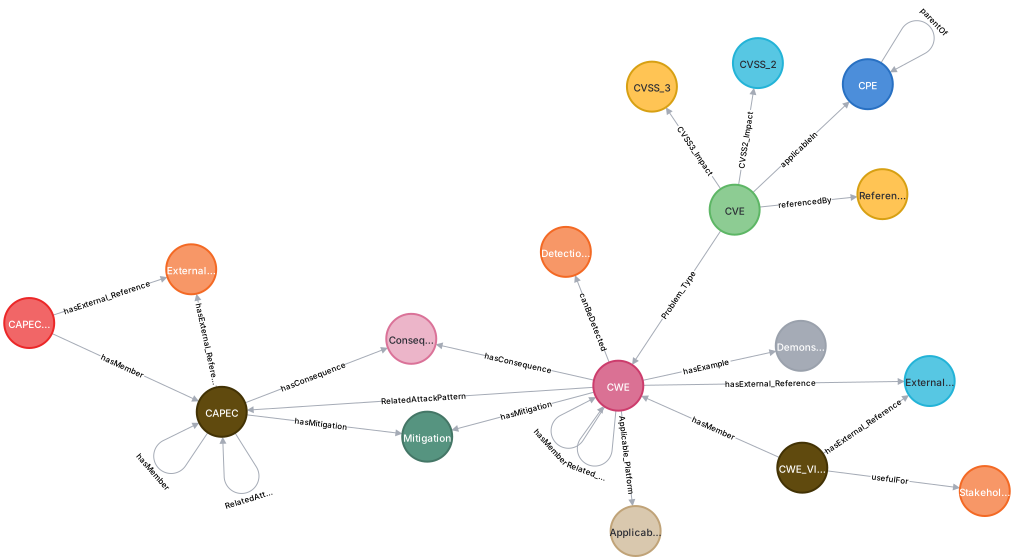
With GraphKer you can have the most recent update of cyber-security vulnerabilities, weaknesses, attack patterns and platforms from MITRE and NIST, in an very useful and user friendly way provided by Neo4j graph databases!
Data model
Prerequisites
3 + 1 Steps to run GraphKer Tool
1) Download and Install Neo4j Desktop
- Windows Users: https://neo4j.com/download/ Create an account to get the license (totally free), download and install Neo4j Desktop. Useful Video: https://tinyurl.com/yjjbn8jx - Linux Users:sudo apt update
sudo apt install apt-transport-https ca-certificates curl software-properties-common
curl -fsSL https://debian.neo4j.com/neotechnology.gpg.key | sudo apt-key add -
sudo add-apt-repository "deb https://debian.neo4j.com stable 4.1"
sudo apt install neo4j
sudo systemctl enable neo4j.service
sudo systemctl status neo4j.service● neo4j.service - Neo4j Graph Database
Loaded: loaded (/lib/systemd/system/neo4j.service; enabled; vendor preset: enabled)
Active: active (running) since Fri 2020-08-07 01:43:00 UTC; 6min ago
Main PID: 21915 (java)
Tasks: 45 (limit: 1137)
Memory: 259.3M
CGroup: /system.slice/neo4j.service
. . .2) Create and Configure the Database
- Create Database: - Windows Users: You can create databases in whatever version you want (latest version preferable) through GUI or Neo4j Terminal. - Create a new database in GUI: Just click the (+), set DB Name, Username and Password. Useful Tutorial: https://www.sqlshack.com/getting-started-with-the-neo4j-graph-database/ - Through Neo4j Shell: https://neo4j.com/docs/cypher-manual/current/databases/ - Linux Users: When you start neo4j through systemctl, typecypher-shellcreate database NAME;dbms.default_database=neo4jdbms.directories.plugins=pluginsdbms.security.procedures.unrestricted=apoc.*
dbms.security.procedures.whitelist=apoc.,apoc.coll.,apoc.load.*
#loads unrestricted and white-listed procedures/plugins to the serverrestart neo4japoc.export.file.enabled=true
apoc.import.file.enabled=true
apoc.import.file.userneo4jconfig=false
cypher.lenientcreaterelationship = true- Configure Memory Usage: In Neo4j Configuration File (neo4j.conf): You can run GraphKer with only 1G of Heap and 512M of pagecache
dbms.memory.heap.initial_size=512M dbms.memory.heap.max_size=1G dbms.memory.pagecache.size=512M3) Install requirements.txt
- GraphKer Uses: xmltodict, neo4j, requests, beautifulsoup4 -pip install -r requirements.txt4) Install Applications Created for Neo4j
- There are several applications created especially for Neo4j that you can use for better experience and work. - Neo4j Bloom: Application for better graph presentations. Free and Easy to use. - Graphlytic: Third-Party App, better graph presentations, but most important auto-analytics and statistics. Free and Paid Editions. We can do the most locally with free edition. Learn More: https://graphlytic.biz/ - Neo4j Database Analyzer: Third-Party App, Free, provides great analysis tools for our Data and our Schema. Learn More: https://community.neo4j.com/t/introducing-the-neo4j-database-analyzer/6197Run GraphKer
// Default
python main.py -u BOLTURL -n USERNAME -p PASSWORD -d IMPORTPATH
// Run and Open Neo4j Browser
python main.py -u BOLTURL -n USERNAME -p PASSWORD -d IMPORTPATH -b y
// Run and Open Graphlytic App
python main.py -u BOLTURL -n USERNAME -p PASSWORD -d IMPORTPATH -g y
// Default Run Example in Ubuntu
sudo python3 main.py -u BOLT_URL -n USERNAME -p PASSWORD -d /var/lib/neo4j/import/
Default Bolt URL for Neo4j: bolt://localhost:7687
Default Username in Neo4j Databases: neo4j
For Neo4j Import Folder check the link above with File Locations.
Estimated RunTime: 6-15 Minutes. Depends on hardware.
At least 8GB in your hard drive.
# You can check out an existing example of the graph database that GraphKer creates. Just download the dump file from repo: https://github.com/amberzovitis/GraphKer-DBMS-Dump and import it to an existing or new graph database in Neo4j. This file consists of CVEs from 2021 (with related CPEs) and all CWEs and CAPECs.
#
You can access the CVE and CPE Datasets in National Vulnerability Database by NIST (https://nvd.nist.gov/vuln/data-feeds), CWE Dataset in MITRE (https://cwe.mitre.org/data/downloads.html) and CAPEC Dataset in MITRE (https://capec.mitre.org/data/downloads.html).
# --Search, Export Data and Analytics, Enrich your Skills--
Created by Adamantios - Marios Berzovitis, Cybersecurity Expert MSc, BSc
Diploma Research - MSc @ Distributed Systems, Security and Emerging Information Technologies | University Of Piraeus --> https://www.cs.unipi.gr/distributed/
Co-Working with Cyber Security Research Lab | University Of Piraeus --> https://seclab.cs.unipi.gr/
Facebook: https://www.facebook.com/GraphKerTool/
LinkedIn: https://tinyurl.com/p57w4ntu
Github: https://github.com/amberzovitis
Enjoy! Provide Feedback!


