
Your gateway to the world of crypto !
crypto-exchanges-gateway
Your gateway to the world of crypto !
NB: this project won't build unless you use node 14.x (check Nix for that). It's unlikely to be updated since I don't really have time to work on it anymore :)
Disclaimer
This project cannot be considered in any way as trading advice.
Use it at your own risks and be careful with your money ;)
Faq
- Does it support real-time data ?
- What about ccxt ?
Btw, ccxt library is now used to interface with some exchanges ;)
- What is the monthly fee for the service ?
- Where is your service hosted ?
- I saw you are accepting donations. What extra service will I get for a donation ?
What it does
- Provides a unified REST API to various exchanges (can be used to automate trading or build bots)
- Handles authentication so that on client side you can concentrate on what really matters
- Implements rate limiting when forwarding requests to remote exchanges
- Provides a REST API to send push notifications using PushOver
- Provides a basic UI which implements most API calls (see documentation in doc_ directory)
- Provides WS access for real-time data (tickers, order books & trades, see documentation in doc directory and video explaining how to create custom WS streams to multiplex data from multiple exchanges)
- Access to a portfolio portfolio overview across all exchanges with estimated value in USD
- Advanced alerting system
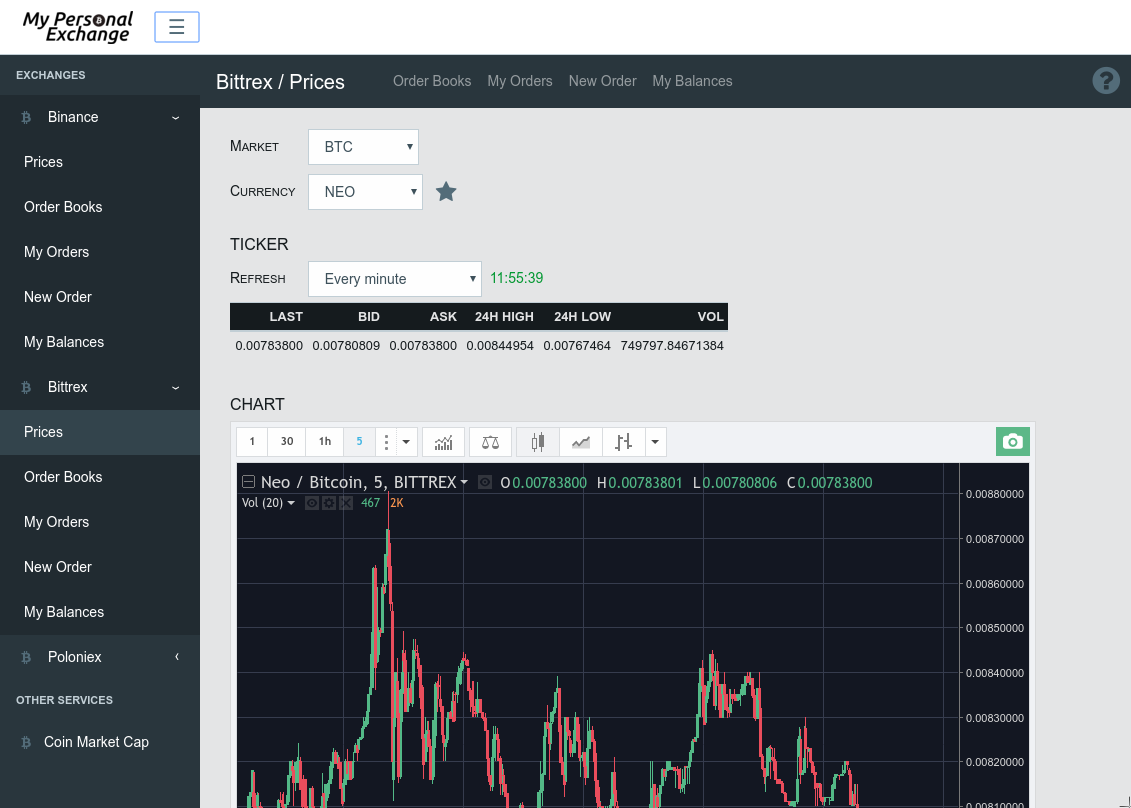
See a live demo at https://mpe-demo.crazyme.net/ui/
Of course, above demo does not use any valid user/token. This means the following :
- everything related to price & order book is populated with real data
- the list of open/completed orders is filled with random data
- the list of balances is filled with random data
- new orders won't be actually executed ;)
How to use it
Install it wherever you want and start sending requests from your own program
- it can be hosted on a VM in the cloud
- it can be installed at home, on a Raspberry Pi
A Node.js client is available here or as a npm package
Available Exchanges
Currently supports for following exchanges :
- Binance (used to be my favorite)
- Bittrex
- Kucoin (optional KYC)
- OKEx (optional KYC)
- Poloniex (worst support ever)
- More to come...
- Retrieve pairs
- Retrieve tickers
- Retrieve order book
- Retrieve last executed trades
- Retrieve klines (charts data)
- List open orders
- List closed orders
- Retrieve a single order
- Test an order (to ensure quantity and price match exchange filters)
- Create an order
- Retrieve balances
See documentation in doc directory for a description of the supported websocket protocol (similar to JSON-RPC_)
See documentation in doc_ directory for informations regarding unit tests
Alerts
Have you ever wanted to receive an alert in case ALL of the following conditions are met :
- NEO-USDT price in range [120, 135] on Binance
- NEO-BTC price on Bittrex < 0.010
- NEO price in MarketCap module > 125$
It comes with built-in support for PushOver but any other notification system can be easily implemented (through third party applications) since all alert changes are emitted over a websocket endpoint (see documentation in doc directory)
Limitations
- Margin trading is not supported (and is unlikely to be)
- Withdrawal is not supported (and is unlikely to be)
- Stop loss & trailing stop loss are not supported for the moment (although it might be supported at some point)
Other services
MarketCap
MarketCap module supports :
- Tickers
Push Over
PushOver module supports :
- Push notifications
Rate limiting
Rate limiting is implemented when required by exchange thanks to Bottleneck
Installation
- Install dependencies
npm install- Copy sample config
cp config/config.sample.json config/config.jsonCheck documentation in doc_ directory for detailed information on each config section
- Start gateway
node gateway.js- Build UI
cd ui
npm install && ./rebuild-ui- Check which exchanges are enabled
["binance","bittrex","poloniex","kucoin"]By default, only public API will be enabled. In order to access trading/private API, you need to update config.json with appropriate user and secret provided by exchange (check documentation in doc_ directory )
- Check BTC & ETH prices using MarketCap module
[
    {
        "symbol":"BTC",
        "name":"Bitcoin",
        "circulating_supply":17372012,
        "price_usd":6406.1049,
        "percentchange1h":-0.08,
        "percentchange1d":-0.08,
        "percentchange7d":-0.15,
        "volume24husd":3120534126.1266,
        "lastUpdated":1542009997,
        "marketcapusd":111286930723.4185,
        "rank":1,
        "price_btc":1
    },
    {
        "symbol":"ETH",
        "name":"Ethereum",
        "circulating_supply":103150460,
        "price_usd":210.4854,
        "percentchange1h":-0.39,
        "percentchange1d":-0.39,
        "percentchange7d":-0.8,
        "volume24husd":1294093048.2094,
        "lastUpdated":1542009997,
        "marketcapusd":21711669585.6914,
        "rank":2,
        "price_btc":0.032857
    }
]- Place an order to buy 1 NEO at 0.0040BTC on Bittrex (assuming you have enough funds)
curl -X POST 'http://127.0.0.1:8000/exchanges/bittrex/openOrders?pair=BTC-NEO&quantity=1&targetRate=0.0040'You should see JSON content such as below :
{"orderNumber":"8bc49a59-1056-4c20-90f2-893fff2be279"}- Cancel above order (assuming order still exists)
curl -X DELETE 'http://127.0.0.1:8000/exchanges/bittrex/openOrders/8bc49a59-1056-4c20-90f2-893fff2be279'You should see JSON content such as below in case order is valid :
{}Docker
See this video to know how to be ready to trade in less then 3 minutes using Docker & Kitematic
A docker image is available at https://hub.docker.com/r/apendergast/crypto-exchanges-gateway/
- Pull image
docker pull apendergast/crypto-exchanges-gateway- Run image
docker run --rm -p 8000:8000 -p 8001:8001 --name ceg apendergast/crypto-exchanges-gatewayYou should then be able to access service on http://127.0.0.1:8000
WS endpoint will be available on ws://127.0.0.1:8001
- Check which exchanges are enabled
["binance","bittrex","kucoin","okex","poloniex"]By default, only public API will be enabled. In order to access trading/private API, you need to pass environment when creating container. Following environment variables are available :
- cfg.logLevel : log level
- cfg.listen.externalEndpoint : used to indicates the external endpoint used to reach http socket, in case gateway is running behing a proxy
- cfg.listenWs.externalEndpoint : used to indicates the external endpoint used to reach ws socket, in case gateway is running behing a proxy
- cfg.sessions.maxSubscriptions : maximum number of subscriptions allowed for a given session (optional, default = 0, no maximum)
- cfg.sessions.maxDuration : maximum duration in second for a given session (optional, default = 0, no maximum)
- cfg.sessions.hideIpaddr : whether or not ip addresses should be hidden when listing sessions through REST api (optional, default = 0)
- cfg.auth.apikey : API Key used to protect access
- cfg.ui.enabled : enable/disable UI (value should be set to 1 to enable UI, 0 to disable UI)
- cfg.tickerMonitor.enabled : enable/disable Ticker Monitor module (value should be set to 1 to enable Ticker Monitor, 0 to disable Ticker Monitor) (default = 1)
- cfg.marketCap.enabled : enable/disable MarketCap module (value should be set to 1 to enable MarketCap module, 0 to disable MarketCap module) (default = 1)
- cfg.pushover.user : PushOver user key
- cfg.pushover.token : PushOver token
- cfg.exchanges.poloniex.enabled : value should be set to 1 to enable exchange, 0 to disable exchange (default = 1)
- cfg.exchanges.poloniex.key : Poloniex user key
- cfg.exchanges.poloniex.secret : Poloniex secret
- cfg.exchanges.bittrex.enabled : value should be set to 1 to enable exchange, 0 to disable exchange (default = 1)
- cfg.exchanges.bittrex.key : Bittrex user key
- cfg.exchanges.bittrex.secret : Bittrex secret
- cfg.exchanges.binance.enabled : value should be set to 1 to enable exchange, 0 to disable exchange (default = 1)
- cfg.exchanges.binance.requirePair : value should be set to 0 to allow retrieving tickers/orders for all pairs at once, 1 to require pair for such operations (default = 0)
- cfg.exchanges.binance.key : Binance user key
- cfg.exchanges.binance.secret : Binance secret
- cfg.exchanges.kucoin.enabled : value should be set to 1 to enable exchange, 0 to disable exchange (default = 1)
- cfg.exchanges.kucoin.requirePair : value should be set to 0 to allow retrieving tickers/orders for all pairs at once, 1 to require pair for such operations (default = 0)
- cfg.exchanges.kucoin.key : Kucoin user key
- cfg.exchanges.kucoin.secret : Kucoin secret
- cfg.exchanges.kucoin.password : Kucoin API password
- cfg.exchanges.okex.enabled : value should be set to 1 to enable exchange, 0 to disable exchange (default = 1)
- cfg.exchanges.okex.requirePair : value should be set to 0 to allow retrieving tickers/orders for all pairs at once, 1 to require pair for such operations (default = 0)
- cfg.exchanges.okex.key : OKEx user key
- cfg.exchanges.okex.secret : OKEx secret
- cfg.exchanges.okex.password : OKEx password
Examples :
Run container with Bittrex user/key environment variables
docker run --rm -p 8000:8000 -p 8001:8001 --name ceg -e cfg.exchanges.bittrex.key='abcdefghijkl' -e cfg.exchanges.bittrex.secret='123456789' apendergast/crypto-exchanges-gatewayDependencies
This project was made possible thanks to following projects :
- big.js
- binance
- body-parser
- bottleneck (for rate limiting)
- ccxt (used to interface with some exchanges)
- chump (for PushOver)
- css-select (for HTML parsing)
- express
- express-ws
- htmlparser2 (for HTML parsing)
- joi (for JSON schema validation)
- lodash
- mocha (for unit tests)
- node-bittrex-api
- poloniex-api-node
- retry (for custom retry strategies upon network failure)
- request
- sqlite3 (for data storage)
- uuid
- winston (for logging)
- ws
- yargs (for CLI commands)
Donate
This project is a work in progress. If you find it useful, you might consider a little donation ;)
BTC: 163Bu8qMSDoHc1sCatcnyZcpm38Z6PWf6E
ETH: 0xDEBBEEB9624449D7f2c87497F21722b1731D42a8
NEO/GAS: NXbbNQ2wSuavGRRffxFQrKLvSysEewzSHZ


