
[CVPR 2026 Highlight] ReAG: Reasoning-Augmented Generation for Knowledge-based Visual Question Answering
ReAG: Reasoning-Augmented Generation for Knowledge-based Visual Question Answering
 -f9f107.svg)


📢 Latest Updates
- [2026/04/24] 🤗 Inference code and weights release - [2026/04/09] 🌟 ReAG has been selected as Highlight - [2026/02/21] 📚 ReAG has been accepted @ CVPR 2026Overview
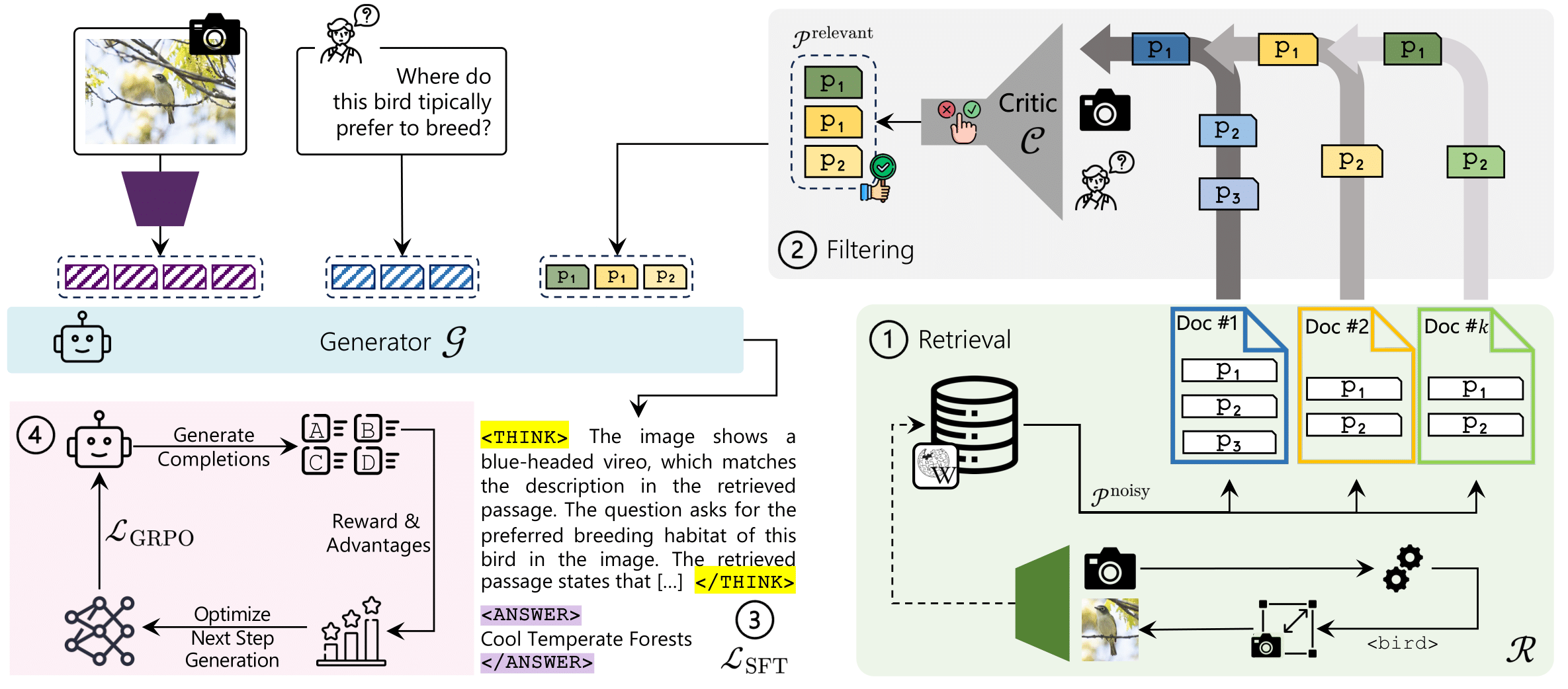
ReAG is a Reasoning-Augmented Multimodal RAG approach for Knowledge-based VQA. Standard retrieval-augmented methods often retrieve noisy or irrelevant passages, limiting answer quality. ReAG addresses this by combining coarse- and fine-grained retrieval with a critic model that filters out low-quality passages before answer generation. The model is trained with a multi-stage strategy: a supervised fine-tuning as a cold start, followed by reinforcement learning to promote explicit reasoning grounded in retrieved evidence. ReAG significantly outperforms prior methods on Encyclopedic-VQA and InfoSeek.
This repository contains the inference pipeline for ReAG: Reasoning-Augmented Generation for Knowledge-based Visual Question Answering (KB-VQA). The model checkpoints are hosted on Hugging Face:
- ReAG Generator 3B: https://huggingface.co/aimagelab/ReAG-3B
- ReAG Generator 7B: https://huggingface.co/aimagelab/ReAG-7B
- ReAG Critic: https://huggingface.co/aimagelab/ReAG-Critic
Table of Contents
- Inference environment - EVQA evaluation environment - Infoseek - Encyclopedic-VQA - Slurm (optional) - What the scripts doEnvironment Setup
The following code was tested using:- Python 3.11
- CUDA 12.6 (for GPU inference)
.venv— main inference environment (PyTorch + Transformers)evqa-eval— EVQA evaluation environment (TensorFlow stack), kept separate due to TF/PyTorch conflicts
1) Create the inference environment
python3.11 -m venv .venv
source .venv/bin/activate
python -m pip install --upgrade pip
Example: Torch wheels for CUDA 12.6
python -m pip install torch==2.6.0+cu126 torchvision==0.21.0+cu126 torchaudio==2.6.0+cu126 \
  --index-url https://download.pytorch.org/whl/cu126
Install remaining dependencies
python -m pip install -r requirements.txt
If you use conda, you can install the packages from requirements.txt in an activated conda environment.
2) Create the EVQA evaluation environment
This environment is only needed to run the EVQA evaluation scripts. TensorFlow dependencies conflicts with the main inference stack, so we kept it separate.
python3.11 -m venv evqa_eval/.venv
source evqa_eval/.venv/bin/activate
python -m pip install --upgrade pip python -m pip install -r src/retrievalmodule/evqaeval/requirements.txt
Datasets
We provide pre-packaged evaluation data for both benchmarks so you can get started quickly without navigating the original dataset repositories.Infoseek
Download the evaluation data for Infoseek here. For the full dataset, refer to the official repository. The inference scripts expect Infoseek in JSONL format (--query_path points to a .jsonl file).
Encyclopedic-VQA
Download the evaluation data for Encyclopedic-VQA here, and the evaluation images here. For the full dataset, refer to the official repository. The inference scripts expect EVQA in JSON format (--query_path points to a .json file).
Knowledge Bases and FAISS Indexes
Our work uses two knowledge bases, one per benchmark. To enhance reproducibility, we provide both the knowledge bases and the pre-built FAISS indexes for the best configuration presented in the paper. Embeddings are generated using the EVA-CLIP model.Inference
Once datasets and indexes are in place, unzip all archives and update the paths in the .sh scripts to match your local filesystem. We provide two ready-to-use scripts:
- EVQA: retrievalevqa.sh
- Infoseek: retrievalinfoseek.sh
srun prefix while keeping the rest of the command unchanged.
Slurm (optional)
If you are on an HPC cluster with SLURM, submit the scripts directly after editing the asset paths:
sbatch retrieval_evqa.sh
sbatch retrieval_infoseek.sh
What the scripts do
Both scripts invoke retrieval.py with a common set of flags representing the full end-to-end ReAG pipeline:
--model_name "aimagelab/ReAG-3B"--top_k 20--forcereasoning+--extractreasoning--cropqueryimg--criticmodelname "aimagelab/ReAG-Critic"--evalpassages+--yesprob_thr 0.1
.sh files to configure your experiment. Notable options include:
--few_shots— Infoseek few-shot prompting--eval_passages— critic-based passage filtering--usegooglelensor--use_oracle— EVQA retrieval variants
Outputs
Results are written under the --output_root directory. The script automatically constructs an experiment folder name based on the dataset, model, retrieval setup, and active flags.
Citation
If you use this code, please cite our CVPR 2026 paper:
@inproceedings{compagnoni2026reag,
  title={{ReAG: Reasoning-Augmented Generation for Knowledge-based Visual Question Answering}},
  author={Compagnoni, Alberto and Morini, Marco and Sarto, Sara and Cocchi, Federico and Caffagni, Davide and Cornia, Marcella and Baraldi, Lorenzo and Cucchiara, Rita},
  booktitle={Proceedings of the IEEE/CVF Computer Vision and Pattern Recognition Conference},
  year={2026}
}


