
🙌 Awesome Django Markdown Editor, supported for Bootstrap & Semantic-UI
martor [![pypi version][1]][2] [![paypal donation][3]][4]
[![license][5]][6] [![python version][7]][8] [![django version][9]][10] [![build][11]][12] [![black][18]][19]
📖 Documentation: https://django-markdown-editor.readthedocs.io
Martor is a Markdown Editor plugin for Django, supported for Bootstrap, Semantic-UI & Tailwind CSS.
Features
- Live Preview
- Integrated with Ace Editor_
- Supported with Bootstrap, Semantic-UI and Tailwind CSS_
- Supported Multiple Fields fixed this issue_
- Upload Images to imgur.com (via API) and [custom uploader][13]
- Direct Mention users
@[username]- (requires user to logged in). - Supports embed/iframe video from (Youtube, Vimeo, Dailymotion, Yahoo, Veoh, & Metacafe)
- Spellchecking (only supports US English at this time)
- Emoji
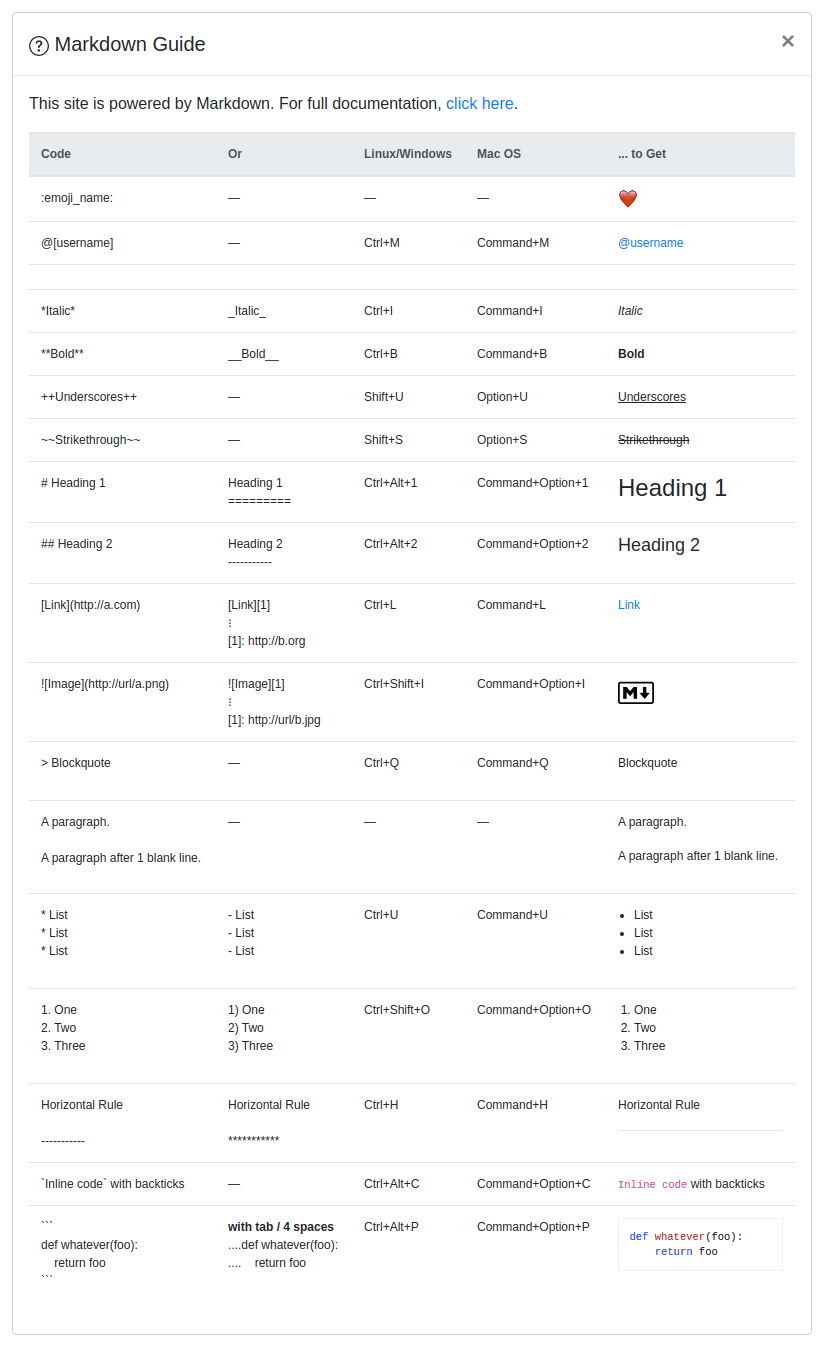
:emoji_name:+ Cheat sheets - Martor Commands Reference
- Supports Django Admin
- Toolbar Buttons
- Highlight
pre - Custom ID Attributes (Add custom IDs to any text element using
{#custom-id}syntax, e.g.,# Heading1 {#my-h1-id}, for easy linking and navigation.
Preview
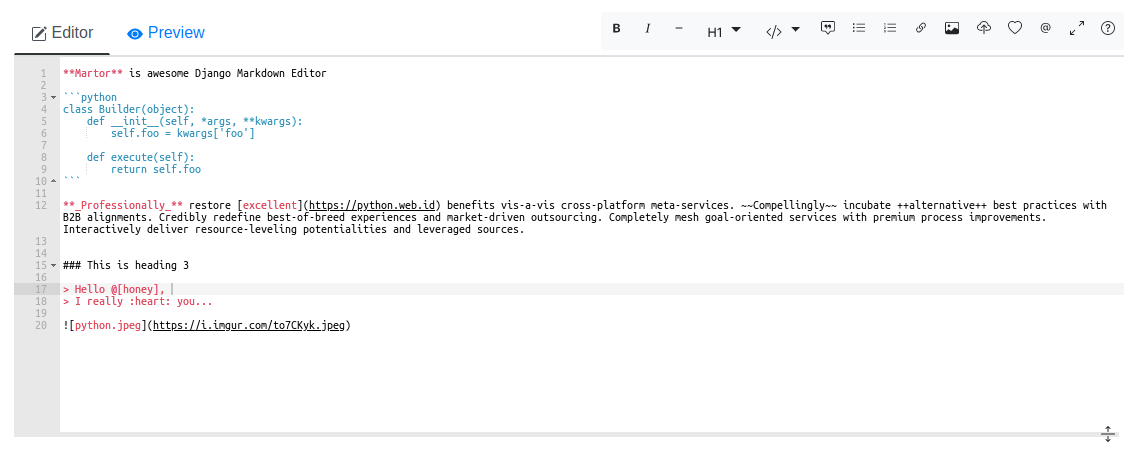
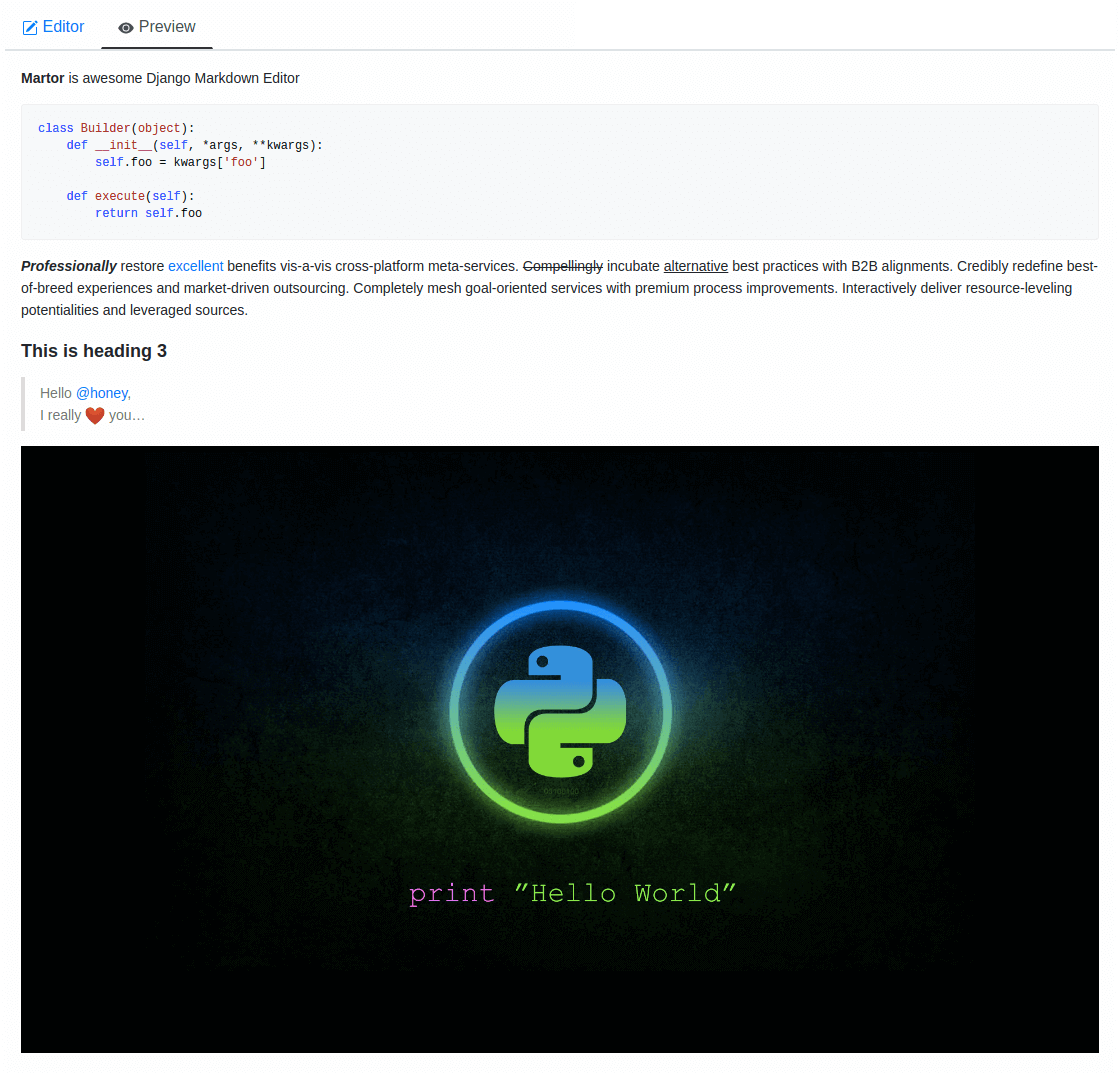
Requirements
Django>=3.2Markdown>=3.0requests>=2.12.4bleach
Installation
Martor is available directly from [PyPI][2]:
1. Installing the package.
$ pip install martor2. Don't forget to add 'martor' to your 'INSTALLEDAPPS' setting (without migrations)_.
# settings.py
INSTALLED_APPS = [
    ....
    'martor',
]
3. Add url pattern to your urls.py.
# urls.py
urlpatterns = [
    ...
    path('martor/', include('martor.urls')),
]
4. Collect martor's static files in your STATIC_ROOT folder.
./manage.py collectstaticSetting Configurations settings.py
Please register your application at https://api.imgur.com/oauth2/addclient to get IMGURCLIENTID and IMGURAPIKEY.
# Choices are: "semantic", "bootstrap", "tailwind"
MARTOR_THEME = 'bootstrap'
Global martor settings
Input: string boolean, true/false
MARTORENABLECONFIGS = {
    'emoji': 'true',        # to enable/disable emoji icons.
    'imgur': 'true',        # to enable/disable imgur/custom uploader.
    'mention': 'false',     # to enable/disable mention
    'jquery': 'true',       # to include/revoke jquery (require for admin default django)
    'living': 'false',      # to enable/disable live updates in preview
    'spellcheck': 'false',  # to enable/disable spellcheck in form textareas
    'hljs': 'true',         # to enable/disable hljs highlighting in preview
}
To show the toolbar buttons
MARTORTOOLBARBUTTONS = [
    'bold', 'italic', 'horizontal', 'heading', 'pre-code',
    'blockquote', 'unordered-list', 'ordered-list',
    'link', 'image-link', 'image-upload', 'emoji',
    'direct-mention', 'toggle-maximize', 'help'
]
To setup the martor editor with title label or not (default is False)
MARTORENABLELABEL = False
Disable admin style when using custom admin interface e.g django-grappelli (default is True)
MARTORENABLEADMIN_CSS = True
Imgur API Keys
MARTORIMGURCLIENT_ID = 'your-client-id'
MARTORIMGURAPI_KEY   = 'your-api-key'
Markdownify
MARTORMARKDOWNIFYFUNCTION = 'martor.utils.markdownify' # default
MARTORMARKDOWNIFYURL = '/martor/markdownify/' # default
Delay in milliseconds to update editor preview when in living mode.
MARTORMARKDOWNIFYTIMEOUT = 0 # update the preview instantly
or:
MARTORMARKDOWNIFYTIMEOUT = 1000 # default
Markdown extensions (default)
MARTORMARKDOWNEXTENSIONS = [
    'markdown.extensions.extra',
    'markdown.extensions.nl2br',
    'markdown.extensions.smarty',
    'markdown.extensions.fenced_code',
    'markdown.extensions.sane_lists',
# Custom markdown extensions.     'martor.extensions.urlize',     'martor.extensions.del_ins',      # strikethrough and ++underscores++     'martor.extensions.mention',      # to parse markdown mention     'martor.extensions.emoji',        # to parse markdown emoji     'martor.extensions.mdx_video',    # to parse embed/iframe video     'martor.extensions.escape_html',  # to handle the XSS vulnerabilities     "martor.extensions.mdxaddid",  # to parse id like {#thisisid} ]
Markdown Extensions Configs
MARTORMARKDOWNEXTENSION_CONFIGS = {}
Markdown urls
MARTORUPLOADURL = '' # Completely disable the endpoint
or:
MARTORUPLOADURL = '/martor/uploader/' # default
MARTORSEARCHUSERS_URL = '' # Completely disables the endpoint or: MARTORSEARCHUSERS_URL = '/martor/search-user/' # default
Markdown Extensions
MARTORMARKDOWNBASEEMOJIURL = 'https://www.webfx.com/tools/emoji-cheat-sheet/graphics/emojis/'     # from webfx
MARTORMARKDOWNBASEEMOJIURL = 'https://github.githubassets.com/images/icons/emoji/'                  # default from github
or:
MARTORMARKDOWNBASEEMOJIURL = ''  # Completely disables the endpoint
MARTORMARKDOWNBASEMENTIONURL = 'https://python.web.id/author/'                                      # please change this to your domain
If you need to use your own themed "bootstrap" or "semantic ui" dependency
replace the values with the file in your static files dir
MARTORALTERNATIVEJSFILETHEME = "semantic-themed/semantic.min.js"   # default None
MARTORALTERNATIVECSSFILETHEME = "semantic-themed/semantic.min.css" # default None
MARTORALTERNATIVEJQUERYJSFILE = "jquery/dist/jquery.min.js"        # default None
URL schemes that are allowed within links
ALLOWEDURLSCHEMES = [
    "file", "ftp", "ftps", "http", "https", "irc", "mailto",
    "sftp", "ssh", "tel", "telnet", "tftp", "vnc", "xmpp",
]
https://gist.github.com/mrmrs/7650266
ALLOWEDHTMLTAGS = [
    "a", "abbr", "b", "blockquote", "br", "cite", "code", "command",
    "dd", "del", "dl", "dt", "em", "fieldset", "h1", "h2", "h3", "h4", "h5", "h6",
    "hr", "i", "iframe", "img", "input", "ins", "kbd", "label", "legend",
    "li", "ol", "optgroup", "option", "p", "pre", "small", "span", "strong",
    "sub", "sup", "table", "tbody", "td", "tfoot", "th", "thead", "tr", "u", "ul"
]
https://github.com/decal/werdlists/blob/master/html-words/html-attributes-list.txt
ALLOWEDHTMLATTRIBUTES = [
    "alt", "class", "color", "colspan", "datetime",  # "data",
    "height", "href", "id", "name", "reversed", "rowspan",
    "scope", "src", "style", "title", "type", "width"
]
Check this setting is not set else csrf will not be sent over ajax calls:
CSRFCOOKIEHTTPONLY = FalseUsage
Model
from django.db import models
from martor.models import MartorField
class Post(models.Model):     description = MartorField()
Form
from django import forms
from martor.fields import MartorFormField
class PostForm(forms.Form):     description = MartorFormField()
Admin
from django.db import models
from django.contrib import admin
from martor.widgets import AdminMartorWidget
from yourapp.models import YourModel
class YourModelAdmin(admin.ModelAdmin):     formfield_overrides = {         models.TextField: {'widget': AdminMartorWidget},     }
admin.site.register(YourModel, YourModelAdmin)
Template Renderer
Simply safely parse markdown content as html output by loading templatetags from martor/templatetags/martortags.py.
{% load martortags %}
{{ fieldname|safemarkdown }}
example
{{ post.description|safe_markdown }}
Don't miss to include the required css & js files before use. You can take a look at this folder [martor_demo/app/templates][14] for more details. The below example is a one of the way to implement it when you choose the MARTOR_THEME = 'bootstrap':
{% extends "bootstrap/base.html" %}
{% load static %}
{% load martortags %}
{% block css %}   <link href="{% static 'plugins/css/ace.min.css' %}" type="text/css" media="all" rel="stylesheet" />   <link href="{% static 'martor/css/martor.bootstrap.min.css' %}" type="text/css" media="all" rel="stylesheet" /> {% endblock %}
{% block content %}   <div class="martor-preview">     <h1>Title: {{ post.title }}</h1>     <p><b>Description:</b></p>     <hr />     {{ post.description|safe_markdown }}   </div> {% endblock %}
{% block js %}       {% endblock %}
Template Editor Form
Different with Template Renderer, the Template Editor Form have more css & javascript dependencies.
{% extends "bootstrap/base.html" %}
{% load static %}
{% block css %}   <link href="{% static 'plugins/css/ace.min.css' %}" type="text/css" media="all" rel="stylesheet" />   <link href="{% static 'martor/css/martor.bootstrap.min.css' %}" type="text/css" media="all" rel="stylesheet" /> {% endblock %}
{% block content %}   <form class="form" method="post">{% csrf_token %}     <div class="form-group">       {{ form.title }}     </div>     <div class="form-group">       {{ form.description }}     </div>     <div class="form-group">       <button class="btn btn-success">         <i class="save icon"></i> Save Post       </button>     </div>   </form> {% endblock %}
{% block js %}                            {% endblock %}
Tailwind CSS Theme
When using MARTOR_THEME = 'tailwind', include the required CSS and JavaScript files:
Template Renderer (Tailwind):
{% extends "base.html" %}
{% load static %}
{% load martortags %}
{% block css %}   <link href="{% static 'plugins/css/ace.min.css' %}" type="text/css" media="all" rel="stylesheet" />   <link href="{% static 'plugins/css/tailwind.min.css' %}" type="text/css" media="all" rel="stylesheet" />   <link href="{% static 'martor/css/martor.tailwind.min.css' %}" type="text/css" media="all" rel="stylesheet" /> {% endblock %}
{% block content %}   <div class="container mx-auto px-4 py-8">     <div class="martor-preview bg-white rounded-lg shadow-sm p-6">       <h1 class="text-3xl font-bold text-gray-900 mb-4">{{ post.title }}</h1>       <div class="prose prose-sm max-w-none">         {{ post.description|safe_markdown }}       </div>     </div>   </div> {% endblock %}
{% block js %}       {% endblock %}
Template Editor Form (Tailwind):
{% extends "base.html" %}
{% load static %}
{% block css %}   <link href="{% static 'plugins/css/ace.min.css' %}" type="text/css" media="all" rel="stylesheet" />   <link href="{% static 'plugins/css/tailwind.min.css' %}" type="text/css" media="all" rel="stylesheet" />   <link href="{% static 'martor/css/martor.tailwind.min.css' %}" type="text/css" media="all" rel="stylesheet" /> {% endblock %}
{% block content %}   <div class="container mx-auto px-4 py-8">     <form class="bg-white rounded-lg shadow-sm p-6" method="post">{% csrf_token %}       <div class="mb-6">         <label class="block text-sm font-medium text-gray-700 mb-2">{{ form.title.label }}</label>         {{ form.title }}       </div>       <div class="mb-6">         <label class="block text-sm font-medium text-gray-700 mb-2">{{ form.description.label }}</label>         {{ form.description }}       </div>       <div class="flex justify-end">         <button class="bg-blue-600 hover:bg-blue-700 text-white font-medium py-2 px-4 rounded-md transition-colors">           Save Post         </button>       </div>     </form>   </div> {% endblock %}
{% block js %}                            {% endblock %}
Custom Uploader
If you want to save the images uploaded to your storage, Martor also provides a way to handle this. Please checkout this [WIKI][13]
Test Martor from this Repository
Assuming you are already setup with a virtual environment (virtualenv):
$ git clone https://github.com/agusmakmun/django-markdown-editor.git
$ cd django-markdown-editor/ && pip install -e .
$ cd martor_demo/
$ python manage.py makemigrations && python manage.py migrate
$ python manage.py runserver
Checkout at http://127.0.0.1:8000/simple-form/ on your browser.
Documentation
Complete documentation is available online at: https://django-markdown-editor.readthedocs.io/
Running Documentation Locally
To build and view the documentation locally:
1. Clone the repository and set up your environment:
$ git clone https://github.com/agusmakmun/django-markdown-editor.git
$ cd django-markdown-editor/
$ python -m venv venv
$ source venv/bin/activate  # On Windows: venv\Scripts\activate
2. Install documentation dependencies:
$ pip install -r docs/requirements.txt3. Build the documentation:
$ cd docs/
$ sphinx-build -b html . _build/html
Or using the included Makefile:
$ cd docs/
$ make html
4. Open the documentation in your browser:
$ open _build/html/index.html  # On macOS
Or on Linux/Windows, navigate to docs/_build/html/index.html
Alternatively, serve the documentation with a local HTTP server:
$ make serve
Then open http://localhost:8000 in your browser
The documentation includes:
- Installation and quickstart guides
- Complete configuration reference
- Usage examples for models, forms, widgets, and admin
- API documentation
- Troubleshooting and FAQ
Contributing to Documentation
The documentation is built with Sphinx and uses reStructuredText format. To contribute:
- Edit the
.rstfiles in thedocs/directory - Build the docs locally to test your changes
- Submit a pull request with your improvements
Martor Commands Reference
Notes
Martor was inspired by these great projects: [django-markdownx][15], [Python Markdown][16] and [Online reStructuredText editor][17].
[1]: https://img.shields.io/pypi/v/martor.svg [2]: https://pypi.python.org/pypi/martor
[3]: https://img.shields.io/badge/donate-paypal-blue [4]: https://www.paypal.com/paypalme/summonagus
[5]: https://img.shields.io/badge/license-GNUGPLv3-blue.svg [6]: https://raw.githubusercontent.com/agusmakmun/django-markdown-editor/master/LICENSE
[7]: https://img.shields.io/pypi/pyversions/martor.svg [8]: https://pypi.python.org/pypi/martor
[9]: https://img.shields.io/badge/Django-3.2%20%3E=%204.2-green.svg [10]: https://www.djangoproject.com
[11]: https://img.shields.io/github/actions/workflow/status/agusmakmun/django-markdown-editor/run-tests.yml?branch=master [12]: https://github.com/agusmakmun/django-markdown-editor/actions/workflows/run-tests.yml
[13]: https://github.com/agusmakmun/django-markdown-editor/wiki [14]: https://github.com/agusmakmun/django-markdown-editor/tree/master/martor_demo/app/templates [15]: https://github.com/adi-/django-markdownx [16]: https://github.com/waylan/Python-Markdown [17]: https://rsted.info.ucl.ac.be
[18]: https://img.shields.io/badge/code%20style-black-000000.svg [19]: https://github.com/ambv/black


