
Dependencies verification system with Kubernetes Operator
Samsahai (S2H) ============== [![Samsahai Actions status badge]][Actions workflow results] [![codecov status badge]](https://codecov.io/gh/agoda-com/samsahai) [![Quay.io badge]](https://quay.io/repository/samsahai/samsahai) [![License badge]](./LICENSE)
Dependencies verification system with Kubernetes Operator
Introduction
Imagine if your testing environment is downstream and to make your environment ready, you need to spawn many services and their dependencies together. And our challenge requirement is not only providing the environment for testing but also providing the up to date dependencies. This is why we are introducing Samsahai. The system that will make your ready environment with freshness dependencies.Read more about Samsahai on Medium

Overview
Technology
Go, ETCD, Kubernetes, HelmStaging Workflow

This flow is for verifying your new component version by running regression tests against staging environment. - Once the testing passed, the verified version will be marked as stable. - Unfortunately, if it failed, the verified version will be re-queued to verify in next round. If it is still failed until reaching retry limits (configurable), the component upgrade notification will be sent.
Verification Types
There are 2 verification types; upgrade and reverify.- Upgrade is a normal verification of particular component by deploying its desired version against all stable components.
- Reverify will happen only when your desired version cannot be upgraded until reaching the maximum of retry time.
Verification States
These are the meaning of verification states which happen in particular upgrading component version.
- Waiting: the component is waiting for the verification process.
- Cleaning before: cleaning the staging namespace before deploying components.
- Detecting image missing: checking the desired version exists or not. If not this verification process will be finished.
- Creating: deploying the component's desired version with other components' stable version.
- Testing: testing the ready staging namespace against CI pipeline.
- Collecting: collecting the result from CI pipeline.
- Cleaning after: cleaning the staging namespace after deploying components.
- Finished: the verification process has been finished.
Notes:
- In case you want to verify components more than one at the same queue, you can do that by adding the components into spec.bundles field.
Please see the example in config.yaml.
- In case you want to prioritize your components in queue to always be at the top of the queue, you can do that by adding the component or bundle into spec.priorityQueues field.
Please see the example in config.yaml.
- In case you do not want to verify a component in staging flow which also want to mark all upcoming latest component version as stable, you can skip verifying process by defining thespec.staging.deployment.engineto bemock.
Please see the example in config.yaml.
Active Promotion Workflow
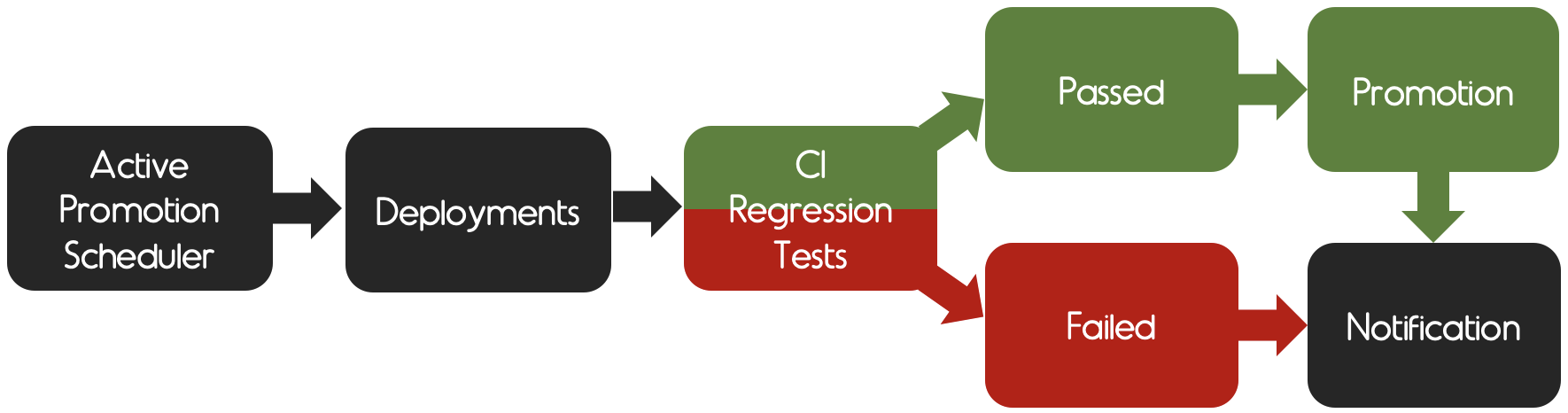
This flow is for promoting new ready active environment of all stable components. By the way, before becoming to be an active namespace, Samsahai will call the new namespace as pre-active first.
- In case the testing passed, the pre-active will be switched to active and old active will be switched to previous active and it will be destroyed in xx minutes depends on your teardownDuration configuration. - In case the testing failed, the switching namespace will not be proceeded and pre-active namespace will be destroyed. So your old active namespace is still there as it is.
Notes:
- At the promotion time, there will be 3 namespaces running in parallel; staging, pre-active and active.
As in our use case, we use active namespace for testing the pull requests and we don't want to break it.
So we let thepre-activenamespace setting up finished, then we destroyprevious activenamespace without downtime.
- In case you want to skip running test when promoting, you are allowed to do that by adding skipTestRunner flag in active-promotion.yaml.
Please see the example in active-promotion.yaml.
Active Promotion States
These are the meaning of verification states which happen in particular active promotion.
- Waiting: the active promotion process is waiting in queue.
- Creating pre-active environment: creating pre-active namespace.
- Deploying stable components: deploying all stable components to pre-active namespace.
- Testing pre-active environment: testing the ready pre-active namespace against CI pipeline.
- Collecting pre-active result: collecting the result from CI pipeline
Testing Passes
- Demoting active environment: demoting previous active namespace.
- Promoting active environment: promoting pre-active to active namespace.
- Destroying previous active environment: destroying previous active namespace.
- Finished: the active promotion process has been finished.
Note: The rollback state can happen when demoting or promoting process is timeout.
By the way, the new active namespace will be switched because the testing has passed.
Testing Fails
- Destroying pre-active environment: destroying pre-active namespace.
- Finished the active promotion process has been finished without switching active namespace.
Pull Request Deployment Workflow
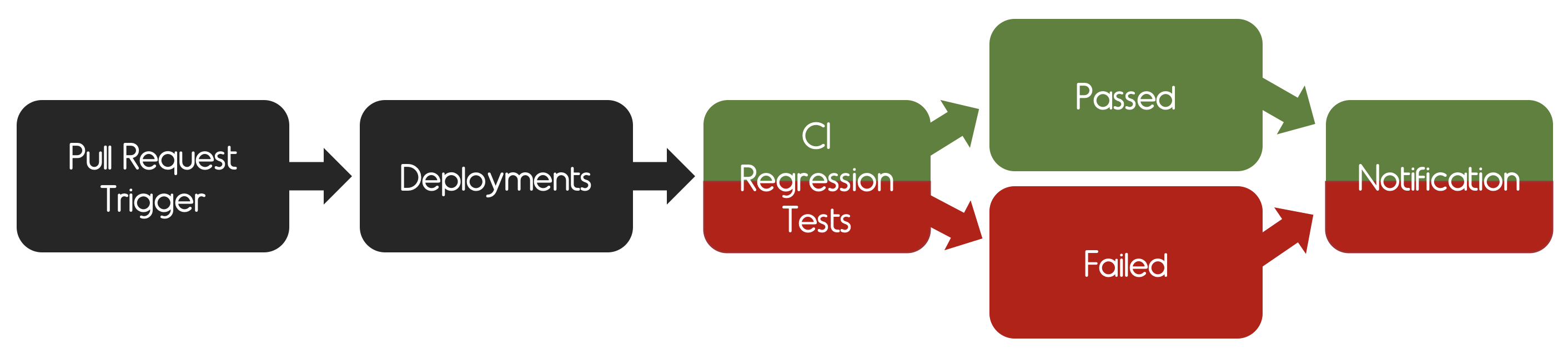
This flow is for verifying components per pull request.
- The pull request component will be deployed into a new namespace along with its dependencies which is required for updating, the version of pull request dependencies will be retrieved from an active namespace. - The pull request component will connect to other shared dependencies in the active namespace. - The verification flow is the same as staging flow except reverification i.e., there is no reverification type for pull request deployment.
Notes:
- The pull request components can be verified in parallel in a different namespace.
- Additional services will be created in the pull request namespace to connect to services in the active namespace, which implies that the pull request deployment requires the active namespace.
Pull Request Queue States
These are the meaning of verification states which happen in particular pull request queue.
- Waiting: the pull request queue is waiting for the verification process.
- Creating: creating pull request namespace.
- Deploying: deploying the component's desired version with required dependencies.
- Testing: testing the ready pull request namespace against CI pipeline.
- Collecting: collecting the result from CI pipeline.
- Destroying: destroying pull request namespace.
- Finished: the verification process has been finished.
Pull Request Trigger Workflow
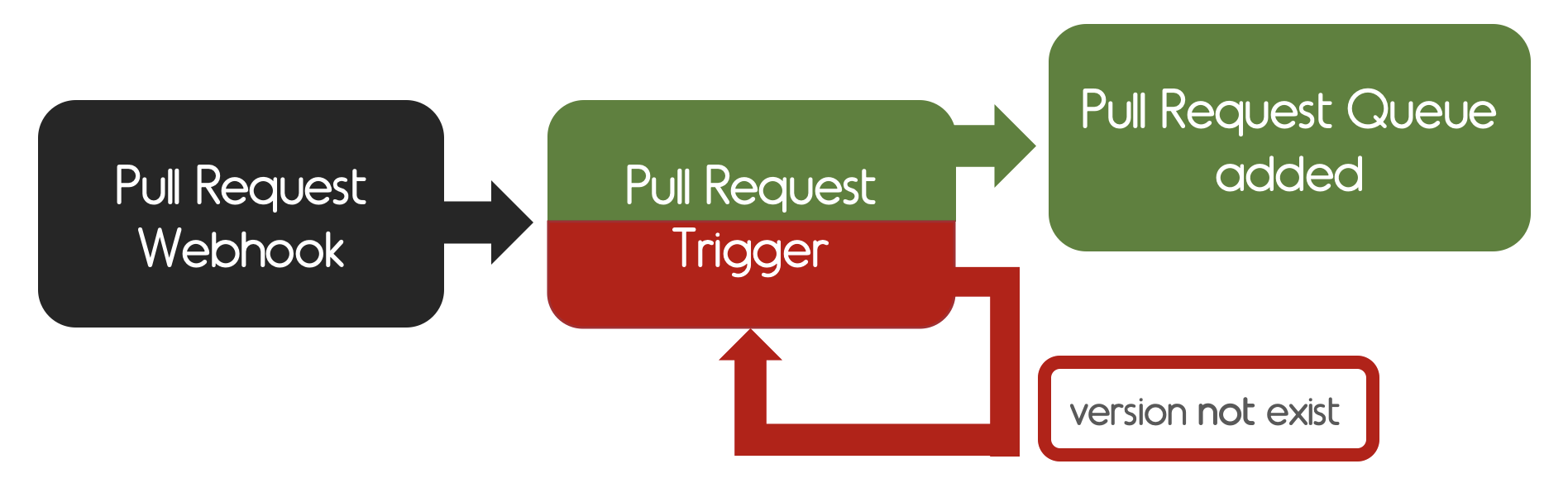
This flow is for checking pull request image in a registry.
- The pull request webhook will keep finding the image in the registry until the image was found or reached the retry counts which are defined in a configuration
Installation
Prerequisites
- Install and setup kubectl.
curl -LO https://storage.googleapis.com/kubernetes-release/release/v1.21.0/bin/darwin/amd64/kubectlkubectl version. If you've already run the command above, do not forget to run step 2 and 3 following the official document.
- Install minikube with HyperKit driver
- Install minikube driver
HyperKit driver.
Environment Setup
Configuration
Find more configuration information in examplesMinikube
- Create and access into samsahai directory in go path
mkdir -p $GOPATH/src/github.com/agoda-com/samsahai && cd $_- Clone the project in directory above
- Start minikube
minikube start \
      --vm-driver=hyperkit \
      --cpus=4 \
      --memory=8192 \
--kubernetes-version=v1.21.0- Install CRDs
kubectl apply -f ./config/crds- Create and go into
samsahai-systemnamespace
kubectl create namespace samsahai-system
kubectl config set-context --current --namespace=samsahai-system- Deploy samsahai by using
Helm
helm upgrade -i samsahai ./config/chart/samsahai- Verify samsahai is deployed successfully
kubectl get pods
NAME                        READY   STATUS    RESTARTS   AGE
    samsahai-695c55fddd-z2gpj   1/1     Running   0          74s
- kubectl get services
NAME TYPE CLUSTER-IP EXTERNAL-IP PORT(S) AGE samsahai NodePort 10.105.227.248 <none> 8080:32501/TCP 10m- Get minikube IP
minikube ip 192.168.64.14 (example of my minikube IP)- Now, you should be able to access
http://<minikubeip>:<nodeport>/version (e.g. http://192.168.64.14:32501/version) http://<minikubeip>:<nodeport>/swagger/index.html# (e.g. http://192.168.64.14:32501/swagger/index.html#)- Apply configuration
kubectl apply -f https://raw.githubusercontent.com/agoda-com/samsahai/master/examples/configs/crds/config-example.yaml- Apply team
kubectl apply -f https://raw.githubusercontent.com/agoda-com/samsahai/master/examples/configs/crds/team-example.yamls2h-example staging namespace should be created.
Upgrade Components
- Upgrade
redisandmariadbcomponents by using Swaggerhttp://<minikubeip>:<nodeport>/swagger/index.html#
POST /webhook/component
{
      "component": "redis"
    }
{
"component": "mariadb"
}- Switch to
s2h-examplenamespace
kubectl config set-context --current --namespace=s2h-example- kubectl get desiredcomponents (see desired components)
NAME AGE mariadb 29s redis 42s- kubectl get queues (the new version of particular component will be verified one by one following the queues)
NAME AGE mariadb 7s redis 20s- kubectl get pods (in s2h-example namespace, you will see all components that you specify in components of samsahai.yaml are running)
NAME READY STATUS RESTARTS AGE example-s2h-example-redis-master-0 1/1 Running 0 66s example-s2h-example-wordpress-57ddb458d4-hqcfx 1/1 Running 0 66s example-s2h-example-wordpress-mariadb-0 1/1 Running 0 66s s2h-staging-ctrl-6c58794fd8-rtdfs 1/1 Running 0 15h- kubectl get stablecomponents (if your component is upgraded successfully, you can see them in stable components crd)
NAME AGE mariadb 3m50s redis 5m10sPromote New Active
- Apply active-promotion
kubectl apply -f https://raw.githubusercontent.com/agoda-com/samsahai/master/examples/configs/crds/active-promotion-example.yamls2h-example-abcdzx active namespace should be created, the active namespace will have last 6 characters randomly.
- If you would like to see what is going on in active promotion flow
kubectl describe activepromotions example- Switch to
s2h-example-abcdzxactive namespace
kubectl config set-context --current --namespace=s2h-example-abcdzx- kubectl get pods (in s2h-example-abcdzx namespace, you will see all components that you specify in config are running)
NAME READY STATUS RESTARTS AGE example-s2h-example-gdthjh-redis-master-0 1/1 Running 0 2m33s example-s2h-example-gdthjh-wordpress-6d794cb9bb-8vqhw 1/1 Running 0 2m28s example-s2h-example-gdthjh-wordpress-mariadb-0 1/1 Running 0 2m28s s2h-staging-ctrl-c566b7f66-5q9bh 1/1 Running 0 2m43sDeploy Pull Request Components
- Deploying all components in
redis-bundleby using Swaggerhttp://<minikubeip>:<nodeport>/swagger/index.html#
POST /teams/example/pullrequest/trigger { "bundleName": "redis-bundle", "prNumber": 56 }{ "bundleName": "redis-bundle", "prNumber": "any", "components": [ { "name": "redis", "tag": "5.0.7-debian-9-r56" } ] }- Switch to
s2h-examplenamespace
kubectl config set-context --current --namespace=s2h-example- kubectl get pullrequesttriggers (see pull request triggers)
NAME AGE redis-bundle-56 10skubectl get pullrequesttriggers no resources found No resources found.- kubectl get pullrequestqueues (see pull request queues created by pull request trigger)
NAME AGE redis-bundle-56 30skubectl get namespaces (you will see a pull request namespace has been created) NAME STATUS AGE s2h-example-redis-bundle-56 Active 49s ...- Switch to
s2h-example-redis-bundle-56namespace
kubectl config set-context --current --namespace=s2h-example-redis-bundle-56- kubectl get pods (in s2h-example-redis-bundle-56 namespace, you will see all pull request components that you specify in config are running)
NAME READY STATUS RESTARTS AGE s2h-example-redis-bundle-56-redis-master-0 1/1 Running 0 65s s2h-staging-ctrl-55c757978f-jx6lj 1/1 Running 0 89s- kubectl get services (in s2h-example-redis-bundle-56 namespace, you will see services which link to the components in active namespace)
NAME TYPE CLUSTER-IP EXTERNAL-IP PORT(S) AGE s2h-example-redis-bundle-56-redis-master ClusterIP 10.97.174.107 <none> 6379/TCP 61s s2h-example-redis-bundle-56-redis-headless ClusterIP None <none> 6379/TCP 61s s2h-example-redis-bundle-56-wordpress ExternalName <none> s2h-example-8ncrwx-wordpress.s2h-example-8ncrwx.svc.cluster.local <none> 6s s2h-example-redis-bundle-56-wordpress-mariadb ExternalName <none> s2h-example-8ncrwx-wordpress-mariadb.s2h-example-8ncrwx.svc.cluster.local <none> 6s s2h-staging-ctrl ClusterIP 10.96.174.13 <none> 8090/TCP 90s- Switch back to
s2h-examplenamespace
kubectl config set-context --current --namespace=s2h-examplekubectl get pullrequestqueuehistories.env.samsahai.io -o=custom-columns=NAME:.metadata.name,RESULT:spec.pullRequestQueue.status.result (in s2h-example namespace, you will see the result of the previous pull request queue)
NAME                                RESULT
   redis-bundle-56-20200927-103006-0   Success
Run/Debug Locally
- Create and access into samsahai directory in go path
mkdir -p $GOPATH/src/github.com/agoda-com/samsahai && cd $_- Clone project in the directory above
- Prepare environment and export KUBECONFIG
make init
    make prepare-env-e2e-k3d
    export KUBECONFIG=/tmp/s2h/k3s-kubeconfig
make install-crds- Run
samsahai controllerby using go build with following configurations:
File: ${GOPATH}/src/github.com/agoda-com/samsahai/cmd/samsahai/main.go
    Envrionment: KUBECONFIG=/tmp/s2h/k3s-kubeconfig
Program arguments: start --debug --pod-namespace samsahai-system --s2h-auth-token 123456- Now, you should be able to access
http://localhost:8080/swagger/index.html#- Apply configuration
kubectl apply -f https://raw.githubusercontent.com/agoda-com/samsahai/master/examples/configs/crds/config-example.yaml- Apply team
kubectl apply -f https://raw.githubusercontent.com/agoda-com/samsahai/master/examples/configs/crds/team-example-local.yamls2h-example staging namespace should be created.
Upgrade Components
- Run
staging controllerby using go build with following configurations:
File: ${GOPATH}/src/github.com/agoda-com/samsahai/cmd/staging/main.go
    Envrionment: KUBECONFIG=/tmp/s2h/k3s-kubeconfig
Program arguments: start --debug --pod-namespace s2h-example --s2h-auth-token 123456 --s2h-server-url http://127.0.0.1:8080 --s2h-team-name example- Upgrade
redisandmariadbcomponents by using Swaggerhttp://localhost:8080/swagger/index.html#
POST /webhook/component
{
      "component": "redis"
    }
{
"component": "mariadb"
}Promote New Active
- Apply active-promotion
kubectl apply -f https://raw.githubusercontent.com/agoda-com/samsahai/master/examples/configs/crds/active-promotion-example.yamls2h-example-abcdzx active namespace should be created, the active namespace will have last 6 characters randomly.
- Switch to run another
staging controllerby modifying--pod-namespaceto point to an active namespace
--pod-namespace s2h-example-abcdzxDeploy Pull Request Components
- Deploying all components in
redis-bundlebundle by using Swaggerhttp://<minikubeip>:<nodeport>/swagger/index.html#
POST /teams/example/pullrequest/trigger
{
     "bundleName": "redis-bundle",
     "prNumber": 56
}{
"bundleName": "redis-bundle",
"prNumber": "any",
"components": [
{
"name": "redis",
"tag": "5.0.7-debian-9-r56"
}
]
}After this step, you can see the result following minikube deploy pull request components part.
Contribution Policy
Samsahai is an open source project, and depends on its users to improve it. We are more than happy to find you are interested in taking the project forward.Kindly refer to the Contribution Guidelines for detailed information.
Code of Conduct
Please refer to Code of Conduct document.License
Samsahai is open source and available under the Apache License, Version 2.0.[Samsahai Actions status badge]: https://github.com/agoda-com/samsahai/workflows/Samsahai/badge.svg [Actions workflow results]: https://github.com/agoda-com/samsahai/actions?query=workflow%3ASamsahai [codecov status badge]: https://codecov.io/gh/agoda-com/samsahai/branch/master/graph/badge.svg?token=mt0oLjFy0k [Quay.io badge]: https://quay.io/repository/samsahai/samsahai/status "Docker Repository on Quay" [License badge]: https://img.shields.io/badge/License-Apache%202.0-blue.svg


