
EPI Judge - Preview Release
EPI Judge
Beta 5
Introduction
EPI Judge is meant to serve as a companion to our book Elements of Programming Interviews. Specifically, this project consists of the following:
- Stub programs for each problem in our book in Python, Java, and C++
- Test-cases that cover common corner-case and performance bugs
- A framework for running these tests on your implementation on your machine
Installation
Here's how to download the judge:
$ git clone https://github.com/adnanaziz/EPIJudge.git If you do not have git, here's a good tutorial on installing git itself.
Running the judge using IDEs
Check out these one minute videos to see how easy it is to get started with the judge.
Python
Java
C++
Running the judge from the command line
Python
$ python3
Java
Use the Makefile.
Compile and run a specific program:
$ make
$ make Anagrams Compile and run the last program that you edited:
$ make
C++
You can manually compile and run all programs by directly invoking GCC and Clang.
$ g++ -pthread -std=c++14 -O3 -o anagrams anagrams.cc You can also use the provided Makefile: make <program_name>. You can also use CMake with the provided CMakeLists.txt file.
$ make The default Makefile target is the last edited file.
$ make anagrams
FAQ
- How can I contact the authors?
adnan.aziz@gmail.com and tsung.hsien.lee@gmail.com
- Help, my EPIJudge is not working, what should I do?
- I'm new to programming, and don't have any kind of development environment, what should I do?
- What compilers are supported for judge?
- What compilers are supported for solutions?
Let us know if you managed to compile with an older version.
- What does the UI look like?
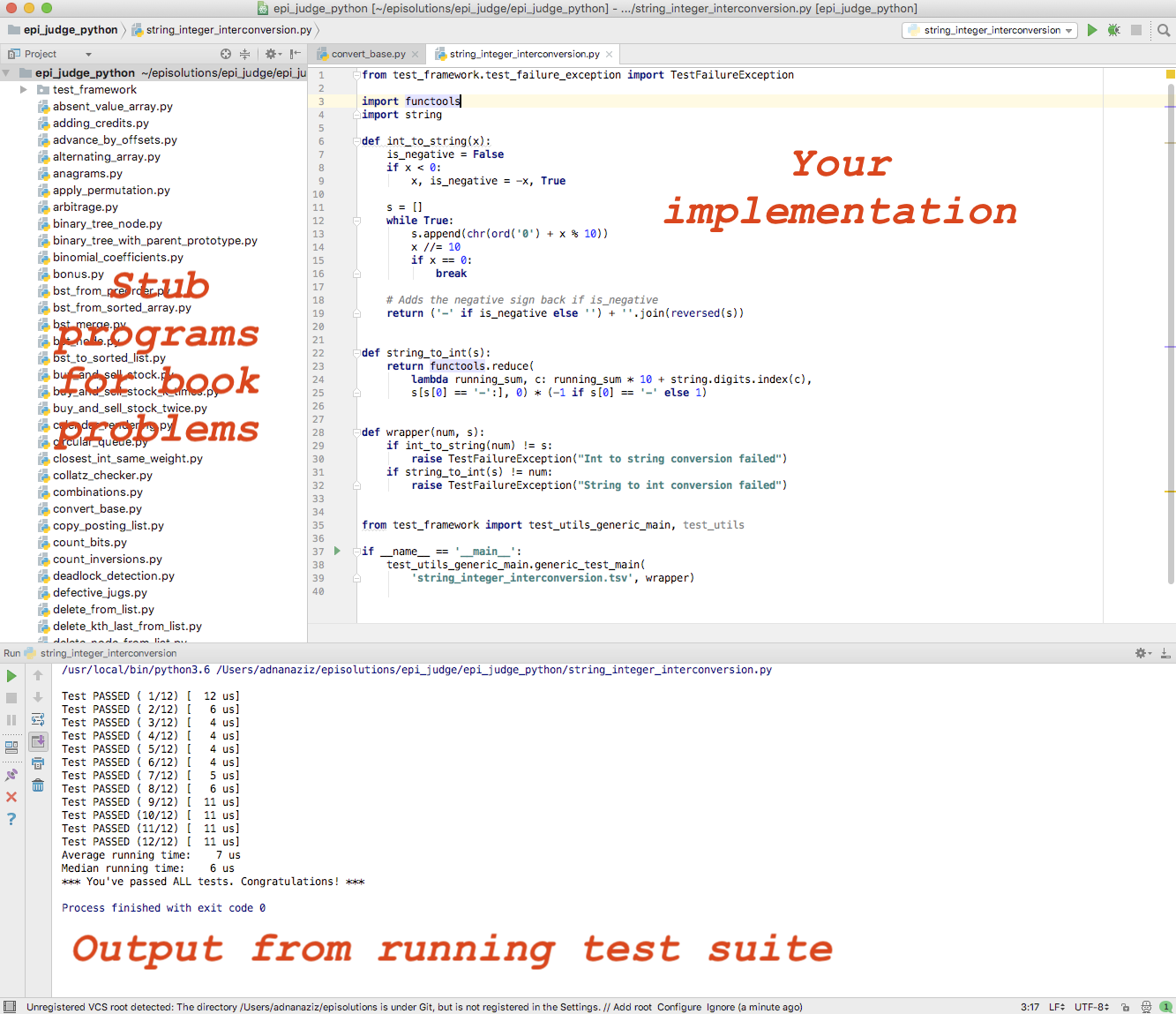
- How can I understand the test framework better?
- How do I import the C++ project?
Here is an example recipe for generationg Visual Studio project (list of all CMake supported IDEs). After installing CMake, open your terminal, go to epijudgecpp folder and run following commands:
mkdir vs cd vs cmake -G "Visual Studio 15 2017" ..
Then just open epijudgecpp/vs/epijudgecpp.sln solution with Visual Studio and it will load all EPI programs.
Tracking your progress
The file index.html in the root of this project tracks your progress through the problems. Specifically, there's an expanding tab for each chapter. Click on it, and you will see your progress, e.g., as below. This file gets updated each time you execute a program. You can use this file to map book problems to stub programs.

Acknowledgments
A big shout-out to the hundreds of users who tried out the release over the past couple of months. As always, we never fail to be impressed by the enthusiasm and commitment our readers have; it has served to bring out the best in us. We all thank Viacheslav Kroilov, for applying his exceptional software engineering skills to make EPI Judge a reality.


