
A High-performance cross-platform Video Processing Python framework powerpacked with unique trailblazing features :fire:



Getting Started | [Gears][gears] | [Documentation][docs] | [Installation][installation] | License
[![Build Status][github-cli]][github-flow] [![Codecov branch][codecov]][code] [![Azure DevOps builds (branch)][azure-badge]][azure-pipeline]
[![Glitter chat][gitter-badge]][gitter] [![Build Status][appveyor]][app] [![PyPi version][pypi-badge]][pypi]
Our Sponsors 🤝
|
Recall.ai - API for meeting recordings
| | :-------------: | | | | If you’re looking for a meeting recording API,consider checking out Recall.ai, an API that records Zoom,Google Meet, Microsoft Teams, in-person meetings, and more. |
🙏 We are incredibly thankful to all our sponsors for supporting the development of VidGear. If you'd like to support VidGear, please check out our GitHub Sponsors page ➶_
Overview
VidGear provides an easy-to-use, highly extensible, thoroughly optimised Multi-Threaded + Asyncio API Framework on top of many state-of-the-art specialized libraries like [OpenCV][opencv], [FFmpeg][ffmpeg], [ZeroMQ][zmq], [picamera2][picamera2], [starlette][starlette], [ytdlp][ytdlp], [pyscreenshot][pyscreenshot], [dxcam][dxcam], [aiortc][aiortc] and [python-mss][mss] serving at its backend, and enable us to flexibly exploit their internal parameters and methods, while silently delivering robust error-handling and real-time performance 🔥.
If you're new to VidGear, head straight to the Getting Started ➶ section to install VidGear.
The following functional block diagram clearly depicts the generalized functioning of VidGear APIs:
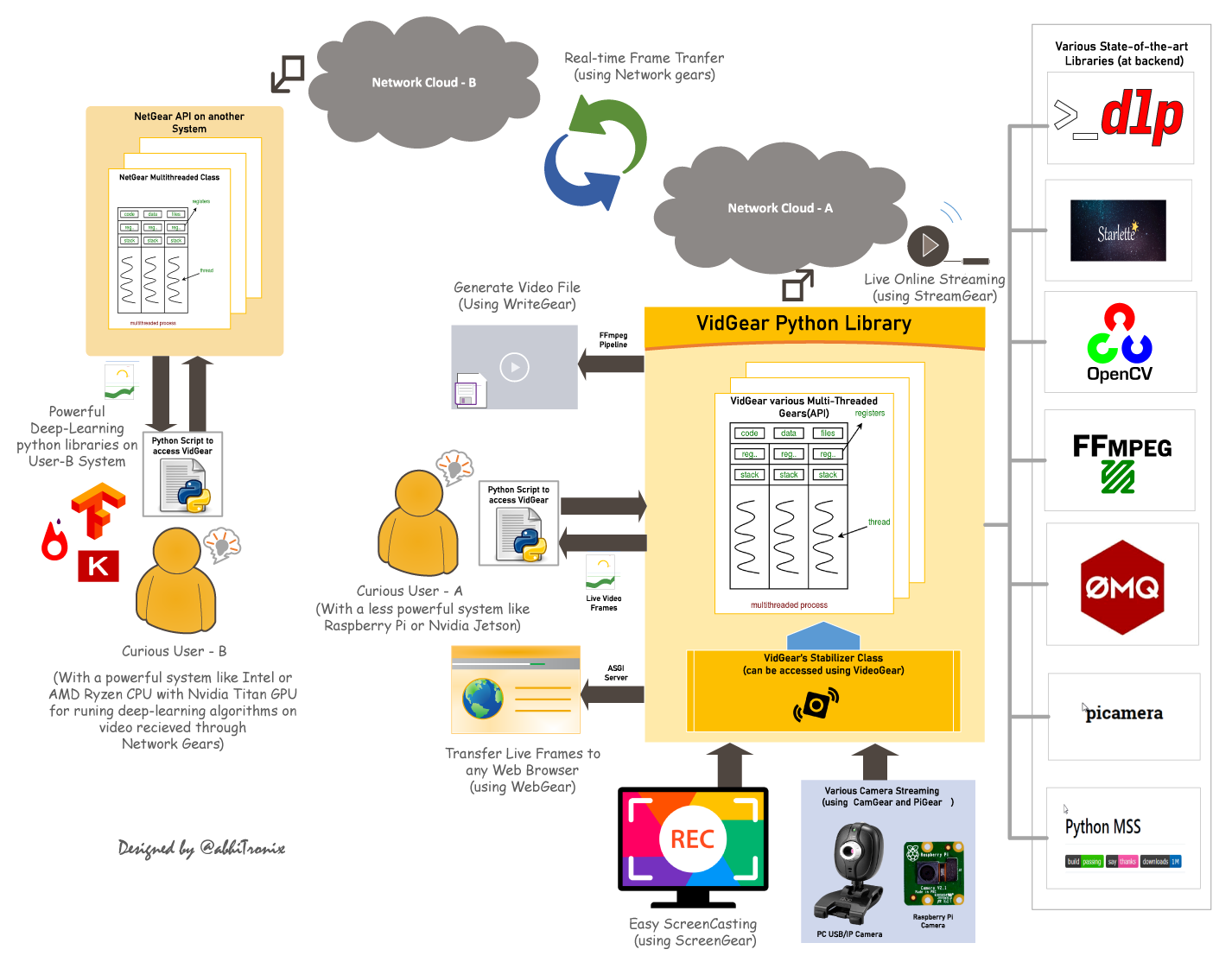
Table of Contents
- CamGear - FFGear - PiGear - VideoGear - ScreenGear - WriteGear - StreamGear - NetGear - WebGear - WebGearRTC - NetGearAsync
TL;DR
What is vidgear?
"VidGear is a cross-platform High-Performance Framework that provides an one-stop Video-Processing solution for building complex real-time media applications in python."
What does it do?
"VidGear can read, write, process, send & receive video files/frames/streams from/to various devices in real-time, and [faster][tqm-doc] than underline libraries."
What is its purpose?
"Write Less and Accomplish More" — VidGear's Motto
"Built with simplicity in mind, VidGear lets programmers and software developers to easily integrate and perform Complex Video-Processing Tasks in their existing or newer applications without going through hefty documentation and in just a [few lines of code][switchfromcv]. Beneficial for both, if you're new to programming with Python language or already a pro at it."
Getting Started
If this is your first time using VidGear, head straight to the [Installation ➶][installation] to install VidGear.
Once you have VidGear installed, Checkout its Well-Documented [Function-Specific Gears ➶][gears]
Also, if you're already familiar with [OpenCV][opencv] library, then see [Switching from OpenCV Library ➶][switchfromcv]
Or, if you're just getting started with OpenCV-Python programming, then refer this FAQ ➶
Finally, if looking for containerizing VidGear with Docker, then refer this guide ➶
Gears: What are these?
VidGear is built with multiple APIs a.k.a [Gears][gears], each with some unique functionality.
Each API is designed exclusively to handle/control/process different data-specific & device-specific video streams, network streams, and media encoders/decoders. These APIs provides the user an easy-to-use, dynamic, extensible, and exposed Multi-Threaded + Asyncio optimized internal layer above state-of-the-art libraries to work with, while silently delivering robust error-handling.
These Gears can be classified as follows:
A. Video-Capture Gears:
- CamGear: Multi-Threaded API targeting various IP-USB-Cameras/Network-Streams/Streaming-Sites-URLs.
- FFGear: Multi-Threaded API for hardware-accelerated FFmpeg-powered video decoding with full filtergraph support.
- PiGear: Multi-Threaded API targeting various Camera Modules and (limited) USB cameras on Raspberry Pis 🍇.
- ScreenGear: High-performance API targeting rapid Screencasting Capabilities.
- VideoGear: Common Video-Capture API with internal Video Stabilizer wrapper.
- WriteGear: Handles Lossless Video-Writer for file/stream/frames Encoding and Compression.
- StreamGear: Handles Transcoding of High-Quality, Dynamic & Adaptive Streaming Formats.
- Asynchronous I/O Streaming Gear:
D. Network Gears:
- NetGear: Handles High-Performance Video-Frames & Data Transfer between interconnecting systems over the network.
- Asynchronous I/O Network Gear:
CamGear
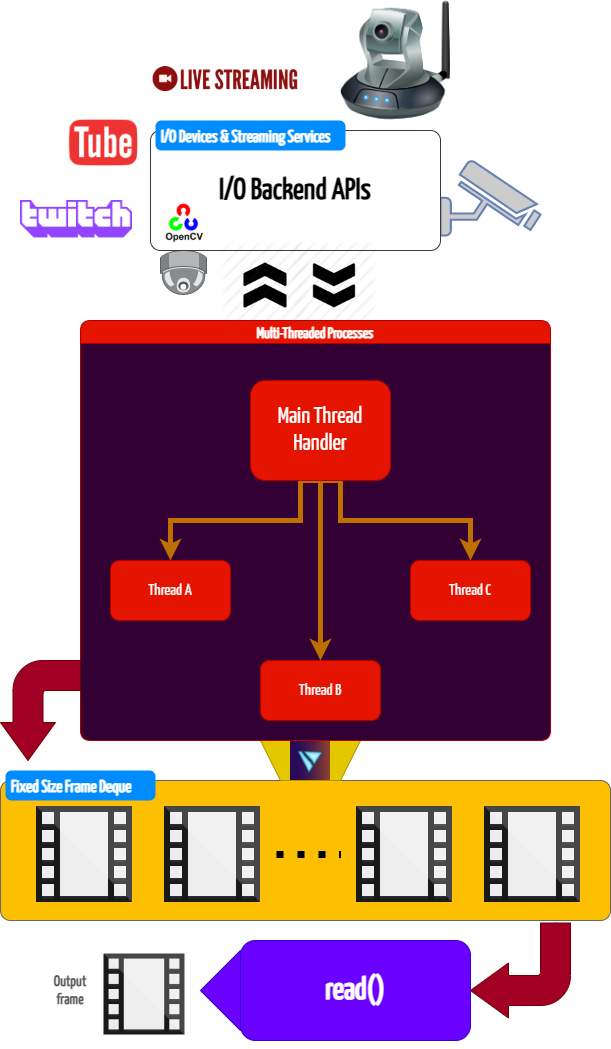
CamGear can grab ultra-fast frames from a diverse range of file-formats/devices/streams, which includes almost any IP-USB Cameras, multimedia video file-formats, various network stream protocols such as http(s), rtp, rtsp, rtmp, mms, etc., and GStreamer's pipelines, plus direct support for live video streaming sites like YouTube, Twitch, LiveStream, Dailymotion etc.
CamGear provides a flexible, high-level, multi-threaded framework around OpenCV's [VideoCapture class][opencv-vc] with access almost all of its available parameters. CamGear internally implements [ytdlp][ytdlp] backend class for seamlessly pipelining live video-frames and metadata from various streaming services like [YouTube][youtube-doc], [Twitch][piping-live-videos], and many more ➶. Furthermore, its framework relies exclusively on [Threaded Queue mode][tqm-doc] for ultra-fast, error-free, and synchronized video-frame handling.
CamGear API Guide:
[>>> Usage Guide][camgear-doc]
FFGear
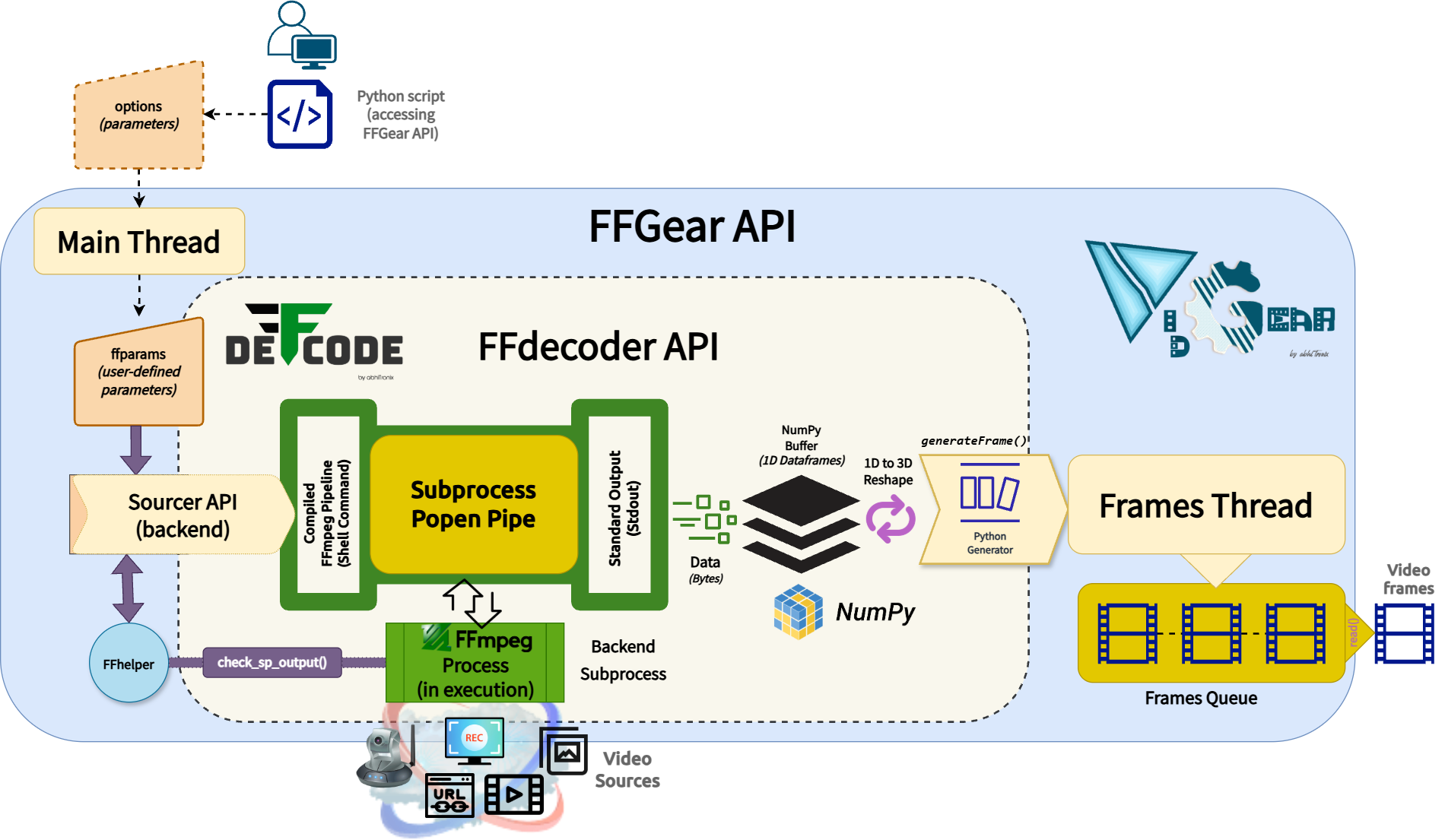
FFGear is a multi-threaded, high-performance wrapper around [DeFFcode's FFdecoder API][deffcode-doc] that compiles and executes an FFmpeg pipeline inside a subprocess pipe for generating real-time, low-overhead, lightning-fast decoded video frames in Python.
FFGear API provides direct, transparent access to the full FFdecoder feature set, including:
- [Hardware-Accelerated Decoding][hardware-accelerated-decoding] — GPU-powered decoding with CUDA/CUVID and other hardware-accelerated backends ⚡
bgr24, yuv420p, gray)* with optional OpenCV compatibility patches for YUV/NV layouts.
- [Per-Frame Metadata Extraction][per-frame-metadata-extraction] — asynchronous frame metadata extraction through the
showinfofilter. - [Live Complex Filtergraphs][complex-filtergraphs] — support for live simple and complex FFmpeg filter pipelines.
Similar to CamGear, FFGear also supports the ytdlp backend for seamlessly [pipelining live video frames from streaming services][streaming-services-ff] like YouTube, Twitch, and many more ➶
Below is a snapshot of FFGear optimizing Real-time YOLOv10-Nano model inference by processing only Keyframes (I-frames) while skipping all non-keyframes (P/B-frames), reducing unnecessary decoding and inference workloads by up to 98%.

FFGear Keyframes (I-frames) optimization in action!
Code to generate above result:
# import required libraries
from vidgear.gears import FFGear
from ultralytics import YOLO
Initialize YOLOv10-Nano model
model = YOLO("yolov10n.pt")
Configure FFGear with per-frame metadata extraction enable
options = {"-extract_metadata": True}
stream = FFGear(
    source="test.mp4", frame_format="bgr24", logging=True, **options
).start()
loop over
while True:
# read data from stream     output = stream.read()
# check if end of stream     if output is None:         break
# Unpack the frame and its associated metadata     frame, meta = output
# --- OPTIMIZATION STEP ---     # We skip all non-keyframes to save processing power.     # This ensures the model only runs on the most information-dense frames.     if not meta.get("is_keyframe"):         continue  # <-- Skips Non-key frames (P, B-frames)
# Log keyframe details     print(f"Keyframe #{meta['framenum']} at {meta['ptstime']:.3f}s")
# Perform AI Inference on keyframes (I-frames) only     # Because we skip non-keyframes, this heavy task runs significantly less often.     results = model(frame)
# Annotate the frame with detection boxes and labels     annotated_frame = results[0].plot()
# {Insert your custom logic here, e.g., displaying/saving frames or triggering an alert}
safely close video stream
stream.stop()
FFGear API Guide:
[>>> Usage Guide][ffgear-doc]
VideoGear
VideoGear API provides a special internal wrapper around VidGear's exclusive [Video Stabilizer][stabilizer-doc] class.
VideoGear also serves as a unified video-capture API, offering seamless access to CamGear, PiGear, and FFGear along with their respective parameters. You can switch between these backends using the api parameter (defaults to Backend.CAMGEAR).
It is especially useful when you want to toggle between different video-capture backends without significant code changes. Additionally, it simplifies video stabilization for both real-time and non-real-time streams, requiring minimal effort and fewer lines of code.
Below is a snapshot of a VideoGear Stabilizer in action (See its detailed usage [here][stabilizer-doc-ex]):

Original Video Courtesy @SIGGRAPH2013
Code to generate above result:
# import required libraries
from vidgear.gears import VideoGear
import numpy as np
import cv2
open any valid video stream with stabilization enabled(stabilize = True)
stream_stab = VideoGear(source="test.mp4", stabilize=True).start()
open same stream without stabilization for comparison
stream_org = VideoGear(source="test.mp4").start()
loop over
while True:
# read stabilized frames     framestab = streamstab.read()
# check for stabilized frame if Nonetype     if frame_stab is None:         break
# read un-stabilized frame     frameorg = streamorg.read()
# concatenate both frames     outputframe = np.concatenate((frameorg, frame_stab), axis=1)
# put text over concatenated frame     cv2.putText(         output_frame,         "Before",         (10, output_frame.shape[0] - 10),         cv2.FONTHERSHEYSIMPLEX,         0.6,         (0, 255, 0),         2,     )     cv2.putText(         output_frame,         "After",         (outputframe.shape[1] // 2 + 10, outputframe.shape[0] - 10),         cv2.FONTHERSHEYSIMPLEX,         0.6,         (0, 255, 0),         2,     )
# Show output window     cv2.imshow("Stabilized Frame", output_frame)
# check for 'q' key if pressed     key = cv2.waitKey(1) & 0xFF     if key == ord("q"):         break
close output window
cv2.destroyAllWindows()
safely close both video streams
stream_org.stop()
stream_stab.stop()
VideoGear API Guide:
[>>> Usage Guide][videogear-doc]
PiGear
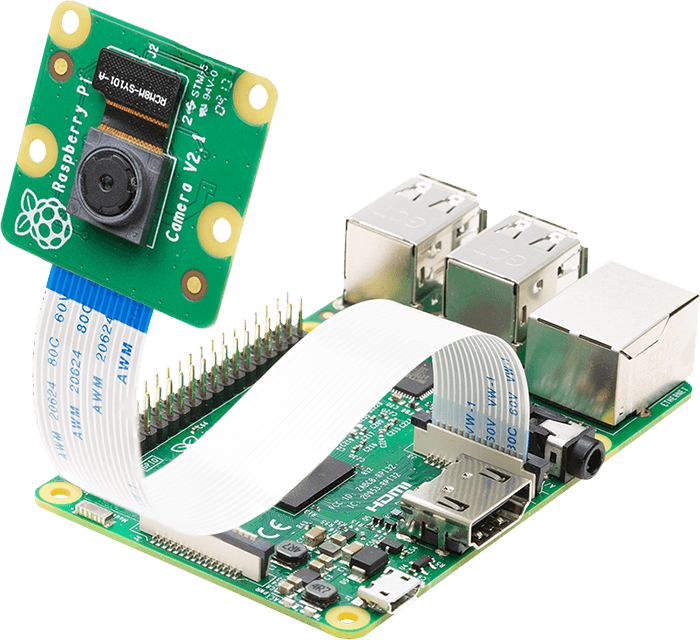
PiGear is a specialized API similar to the CamGear API but optimized for Raspberry Pi :grapes: Boards, offering comprehensive support for camera modules (e.g., [OmniVision OV5647 Camera Module][ov5647-picam], [Sony IMX219 Camera Module][imx219-picam]), along with limited compatibility for USB cameras.
PiGear implements a seamless and robust wrapper around the [picamera2][picamera2] python library, simplifying integration with minimal code changes and ensuring a smooth transition for developers already familiar with the Picamera2 API. PiGear leverages the libcamera API under the hood with multi-threading, providing high-performance :fire:, enhanced control and functionality for Raspberry Pi camera modules.
PiGear handles common configuration parameters and non-standard settings for various camera types, simplifying the integration process. PiGear currently supports PiCamera2 API parameters such as sensor, controls, transform, and format etc., with internal type and sanity checks for robust performance.
While primarily focused on Raspberry Pi camera modules, PiGear also provides basic functionality for USB webcams only with Picamera2 API, along with the ability to accurately differentiate between USB and Raspberry Pi cameras using metadata.
PiGear seamlessly switches to the legacy [picamera][picamera] library if the picamera2 library is unavailable, ensuring seamless backward compatibility. For this, PiGear also provides a flexible multi-threaded framework around complete picamera API, allowing developers to effortlessly exploit a wide range of parameters, such as brightness, saturation, sensor_mode, iso, exposure, and more.
Furthermore, PiGear supports the use of multiple camera modules, including those found on Raspberry Pi Compute Module IO boards and USB cameras (only with Picamera2 API).
Best of all, PiGear contains Threaded Internal Timer - that silently keeps active track of any frozen-threads/hardware-failures and exit safely, if any does occur. That means that if you're running PiGear API in your script and someone accidentally pulls the Camera-Module cable out, instead of going into possible kernel panic, API will exit safely to save resources.
Code to open picamera2 stream with variable parameters in PiGear API:
# import required libraries
from vidgear.gears import PiGear
from libcamera import Transform
import cv2
formulate various Picamera2 API
configurational parameters
options = {
    "controls": {"Brightness": 0.5, "ExposureValue": 2.0},
    "transform": Transform(hflip=1),
    "sensor": {"output_size": (480, 320)},  # will override resolution
    "format": "RGB888", # 8-bit BGR
}
open pi video stream with defined parameters
stream = PiGear(resolution=(640, 480), framerate=60, logging=True, **options).start()
loop over
while True:
# read frames from stream     frame = stream.read()
# check for frame if Nonetype     if frame is None:         break
# {do something with the frame here}
# Show output window     cv2.imshow("Output Frame", frame)
# check for 'q' key if pressed     key = cv2.waitKey(1) & 0xFF     if key == ord("q"):         break
close output window
cv2.destroyAllWindows()
safely close video stream
stream.stop()
PiGear API Guide:
[>>> Usage Guide][pigear-doc]
ScreenGear
ScreenGear is designed exclusively for targeting rapid Screencasting Capabilities, which means it can grab frames from your monitor in real-time, either by defining an area on the computer screen or full-screen, at the expense of inconsiderable latency. ScreenGear also seamlessly support frame capturing from multiple monitors as well as supports multiple backends.
ScreenGear implements a Lightning-Fast API wrapper around [dxcam][dxcam], [pyscreenshot][pyscreenshot] & [python-mss][mss] python libraries and also supports an easy and flexible direct internal parameters manipulation.
Below is a snapshot of a ScreenGear API in action:
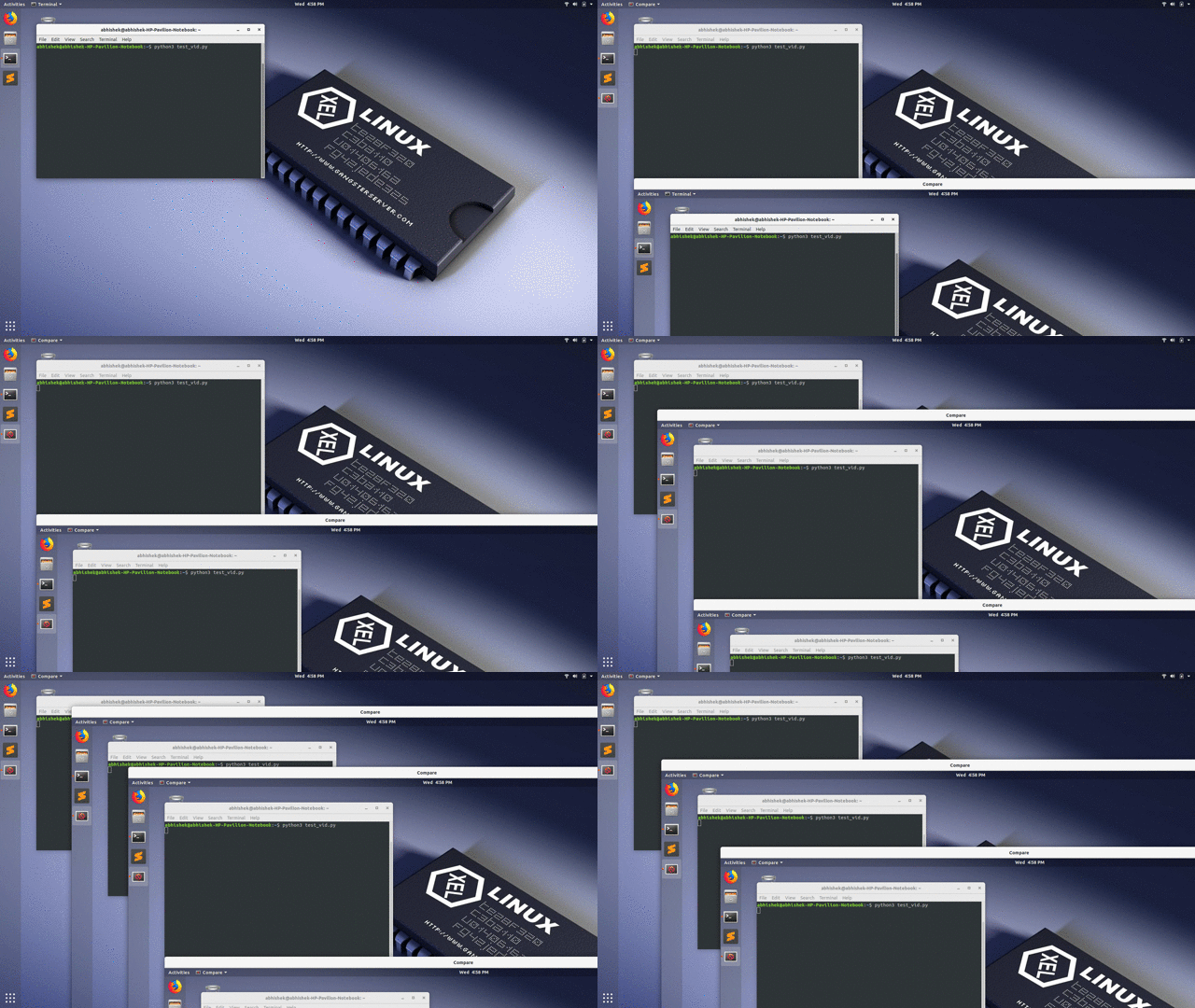
Code to generate the above results:
# import required libraries
from vidgear.gears import ScreenGear
import cv2
open video stream with default parameters
stream = ScreenGear().start()
loop over
while True:
# read frames from stream     frame = stream.read()
# check for frame if Nonetype     if frame is None:         break
# {do something with the frame here}
# Show output window     cv2.imshow("Output Frame", frame)
# check for 'q' key if pressed     key = cv2.waitKey(1) & 0xFF     if key == ord("q"):         break
close output window
cv2.destroyAllWindows()
safely close video stream
stream.stop()
ScreenGear API Guide:
[>>> Usage Guide][screengear-doc]
WriteGear
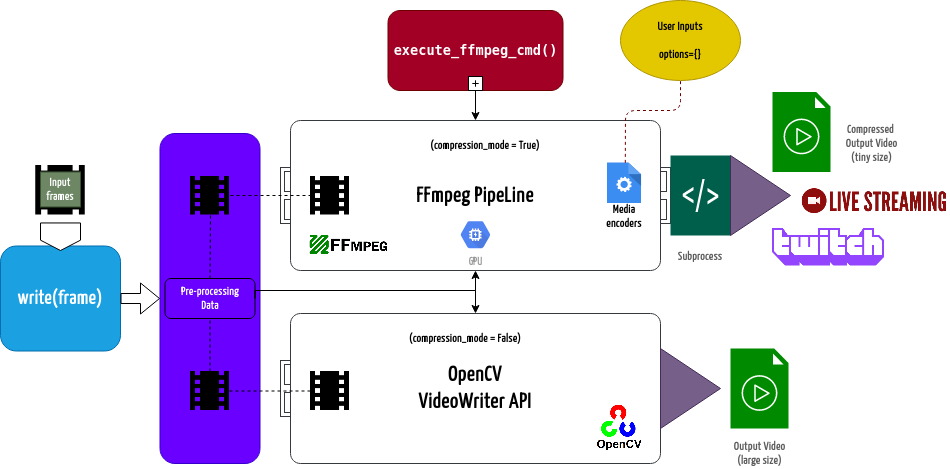
WriteGear handles various powerful Video-Writer Tools that provide us the freedom to do almost anything imaginable with multimedia data.
WriteGear API provides a complete, flexible, and robust wrapper around [FFmpeg][ffmpeg], a leading multimedia framework. WriteGear can process real-time frames into a lossless compressed video-file with any suitable specifications (such asbitrate, codec, framerate, resolution, subtitles, etc.).
WriteGear also supports streaming with traditional protocols such as [RTSP/RTP][rtsp-ex], RTMP. It is powerful enough to perform complex tasks such as [Live-Streaming][live-stream] (such as for Twitch, YouTube etc.) and [Multiplexing Video-Audio][live-audio-doc] with real-time frames in just few lines of code.
Best of all, WriteGear grants users the complete freedom to play with any FFmpeg parameter with its exclusive Custom Commands function (see this [doc][custom-command-doc]) without relying on any third-party API.
In addition to this, WriteGear also provides flexible access to [OpenCV's VideoWriter API][opencv-writer] tools for video-frames encoding without compression.
WriteGear primarily operates in the following two modes:
- Compression Mode: In this mode, WriteGear utilizes powerful [FFmpeg][ffmpeg] inbuilt encoders to encode lossless multimedia files. This mode provides us the ability to exploit almost any parameter available within FFmpeg, effortlessly and flexibly, and while doing that it robustly handles all errors/warnings quietly. You can find more about this mode [here ➶][cm-writegear-doc]
- Non-Compression Mode: In this mode, WriteGear utilizes basic [OpenCV's inbuilt VideoWriter API][opencv-vw] tools. This mode also supports all parameter transformations available within OpenCV's VideoWriter API, but it lacks the ability to manipulate encoding parameters and other important features like video compression, audio encoding, etc. You can learn about this mode [here ➶][ncm-writegear-doc]
WriteGear API Guide:
[>>> Usage Guide][writegear-doc]
StreamGear
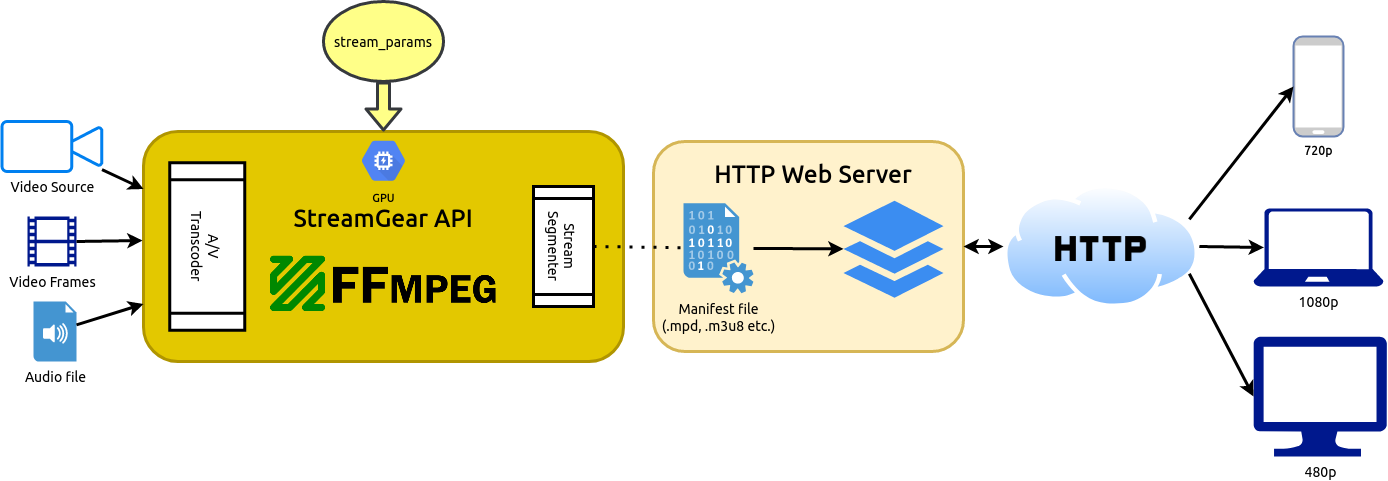
StreamGear streamlines and simplifies the transcoding workflow to generate Ultra-Low Latency, High-Quality, Dynamic & Adaptive Streaming Formats like MPEG-DASH and Apple HLS with just a few lines of Python code, allowing developers to focus on their application logic rather than dealing with the complexities of transcoding and chunking media files.
StreamGear API provides a standalone, highly extensible, and flexible wrapper around the FFmpeg multimedia framework for generating chunk-encoded media segments from your multimedia content effortlessly.
With StreamGear, you can transcode source video/audio files and real-time video frames into a sequence of multiple smaller chunks/segments of suitable lengths. These segments facilitate streaming at different quality levels (bitrates or spatial resolutions) and allow for seamless switching between quality levels during playback based on available bandwidth. You can serve these segments on a web server, making them easily accessible via standard HTTP GET requests.
SteamGear currently supports both MPEG-DASH (Dynamic Adaptive Streaming over HTTP, ISO/IEC 23009-1) and Apple HLS (HTTP Live Streaming).
Additionally, StreamGear generates a manifest file (such as MPD for DASH) or a master playlist (such as M3U8 for Apple HLS) alongside the segments. These files contain essential segment information, including timing, URLs, and media characteristics like video resolution and adaptive bitrates. They are provided to the client before the streaming session begins.
StreamGear primarily works in two Independent Modes for transcoding which serves different purposes:
- Single-Source Mode 💿 : In this mode, StreamGear transcodes entire video file (as opposed to frame-by-frame) into a sequence of multiple smaller chunks/segments for streaming. This mode works exceptionally well when you're transcoding long-duration lossless videos(with audio) for streaming that required no interruptions. But on the downside, the provided source cannot be flexibly manipulated or transformed before sending onto FFmpeg Pipeline for processing. Learn more about this mode [here ➶][ss-mode-doc]
- Real-time Frames Mode 🎞️ : In this mode, StreamGear directly transcodes frame-by-frame (as opposed to a entire video file), into a sequence of multiple smaller chunks/segments for streaming. This mode works exceptionally well when you desire to flexibility manipulate or transform
numpy.ndarrayframes in real-time before sending them onto FFmpeg Pipeline for processing. But on the downside, audio has to added manually (as separate source) for streams. Learn more about this mode [here ➶][rtf-mode-doc]_
StreamGear API Guide:
[>>> Usage Guide][streamgear-doc]
NetGear
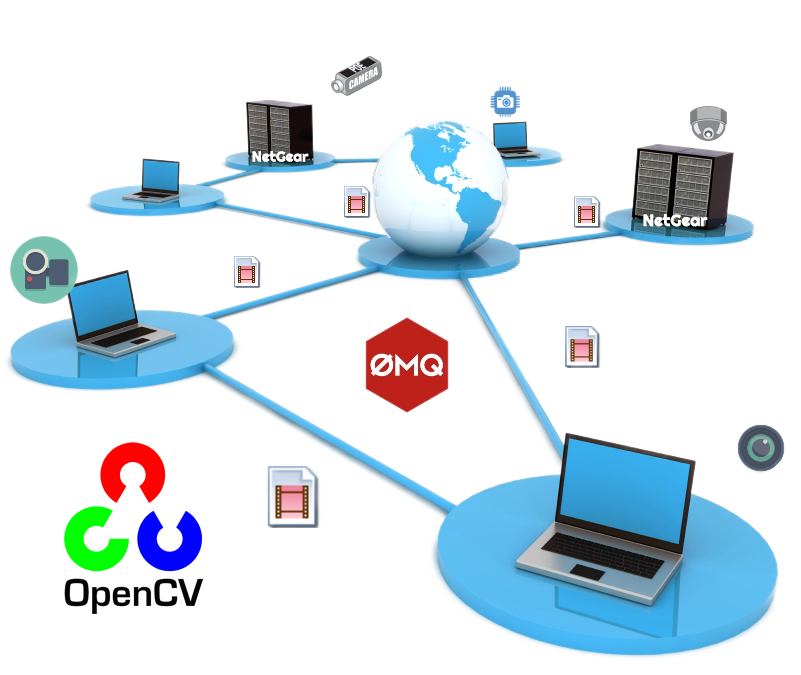
NetGear is exclusively designed to transfer video-frames & data synchronously between interconnecting systems over the network in real-time.
NetGear implements a high-level wrapper around [PyZmQ][pyzmq] python library that contains python bindings for [ZeroMQ][zmq] - a high-performance asynchronous distributed messaging library.
NetGear seamlessly supports additional [bidirectional data transmission][netgearbidatadoc] between receiver(client) and sender(server) while transferring video-frames all in real-time.
NetGear can also robustly handle [Multiple Server-Systems][netgearmultiserverdoc] and [Multiple Client-Systems][netgearmulticlientdoc] and at once, thereby providing access to a seamless exchange of video-frames & data between multiple devices across the network at the same time.
NetGear allows remote connection over [SSH Tunnel][netgearsshtunneldoc] that allows us to connect NetGear client and server via secure SSH connection over the untrusted network and access its intranet services across firewalls.
NetGear also enables real-time [JPEG Frame Compression][netgearcompressiondoc] capabilities for boosting performance significantly while sending video-frames over the network in real-time.
For security, NetGear implements easy access to ZeroMQ's powerful, smart & secure Security Layers that enable [Strong encryption on data][netgearsecuritydoc] and unbreakable authentication between the Server and the Client with the help of custom certificates.
NetGear as of now seamlessly supports three ZeroMQ messaging patterns:
- [
zmq.PAIR][zmq-pair] (ZMQ Pair Pattern) - [
zmq.REQ/zmq.REP][zmq-req-rep] (ZMQ Request/Reply Pattern) - [
zmq.PUB/zmq.SUB][zmq-pub-sub] (ZMQ Publish/Subscribe Pattern)
tcp and ipc.
NetGear API Guide:
[>>> Usage Guide][netgear-doc]
WebGear
WebGear is a powerful ASGI Video-Broadcaster API ideal for transmitting Motion-JPEG-frames from a single source to multiple recipients via the browser._
WebGear API works on Starlette's ASGI application and provides a highly extensible and flexible async wrapper around its complete framework. WebGear can flexibly interact with Starlette's ecosystem of shared middleware, mountable applications, Response classes, Routing tables, Static Files, Templating engine(with Jinja2), etc.
WebGear API uses an intraframe-only compression scheme under the hood where the sequence of video-frames are first encoded as JPEG-DIB (JPEG with Device-Independent Bit compression) and then streamed over HTTP using Starlette's Multipart Streaming Response and a Uvicorn ASGI Server. This method imposes lower processing and memory requirements, but the quality is not the best, since JPEG compression is not very efficient for motion video.
In layman's terms, WebGear acts as a powerful Video Broadcaster that transmits live video-frames to any web-browser in the network. Additionally, WebGear API also provides a special internal wrapper around VideoGear, which itself provides internal access to CamGear, PiGear, and FFGear APIs (via the api parameter), thereby granting it exclusive power of broadcasting frames from any incoming stream. It also allows us to define our custom Server as source to transform frames easily before sending them across the network (see this [doc][webgear-cs] example).
Below is a snapshot of a WebGear Video Server in action on Chrome browser:
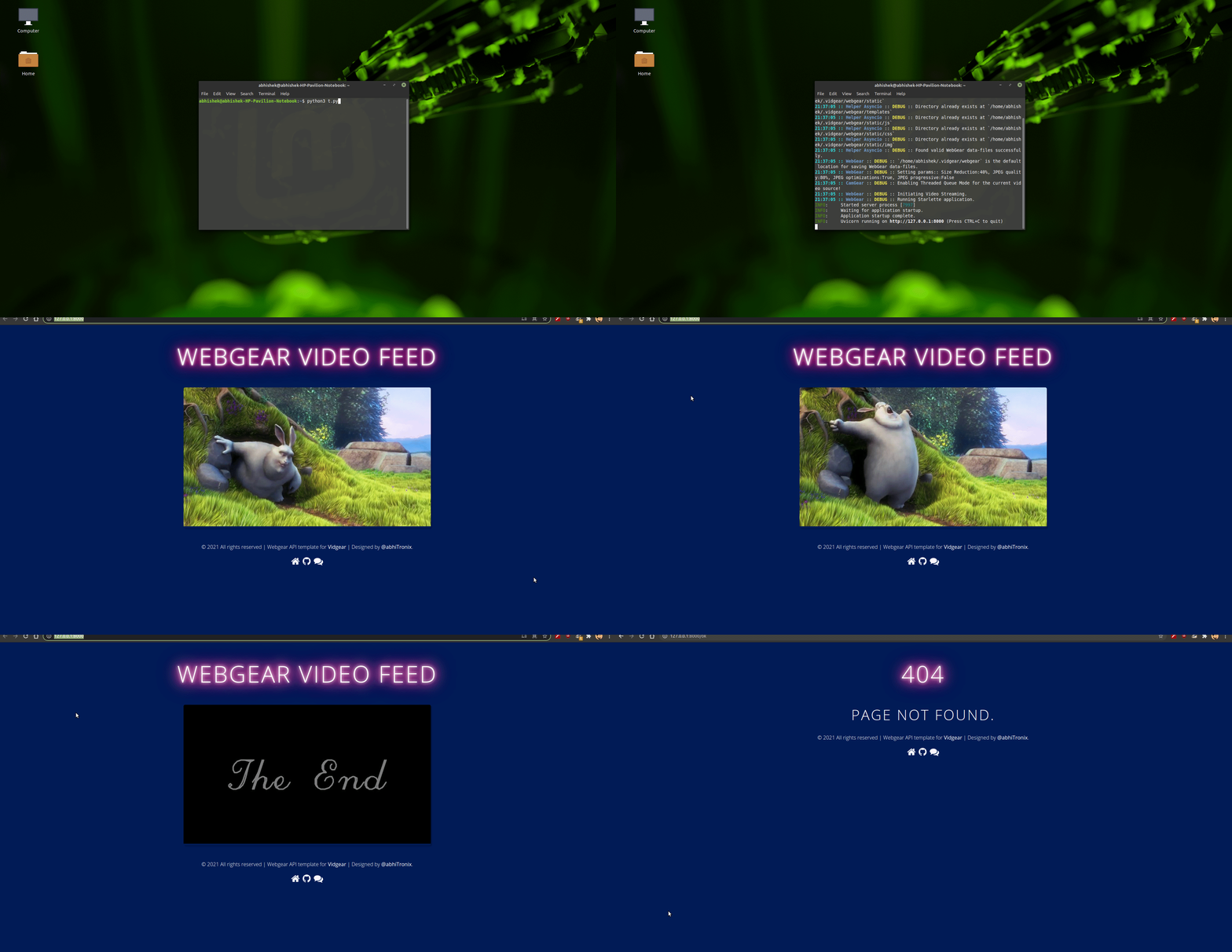
WebGear Video Server at http://localhost:8000/ address.
Code to generate the above result:
# import required libraries
import uvicorn
from vidgear.gears.asyncio import WebGear
various performance tweaks
options = {
    "framesizereduction": 40,
    "jpegcompressionquality": 80,
    "jpegcompressionfastdct": True,
    "jpegcompressionfastupsample": False,
}
initialize WebGear app
web = WebGear(source="foo.mp4", logging=True, **options)
run this app on Uvicorn server at address http://localhost:8000/
uvicorn.run(web(), host="localhost", port=8000)
close app safely
web.shutdown()
WebGear API Guide:
[>>> Usage Guide][webgear-doc]
WebGear_RTC
WebGearRTC is similar to WeGear API in many aspects but utilizes [WebRTC][webrtc] technology under the hood instead of Motion JPEG, which makes it suitable for building powerful video-streaming solutions for all modern browsers as well as native clients available on all major platforms._
WebGear_RTC is implemented with the help of [aiortc][aiortc] library which is built on top of asynchronous I/O framework for Web Real-Time Communication (WebRTC) and Object Real-Time Communication (ORTC) and supports many features like SDP generation/parsing, Interactive Connectivity Establishment with half-trickle and mDNS support, DTLS key and certificate generation, DTLS handshake, etc.
WebGearRTC can handle [multiple consumers][webgearrtc-mc] seamlessly and provides native support for ICE (Interactive Connectivity Establishment) protocol, STUN (Session Traversal Utilities for NAT), and TURN (Traversal Using Relays around NAT) servers that help us to seamlessly establish direct media connection with the remote peers for uninterrupted data flow. It also allows us to define our custom streaming class with suitable source to transform frames easily before sending them across the network(see this [doc][webgear_rtc-cs] example).
WebGearRTC API works in conjunction with [Starlette][starlette]'s ASGI application and provides easy access to its complete framework. WebGearRTC can also flexibly interact with Starlette's ecosystem of shared middleware, mountable applications, Response classes, Routing tables, Static Files, Templating engine(with Jinja2), etc.
Additionally, WebGear_RTC API also provides a special internal wrapper around VideoGear, which itself provides internal access to CamGear, PiGear, and FFGear APIs, selectable via the api parameter.
Below is a snapshot of a WebGear_RTC Media Server in action on Chrome browser:

WebGear_RTC Video Server at http://localhost:8000/ address.
Code to generate the above result:
# import required libraries
import uvicorn
from vidgear.gears.asyncio import WebGear_RTC
various performance tweaks
options = {
    "framesizereduction": 30,
}
initialize WebGear_RTC app
web = WebGear_RTC(source="foo.mp4", logging=True, **options)
run this app on Uvicorn server at address http://localhost:8000/
uvicorn.run(web(), host="localhost", port=8000)
close app safely
web.shutdown()
WebGear_RTC API Guide:
[>>> Usage Guide][webgear_rtc-doc]
NetGear_Async
NetGearAsync can generate the same performance as NetGear API at about one-third the memory consumption, and also provide complete server-client handling with various options to use variable protocols/patterns similar to NetGear, but lacks in term of flexibility as it supports only a few [NetGear's Exclusive Modes][netgear-exm]._
NetGearAsync is built on [zmq.asyncio][asyncio-zmq], and powered by a high-performance asyncio event loop called [uvloop][uvloop] to achieve unmatchable high-speed and lag-free video streaming over the network with minimal resource constraints. NetGearAsync can transfer thousands of frames in just a few seconds without causing any significant load on your system.
NetGearAsync provides complete server-client handling and options to use variable protocols/patterns similar to NetGear API. Furthermore, NetGearAsync allows us to define our custom Server as source to transform frames easily before sending them across the network(see this [doc][netgear_async-cs] example).
NetGear_Async also provides a special internal wrapper around VideoGear, which itself provides internal access to CamGear, PiGear, and FFGear APIs, selectable via the api parameter.
NetGearAsync now supports additional [bidirectional data transmission][btmnetgear_async] between receiver(client) and sender(server) while transferring video-frames. Users can easily build complex applications such as like [Real-Time Video Chat][rtvc] in just few lines of code.
NetGear_Async as of now supports all four ZeroMQ messaging patterns:
- [
zmq.PAIR][zmq-pair] (ZMQ Pair Pattern) - [
zmq.REQ/zmq.REP][zmq-req-rep] (ZMQ Request/Reply Pattern) - [
zmq.PUB/zmq.SUB][zmq-pub-sub] (ZMQ Publish/Subscribe Pattern) - [
zmq.PUSH/zmq.PULL][zmq-pull-push] (ZMQ Push/Pull Pattern)
tcp and ipc.
NetGear_Async API Guide:
[>>> Usage Guide][netgear_async-doc]
Contributions
👑 Contributor Hall of Fame 👑
We're happy to meet new contributors💗
We welcome your contributions to help us improve and extend this project. If you want to get involved with VidGear development, checkout the [Contribution Guidelines ➶][contribute]
We're offering support for VidGear on Gitter Community Channel. Come and join the conversation over there!
Donations and Sponsorships

VidGear is free and open source and will always remain so. ❤️
It is something I am doing with my own free time. But so much more needs to be done, and I need your help to do this. For just the price of a cup of coffee 🍵, you can make a difference 🤝

You can also become a sponsor via GitHub Sponsors by clicking the button below:

Thanks a million! 💖
Citation
Here is a Bibtex entry you can use to cite this project in a publication:

@software{vidgear,
  author       = {Abhishek Thakur and
                  Zoe Papakipos and
                  Christian Clauss and
                  Christian Hollinger and
                  Ian Max Andolina and
                  Kyle Ahn and
                  freol35241 and
                  Abhishek Suran and
                  Benjamin Lowe and
                  Mickaël Schoentgen and
                  Renaud Bouckenooghe and
                  Ibtsam Ahmad},
  title        = {abhiTronix/vidgear: VidGear Stable v0.3.4},
  month        = nov,
  year         = 2025,
  publisher    = {Zenodo},
  version      = {vidgear-0.3.4},
  doi          = {10.5281/zenodo.17586698},
  url          = {https://doi.org/10.5281/zenodo.17586698},
  swhid        = {swh:1:dir:cd4e557ff277da86fb252ab7983e8b9d2be39065
                   ;origin=https://doi.org/10.5281/zenodo.4718615;vis
                   it=swh:1:snp:6bd11960231209999e32066a75196a96818d4
                   1b8;anchor=swh:1:rel:a930455cfcd23d1098834cce7f6d8
                   8dd58cad2e8;path=abhiTronix-vidgear-84d99c3
                  },
}
Copyright
Copyright © abhiTronix 2019
This library is released under the [Apache 2.0 License][license].
[appveyor]: https://img.shields.io/appveyor/build/abhitronix/vidgear/testing?style=for-the-badge&logo=appveyor [codecov]: https://img.shields.io/codecov/c/github/abhitronix/vidgear/testing?style=for-the-badge&logo=codecov [github-cli]: https://img.shields.io/github/actions/workflow/status/abhitronix/vidgear/ci_linux.yml?style=for-the-badge&logo=githubactions [prs-badge]: https://img.shields.io/badge/PRs-welcome-brightgreen.svg?style=for-the-badge&logo=data:image/png;base64,iVBORw0KGgoAAAANSUhEUgAAACAAAAAgCAYAAABzenr0AAABC0lEQVRYhdWVPQoCMRCFX6HY2ghaiZUXsLW0EDyBrbWtN/EUHsHTWFnYyCL4gxibVZZlZzKTnWz0QZpk5r0vIdkF/kBPAMOKeddE+CQPKoc5Yt5cTjBMdQSwDQToWgBJAn3jmhqgltapAV6E6b5U17MGGAUaUj07TficMfIBZDV6vxowBm1BP9WbSQE4o5h9IjPJmy73TEPDDxVmoZdQrQ5jRhly9Q8tgMUXkIIWn0oG4GYQfAXQzz1PGoCiQndM7b4RgJay/h7zBLT3hASgoKjamQJMreKf0gfuAGyYtXEIAKcL/Dss15iq6ohXghozLYiAMxPuACwtIT4yeQUxAaLrZwAoqGRKGk7qDSYTfYQ8LuYnAAAAAElFTkSuQmCC [twitter-badge]: https://img.shields.io/badge/Tweet-Now-blue.svg?style=for-the-badge&logo=twitter [azure-badge]: https://img.shields.io/azure-devops/build/abhiuna12/public/2/testing?style=for-the-badge&logo=data:image/png;base64,iVBORw0KGgoAAAANSUhEUgAAACAAAAAgCAYAAABzenr0AAAABHNCSVQICAgIfAhkiAAAAS9JREFUWIXtlj0SAUEQRj9KgkRApEhwDyV1BCkXEDmCyAVIHUGq3GMRUCICCcIRtRqzMzs9P0XAy2ytft90z84u8OfXycUo0pyeBPfew6T+5sx/Uq4jKECoHAAKoQVUxr3q2+/Z+pJ5v3cHdKtX5aZrwQFitJ5IjaA22kQrzsG5A8VW53sBbHLdhrNtwuhPgU2owu6AafXtRsVJ6BXAJueGUI9hdoAsOQBsj1cvOWB4GcmPom71LnKTmNB24DzvGv8UU24MIIeQi3Dlj13CkgMO3wO95e01FpscyO6iDOscGK7uAgD2V2GUk9iV1AiGq7sgIbHol3IAsB6UtavylWsDmKAQ8mwfuyRIDngcxbXRRoRKZZwPIu7m4pIqps6foBEQtu8GblDvozh2J/78Lk/hqXPpyqzyKAAAAABJRU5ErkJggg== [pypi-badge]: https://img.shields.io/pypi/v/vidgear?style=for-the-badge&logo=pypi [gitter-badge]: https://img.shields.io/badge/Chat-Gitter-blueviolet.svg?style=for-the-badge&logo=gitter [coffee-badge]: https://abhitronix.github.io/img/vidgear/orange_img.png [kofi-badge]: https://www.ko-fi.com/img/githubbutton_sm.svg [black-badge]: https://img.shields.io/badge/code%20style-black-000000.svg?style=for-the-badge&logo=github
[release]: https://github.com/abhiTronix/vidgear/releases/latest [pypi]: https://pypi.org/project/vidgear/ [gitter]: https://gitter.im/vidgear/community?utmsource=badge&utmmedium=badge&utm_campaign=pr-badge [twitter-intent]: https://twitter.com/intent/tweet?url=https%3A%2F%2Fabhitronix.github.io%2Fvidgear&via%20%40abhi_una12&text=Checkout%20VidGear%20-%20A%20High-Performance%20Video-Processing%20Python%20Framework.&hashtags=vidgear%20%23videoprocessing%20%23python%20%23threaded%20%23asyncio [coffee]: https://www.buymeacoffee.com/2twOXFvlA [kofi]: https://ko-fi.com/W7W8WTYO [license]: https://github.com/abhiTronix/vidgear/blob/master/LICENSE [github-flow]: https://github.com/abhiTronix/vidgear/actions?query=workflow%3A%22Run+Linux+CI-Tests+for+vidgear%22 [azure-pipeline]: https://dev.azure.com/abhiuna12/public/_build?definitionId=2 [app]: https://ci.appveyor.com/project/abhiTronix/vidgear [code]: https://codecov.io/gh/abhiTronix/vidgear [btmnetgearasync]: https://abhitronix.github.io/vidgear/latest/gears/netgearasync/advanced/bidirectionalmode/ [rtvc]: https://abhitronix.github.io/vidgear/latest/gears/netgearasync/advanced/bidirectionalmode/#using-bidirectional-mode-for-video-frames-transfer [test-4k]: https://github.com/abhiTronix/vidgear/blob/e0843720202b0921d1c26e2ce5b11fadefbec892/vidgear/tests/benchmarktests/testbenchmark_playback.py#L65 [bsscriptdataset]: https://github.com/abhiTronix/vidgear/blob/testing/scripts/bash/prepare_dataset.sh [faq]: https://abhitronix.github.io/vidgear/latest/help/get_help/#frequently-asked-questions [contribute]: https://abhitronix.github.io/vidgear/latest/contribution [rtsp-ex]: https://abhitronix.github.io/vidgear/latest/help/writegear_ex/#using-writegears-compression-mode-for-rtsprtp-live-streaming [doc-vidgear-purpose]: https://abhitronix.github.io/vidgear/latest/help/motivation/#why-is-vidgear-a-thing [live-stream]: https://abhitronix.github.io/vidgear/latest/gears/writegear/compression/usage/#using-compression-mode-for-live-streaming [live-audio-doc]: https://abhitronix.github.io/vidgear/latest/gears/writegear/compression/usage/#using-compression-mode-with-live-audio-input [piping-live-videos]: https://abhitronix.github.io/vidgear/latest/gears/camgear/usage/#using-camgear-with-streaming-websites [ffmpeg-doc]: https://abhitronix.github.io/vidgear/latest/gears/writegear/compression/advanced/ffmpeg_install/ [youtube-doc]: https://abhitronix.github.io/vidgear/latest/gears/camgear/usage/#using-camgear-with-youtube-videos [tqm-doc]: https://abhitronix.github.io/vidgear/latest/bonus/TQM/#threaded-queue-mode [camgear-doc]: https://abhitronix.github.io/vidgear/latest/gears/camgear/ [ffgear-doc]: https://abhitronix.github.io/vidgear/latest/gears/ffgear/ [deffcode-doc]: https://abhitronix.github.io/deffcode/latest/reference/ffdecoder/ [stabilizer-doc]: https://abhitronix.github.io/vidgear/latest/gears/stabilizer/ [stabilizer-doc-ex]: https://abhitronix.github.io/vidgear/latest/gears/videogear/usage/#using-videogear-with-video-stabilizer-backend [videogear-doc]: https://abhitronix.github.io/vidgear/latest/gears/videogear/ [pigear-doc]: https://abhitronix.github.io/vidgear/latest/gears/pigear/ [cm-writegear-doc]: https://abhitronix.github.io/vidgear/latest/gears/writegear/compression/ [ncm-writegear-doc]: https://abhitronix.github.io/vidgear/latest/gears/writegear/non_compression/ [screengear-doc]: https://abhitronix.github.io/vidgear/latest/gears/screengear/ [streamgear-doc]: https://abhitronix.github.io/vidgear/latest/gears/streamgear/introduction/ [writegear-doc]: https://abhitronix.github.io/vidgear/latest/gears/writegear/introduction/ [netgear-doc]: https://abhitronix.github.io/vidgear/latest/gears/netgear/ [webgear-doc]: https://abhitronix.github.io/vidgear/latest/gears/webgear/ [webgearrtc-doc]: https://abhitronix.github.io/vidgear/latest/gears/webgearrtc/ [netgearasync-doc]: https://abhitronix.github.io/vidgear/latest/gears/netgearasync/ [drop35]: https://github.com/abhiTronix/vidgear/issues/99 [custom-command-doc]: https://abhitronix.github.io/vidgear/latest/gears/writegear/compression/advanced/cciw/ [advanced-webgear-doc]: https://abhitronix.github.io/vidgear/latest/gears/webgear/advanced/ [netgearbidatadoc]: https://abhitronix.github.io/vidgear/latest/gears/netgear/advanced/bidirectional_mode/ [netgearcompressiondoc]: https://abhitronix.github.io/vidgear/latest/gears/netgear/advanced/compression/ [netgearsecuritydoc]: https://abhitronix.github.io/vidgear/latest/gears/netgear/advanced/secure_mode/ [netgearmultiserverdoc]: https://abhitronix.github.io/vidgear/latest/gears/netgear/advanced/multiserver/ [netgearmulticlientdoc]: https://abhitronix.github.io/vidgear/latest/gears/netgear/advanced/multiclient/ [netgearsshtunneldoc]: https://abhitronix.github.io/vidgear/latest/gears/netgear/advanced/ssh_tunnel/ [netgear-exm]: https://abhitronix.github.io/vidgear/latest/gears/netgear/#modes-of-operation [stabilizewebgeardoc]: https://abhitronix.github.io/vidgear/latest/gears/webgear/advanced/#using-webgear-with-real-time-video-stabilization-enabled [netgearasync-cs]: https://abhitronix.github.io/vidgear/latest/gears/netgearasync/usage/#using-netgear_async-with-a-custom-sourceopencv [installation]: https://abhitronix.github.io/vidgear/latest/installation/ [gears]: https://abhitronix.github.io/vidgear/latest/gears [switchfromcv]: https://abhitronix.github.io/vidgear/latest/switchfromcv/ [ss-mode-doc]: https://abhitronix.github.io/vidgear/latest/gears/streamgear/ssm/#overview [rtf-mode-doc]: https://abhitronix.github.io/vidgear/latest/gears/streamgear/rtfm/#overview [webgear-cs]: https://abhitronix.github.io/vidgear/latest/gears/webgear/advanced/#using-webgear-with-a-custom-sourceopencv [webgearrtc-cs]: https://abhitronix.github.io/vidgear/latest/gears/webgearrtc/advanced/#using-webgear_rtc-with-a-custom-sourceopencv [webgearrtc-mc]: https://abhitronix.github.io/vidgear/latest/gears/webgearrtc/advanced/#using-webgear_rtc-as-real-time-broadcaster [hardware-accelerated-decoding]:https://abhitronix.github.io/vidgear/latest/gears/ffgear/advanced/#hardware-accelerated-decoding [flexible-pixel-formats]:https://abhitronix.github.io/vidgear/latest/gears/ffgear/usage/#using-ffgear-with-different-pixel-formats [per-frame-metadata-extraction]:https://abhitronix.github.io/vidgear/latest/gears/ffgear/advanced/#per-frame-metadata-extraction [complex-filtergraphs]:https://abhitronix.github.io/vidgear/latest/gears/ffgear/advanced/#complex-ffmpeg-filtergraphs [cameras-ff]:https://abhitronix.github.io/vidgear/latest/gears/ffgear/usage/#using-ffgear-with-camera-devices-indexes [multimedia-files-ff]:https://abhitronix.github.io/vidgear/latest/gears/ffgear/usage/#bare-minimum-usage [image-sequences-ff]:https://abhitronix.github.io/vidgear/latest/gears/ffgear/usage/#using-ffgear-with-sequence-of-images [network-streams-ff]:https://abhitronix.github.io/vidgear/latest/gears/ffgear/usage/#using-ffgear-with-network-streams [streaming-services-ff]:https://abhitronix.github.io/vidgear/latest/gears/ffgear/usage/#using-ffgear-with-streaming-websites [desktop-screen-capture]:https://abhitronix.github.io/vidgear/latest/gears/ffgear/advanced/#using-ffgear-with-desktop-screen-capturing [docs]: https://abhitronix.github.io/vidgear
[asyncio-zmq]: https://pyzmq.readthedocs.io/en/latest/api/zmq.asyncio.html [uvloop]: https://github.com/MagicStack/uvloop [streamlink]: https://streamlink.github.io/ [aiortc]: https://aiortc.readthedocs.io/en/latest/ [pyscreenshot]: https://github.com/ponty/pyscreenshot [uvloop-ns]: https://github.com/MagicStack/uvloop/issues/14 [ffmpeg]: https://www.ffmpeg.org/ [flake8]: https://flake8.pycqa.org/en/latest/ [dxcam]: https://github.com/ra1nty/DXcam [black]: https://github.com/psf/black [pytest]: https://docs.pytest.org/en/latest/ [opencv-writer]: https://docs.opencv.org/master/dd/d9e/classcv11VideoWriter.html#ad59c61d8881ba2b2da22cff5487465b5 [opencv-windows]: https://www.learnopencv.com/install-opencv3-on-windows/ [opencv-linux]: https://www.pyimagesearch.com/2018/05/28/ubuntu-18-04-how-to-install-opencv/ [opencv-pi]: https://www.pyimagesearch.com/2018/09/26/install-opencv-4-on-your-raspberry-pi/ [starlette]: https://www.starlette.io/ [uvicorn]: http://www.uvicorn.org/ [daphne]: https://github.com/django/daphne/ [hypercorn]: https://pgjones.gitlab.io/hypercorn/ [prs]: http://makeapullrequest.com [opencv]: https://github.com/opencv/opencv [picamera]: https://github.com/waveform80/picamera [pafy]: https://github.com/mps-youtube/pafy [pyzmq]: https://github.com/zeromq/pyzmq [zmq]: https://zeromq.org/ [mss]: https://github.com/BoboTiG/python-mss [pip]: https://pip.pypa.io/en/stable/installing/ [opencv-vc]: https://docs.opencv.org/master/d8/dfe/classcv11VideoCapture.html#a57c0e81e83e60f36c83027dc2a188e80 [ov5647-picam]: https://github.com/techyian/MMALSharp/doc/OmniVision-OV5647-Camera-Module [imx219-picam]: https://github.com/techyian/MMALSharp/doc/Sony-IMX219-Camera-Module [opencv-vw]: https://docs.opencv.org/3.4/d8/dfe/classcv11VideoCapture.html [yt_dlp]: https://github.com/yt-dlp/yt-dlp [numpy]: https://github.com/numpy/numpy [zmq-pair]: https://learning-0mq-with-pyzmq.readthedocs.io/en/latest/pyzmq/patterns/pair.html [zmq-req-rep]: https://learning-0mq-with-pyzmq.readthedocs.io/en/latest/pyzmq/patterns/client_server.html [zmq-pub-sub]: https://learning-0mq-with-pyzmq.readthedocs.io/en/latest/pyzmq/patterns/pubsub.html [zmq-pull-push]: https://learning-0mq-with-pyzmq.readthedocs.io/en/latest/pyzmq/patterns/pushpull.html#push-pull [picamera2]:https://github.com/raspberrypi/picamera2 [picamera-setting]: https://picamera.readthedocs.io/en/release-1.13/quickstart.html [webrtc]: https://webrtc.org/


